
Important Safety Information
Do not use with non-TCL TV models. Always ensure the legs are securely attached to the TV before moving or using. Be cautious when handling the legs, as they are made of a hard plastic that could potentially break or cause injury.
1. Product Overview
The Rimous TV Stand Legs are designed as replacement or alternative base feet for compatible TCL Roku TV models. These black, durable ABS plastic legs provide stable support for your television without requiring wall mounting. They feature anti-slip and anti-scratch silicone pads to protect surfaces and ensure TV stability.
2. Compatibility
These TV stand legs are specifically designed for TCL Roku TV models only. They are not universal and will not fit other TV brands such as Onn, Insignia, Hisense, LG, Westinghouse, Sanyo, Sharp, RCA, or JVC.
Please verify your TV's brand and model number before installation. Compatible screen sizes range from 28 inches to 65 inches. A detailed list of compatible models is provided below:

Image 2.1: Visual guide to compatible TCL Roku TV models, categorized by screen size (28-inch, 32-inch, 40-inch, 43-inch, 49-inch, 50-inch, 55-inch, 65-inch).
- 28 inch: 28S305, 28S405
- 32 inch: 32S301, 32S303, 32S305, 32S321, 32S325, 32S327, 32S330, 32S331, 32S334, 32S335, 32S401, 32S405, 32S355, 32S356, 32S359
- 40 inch: 40S303, 40S305, 40S321, 40S325, 40S330, 40S334, 40S355, 40S405
- 43 inch: 43S303, 43S305, 43S325, 43S403, 43S405, 43S421, 43S423, 43S425, 43S431, 43S433, 43S434, 43S435, 43S446, 43S515, 43S517, 43S525, 43S453, 43S455
- 49 inch: 49S303, 49S321, 49S403, 49S405, 49S423, 49S425, 49S515, 49S517
- 50 inch: 50S423, 50S425, 50S431, 50S433, 50S434, 50S435, 50S446, 50S453, 50S455, 50S515, 50S525, 50S535, 50S546, 50S555
- 55 inch: 55S401, 55S403, 55S421, 55S423, 55S431, 55S433, 55S434, 50S435, 55S446, 55S453, 55S455, 55S517, 55S525, 55S546, 55S555, 55R615, 55R635
- 65 inch: 65S401, 65S403, 65S421, 65S431, 65S433, 65S434, 65S435, 65S446, 65S453, 65S455, 65S515, 65S525, 65S546, 65S555
3. Package Contents
Before beginning installation, please ensure all components are present and undamaged:
- 2 x TV Stand Legs (Left and Right)
- 1 x Installation Instruction Sheet
- 1 x Screw Set (various sizes to accommodate different TV models)

Image 3.1: All included components: two TV stand legs, a comprehensive screw set, and washers.
4. Setup and Installation
The installation process is designed to be straightforward and does not require drilling into walls.
- Prepare the TV: Carefully place your TCL Roku TV face down on a soft, clean surface to prevent screen damage.
- Identify Mounting Holes: Locate the screw mounting holes on the bottom rear of your TV.
- Select Correct Screws: Refer to the included screw set and the installation instruction sheet to determine the appropriate screw size for your specific TV model. It is crucial to use the correct screw size to ensure a secure fit and prevent damage.
- Attach the Legs: Align each TV stand leg with the corresponding mounting holes on the TV. The legs feature a universal hole design, allowing them to be used on either the left or right side.
- Secure the Legs: Insert the selected screws through the leg and into the TV's mounting holes. Tighten the screws firmly but do not overtighten, as this can strip the threads or damage the TV.
- Verify Stability: Once both legs are securely attached, carefully lift the TV and place it on your desired surface. Gently test the stability of the TV to ensure it is firm and level.
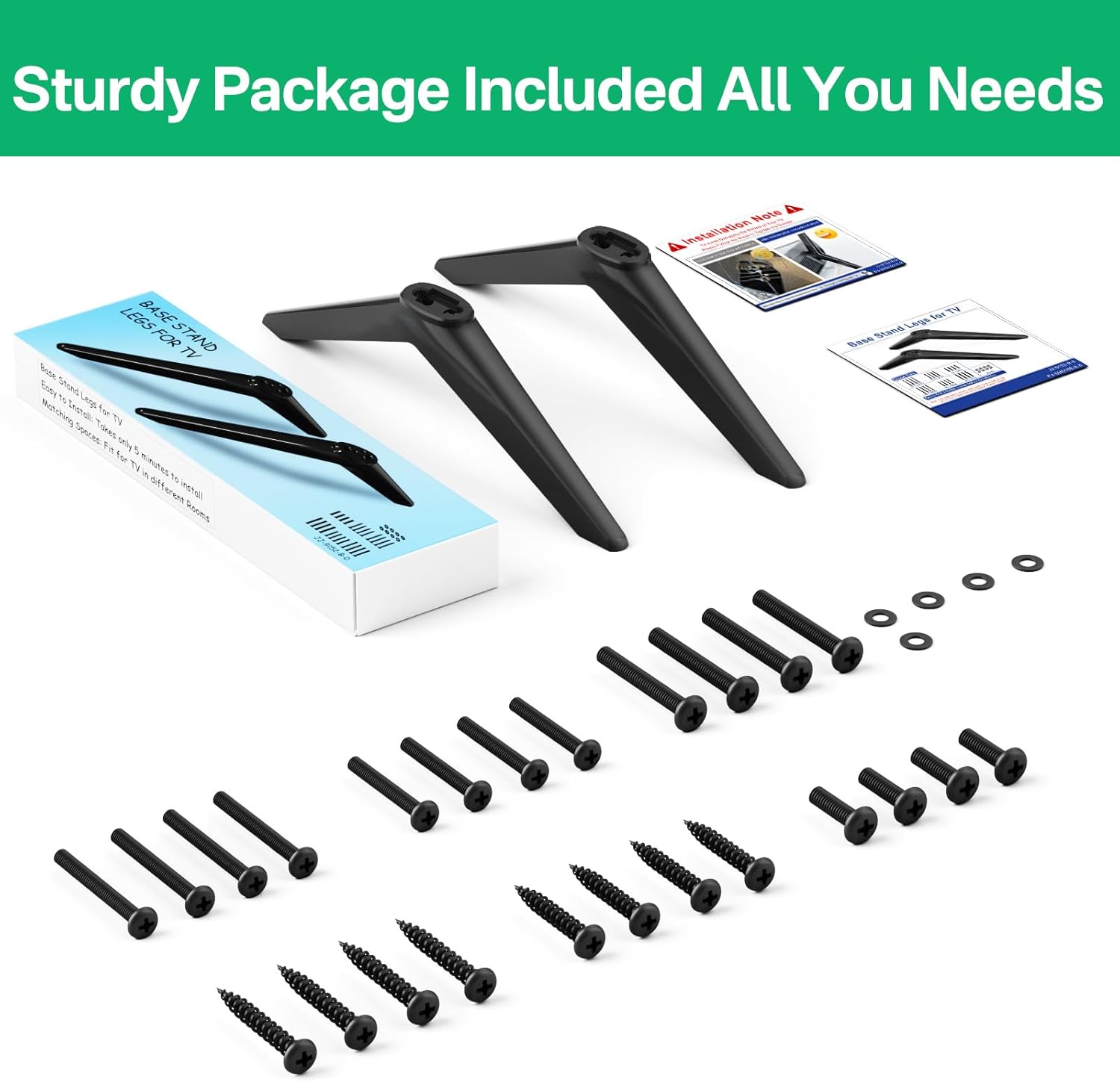
Image 4.1: Detail of the universal hole design on the TV stand leg, indicating flexibility for left or right side installation.
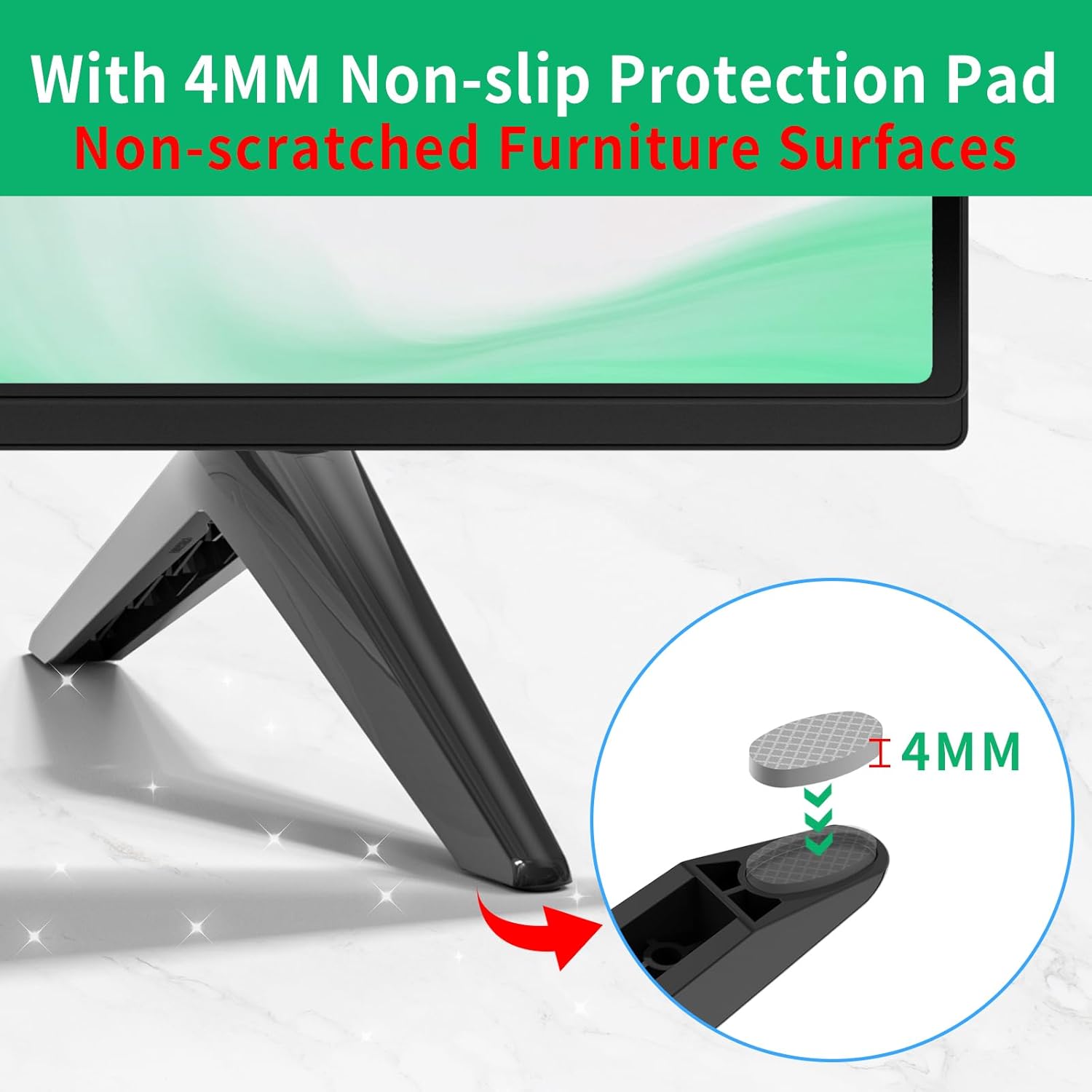
Image 4.2: Visual representation of the TV stand legs and the screw set, illustrating the components used during installation.
These legs provide a stable base without the need for wall mounting, protecting your walls from damage.

Image 4.3: Illustration demonstrating the benefit of stand legs over wall mounting, preventing wall damage.
5. Operating Instructions
Once installed, the Rimous TV Stand Legs provide a stable and secure base for your television. No specific operational steps are required for the legs themselves.
Stability Features:
- Anti-slip Pads: Each leg is equipped with 4mm silicone pads on the bottom. These pads increase friction with the desktop surface, enhancing stability and preventing accidental movement.
- Anti-scratch Protection: The silicone pads also protect your furniture surfaces from scratches and scuffs.
- Triangular Stress Surface: The design incorporates a triangular stress surface for enhanced structural support and stability.

Image 5.1: Detail of the 4mm silicone pad designed for anti-slip and anti-scratch protection.

Image 5.2: Diagram illustrating the triangular stress surface on the TV stand leg, contributing to stronger support.
The legs allow for flexible placement of your TV in various rooms, such as living rooms, bedrooms, or meeting rooms.

Image 5.3: Example of TV placement using the stand legs in a living room, highlighting the simple and elegant design suitable for various environments.
6. Maintenance
To ensure the longevity and appearance of your Rimous TV Stand Legs, follow these simple maintenance guidelines:
- Cleaning: Wipe the legs with a soft, dry cloth to remove dust. For stubborn marks, a slightly damp cloth with mild soap can be used, followed by drying thoroughly. Avoid abrasive cleaners or solvents.
- Inspection: Periodically check the screws to ensure they remain tight. If any screws feel loose, gently tighten them.
- Avoid Harsh Conditions: Do not expose the legs to extreme temperatures or direct sunlight for prolonged periods, as this may affect the material's integrity.
7. Troubleshooting
- Problem: The TV stand legs do not fit my television.
- Solution: These legs are designed exclusively for specific TCL Roku TV models. Please refer to the "2. Compatibility" section to confirm if your TV model is listed. If your model is not listed, these legs are likely incompatible. Ensure you have not confused your TV brand with TCL.
- Problem: The TV feels unstable after installation.
- Solution:
- Verify that the correct screw sizes were used for your TV's mounting holes. Using screws that are too short or too long can compromise stability.
- Ensure all screws are tightened firmly. Do not overtighten, but confirm there is no wobble.
- Check that the TV is placed on a flat, level, and sturdy surface.
- Confirm that the silicone anti-slip pads are correctly attached to the bottom of the legs.
- Problem: The legs appear damaged or broken.
- Solution: If the product arrived damaged or breaks during normal use, please contact Rimous customer support for assistance. Refer to the "9. Warranty and Support" section.
8. Specifications
| Brand | Rimous |
| Color | Black |
| Material | Acrylonitrile Butadiene Styrene (ABS) |
| Item Weight | 0.19 Kilograms (6.7 ounces) |
| Number of Pieces | 2 (TV Stand Legs) |
| Package Dimensions | 10.51 x 3.43 x 1.57 inches |
9. Warranty and Support
While specific warranty details are not provided, Rimous is committed to customer satisfaction. If you encounter any issues with your TV stand legs, such as missing parts, manufacturing defects, or difficulties with installation, please contact Rimous customer support.
For support, please refer to the contact information provided with your purchase or visit the official Rimous brand store online.
Note: Always retain your proof of purchase for any warranty or support claims.
Additional Information
No official product videos from the seller were available for embedding in this manual.