1. Product Overview
The SHEHDS Par Can Stage Light is a versatile LED lighting fixture designed to create dynamic and colorful effects for various events and venues. Featuring 18 RGBW 4-in-1 LEDs, it offers a wide spectrum of colors and lighting modes, making it suitable for professional stage setups, parties, clubs, weddings, and more.
Its robust aluminum shell ensures durability and efficient heat dissipation, contributing to a long operational lifespan. The light supports multiple control modes, including DMX512, sound activation, and automated programs, providing flexibility for different lighting needs.
2. What's in the Box
- SHEHDS Par Can Stage Light Unit
- Mounting Bracket
- Power Cable
3. Key Features
- Powerful Illumination: Equipped with 18 RGBW 4-in-1 LEDs, each 12-watt, totaling 216W for extremely bright and vibrant lighting.
- Wide Beam Angle: A 45° beam angle ensures a broad and effective illumination range.
- Versatile Lighting Modes: Supports Sound Activated mode (adjustable sensitivity), Master-Slave, Auto Play, Static Color, Hopping, Fade, Pulse, Strobe, and DMX512 control.
- Daisy-Chain Capability: Features a power output port for easy daisy-chaining of multiple units, simplifying power distribution.
- Durable Construction: Built with an impact-resistant cast aluminum shell and an integrated cooling fan for extended lifespan and efficient heat dissipation, ensuring over 60,000 hours of LED life.
- Imported Lamp Beads: Utilizes high-quality imported light-emitting chips for high light intensity, uniform color temperature, low functional consumption, and linear mixed color adjustment.
4. Product Visuals
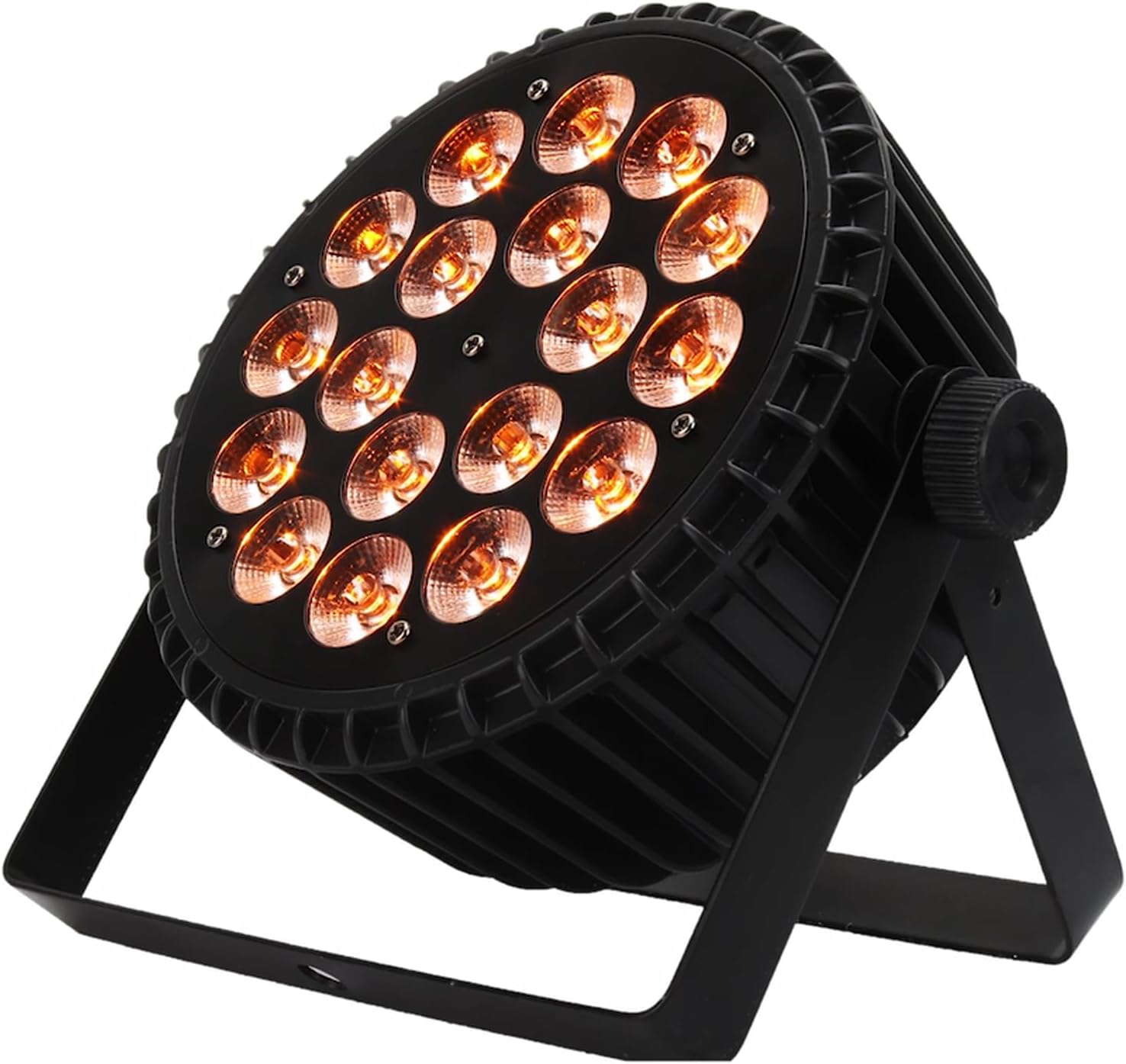
Figure 4.1: Front view of the SHEHDS Par Can Stage Light, showcasing its 18 LED bulbs and sturdy bracket.

Figure 4.2: The stage light displaying its RGBW capabilities, showing red, green, blue, and white light outputs.

Figure 4.3: Product dimensions of the SHEHDS Par Can Stage Light, indicating its compact size for versatile placement.

Figure 4.4: Rear view of the stage light, highlighting the control panel with DMX In/Out ports, power socket, and cooling fan.
5. Official Product Video
Video 5.1: A demonstration of the SHEHDS 18x12W Par Lights showcasing various lighting effects and modes in a stage setting.
6. Setup Instructions
- Unpacking: Carefully remove the stage light unit, mounting bracket, and power cable from the packaging. Inspect all components for any signs of damage.
- Mounting:
- Attach the included mounting bracket to the sides of the light unit using the provided screws.
- Securely mount the light to a truss, lighting stand, or flat surface using appropriate clamps or fasteners (not included). Ensure the mounting is stable and can support the weight of the fixture.
- Adjust the angle of the light as desired using the bracket's adjustable knobs.
- Power Connection: Connect the power cable to the "POWER IN" socket on the rear panel of the light. Plug the other end into a compatible power outlet (240 Volts). For multiple units, use the "POWER OUT" port to daisy-chain power to subsequent lights.
- DMX Connection (Optional): If using DMX control, connect a DMX cable from your DMX controller's output to the "DMX IN" port on the first light. For multiple lights, connect from the "DMX OUT" of the first light to the "DMX IN" of the next, and so on.
7. Operating Modes
The SHEHDS Par Can Stage Light offers several operating modes, selectable via the 4-button LED menu on the rear panel.
- Sound Activated Mode: The light reacts to ambient sound, changing colors and patterns. Sensitivity can be adjusted.
- Master-Slave Mode: Connect multiple lights via DMX cables. Set one light as the "Master" and others as "Slave" to synchronize their operation.
- Auto Play Mode: The light cycles through pre-programmed patterns and color changes automatically.
- Static Color Mode: Select and maintain a single color (Red, Green, Blue, White, or mixed colors).
- Hopping Mode: Colors change abruptly.
- Fade Mode: Colors transition smoothly from one to another.
- Pulse Mode: Colors flash on and off.
- Strobe Mode: Produces rapid, intermittent flashes of light.
- DMX512 Control: For advanced control, connect to a DMX controller to precisely manage individual light parameters such as color, intensity, and effects. Refer to the DMX channel chart in the full manual for specific channel assignments.
To navigate the menu, use the "MENU", "UP", "DOWN", and "ENTER" buttons on the rear panel. The LED display will show the current mode or setting.
8. Maintenance
- Cleaning: Regularly clean the lens and exterior of the light with a soft, lint-free cloth. Do not use abrasive cleaners or solvents.
- Cooling Fan: Ensure the cooling fan on the rear panel is free from dust and obstructions to maintain optimal heat dissipation.
- Cable Inspection: Periodically check all cables (power and DMX) for any signs of wear, cuts, or damage. Replace damaged cables immediately.
- Storage: When not in use, store the light in a dry, dust-free environment, preferably in its original packaging or a protective case.
9. Troubleshooting
| Problem | Possible Cause | Solution |
|---|---|---|
| Light does not turn on. | No power supply; faulty cable. | Check power connection and outlet. Test with a different power cable. |
| No DMX control. | Incorrect DMX address; faulty DMX cable; incorrect DMX mode. | Verify DMX address setting on the light. Ensure DMX cables are connected correctly and are not faulty. Check DMX mode setting on the light and controller. |
| Light flickers or behaves erratically. | Power fluctuations; DMX signal interference; overheating. | Ensure stable power supply. Check DMX connections and consider a DMX terminator. Ensure proper ventilation and clear the cooling fan. |
| Sound activated mode not working. | Low sound input; incorrect sensitivity setting. | Increase sound volume or adjust sound sensitivity on the light's menu. |
10. Technical Specifications
| Feature | Detail |
|---|---|
| Light Source | 18 x 12W RGBW 4-in-1 LEDs |
| Total Wattage | 216 Watts |
| Beam Angle | 45 Degrees |
| Material | Aluminum Shell |
| Product Dimensions (L x W x H) | 9.06" x 4.53" x 9.06" |
| Item Weight | 6.5 Pounds |
| Voltage | 240 Volts |
| Control Modes | DMX512, Sound Activated, Master-Slave, Auto Play, Static Color, Hopping, Fade, Pulse, Strobe |
| Lifespan | > 60,000 hours |
| UPC | 761064088631 |
11. Warranty and Support
SHEHDS is committed to providing high-quality products and excellent customer service. Friendly after-sale service and technology support are available for all customers.
For technical assistance, troubleshooting, or warranty inquiries, please contact SHEHDS customer support through the retailer's platform or the official SHEHDS website.
Please retain your proof of purchase for warranty claims.


