
1. Introduction
The Ezonetronics CarPlay Android Auto Retrofit Kit is designed to integrate advanced smartphone connectivity into your Volkswagen vehicle's existing MIB1/MIB2 infotainment system. This decoder box enables features such as Apple CarPlay, Android Auto, Mirror Link, and voice control, utilizing your car's original display and controls. The system provides an OEM-like experience by retaining the factory display and control mechanisms, including the rotary controller and steering wheel commands.
2. Product Overview
This retrofit kit enhances your driving experience with the following key features:
- Seamless Integration: Specifically designed for VW Golf 7, Tiguan, Lamando, Magotan, Phideon, and Teramont models with MIB1/MIB2 platforms.
- Wireless Connectivity: Built-in 2.4G and 5.8G WiFi for stable connection and Bluetooth 5.0 technology.
- Multiple Functions: Supports Apple CarPlay, Android Auto, Mirror Link, CarLife, and USB media playback.
- Intuitive Control: Operates via original steering wheel controls, touch control (vehicle dependent), and voice commands (e.g., "Hey Siri...").
- Navigation Support: Compatible with GPS navigation apps like Google Maps, Waze, and Apple Maps, providing real-time traffic information.
- Enhanced Audio: Integrated DSP with a fully adjustable audio equalizer for improved sound quality.
- Camera Inputs: Two RCA inputs for adding PAL, NTSC, CVBS, and AHD rear and front cameras.
- Parking Assistance: Supports 360 HD panoramic cameras, dynamic guidelines, and parking distance control with OEM parking style.
- Easy Installation: Plug and Play design ensures non-destructive installation without cutting wires.
- Flexible Operation: Ability to switch the CarPlay display on and off at any time using factory controls.
3. Package Contents
Verify that all items are present in the package:
- 1 x Ezonetronics VW Decoder Box
- 1 x Power Wiring Harness
- 1 x LVDS Cable
- 1 x USB/MIC Cable
- 1 x WiFi Antenna
- 1 x 5G Antenna
4. Compatibility
This kit is compatible with the following Volkswagen models equipped with the MIB1/MIB2 platform:
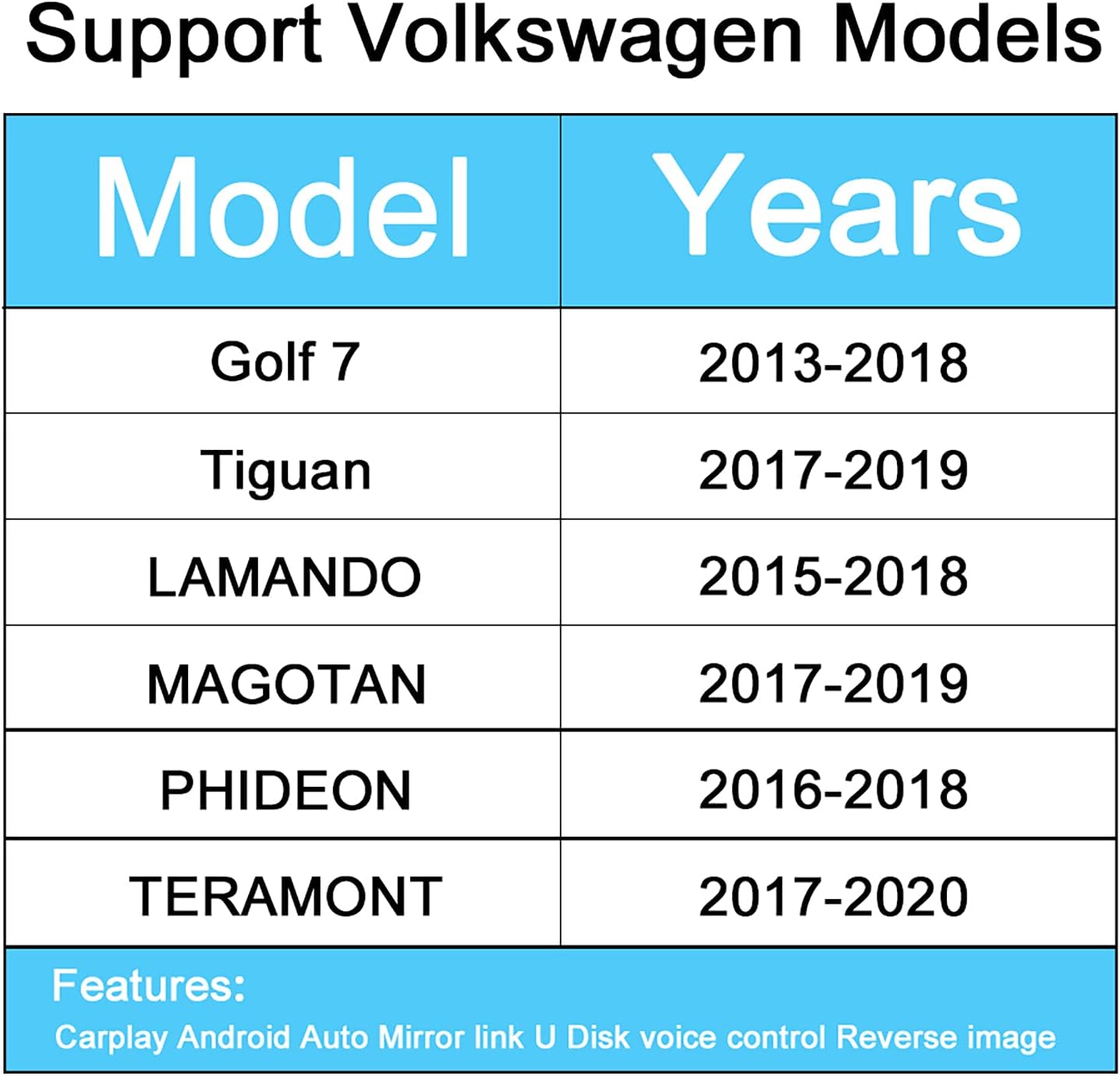
Image 4.1: Compatible Volkswagen Models and Years. This image displays a table listing the Volkswagen models and their corresponding compatible years for the retrofit kit.
| Model | Years |
|---|---|
| Golf 7 | 2013-2018 |
| Tiguan | 2017-2019 |
| Lamando | 2015-2018 |
| Magotan | 2017-2019 |
| Phideon | 2016-2018 |
| Teramont | 2017-2020 |
To confirm compatibility, especially if you are unsure, please contact customer support with photos of your car's central console.
5. Setup and Installation
The Ezonetronics Retrofit Kit is designed for a Plug and Play installation, meaning it is non-destructive and does not require cutting or breaking original wires. However, professional installation is recommended to ensure correct wiring and functionality.
5.1. General Installation Steps (Consult a professional for detailed instructions)
- Preparation: Ensure the vehicle's ignition is off and the battery is disconnected before beginning installation.
- Access the Head Unit: Carefully remove the trim panels and screws to access the factory head unit or display.
- Connect the Decoder Box: Integrate the Ezonetronics decoder box into the existing wiring harness using the provided power wiring and LVDS cables. These connections are typically inline with the factory wiring.
- Install Antennas: Connect the WiFi and 5G antennas and route them to an optimal location for signal reception, away from metal obstructions.
- USB/MIC Connection: Connect the USB/MIC cable. The USB port can be used for media playback or wired CarPlay/Android Auto connections. The microphone is essential for voice control.
- Camera Connections (Optional): If installing front or rear cameras, connect them to the RCA inputs on the decoder box.
- Test Functionality: Before reassembling the dashboard, reconnect the battery and test all functions: CarPlay, Android Auto, Mirror Link, audio, voice control, and camera inputs.
- Reassembly: Once all functions are verified, carefully reassemble the dashboard components.
For specific vehicle disassembly and wiring diagrams, refer to your vehicle's service manual or consult a qualified automotive technician.
6. Operating Instructions
The Ezonetronics Retrofit Kit allows you to seamlessly switch between your car's original system and the CarPlay/Android Auto interface using factory controls.
6.1. Switching Between Systems
Typically, you can switch to the CarPlay/Android Auto interface by pressing and holding a specific button on your car's original head unit (e.g., 'MEDIA' or 'NAV') or via a menu option. Refer to your vehicle's specific controls for exact activation.
6.2. Apple CarPlay
Connect your iPhone via USB or wirelessly (if supported by your phone and the kit). CarPlay will display a simplified iOS interface on your car's screen, allowing access to:
- Phone Calls: Make and receive calls.
- Maps: Use Apple Maps, Google Maps, or Waze for navigation.
- Music: Play music from Apple Music, Spotify, or other audio apps.
- Messages: Send and receive messages via Siri.

Image 6.1: CarPlay Phone Interface. This image shows the CarPlay interface displaying an incoming phone call on the vehicle's screen.

Image 6.2: CarPlay Maps Interface. This image illustrates the CarPlay navigation screen with various map applications available.

Image 6.3: CarPlay Music Interface. This image displays the CarPlay music player with a list of playlists.
6.3. Android Auto
Connect your Android phone via USB. Android Auto provides a driver-friendly interface for:
- Navigation: Google Maps and Waze.
- Communication: Calls and messages.
- Media: Music and podcast apps.

Image 6.4: Android Auto Wired Connection. This image shows an Android phone connected via USB, displaying the Android Auto interface on the car's screen.
6.4. Mirror Link
Mirror Link allows you to display your smartphone's screen directly onto the car's display. This function supports both Airplay for iPhones and Auto Link for Android devices. It is typically used for viewing videos, photos, or other content not natively supported by CarPlay/Android Auto.

Image 6.5: Mirror Link Wired Connection. This image demonstrates a smartphone's screen being mirrored onto the car's display via a wired connection.
6.5. Voice Control
Activate voice control by saying "Hey Siri" (for CarPlay) or using the voice command button on your steering wheel. This allows hands-free operation for navigation, calls, messages, and music playback.
6.6. Reverse Camera and Parking Assistance
The kit supports the display of original and aftermarket reverse cameras, including dynamic guidelines and parking sensor integration. When the vehicle is put into reverse, the camera feed will automatically appear on the screen.

Image 6.6: Reverse Camera View. This image shows the rear view camera display on the car's screen, including parking guidelines.
6.7. USB Media Playback
Connect a USB flash drive to the provided USB port to play audio and video files directly through the system.
7. Maintenance
To ensure the longevity and optimal performance of your Ezonetronics Retrofit Kit, follow these general maintenance guidelines:
- Cleaning: Keep the unit and surrounding areas clean and free of dust. Use a soft, dry cloth for cleaning. Avoid abrasive cleaners or solvents.
- Avoid Liquids: Do not expose the unit to liquids or excessive moisture.
- Temperature: Operate the unit within the recommended temperature range for automotive electronics. Extreme temperatures can affect performance.
- Cable Integrity: Periodically check all connected cables for any signs of wear or damage. Ensure connections are secure.
- Software Updates: Check the Ezonetronics website or contact support for any available software or firmware updates to ensure optimal performance and compatibility.
8. Troubleshooting
If you encounter issues with your Ezonetronics Retrofit Kit, try the following troubleshooting steps:
- No Power/No Display:
- Check all power connections to ensure they are securely seated.
- Verify the vehicle's battery is properly connected and charged.
- Ensure the kit is correctly switched to the CarPlay/Android Auto interface.
- No Audio:
- Check the volume levels on both the car's system and your smartphone.
- Ensure the audio output settings on your smartphone are correct.
- Verify all audio cables (if applicable) are connected properly.
- CarPlay/Android Auto Not Connecting:
- Ensure your smartphone's operating system is up to date.
- Try restarting your smartphone and the car's infotainment system.
- For wired connections, try a different USB cable. For wireless, ensure WiFi and Bluetooth are enabled on your phone and the kit.
- Check if your phone is listed as a compatible device for CarPlay/Android Auto.
- Poor Signal/Intermittent Connection:
- Ensure the WiFi and 5G antennas are properly installed and not obstructed.
- Minimize interference from other electronic devices.
- Voice Control Not Responding:
- Ensure the microphone is properly connected and positioned.
- Check microphone permissions on your smartphone.
If these steps do not resolve the issue, please contact Ezonetronics customer support for further assistance.
9. Specifications
| Feature | Detail |
|---|---|
| Brand | Ezonetronics |
| Model Number | 9b723a35-12a5-4b68-974b-97c44dee9d8b |
| Connectivity Technology | USB, Wi-Fi (2.4G & 5.8G), Bluetooth 5.0 |
| Controller Type | Android, Button, iOS (via vehicle controls) |
| Special Feature | Voice Control |
| Compatible Devices | Smartphone, Tablet, USB Stick |
| Audio Output Mode | RCA, Speakers |
| Surround Sound Configuration | 5.1 |
| Video Encoding | H.264, H.265/HEVC, VP9, AV1, MPEG-4 |
| Color | Black |
| Item Weight | 900 Grams |
| Output Power | 50 Watt |
| Number of Channels | 2 (Audio), 5.1 (Surround) |
| Internet Applications | YouTube |
| Control Method | App, Touch, Voice |
| Audio Format | WAV |
10. Warranty and Support
Ezonetronics stands behind its products and services. For warranty information, technical support, or any inquiries regarding your retrofit kit, please refer to the official Ezonetronics website or contact their customer service department.
You can also visit the Ezonetronics Store on Amazon for more information and contact options.


