
1. Introduction
This manual provides instructions for the Allimity RM-C3402 replacement remote control. This remote is designed to function as a direct replacement for original JVC TV remote controls, offering seamless operation without the need for complex programming. Please read this manual carefully to ensure proper use and to maximize your experience with the remote control.
2. Product Overview
The Allimity RM-C3402 is an infrared replacement remote control for various JVC TV models. It features a standard layout with dedicated buttons for power, channel, volume, menu navigation, and other common TV functions. Its ergonomic design ensures comfortable handling.
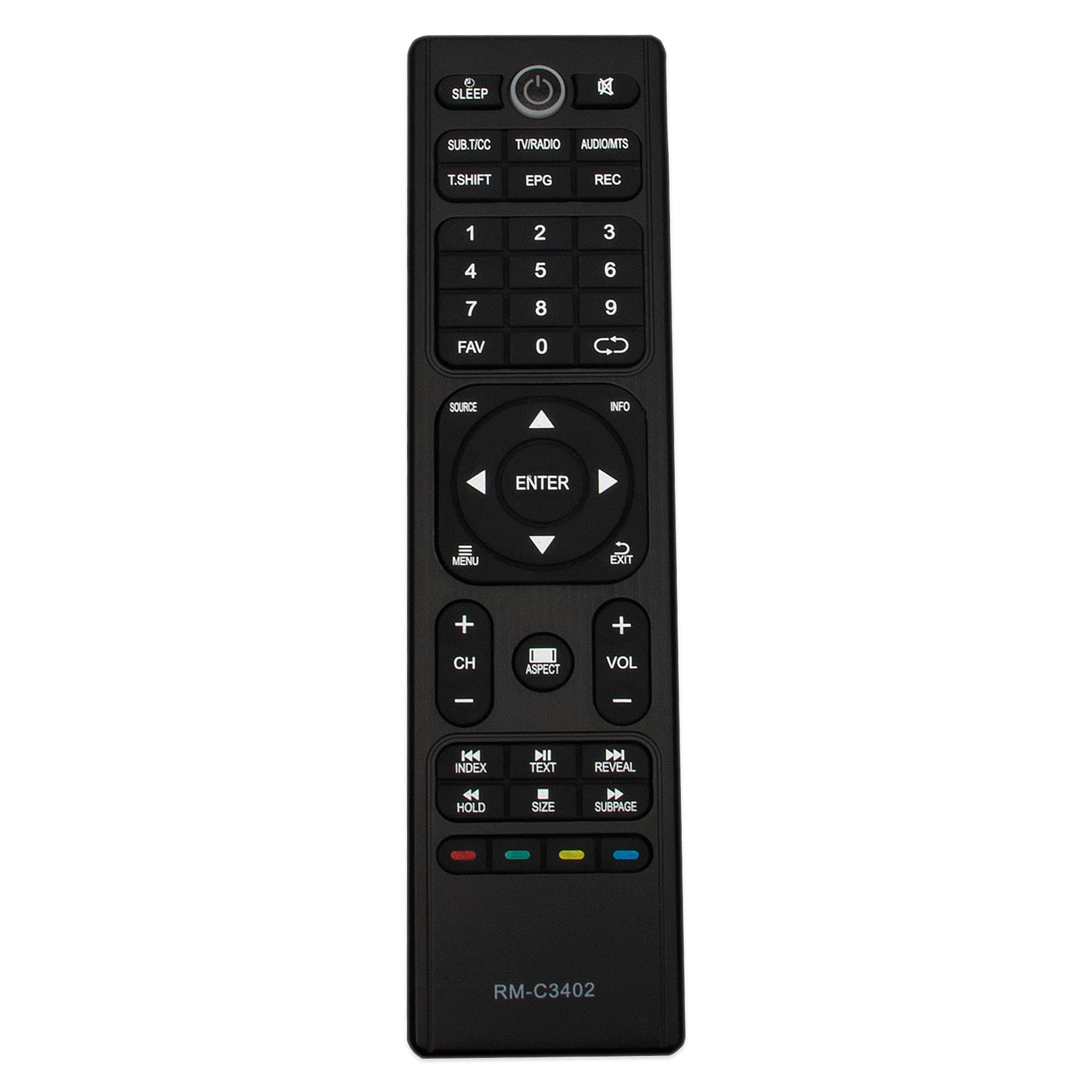
Figure 2.1: Front view of the Allimity RM-C3402 Remote Control, showing all buttons and their labels.
3. Setup
3.1 Battery Installation
The RM-C3402 remote control requires two (2) AAA alkaline batteries for operation. No programming or setup is required; simply insert the batteries, and the remote will be ready to use.
- Locate the battery compartment on the back of the remote control.
- Press down on the latch and slide the battery cover downwards to open it.
- Insert two AAA alkaline batteries, ensuring the positive (+) and negative (-) terminals align correctly with the markings inside the compartment.
- Slide the battery cover back into place until it clicks securely.

Figure 3.1: Back view of the remote control with the battery compartment open, showing correct battery placement.
4. Operating Instructions
Once batteries are installed, the remote control is ready for immediate use with compatible JVC TV models. Point the remote directly at your television and press the desired function button.
4.1 Basic Functions
- Power Button (⏻): Turns the TV on or off.
- Number Pad (0-9): Selects channels directly.
- VOL +/-: Adjusts the volume level.
- CH +/-: Changes channels sequentially.
- Mute Button (🔇): Mutes or unmutes the TV audio.
- MENU: Accesses the TV's main menu.
- ENTER: Confirms selections within menus.
- Arrow Buttons (▲ ▼ ◄ ►): Navigates through menus and options.
- SOURCE: Selects input sources (HDMI, AV, etc.).
- EPG: Displays the Electronic Program Guide.
- INFO: Displays information about the current program.
- SLEEP: Sets the TV's sleep timer.
The remote operates using infrared technology and has a maximum effective range of 10 meters (approximately 33 feet). Ensure a clear line of sight between the remote control and the TV's infrared receiver for optimal performance.
5. Compatibility
This Allimity RM-C3402 remote control is compatible with the following JVC TV models:
- LT-65N785A
- LT-32N386A
- LT-40N570A
- LT-50N790A
- LT-55N550A
- LT-32N370A
- LT-39N370AN
- LT-58N790A
- LT-50N590A
- LT-55N685A
This list includes both the hyphenated and non-hyphenated versions of the model numbers as provided by the manufacturer.
6. Specifications
| Brand | ALLIMITY |
| Model Number | RM-C3402 |
| Connectivity Technology | Infrared |
| Compatible Devices | Television |
| Special Feature | No Programming Required |
| Maximum Range | 10 Meters (approx. 33 feet) |
| Number of Batteries Required | 2 |
| Battery Type | AAA Alkaline |
| Item Weight | 2 Ounces |
| Item Dimensions (L x W x H) | 6" x 2" x 0.5" |
7. Troubleshooting
If you experience issues with your remote control, please try the following steps:
- Check Batteries: Ensure batteries are inserted correctly with the correct polarity (+/-). Replace old batteries with new AAA alkaline batteries if the remote is unresponsive.
- Line of Sight: Make sure there are no obstructions between the remote control and the TV's infrared sensor.
- Remote Proximity: Ensure you are within the effective operating range (up to 10 meters) of the television.
- TV Compatibility: Verify that your JVC TV model is listed in the compatibility section of this manual.
If problems persist after trying these steps, please refer to the support section for further assistance.
8. Maintenance
To ensure the longevity and proper functioning of your remote control, follow these maintenance guidelines:
- Cleaning: Wipe the remote control with a soft, dry cloth. Do not use liquid cleaners or abrasive materials, as they may damage the surface or internal components.
- Battery Care: Remove batteries if the remote control will not be used for an extended period to prevent battery leakage.
- Storage: Store the remote control in a cool, dry place away from direct sunlight and extreme temperatures.
- Avoid Drops: Protect the remote from physical impact or dropping, which can cause internal damage.
9. Warranty and Support
9.1 Warranty Information
This Allimity RM-C3402 remote control comes with a 60-day warranty from the date of purchase. This warranty covers manufacturing defects and ensures the product functions as described. Please retain your proof of purchase for warranty claims.
9.2 Customer Support
For any questions regarding the remote control, troubleshooting assistance, or warranty claims, please feel free to contact us by email. Our customer support team is available to help resolve any issues you may encounter.
Contact information is typically provided with your purchase or on the product packaging.