Introduction
This manual provides essential instructions for the safe and effective use of your Ricoh GR III Street Edition Digital Camera. Please read this manual thoroughly before using the camera and retain it for future reference.
Package Contents
Verify that all items are present in the package:
- Ricoh GR III Street Edition Digital Camera Body
- Rechargeable Lithium-Ion Battery
- USB Type-C Cable
- Power Adapter
- Strap
- Instruction Manual (this document)
Note: Specific accessories may vary by region or package.
Camera Overview
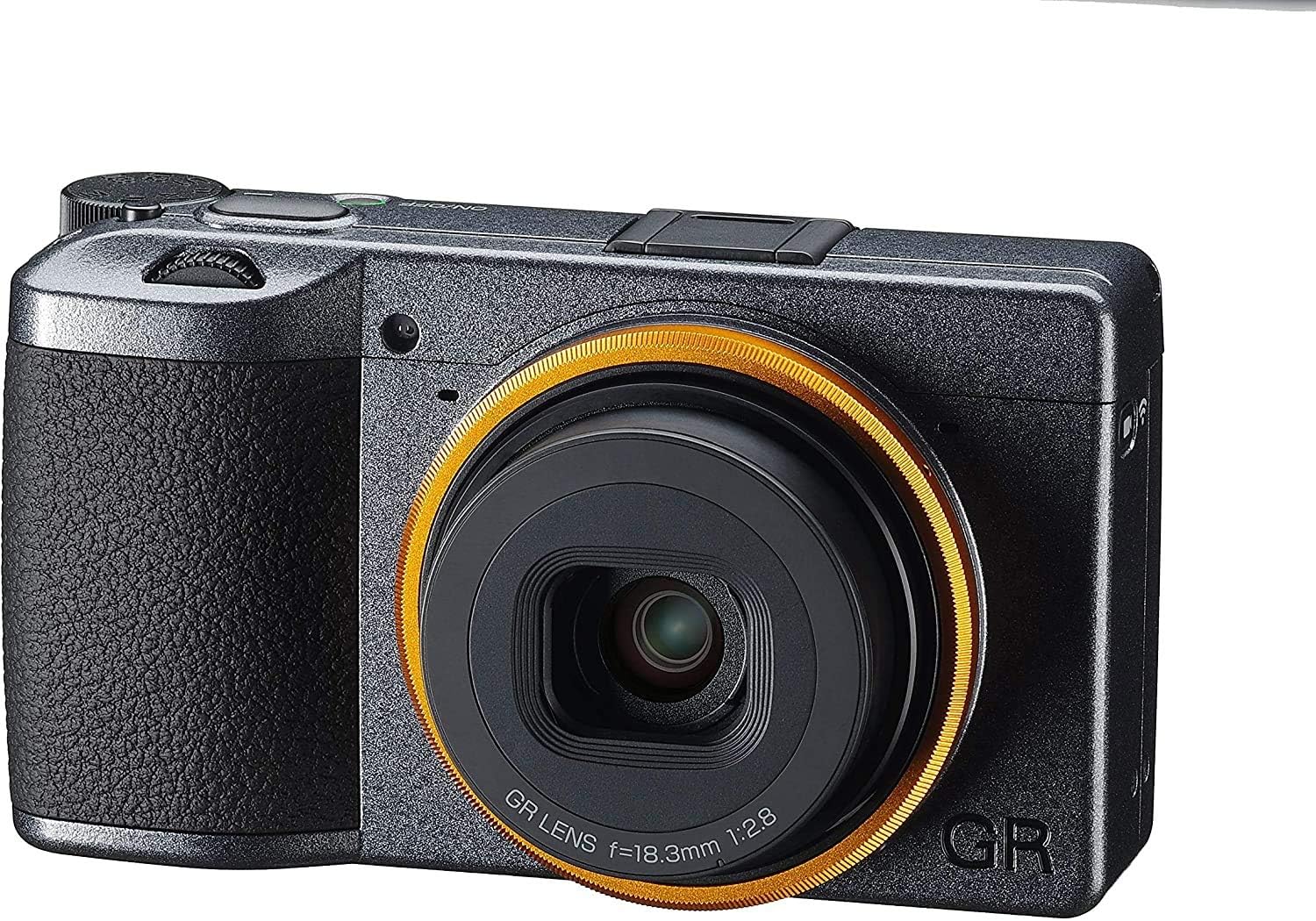
Figure 1: Front View. This image displays the front of the Ricoh GR III Street Edition camera. Key features visible include the GR lens with its distinctive orange-yellow accent ring, the metallic gray finish of the camera body, and the textured grip on the left side.

Figure 2: Back View. This image shows the rear of the Ricoh GR III Street Edition camera. Prominently featured is the LCD monitor, which displays the "GR III Street Edition" logo upon shutdown. Various control buttons are visible to the right of the screen, including the power button, ADJ lever, Fn button, ISO/OK/WB dial, and MENU/DISP buttons.
Setup
1. Charging the Battery
- Insert the provided Lithium-Ion battery into the camera.
- Connect the camera to a power source using the supplied USB Type-C cable and power adapter.
- The charging indicator light will illuminate during charging and turn off when complete.
2. Inserting a Memory Card
- Open the memory card slot cover.
- Insert a compatible SD card (not included) into the slot with the label facing the correct direction until it clicks into place.
- Close the memory card slot cover securely.
3. Initial Power-On and Basic Settings
- Press the power button to turn on the camera.
- Follow the on-screen prompts to set the date, time, and language.
Operating the Camera
1. Basic Photography Modes
The GR III offers various shooting modes, including Manual (M), Aperture Priority (Av), Shutter Priority (Tv), and Program (P). Select your desired mode using the mode dial or menu settings.
2. Focusing
- Autofocus (AF): The camera utilizes a high-speed hybrid AF system combining contrast detection for accuracy. Half-press the shutter button to focus.
- Full-Press Snapshot: This feature allows you to focus and shoot at a pre-specified distance by fully pressing the shutter button at once, or by touching the image monitor. This is ideal for quick street photography.
- Manual Focus (MF): For precise control, switch to manual focus and adjust the focus ring on the lens or use the camera's focus assist features.
3. Exposure Control
- Aperture: Adjust the aperture (F2.8-F5.6) to control depth of field.
- Shutter Speed: The camera supports shutter speeds from 1/4000 sec. to 30 sec., with options for Timed Exposure, Bulb, and Time modes.
- ISO Sensitivity: The expanded ISO range starts from 100. Adjust ISO to compensate for lighting conditions.
4. Image Stabilization
The GR III features in-body image stabilization (IBIS) using digital, hybrid, and optical methods to reduce blur from camera shake, especially useful in low light or with slower shutter speeds.
5. Flash Usage
The built-in flash supports Auto, On/Fill, and Slow Sync modes. Access flash settings through the camera menu.
6. Video Recording
The camera can capture video in MOV format with a maximum resolution of 2160p at 60 FPS. Switch to video mode and press the record button to start/stop recording.
7. Wireless Connectivity (Wi-Fi)
Utilize the built-in Wi-Fi (IEEE 802.11b/g/n) to connect your camera to a smartphone or tablet for remote control, image transfer, and sharing. Refer to the camera's Wi-Fi settings menu for connection instructions.
Maintenance
1. Cleaning the Camera
- Lens: Use a soft, lint-free cloth specifically designed for optical lenses. For stubborn smudges, use a lens cleaning solution sparingly.
- Sensor: While the camera has a sealed design, dust can still accumulate. If dust spots appear on images, consult a professional service center for sensor cleaning. Avoid attempting to clean the sensor yourself unless you are experienced.
- Body: Wipe the camera body with a soft, dry cloth. Do not use harsh chemicals or solvents.
2. Battery Care
- Store batteries in a cool, dry place when not in use.
- Avoid fully discharging the battery frequently to prolong its lifespan.
- Charge the battery fully before extended storage.
3. Storage
When storing the camera for extended periods, remove the battery and memory card. Store the camera in a dry, dust-free environment, preferably in a camera bag or case.
Troubleshooting
- Camera does not power on: Ensure the battery is fully charged and correctly inserted.
- Images are blurry: Check focus settings, ensure sufficient light, and verify image stabilization is active if needed.
- Darkened edges (Vignetting): While some vignetting can be a characteristic of certain lenses, if it is excessively pronounced, ensure no accessories are obstructing the lens.
- Slow Autofocus: In very low light or with subjects lacking contrast, autofocus may be slower. Try using manual focus or focusing on a high-contrast area.
- Dust on Sensor: If dark spots appear consistently in your images, especially at smaller apertures, it may indicate dust on the sensor. Contact Ricoh service for professional cleaning.
- Wi-Fi connection issues: Ensure the camera's Wi-Fi is enabled and your smart device is within range. Refer to your smart device's Wi-Fi settings.
For further assistance, refer to the official Ricoh support resources.
Specifications
| Feature | Detail |
|---|---|
| Model Name | GR III |
| Photo Sensor Size | 23.5mm x 15.6mm (APS-C) |
| Photo Sensor Technology | CMOS |
| Effective Still Resolution | 24.2 MP |
| Lens Type | GR lens, 18.3mm (28mm equivalent in 35mm format), F2.8-F5.6 |
| Image Stabilization | Digital, Hybrid, Optical (In-body) |
| Expanded ISO Minimum | 100 |
| Minimum Shutter Speed | 0.00025 seconds (1/4000 sec) |
| Video Resolution | 2160p (4K) |
| Frame Rate | 60 FPS (for video) |
| Wireless Technology | Wi-Fi (IEEE 802.11b/g/n) |
| Battery Type | Lithium Ion |
| Item Weight | 2.4 Pounds |
| Item Dimensions (D x W x H) | 9"D x 7"W x 5"H |
| UPC | 027075302808 |
Warranty and Support
Warranty Information
Specific warranty terms and conditions for the Ricoh GR III Street Edition Digital Camera are provided with your purchase documentation. Please refer to the warranty card or the official Ricoh website for detailed information regarding coverage, duration, and service procedures.
Customer Support
For technical support, service, or additional inquiries, please visit the official Ricoh support website or contact their customer service department. You can find more information and resources at the Ricoh Store on Amazon or the main Ricoh website.