
1. Introduction
This manual provides essential information for the safe and effective operation, maintenance, and troubleshooting of your Eibenstock 6535000 EOF 100.1 Surface Router. Please read these instructions carefully before using the tool and keep them for future reference.
2. General Safety Instructions
Always observe the following safety precautions to reduce the risk of electric shock, fire, and serious injury.
- Work Area Safety: Keep the work area clean and well-lit. Cluttered or dark areas invite accidents.
- Electrical Safety: Do not expose power tools to rain or wet conditions. Ensure the plug matches the outlet.
- Personal Safety: Always wear eye protection, hearing protection, and a dust mask. Dress appropriately; avoid loose clothing or jewelry.
- Tool Use and Care: Do not force the power tool. Use the correct tool for your application. Disconnect the plug from the power source before making any adjustments, changing accessories, or storing power tools.
- Dust Extraction: When using the tool, connect a dust extraction system to minimize dust exposure.
3. Product Overview and Components
Familiarize yourself with the main components of your Eibenstock EOF 100.1 Surface Router.

Figure 3.1: Overall view of the Eibenstock 6535000 EOF 100.1 Surface Router. This image shows the tool's main body, handle, and base plate, highlighting its compact design.
- Main Handle: Ergonomically designed for comfortable grip and control.
- Motor Housing: Contains the electric motor and ventilation system.
- Base Plate: Provides stability and guides the tool across the work surface.
- Depth Adjustment Mechanism: Allows precise control over routing depth.
- Power Switch/Speed Control: Activates the tool and adjusts rotational speed.
- Dust Extraction Port: Connects to an external dust extraction system.
4. Setup and Preparation
4.1 Unpacking and Inspection
- Carefully remove the surface router and all accessories from the packaging.
- Inspect the tool for any signs of damage that may have occurred during transit. Do not operate a damaged tool.
- Ensure all listed components are present.
4.2 Connecting Dust Extraction
For optimal performance and a cleaner work environment, connect a suitable dust extraction system to the tool's dust port.

Figure 4.1: The Eibenstock Surface Router connected to a dust extraction hose. This setup demonstrates how to maintain a clean work area and reduce airborne dust during operation.
- Locate the dust extraction port on the tool's base.
- Attach a compatible vacuum hose securely to the port.
- Ensure the dust extractor is switched on before operating the surface router.
5. Operating Instructions
5.1 Adjusting Routing Depth
The routing depth can be precisely adjusted to suit your application.

Figure 5.1: Close-up view of the depth adjustment mechanism. This image highlights the knob and scale used to set the precise routing depth for various tasks.
- Ensure the tool is disconnected from the power supply.
- Loosen the depth adjustment locking mechanism (if present).
- Rotate the adjustment knob to set the desired routing depth. Refer to the scale for precise measurements.
- Tighten the locking mechanism to secure the depth setting.
5.2 Powering On and Speed Control
The tool features a power switch and variable speed control for different materials and applications.

Figure 5.2: Detail of the power switch and speed control dial. This shows the location of the controls for activating the tool and adjusting its operational speed.
- Connect the tool to a suitable power outlet.
- To switch on, press the power switch.
- Adjust the speed control dial to the desired RPM for your material. Lower speeds are generally for harder materials or finer work, higher speeds for softer materials or faster removal.
- To switch off, release or press the power switch again, depending on its type (momentary or latching).
5.3 General Operation
Always maintain a firm grip on the tool with both hands during operation.

Figure 5.3: The surface router being used to prepare a wall surface. This demonstrates the tool's application for material removal on vertical surfaces.
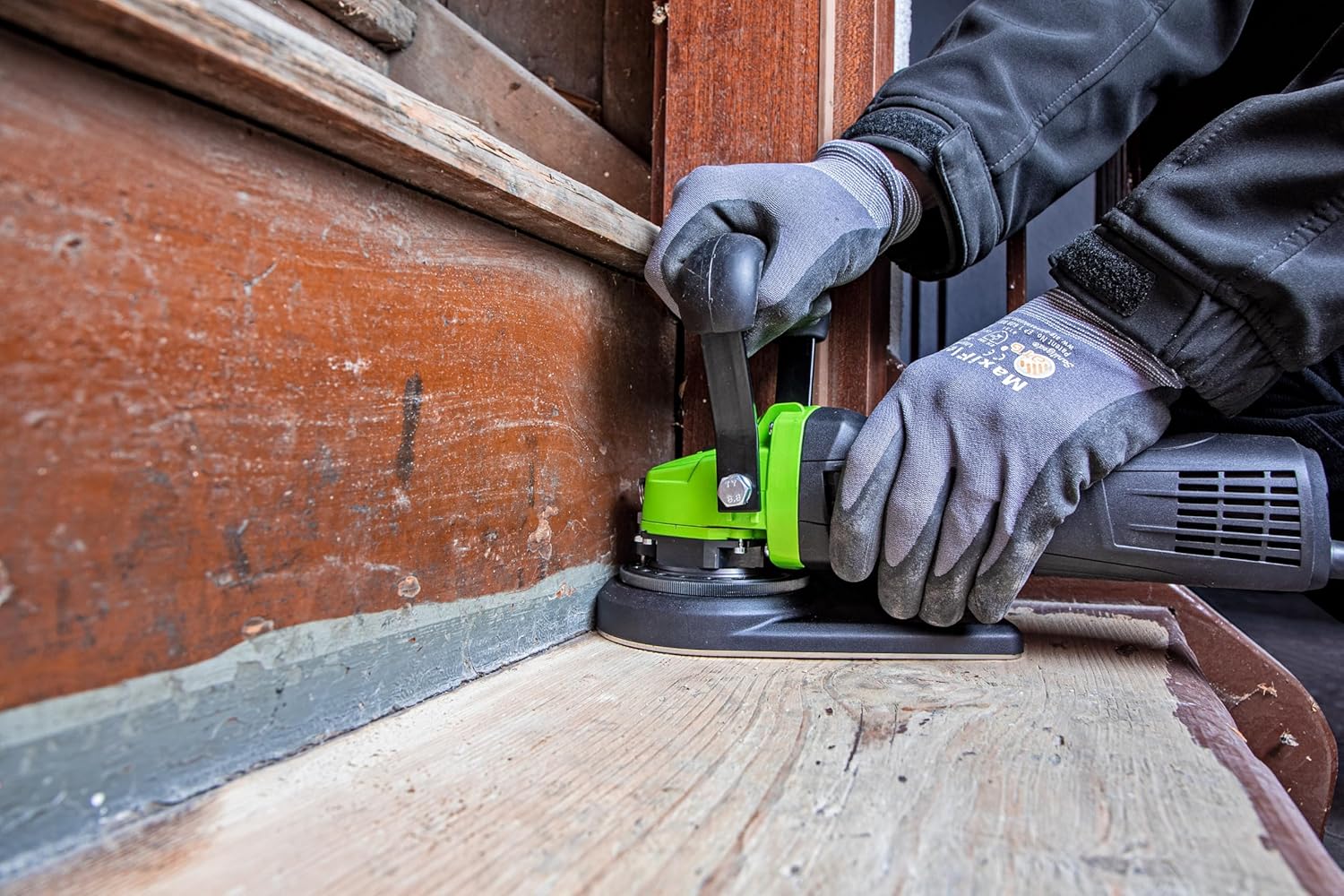
Figure 5.4: The surface router operating on a wooden surface. This illustrates the tool's versatility for different materials and its ability to work close to edges.
- Place the tool flat on the workpiece before switching it on.
- Apply even pressure and move the tool smoothly across the surface.
- Avoid sudden movements or excessive force, which can damage the tool or workpiece.
- Always work away from your body.
- Allow the tool to reach full speed before engaging the workpiece.
6. Maintenance
Regular maintenance ensures the longevity and safe operation of your Eibenstock Surface Router.
6.1 Cleaning
- Disconnect the tool from the power supply before cleaning.
- Use a soft brush or compressed air to remove dust and debris from the ventilation slots and around the base plate.
- Wipe the exterior of the tool with a damp cloth. Do not use harsh chemicals or abrasive cleaners.
6.2 Storage
Store the tool in a dry, secure location, out of reach of children and unauthorized users.
7. Troubleshooting
This section addresses common issues you might encounter.
| Problem | Possible Cause | Solution |
|---|---|---|
| Tool does not start | No power supply; faulty switch; damaged power cord. | Check power connection; inspect power cord; contact service if switch is faulty. |
| Excessive vibration | Loose components; damaged cutter. | Check for loose parts and tighten; replace damaged cutter. |
| Poor material removal | Incorrect depth setting; worn cutter. | Adjust depth setting; replace cutter. |
If you encounter problems not listed here or if solutions do not resolve the issue, contact Eibenstock customer service or an authorized service center.
8. Technical Specifications
| Feature | Specification |
|---|---|
| Brand | Eibenstock |
| Model Number | 6535000 (EOF 100.1) |
| Manufacturer | Eibenstock |
| Package Dimensions | 58.9 x 32.29 x 30.1 cm |
| Item Weight | 7.06 kilograms |
| Color | Green |
| Quantity | 1 |
| Handle Material | Metal |
| Batteries Required | No |
| Blade Material | High-speed steel |
| Number of Teeth | 1 |
| Blade Shape | Flat |
9. Warranty and Support
Information regarding specific warranty terms for the Eibenstock 6535000 EOF 100.1 Surface Router is not available in the provided product details. For warranty claims, spare parts, or technical support, please contact your authorized Eibenstock dealer or visit the official Eibenstock website.
Note: Availability of spare parts is currently listed as "Information unavailable". Please consult Eibenstock directly for current spare part information.