
Introduction
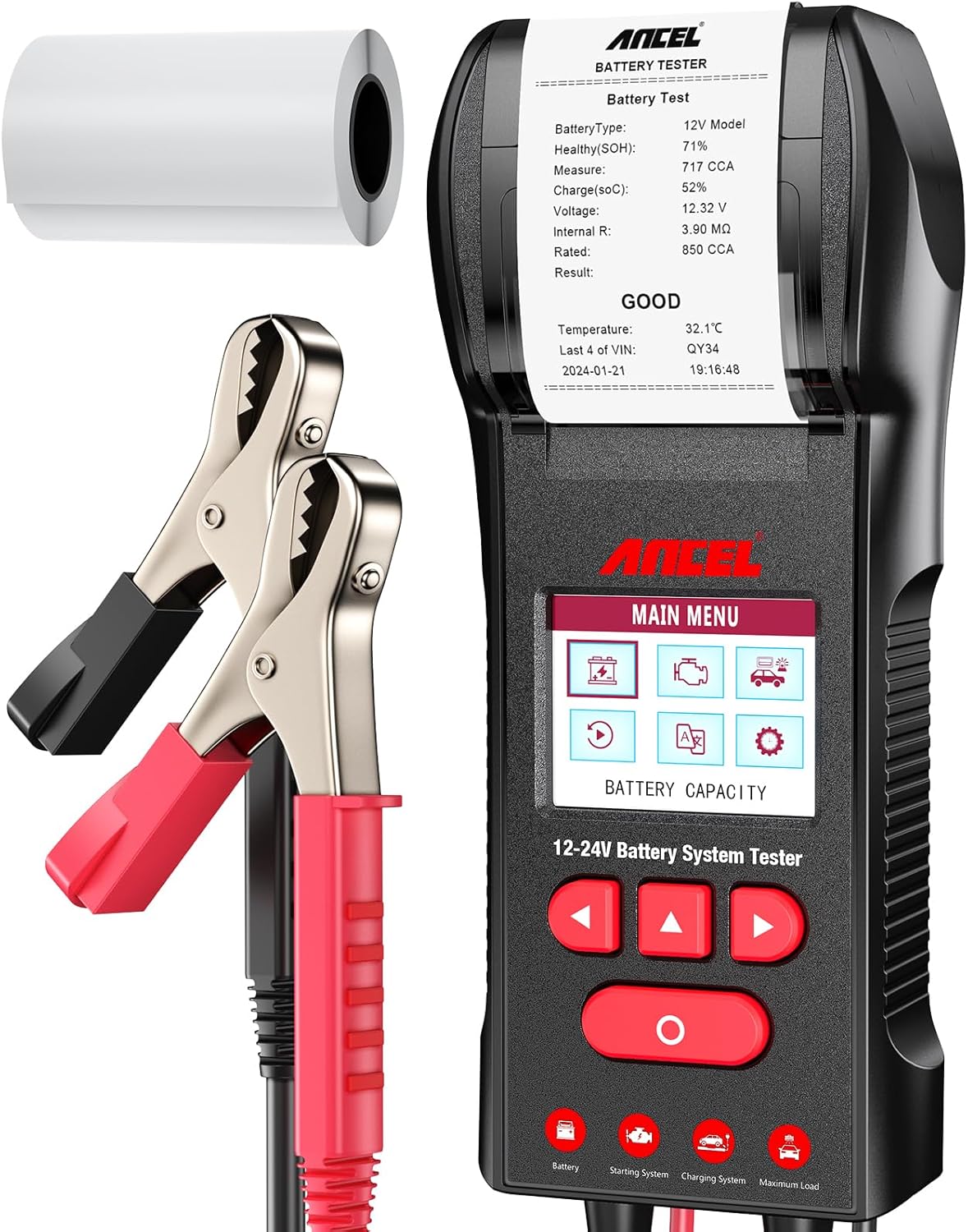
The ANCEL BST600 is a professional 12V and 24V automotive battery system tester designed to accurately assess the health, cranking, and charging systems of various vehicles. This device features a built-in printer for immediate result documentation and supports multiple battery types and testing standards. This manual provides detailed instructions for its safe and effective use.
Safety Information
Always observe the following safety precautions when operating the ANCEL BST600 battery tester:
- Wear appropriate eye protection and protective clothing.
- Ensure the vehicle is in a well-ventilated area.
- Avoid sparks, flames, and smoking near the battery.
- The BST600 features spark-proof and reverse polarity protection. However, always connect the red clamp to the positive (+) terminal and the black clamp to the negative (-) terminal.
- Keep the tester and cables away from moving engine parts.
- If battery acid comes into contact with skin or eyes, flush immediately with water and seek medical attention.

Product Overview
The ANCEL BST600 is a versatile diagnostic tool for automotive batteries and electrical systems. Key features include:
- 12V & 24V System Compatibility: Tests both 12V and 24V lead-acid batteries and their associated cranking and charging systems.
- Wide Battery Type Support: Compatible with Regular Flooded, AGM Flat Plate, AGM Spiral, EFB, and GEL batteries.
- Integrated Thermal Printer: Allows for immediate printing of test results for record-keeping or customer sharing.
- Comprehensive Battery Analysis: Measures State of Health (SOH), State of Charge (SOC), Cold Cranking Amps (CCA), voltage, internal resistance, and temperature.
- Cranking & Charging System Tests: Evaluates the starter motor's performance and the alternator's charging output.
- 3.2" Color Backlit LCD: Provides clear and easy-to-read visual data.
- Multilingual Interface: Supports 10 languages for global usability.

Setup
- Prepare the Battery: Ensure the battery terminals are clean and free of corrosion. If necessary, clean them with a wire brush.
- Connect the Clamps:
- Connect the red positive (+) clamp to the positive (+) terminal of the battery.
- Connect the black negative (-) clamp to the negative (-) terminal of the battery.
The tester will power on automatically once correctly connected to a battery with sufficient voltage.
- Initial Settings: Upon first use or after a reset, you may need to set the language. Navigate using the arrow buttons and confirm with the 'OK' button.

Figure 4: The 3.2-inch color screen allows for easy navigation and language selection.
Operating Instructions
After connecting the tester, the main menu will appear. Use the arrow buttons to navigate and the 'OK' button to select an option.

1. Battery Test
This test evaluates the overall health and charge level of the battery.
- From the main menu, select "Battery Test".
- Select the battery type (e.g., Regular Flooded, AGM Flat Plate, GEL).
- Enter the battery's rated CCA (Cold Cranking Amps) or other standard (e.g., JIS, DIN, EN). This information is usually found on the battery label.
- The tester will perform the analysis and display results including SOH, SOC, Voltage, Internal Resistance, and a general status (e.g., "GOOD", "REPLACE").
2. Cranking System Test
This test assesses the starter motor's ability to draw current and maintain voltage during engine start-up.
- From the main menu, select "Cranking Test".
- Follow the on-screen prompts to start the vehicle's engine.
- The tester will record the cranking voltage and time, then display the results, indicating if the cranking system is performing adequately.
3. Charging System Test
This test evaluates the alternator's ability to charge the battery and maintain stable voltage under various loads.
- From the main menu, select "Charging Test".
- Follow the on-screen instructions, which may include revving the engine to a specific RPM and turning on electrical accessories (e.g., headlights, fan).
- The tester will measure ripple voltage, loaded voltage, and unloaded voltage, providing a status of the charging system (e.g., "CHARGING GOOD", "GENERAL", "CAUTION").
4. Printing Test Results
After any test, the device will typically prompt you to print the results. Select "Yes" to print the report immediately.

Maintenance
- Cleaning: Wipe the tester with a soft, damp cloth. Do not use abrasive cleaners or solvents.
- Storage: Store the device in a dry, cool place, away from direct sunlight and extreme temperatures.
- Thermal Paper Replacement: When the printer runs out of paper, open the printer cover, remove the old roll, and insert a new standard thermal paper roll (2 1/4" W (57mm W) * 1 1/5" D (30mm D)), ensuring the paper feeds correctly.
- Internal Battery (for Date/Time): The device may require a CR2032 coin cell battery to maintain date and time settings when disconnected from a power source. Refer to the device's internal compartment for replacement if necessary.
Troubleshooting
| Problem | Possible Cause | Solution |
|---|---|---|
| Tester does not power on. | Incorrect clamp connection; battery voltage too low. | Ensure red clamp is on positive (+), black on negative (-). Check battery voltage; if below minimum operating voltage, charge the battery. |
| Inaccurate test results. | Loose connections; dirty battery terminals; incorrect battery type/CCA input. | Ensure clamps are securely attached. Clean battery terminals. Verify correct battery type and CCA rating entered. |
| Printer not printing or paper not advancing. | Out of thermal paper; paper incorrectly loaded; printer jam. | Replace thermal paper roll, ensuring it is loaded correctly. Check for any paper jams and clear them carefully. |
| Date/Time settings are lost. | Internal CR2032 battery needs replacement. | Replace the internal CR2032 coin cell battery. Refer to the device's internal compartment for access. |
Specifications
- Brand: ANCEL
- Model: BST600
- Voltage Range: 12V / 24V
- CCA Range: 100-2000 CCA
- Supported Battery Types: Regular Flooded, AGM Flat Plate, AGM Spiral, EFB, GEL
- Display: 3.2" Color Backlit LCD
- Printer: Built-in Thermal Printer
- Power Source: Battery Powered (from vehicle battery)
- Item Weight: 1 Pound
- Product Dimensions: 12.8 x 7.87 x 3.35 inches
- Safety Features: Spark-proof, Reverse Polarity Protection, Short-circuit Protection, Overload Protection
- Measurement Type: Voltmeter, Ohmmeter
What's in the Box
- 1 x ANCEL BST600 Battery Tester
- 1 x User Manual
- 1 x Thermal Print Paper Roll

Warranty and Support
ANCEL provides the following support for the BST600 Battery Tester:
- 1-Year Replacement: For manufacturing defects.
- 30-Day Free Returns: For eligible purchases.
- Lifetime Technical Support: Available for product assistance.
For further assistance, please contact ANCEL customer service.


