
SAMCOM FPCN30A
SAMCOM FPCN30A Two-Way Radio User Manual
Model: FPCN30A | Brand: SAMCOM
1. Introduction
The SAMCOM FPCN30A is a high-power, long-range two-way radio designed for reliable communication across various environments. Featuring 5 watts of transmit power and 20 programmable channels, it offers strong penetration and clear audio. This manual provides detailed instructions for setting up, operating, and maintaining your FPCN30A radio.

Figure 1.1: SAMCOM FPCN30A Two-Way Radios and Included Accessories.
2. What's in the Box
Your SAMCOM FPCN30A package includes the following items:
- Two Way Radio x 2
- Long Antenna (6.7 inches) x 2
- K-Type Earpiece x 2
- Charging dock x 2
- Charger x 2
- Back Clip x 2
- Working Manual x 2

Figure 2.1: All components included in the SAMCOM FPCN30A package.
Video 2.1: Unboxing and overview of accessories included with the SAMCOM FPCN30A Two-Way Radio.
3. Product Overview and Components
Familiarize yourself with the various parts of your SAMCOM FPCN30A radio:

Figure 3.1: Labeled diagram of the SAMCOM FPCN30A Two-Way Radio components.
4. Setup Guide
4.1 Attaching the Antenna
- Align the threaded end of the antenna with the antenna port on top of the radio.
- Gently screw the antenna clockwise until it is finger-tight. Do not overtighten.
4.2 Charging the Battery
The radio comes with a 1500mAh rechargeable Lithium Polymer battery. Ensure the battery is fully charged before first use.
- Connect the charger adapter to the charging dock.
- Plug the charger into a standard wall outlet.
- Place the radio (with battery attached) into the charging dock. The indicator light on the dock will show charging status (typically red for charging, green for fully charged).
- A full charge typically takes several hours.
4.3 Attaching the Earpiece
For private communication, connect the K-Type earpiece:
- Open the earpiece cap on the side of the radio.
- Insert the two-pin plug of the earpiece firmly into the corresponding ports.
5. Operating Instructions
5.1 Power On/Off and Volume Control
Rotate the Power/Volume Switch knob (top-left knob) clockwise to turn the radio ON. Continue rotating to increase volume. Rotate counter-clockwise to decrease volume and turn OFF.
5.2 Channel Selection
Rotate the Channel Selection Knob (top-right knob) to choose from the 20 available channels. The selected channel will be displayed on the LCD screen.
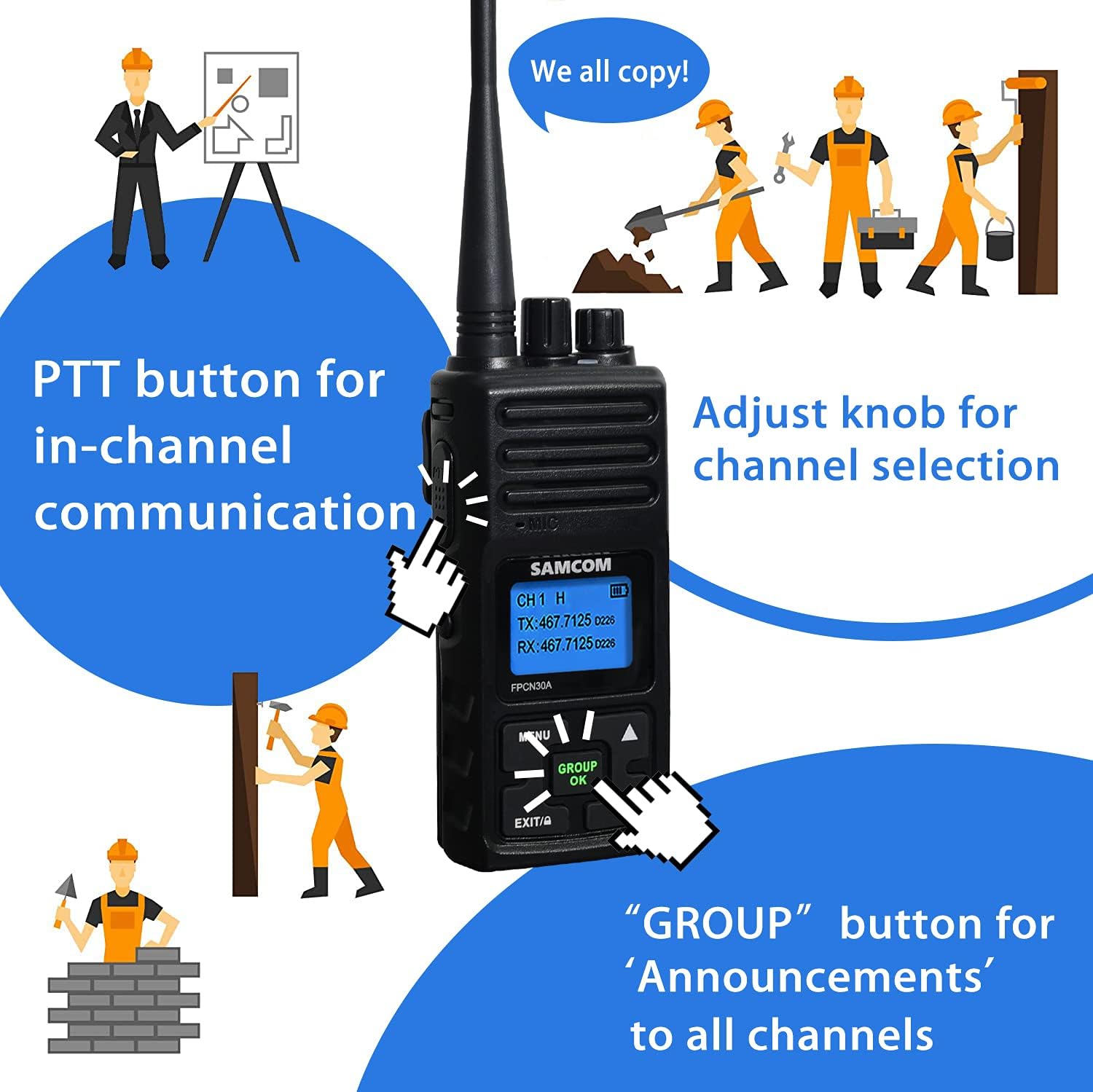
Figure 5.1: PTT button and Channel Selection Knob.
5.3 Transmitting and Receiving (PTT Button)
To transmit, press and hold the PTT (Push-To-Talk) button on the side of the radio. Speak clearly into the microphone. Release the PTT button to receive.
5.4 Group Function
The unique GROUP PTT feature allows for one-key group calling across different channels, ideal for announcements or emergency contact. This function enables communication with all radios programmed with the same group frequency, regardless of their current active channel.

Figure 5.2: The 'GROUP OK' button for group communication.
Video 5.1: Detailed introduction to the SAMCOM Two-Way Radio's functions, including the group call feature.
5.5 High/Low Power Mode
The radio operates in two power modes: high power for stronger penetration and low power to extend battery life. To switch between high and low power, long press the right "▲" or "▼" button.

Figure 5.3: High Power vs. Low Power Modes.
5.6 Programmable Features (DCS/CTCSS Tones, Scrambler)
The FPCN30A supports CDCSS codes for each channel, which can be set using computer software. It also features a voice scrambler for increased privacy. The frequency range is UHF 406.1-470MHz. You can rewrite the frequency through a Programming Data Cable (not included) to match other brands of walkie-talkies. Note: The software does not support Mac.
Video 5.2: In-depth review of the SAMCOM FPCN30A, including programming and scrambler features.
6. Performance Characteristics
6.1 Range
The SAMCOM FPCN30A offers impressive range capabilities:
- Obstructed: 1-2 miles (e.g., urban areas with many buildings)
- Partially Obstructed: 3-5 miles (e.g., suburban areas with some trees/buildings)
- No Obstructed: 5-15 miles (e.g., open fields, line-of-sight)
Figure 6.1: Estimated communication range under various conditions.
6.2 Battery Life
The built-in high-quality 1500mAh rechargeable battery provides:
- Working time: Up to 12 hours
- Standby time: Up to 50 hours
7. Maintenance
To ensure the longevity and optimal performance of your SAMCOM FPCN30A radio:
- Keep the radio clean by wiping it with a soft, dry cloth. Avoid using harsh chemicals or abrasive cleaners.
- Ensure the battery contacts are clean and free of debris.
- Store the radio in a cool, dry place when not in use.
- Avoid exposing the radio to extreme temperatures, direct sunlight, or moisture. The radio is not water resistant.
8. Troubleshooting
If you encounter issues with your radio, refer to the following common problems and solutions:
| Problem | Possible Cause | Solution |
|---|---|---|
| Radio does not power on | Low or dead battery | Charge the battery fully. |
| No reception or poor audio quality | Out of range, incorrect channel/tone, antenna loose | Move closer to other radios, verify channel and CDCSS settings, ensure antenna is securely attached. |
| Cannot communicate with other radios | Different frequencies/tones, scrambler active | Ensure all radios are on the same frequency and tone settings. Deactivate scrambler if not all radios have it enabled. Consider using a Programming Data Cable to synchronize frequencies. |
9. Technical Specifications
| Feature | Specification |
|---|---|
| Model Number | FPCN30A |
| Item Weight | 2.64 pounds |
| Product Dimensions | 1.38 x 2.28 x 11.1 inches |
| Batteries | 2 Lithium Polymer batteries required (included) |
| Display Type | LCD |
| Number of Channels | 20 |
| Frequency Range | UHF 406.1-470MHz |
| Talking Range Maximum | 5 Mile |
| Voltage | 7 Volts |
| Water Resistance Level | Not Water Resistant |
10. Warranty and Support
SAMCOM offers a Lifetime Quality Warranty for this product. Additionally, you are eligible for a 30-day no-reason return policy.
For further support or to purchase accessories, please visit the SAMCOM Store on Amazon.
Related documentsFPCN30A


Ask a question about this manual
Ask about setup, troubleshooting, compatibility, parts, safety, or missing instructions. Manuals+ will review the question and use this page’s manual context to help answer it.