
1. Introduction
Thank you for choosing the LASIKA Digital Sports Kids Watch, Model 88. This manual provides detailed instructions on how to set up, operate, and maintain your watch. Please read this manual carefully to ensure proper use and to enjoy all the features of your new watch.
2. Product Overview
The LASIKA Model 88 is a durable digital watch designed for children, featuring a clear display and multiple functions. It is equipped with a quartz movement for accurate timekeeping and a comfortable rubber strap.
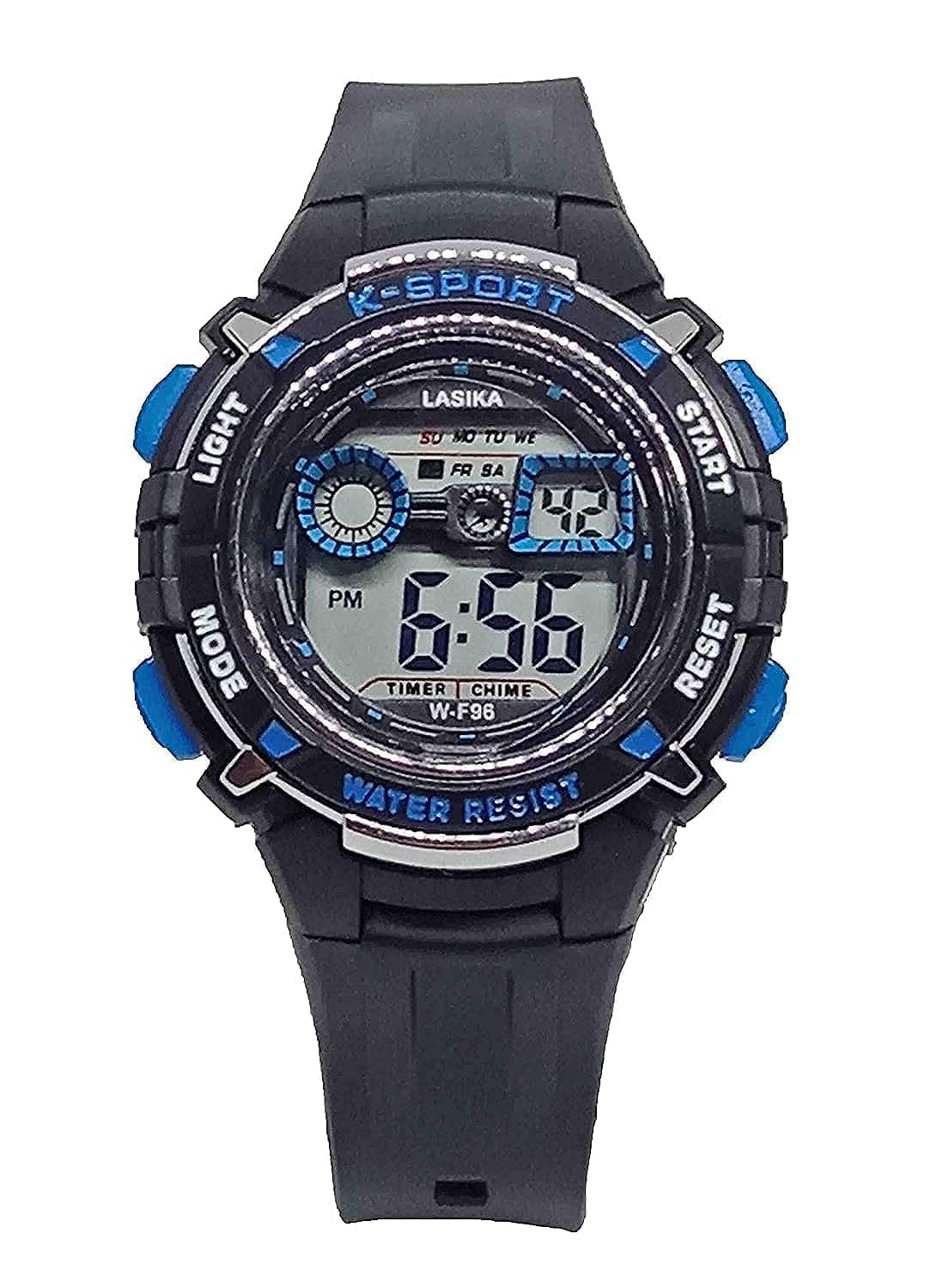
Image 1: Front view of the LASIKA Digital Sports Kids Watch Model 88. The watch features a black case and strap with blue accents on the buttons and dial markings. The digital display shows the time, day of the week, and indicators for timer and chime functions. The buttons are clearly labeled for easy operation.
2.1 Button Functions
- LIGHT Button (Top Left): Activates the backlight for visibility in low-light conditions.
- MODE Button (Bottom Left): Cycles through different operational modes (Time, Stopwatch, Alarm).
- START Button (Top Right): Used to start/stop functions in Stopwatch mode and adjust settings in setting modes.
- RESET Button (Bottom Right): Used to reset functions in Stopwatch mode and select settings in setting modes.
2.2 Digital Display Elements
- Time Display: Shows hours, minutes, and seconds.
- PM Indicator: Appears when the time is in the afternoon (12-hour format).
- Day of Week: Displays the current day (e.g., FR for Friday, SA for Saturday).
- TIMER Indicator: Appears when the timer function is active.
- CHIME Indicator: Appears when the hourly chime function is active.
3. Setup: Setting Time and Date
Follow these steps to set the current time and date on your watch:
- From the normal time display, press the MODE button three times to enter the time setting mode. The seconds digits will begin to flash.
- Press the RESET button to select the setting you wish to adjust. The flashing sequence is: Seconds → Hours → Minutes → Month → Date → Day of Week.
- While the desired digit is flashing, press the START button to increase the value. Hold the START button to advance rapidly.
- To switch between 12-hour and 24-hour format, press the START button when the hour digits are flashing.
- Once all settings are correct, press the MODE button once to exit the setting mode and return to the normal time display.
4. Operating Modes
The watch has several operational modes accessible via the MODE button.
4.1 Stopwatch Mode
- From the normal time display, press the MODE button once to enter Stopwatch mode. The display will show "00:00:00".
- Press the START button to begin timing.
- Press the START button again to pause timing.
- Press the RESET button to clear the stopwatch to "00:00:00".
- Press the MODE button to return to the normal time display.
4.2 Alarm Mode
- From the normal time display, press the MODE button twice to enter Alarm mode. The display will show the alarm time.
- Press the RESET button to select the hour or minute digits for setting. The selected digits will flash.
- Press the START button to adjust the flashing digits.
- To activate or deactivate the alarm, press the START and RESET buttons simultaneously while in Alarm mode. An alarm icon will appear/disappear on the display.
- Press the MODE button to return to the normal time display.
4.3 Hourly Chime
To activate or deactivate the hourly chime, press the MODE button twice to enter Alarm mode. Then, press the RESET button to select the hour digits. While the hour digits are flashing, press the START button to toggle the hourly chime on or off. A chime icon will appear/disappear on the display.
4.4 Backlight Function
Press the LIGHT button (top left) at any time to illuminate the display for a few seconds, improving visibility in dark environments.
5. Maintenance
Proper care will extend the life and functionality of your LASIKA watch.
- Cleaning: Wipe the watch regularly with a soft, dry cloth. For stubborn dirt, use a slightly damp cloth and mild soap, then dry thoroughly. Avoid harsh chemicals.
- Water Resistance: This watch is marked "WATER RESIST". This means it can withstand splashes, rain, and brief immersion. It is not suitable for swimming, diving, or hot water activities (e.g., showering, sauna) as steam can penetrate the seals. Do not operate buttons underwater.
- Battery: The watch uses a standard watch battery. When the display dims or functions become erratic, the battery may need replacement. It is recommended to have the battery replaced by a qualified watch technician to ensure proper sealing and water resistance.
- Temperature: Avoid exposing the watch to extreme temperatures (hot or cold) for prolonged periods, as this can affect battery life and accuracy.
6. Troubleshooting
If you encounter issues with your watch, try the following solutions:
- Display is blank or dim: The battery may be low or depleted. Replace the battery.
- Time is incorrect: Re-set the time and date following the instructions in Section 3. Ensure the 12/24-hour format is correctly selected.
- Buttons are unresponsive: Ensure the watch is not in a locked mode (if applicable, though this model does not have a specific lock). A low battery can also affect button responsiveness. Try replacing the battery.
- Watch stops working: This could indicate a depleted battery or an internal malfunction. If a battery replacement does not resolve the issue, professional inspection may be required.
7. Specifications
| Feature | Specification |
|---|---|
| Brand | LASIKA |
| Model Number | 88 (Internal Module W-F96) |
| Display Type | Digital |
| Movement Type | Quartz |
| Case Diameter | 30 mm |
| Case Thickness | 12 mm |
| Band Material | Rubber |
| Band Color | Black |
| Dial Color | Grey |
| Water Resistance | Water Resist (Splash/Rain resistant, not for swimming/diving) |
| Target Audience | Boys / Kids |
8. Warranty and Support
This product is covered by a standard manufacturer's warranty against defects in materials and workmanship. Please refer to the packaging or point of purchase for specific warranty terms and duration. For technical support or warranty claims, please contact the retailer or the manufacturer's customer service department.