
1. Introduction
This manual provides detailed instructions for the proper use and care of your Lasika W-H9016 Sport Watch. Please read this manual thoroughly to ensure optimal performance and longevity of your watch. Keep this manual for future reference.
2. Product Overview
The Lasika W-H9016 is a digital sport watch designed for men, featuring a round dial and a durable rubber band. It includes basic timekeeping functions and is built for everyday use.
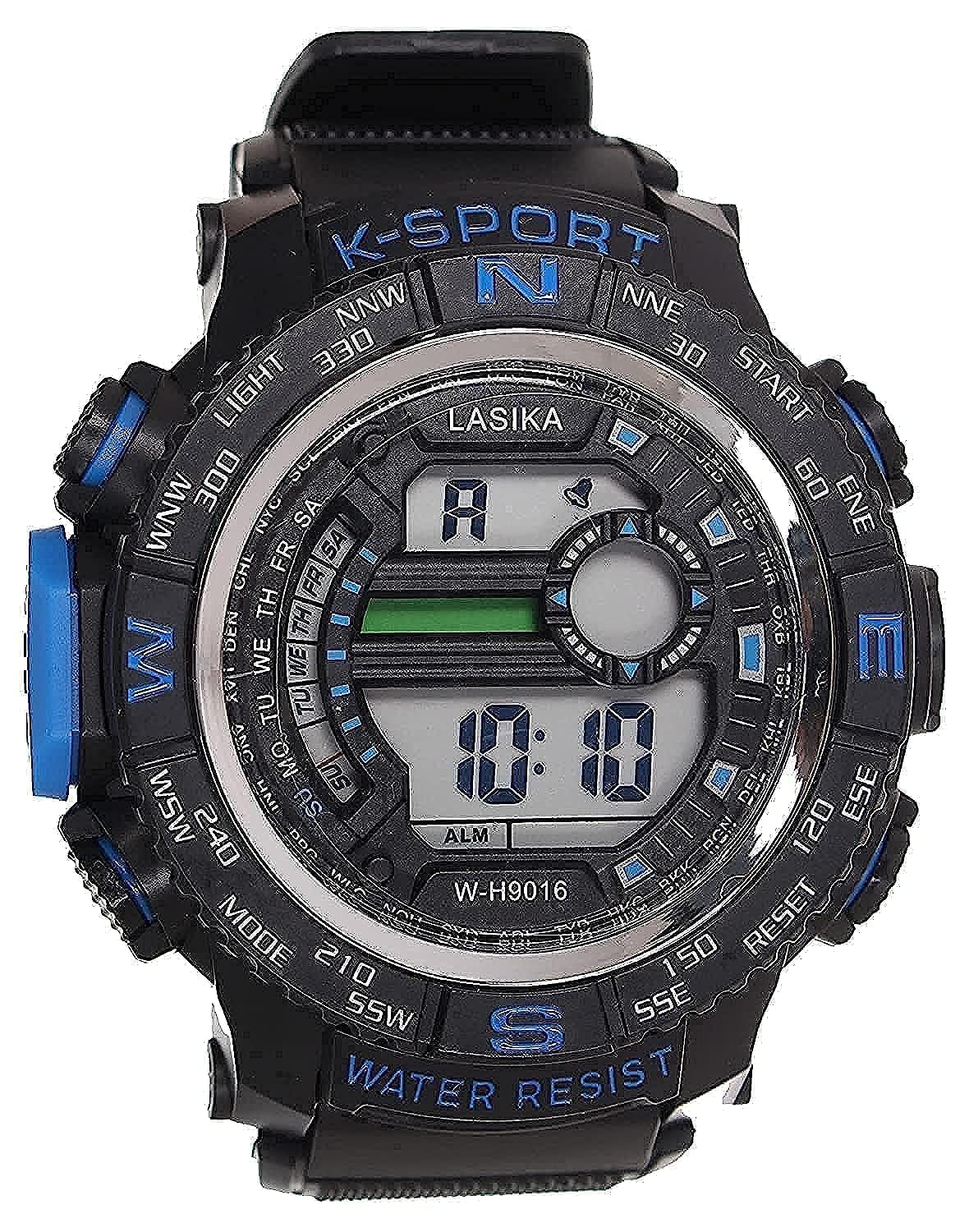
Figure 1: Front view of the Lasika W-H9016 Sport Watch. The digital display shows the time and alarm indicator. Buttons for LIGHT, START, RESET, and MODE are visible around the bezel. The watch features a black case with blue accents and a rubber strap, marked with 'WATER RESIST'.
2.1 Watch Components
- Digital Display: Shows time, date, and other mode-specific information.
- LIGHT Button (Top Left): Activates the backlight for visibility in low-light conditions.
- START Button (Top Right): Used to start functions like the stopwatch or confirm settings.
- RESET Button (Bottom Right): Used to reset functions or adjust settings.
- MODE Button (Bottom Left): Cycles through different operating modes (e.g., Time, Alarm, Stopwatch).
- Bezel Markings: Decorative compass points (N, S, E, W, etc.) are present on the bezel. These are for aesthetic purposes and do not indicate a functional compass.
- Water Resistance: The watch is marked as 'WATER RESIST', indicating a degree of protection against water. Refer to the 'Maintenance' section for details.
3. Setup
3.1 Initial Time and Date Setting
- In the normal time display mode, press the MODE button repeatedly until the setting mode is activated (usually indicated by flashing digits).
- Use the START button to select the digit or setting you wish to adjust (e.g., hours, minutes, month, day).
- Use the RESET button to change the value of the selected digit or setting.
- Repeat steps 2 and 3 until all desired settings (time, date, day of week) are correctly set.
- Press the MODE button again to exit the setting mode and return to normal time display.
4. Operating Modes
The MODE button is used to cycle through the watch's various functions.
4.1 Time Display Mode
This is the default mode, displaying the current time (hours, minutes, seconds) and day of the week. Press the LIGHT button to illuminate the display.
4.2 Alarm Mode
- From the time display mode, press the MODE button once to enter Alarm Mode. The display will show the alarm time, often with an 'ALM' indicator.
- To set the alarm, press and hold the START button until the alarm time digits begin to flash.
- Use the START button to select hours or minutes.
- Use the RESET button to adjust the selected value.
- Press the MODE button to confirm and exit alarm setting.
- To turn the alarm on or off, press the RESET button while in Alarm Mode. An alarm icon will appear or disappear on the display.
4.3 Stopwatch Mode
- From the time display mode, press the MODE button repeatedly until you enter Stopwatch Mode (display usually shows '00:00:00').
- Press the START button to begin timing.
- Press the START button again to pause timing.
- Press the RESET button to clear the stopwatch to zero.
- To resume timing after pausing, press the START button.
5. Maintenance
5.1 Cleaning
Wipe the watch regularly with a soft, dry cloth. For stubborn dirt, a slightly damp cloth can be used. Avoid harsh chemicals or abrasive materials, as these can damage the watch's finish or rubber band.
5.2 Water Resistance
The Lasika W-H9016 is marked as 'WATER RESIST'. This typically means it is suitable for daily use and can withstand splashes, rain, or brief immersion. It is not suitable for swimming, diving, or prolonged water exposure. Do not operate buttons while the watch is wet, as this can compromise the water resistance seals.
5.3 Battery Replacement
When the display becomes dim or the watch stops functioning, the battery may need replacement. Battery replacement should ideally be performed by a qualified watch technician to ensure proper sealing and water resistance. Attempting to replace the battery yourself may void any implied warranty and could damage the watch.
6. Troubleshooting
- Watch not functioning: Check if the battery needs replacement. Ensure no buttons are stuck.
- Display is dim or blank: This is a common sign of a low battery. Replace the battery.
- Incorrect time/date: Refer to section 3.1 for instructions on how to set the time and date.
- Buttons not responding: Ensure the watch is not wet. If the issue persists, the internal mechanism may require inspection by a technician.
7. Specifications
| Feature | Detail |
|---|---|
| Brand | Lasika |
| Model Number | W-H9016 |
| Display Type | Digital |
| Watch Shape | Round |
| Dial Case Diameter | 30 millimeters |
| Band Material | Rubber |
| Targeted Group | Men |
| Water Resistance | Water Resist (suitable for splashes, rain; not for swimming/diving) |
| Package Dimensions | 7.6 x 7.5 x 6.1 cm |
| Item Weight | 100 g |
8. Warranty and Support
For information regarding warranty coverage or technical support, please refer to the documentation provided at the point of purchase or contact your retailer. Keep your purchase receipt as proof of purchase.