
1. Product Overview
The Lasika W-H9003 is a stylish and functional digital watch designed for women. It features a clear digital display, a durable rubber strap, and a reliable quartz movement. This manual provides essential information for setting up, operating, and maintaining your watch.
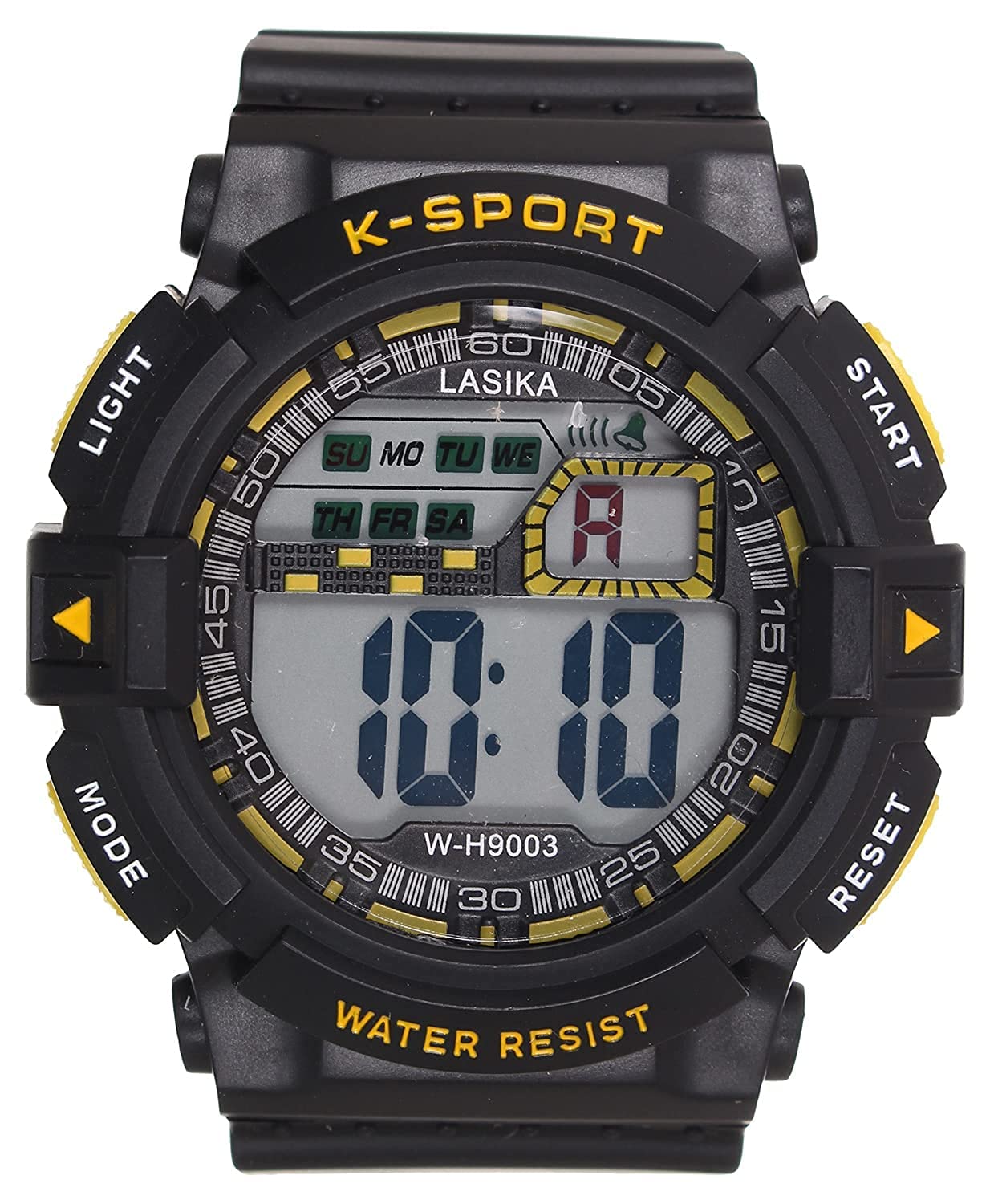
Figure 1: A close-up view of the Lasika W-H9003 women's digital watch, featuring a round black dial and a black rubber strap.
Key Features:
- Brand: Lasika
- Watch Shape: Round
- Dial Diameter Size: 30 mm
- Strap Material: Rubber
- Display Type: Digital
- Target Group: Women
2. Setup
2.1 Initial Setup
- Unpacking: Carefully remove the watch from its packaging. Inspect for any visible damage.
- Time Setting:
- Locate the mode button (usually on the bottom left) and the adjust button (usually on the bottom right).
- Press the mode button repeatedly until the time setting mode is activated (e.g., seconds flashing).
- Use the adjust button to change the flashing value (seconds, minutes, hours, date).
- Press the mode button again to cycle through the settings.
- Once all settings are correct, press the mode button to exit the setting mode.
3. Operating Instructions
3.1 Button Functions
- Mode Button: Cycles through different display modes (Time, Date, Alarm, Stopwatch). Also used to confirm settings during adjustment.
- Adjust Button: Used to change values when in setting mode. In normal time display, it may activate the backlight or show the date.
3.2 Display Modes
Your watch typically features the following display modes, accessible by pressing the Mode button:
- Time Display: Shows current hour, minute, and second.
- Date Display: Shows month, day, and day of the week.
- Alarm Mode: Allows setting and activating an alarm.
- Stopwatch Mode: For measuring elapsed time.
4. Maintenance
- Cleaning: Wipe the watch with a soft, dry cloth. For stubborn dirt, use a slightly damp cloth and mild soap, then dry thoroughly. Avoid harsh chemicals.
- Water Resistance: This watch is generally splash-resistant. Avoid submerging it in water or exposing it to high-pressure water jets.
- Battery Replacement: When the display dims or stops functioning, the battery may need replacement. This should ideally be done by a qualified watch technician to ensure proper sealing and water resistance.
- Storage: Store the watch in a cool, dry place away from direct sunlight and extreme temperatures.
5. Troubleshooting
| Problem | Possible Cause | Solution |
|---|---|---|
| Display is blank or dim. | Low battery. | Replace the battery. |
| Time is incorrect. | Time needs adjustment. | Refer to Section 2.1 for time setting instructions. |
| Buttons are unresponsive. | Watch may be in a locked mode or battery is very low. | Try pressing all buttons to reset. If issue persists, replace battery. |
6. Specifications
| Feature | Detail |
|---|---|
| Brand Name | Lasika |
| Model Name | W-H9003 |
| Item Model Number | W-H9003 |
| Target Group | Women |
| Display Type | Digital |
| Movement | Quartz |
| Case Material Type | Resin |
| Case Diameter | 30 mm |
| Watch Glass Material Type | Crystal |
| Band Material Type | Rubber |
| Band Color | Black |
| Dial Color | Black |
| Clasp Type | Buckle |
| Power Source | Battery Powered |
| Special Features | Full-featured |
| Package Dimensions | 8 x 7.9 x 7.3 cm; 100 grams |
7. Warranty Information
Your Lasika W-H9003 digital watch comes with a manufacturer's warranty. Please refer to the included warranty card for specific terms, conditions, and duration of coverage. Keep your proof of purchase for any warranty claims.
8. Support
For further assistance or inquiries regarding your Lasika W-H9003 watch, please contact the retailer where you purchased the product or visit the official Lasika website for customer support information.