
1. Product Overview
The Generic JK-9518 is a compact and portable 800W travel steam iron designed for efficient garment care. It features a ceramic soleplate for smooth gliding and versatile functionality, allowing for both steam and dry ironing. Its lightweight design makes it ideal for travel and quick touch-ups.

Image 1: Overview of the JK-9518 Travel Steam Iron, highlighting key components such as the steam button, temperature control dial, water inlet, comfortable handle, and ceramic plate.
Package Contents:
- 1 x Travel Steam Iron (Model JK-9518)
- 1 x Flannel Brush attachment
- 1 x Fabric Brush attachment
- 1 x Measuring Cup
- 1 x Base Frame
- 1 x Storage Bag
- 1 x User Manual (this document)
2. Safety Instructions
Please read all safety instructions carefully before using the appliance to prevent injury or damage.
- Always ensure the iron is unplugged before filling or emptying the water tank, cleaning, or when not in use.
- Do not immerse the iron, power cord, or plug in water or other liquids.
- Keep the iron out of reach of children and pets.
- Use the iron only for its intended purpose as described in this manual.
- Do not operate the iron with a damaged cord or plug, or if the iron has been dropped or damaged. Contact customer support for repair.
- Never direct steam towards people or animals.
- Place the iron on a stable, heat-resistant surface when not in use.
- The soleplate and steam can become extremely hot and cause burns. Handle with care.
- Always ensure the temperature control knob is set to OFF before adding water to prevent leakage.
- Do not press the steam button when the red indicator light is on, as this may cause water leakage.
3. Setup
- Unpack: Carefully remove the iron and all accessories from the packaging. Retain packaging for future storage or transport.
- Initial Cleaning: Before first use, wipe the soleplate with a damp cloth to remove any manufacturing residues.
- Fill Water Tank (for steam ironing):
- Ensure the iron is unplugged and the temperature control knob is set to the 'OFF' position.
- Open the water inlet cover.
- Using the provided measuring cup, carefully pour clean tap water into the water tank. Do not overfill beyond the MAX line.
- Close the water inlet cover securely.
- Power Connection: Plug the iron into a suitable 220V, 50Hz power outlet.
4. Operating Instructions
4.1. Temperature Settings and Fabric Types
Select the appropriate temperature setting based on the fabric type to prevent damage to garments. The iron features a temperature control dial with specific modes for different materials.
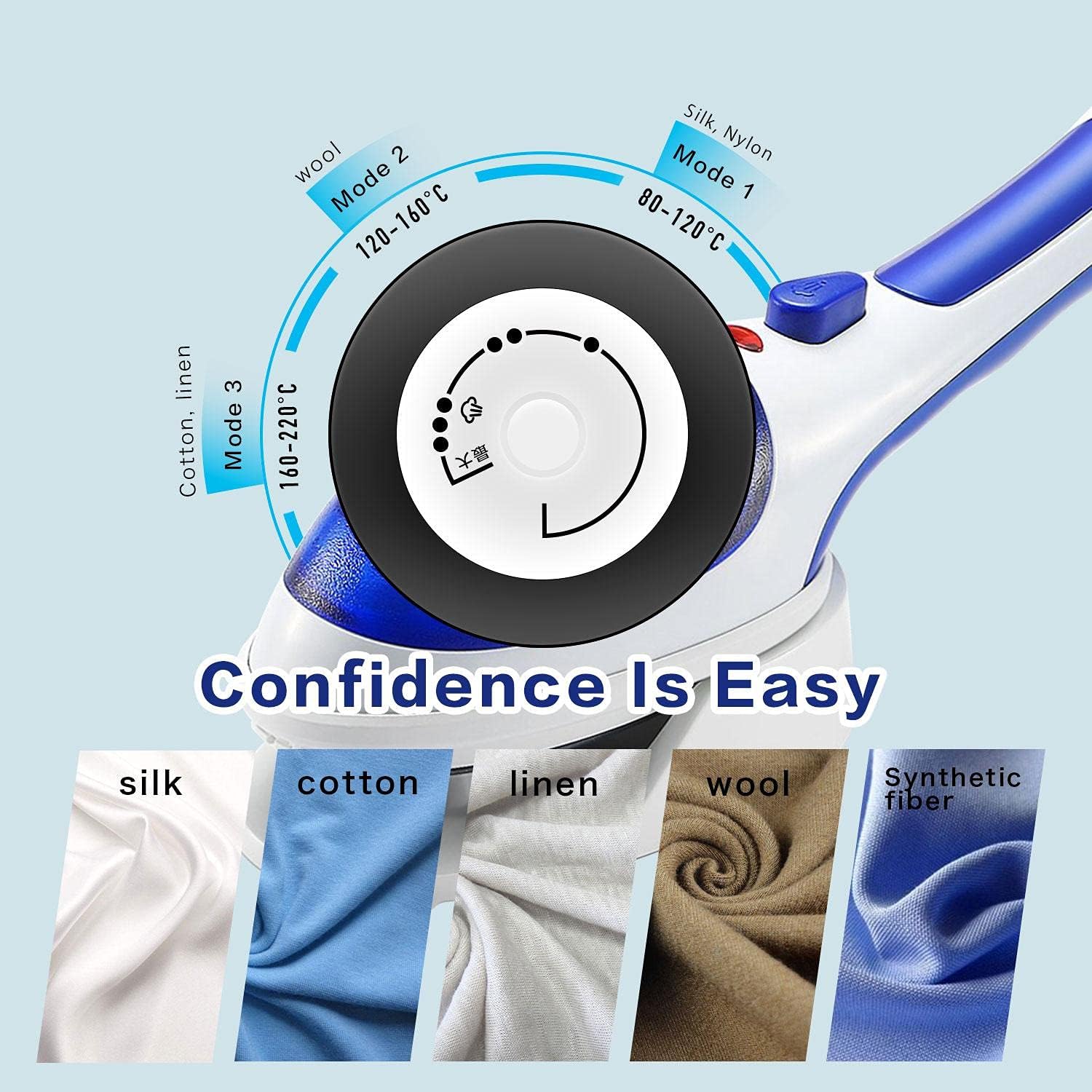
Image 2: Temperature control dial indicating settings for Silk/Nylon (Mode 1, 80-120°C), Wool (Mode 2, 120-160°C), and Cotton/Linen (Mode 3, 160-220°C).
- Mode 1 (80-120°C): Suitable for delicate fabrics like Silk and Nylon.
- Mode 2 (120-160°C): Ideal for Wool.
- Mode 3 (160-220°C): Best for Cotton and Linen.
4.2. Dry Ironing
- Ensure the water tank is empty or the steam function is turned off.
- Plug in the iron.
- Set the temperature control dial to the desired fabric setting. The indicator light will illuminate, then turn off when the set temperature is reached.
- Begin ironing your garments.
4.3. Steam Ironing
- Ensure the water tank is filled as described in the Setup section.
- Plug in the iron.
- Set the temperature control dial to the 'MAX' position. The indicator light will illuminate.
- Wait for the indicator light to turn off, indicating the iron has reached the optimal steam temperature.
- Press the steam button to release steam. Do not press the steam button if the red indicator light is on, as this may cause water leakage.
- Move the iron over the fabric, pressing the steam button as needed for stubborn wrinkles.

Image 3: The iron emitting steam, demonstrating its effectiveness on a wrinkled shirt (before) and a smoothed shirt (after).
4.4. Versatile Applications
The JK-9518 steam iron is suitable for a variety of fabrics and household items, not just clothing. Its powerful steam can refresh and smooth items such as:
- Tablecloths
- Curtains
- Sofa upholstery (spot treatment)
- Pillows (for refreshing and sanitizing)

Image 4: The steam iron demonstrating its use on a variety of items including a tablecloth, curtain, sofa, and pillow, highlighting its versatility for deep care and leveling.
5. Maintenance
5.1. Cleaning
- Always unplug the iron and allow it to cool completely before cleaning.
- Wipe the exterior of the iron with a soft, damp cloth. Do not use abrasive cleaners or solvents.
- To clean the ceramic soleplate, wipe it with a damp cloth. For stubborn stains, a mild, non-abrasive cleaner designed for iron soleplates can be used.
- Empty any remaining water from the tank after each use to prevent mineral buildup.
5.2. Storage
- Ensure the iron is completely cool and dry before storing.
- Wrap the power cord neatly around the base or secure it with a tie.
- Store the iron in an upright position in a dry, safe place, away from direct sunlight and moisture. Use the provided storage bag for protection.
6. Troubleshooting
| Problem | Possible Cause | Solution |
|---|---|---|
| Iron does not heat up. | Not plugged in; power outlet issue; temperature dial set to OFF. | Check power connection; try a different outlet; turn temperature dial to a heat setting. |
| No steam or insufficient steam. | Water tank empty; temperature too low for steam; steam button not pressed. | Fill water tank; set temperature to MAX; press the steam button. |
| Water leakage from soleplate. | Temperature too low for steam; water tank overfilled; steam button pressed when indicator light is on. | Ensure temperature is set to MAX for steam; do not overfill water tank; avoid pressing steam button when red indicator light is on. |
| Iron leaves marks on fabric. | Soleplate is dirty; temperature too high for fabric. | Clean the soleplate; adjust temperature according to fabric type. |
7. Specifications
| Feature | Detail |
|---|---|
| Model Number | JK-9518 |
| Brand | Generic |
| Power | 800W |
| Voltage | 220V |
| Frequency | 50Hz |
| Soleplate Type | Ceramic |
| Iron Type | Travel Steam Iron |
| Color | Blue |
| Item Weight | 1.14 kg |
| Special Features | Portable |
8. Warranty and Support
Specific warranty information for the Generic JK-9518 Travel Steam Iron is not provided in the product details. Please refer to your purchase receipt or contact the retailer for details regarding warranty coverage and customer support.
For any operational issues not covered in the troubleshooting section, or for further assistance, please contact the point of purchase or the manufacturer's customer service if contact details were provided with your product packaging.