
Daewoo DHC-2100
Daewoo DHC-2100 Rechargeable Hair Trimmer
User Instruction Manual
Introduction
Thank you for purchasing the Daewoo DHC-2100 Rechargeable Hair Trimmer. This manual provides important information regarding the safe operation, maintenance, and troubleshooting of your new device. Please read it thoroughly before first use and keep it for future reference.
The Daewoo DHC-2100 is designed for personal hair trimming, offering convenience and precision with its cordless operation and durable stainless steel blade. It is specifically designed for use in 220-240 Volt 50/60 Hz countries, outside North America.
Important Safety Information
To reduce the risk of electric shock, injury, or fire, always follow these basic safety precautions:
- This appliance is designed for household use only.
- Do not immerse the trimmer in water or other liquids.
- Keep the appliance away from water sources (sinks, bathtubs, showers).
- Always unplug the trimmer from the power outlet before cleaning or maintenance.
- Do not use the trimmer if it has a damaged cord or plug, or if it is not working properly.
- Keep out of reach of children. This appliance is not intended for use by persons with reduced physical, sensory or mental capabilities, or lack of experience and knowledge, unless they have been given supervision or instruction concerning use of the appliance by a person responsible for their safety.
- Use only the charging cord supplied with the trimmer.
- Ensure the voltage specified on the appliance matches your local mains voltage before connecting. This product is for 220-240 Volt 50/60 Hz regions.
Package Contents
Please check the package for the following items:
- Daewoo DHC-2100 Rechargeable Hair Trimmer
- Adjustable Comb Attachment
- Charging Cord
- Cleaning Brush
- Lubricating Oil
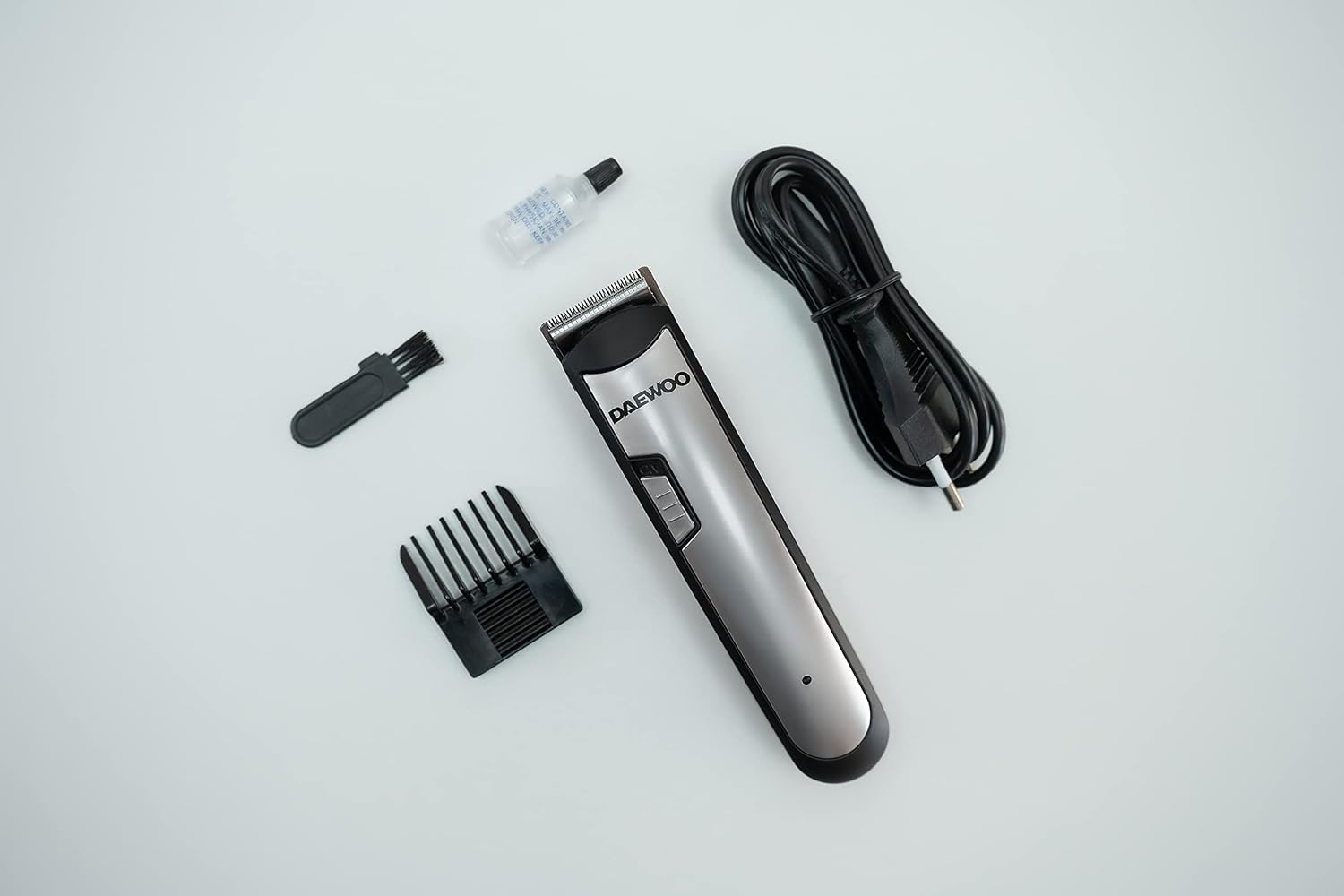
Image: All components included in the Daewoo DHC-2100 package.
Product Overview
Familiarize yourself with the different parts of your Daewoo DHC-2100 Hair Trimmer:
- Precision Cutting Blade: Durable stainless steel blade for effective trimming.
- On/Off Power Switch: Controls the trimmer's operation.
- Adjustable Comb: Allows for different cutting lengths.
- Charging Indicator Light: Illuminates during charging.
- Charging Port: Located at the bottom of the trimmer.

Image: Front view of the Daewoo DHC-2100 Hair Trimmer.

Image: Detail of the On/Off power switch.

Image: Detail of the precision cutting blade.
Setup and Charging
Before using your trimmer for the first time, it is recommended to fully charge it.
- Ensure the trimmer is switched OFF.
- Insert the charging cord into the charging port at the bottom of the trimmer.
- Plug the other end of the charging cord into a 220-240 Volt 50/60 Hz power outlet.
- The charging indicator light will illuminate, indicating that the trimmer is charging.
- Allow the trimmer to charge for the recommended time until fully charged. A full charge provides approximately 30 minutes of continuous operation.
- Once fully charged, unplug the charging cord from both the trimmer and the power outlet.
Operating Instructions
Follow these steps for effective hair trimming:
- Attach the Comb: If desired, slide the adjustable comb attachment onto the trimmer head until it clicks into place.
- Adjust Cutting Length: Use the adjustment mechanism on the comb to select your desired cutting length. The comb typically has markings for different lengths (e.g., 2mm, 4mm, 6mm, 8mm).
- Turn On: Slide the On/Off power switch to the "ON" position.
- Begin Trimming: Hold the trimmer with the blade flat against the skin and move it slowly against the direction of hair growth. For best results, ensure hair is clean and dry.
- Turn Off: After use, slide the On/Off power switch to the "OFF" position.

Image: Side view showing the adjustable comb and length settings.
Maintenance and Cleaning
Regular cleaning and maintenance will ensure optimal performance and extend the life of your trimmer.
- Clean After Each Use:
- Ensure the trimmer is switched OFF and unplugged.
- Remove the comb attachment.
- Use the supplied cleaning brush to brush away any loose hairs from the blade and the trimmer body.
- Do not rinse the trimmer head or body under water.
- Lubricate Blades:
- After cleaning, apply a few drops of the supplied lubricating oil to the blades.
- Turn the trimmer on for a few seconds to allow the oil to distribute evenly.
- Wipe off any excess oil with a soft cloth.
- Lubricating the blades regularly (e.g., after every few uses) helps maintain cutting efficiency and prevents rust.
- Storage: Store the trimmer in a cool, dry place, away from direct sunlight and moisture.
Troubleshooting
| Problem | Possible Cause | Solution |
|---|---|---|
| Trimmer does not turn on. | Battery is depleted. | Charge the trimmer fully. |
| Trimmer pulls hair or cuts poorly. | Blades are dirty or not lubricated. | Clean the blades and apply lubricating oil. |
| Trimmer makes unusual noise. | Blades may be misaligned or need lubrication. | Check blade alignment and lubricate. If problem persists, contact customer support. |
| Charging indicator light does not turn on. | Charging cord not properly connected or power outlet issue. | Ensure cord is securely connected. Try a different power outlet. Verify voltage is 220-240V. |
Specifications
- Model: DHC-2100
- Power Input: 220-240 Volt, 50/60 Hz
- Battery Type: Product Specific (included)
- Operation Time: Approximately 30 minutes continuous operation (fully charged)
- Blade Material: Stainless Steel
- Dimensions: 5.91 x 1.57 x 1.57 inches (15 x 4 x 4 cm)
- Weight: 3.88 ounces (0.11 Kilograms)
- Color: Silver
Warranty and Support
For warranty information or technical support, please refer to the warranty card included with your purchase or contact your local Daewoo service center. Keep your proof of purchase for any warranty claims.
For further assistance, you may also visit the official Daewoo website or contact their customer service department.
Ask a question about this manual
Ask about setup, troubleshooting, compatibility, parts, safety, or missing instructions. Manuals+ will review the question and use this page’s manual context to help answer it.