
1. Introduction
Welcome to the user manual for your new SilverStone SST-NT06-PRO-V2 Nitrogon CPU Cooler. This manual provides comprehensive instructions for the installation, operation, and maintenance of your CPU cooler. Please read this manual thoroughly before installation to ensure proper setup and optimal performance. For additional support, please visit the official SilverStone website.
2. Product Overview
The SilverStone SST-NT06-PRO-V2 Nitrogon is a high-performance CPU cooler designed to efficiently dissipate heat from your processor, ensuring stable and reliable system operation. Its compact design and advanced heat pipe technology make it suitable for various PC builds.
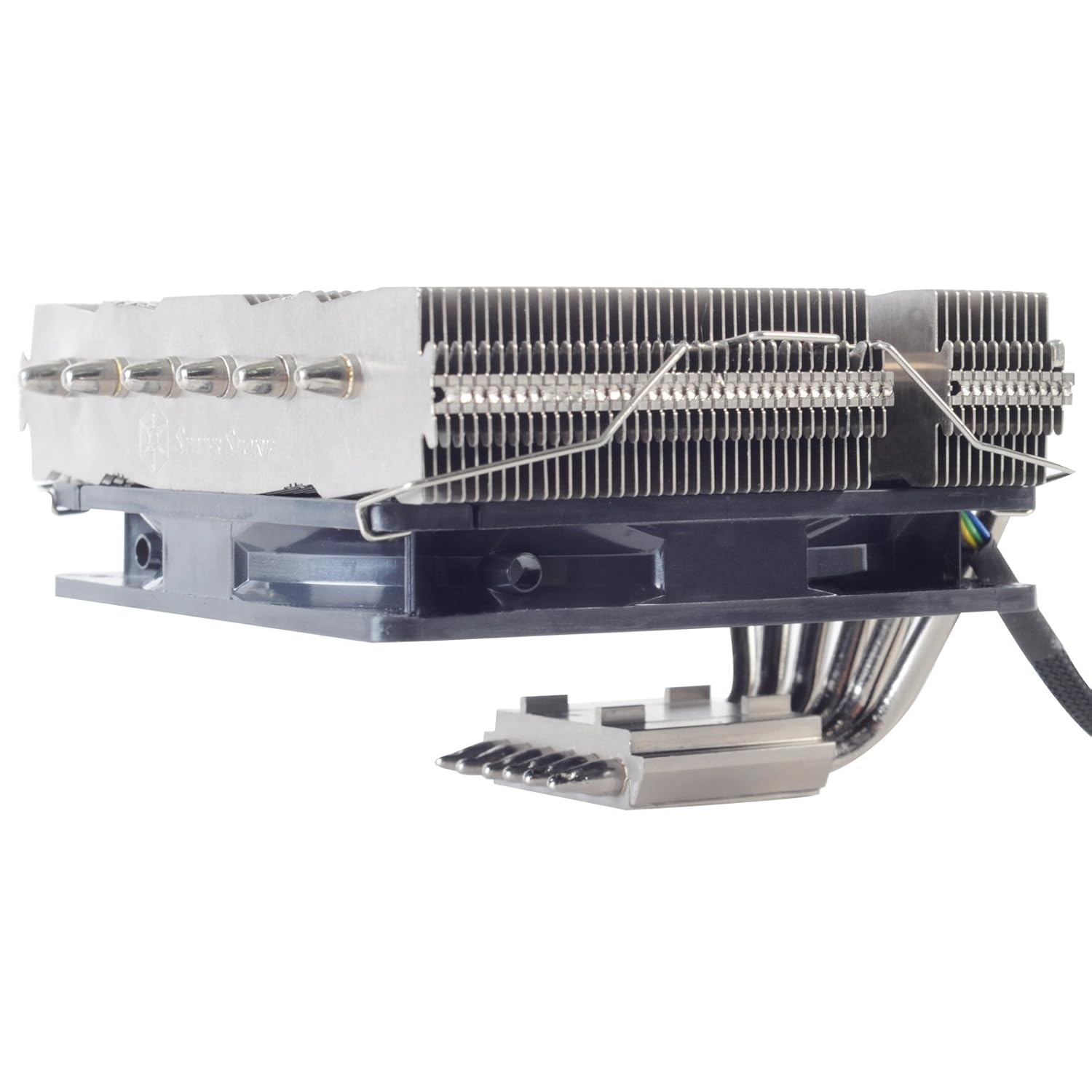
Figure 2.1: Side view of the SilverStone SST-NT06-PRO-V2 Nitrogon CPU Cooler, showcasing its heatsink fins and heat pipes.

Figure 2.2: Top-down view of the heatsink, highlighting the dense fin array for efficient heat dissipation.
3. Features
- High-Performance Cooling: Designed for superior heat dissipation to maintain optimal CPU temperatures.
- Compact Design: Optimized dimensions for compatibility with various PC cases and motherboard layouts.
- Advanced Heat Pipe Technology: Utilizes multiple heat pipes for efficient heat transfer from the CPU to the heatsink fins.
- Durable Construction: Made with high-quality aluminum for longevity and effective thermal conductivity.
- Broad Compatibility: Supports a wide range of Intel and AMD CPU sockets (specific compatibility depends on mounting kit).

Figure 3.1: Product packaging highlighting key features and multi-language descriptions.
4. Specifications
| Attribute | Value |
|---|---|
| Model Number | SST-NT06-PRO-V2 |
| Brand | SilverStone |
| Product Dimensions | 19.69 x 19.69 x 11.02 inches |
| Item Weight | 2.2 Pounds |
| Cooler Heatsink Material | Aluminum |
| Date First Available | June 5, 2021 |
5. Package Contents
Please verify that all components listed below are present in your package before proceeding with installation. If any items are missing or damaged, please contact SilverStone customer support.
- SilverStone SST-NT06-PRO-V2 CPU Cooler Heatsink
- Mounting Brackets for Intel and AMD Sockets
- Backplate
- Mounting Screws and Spacers
- Fan Clips (for optional fan installation)
- Thermal Paste Tube
- User Manual (this document)

Figure 5.1: Overview of all included accessories and mounting hardware.
6. Setup and Installation
Before beginning installation, ensure your system is powered off and unplugged. It is recommended to work on a clean, static-free surface.
6.1 Prepare Your Motherboard
- Remove any existing CPU cooler and clean off old thermal paste from the CPU and motherboard.
- Identify the correct mounting brackets for your CPU socket type (Intel or AMD).
- Install the appropriate backplate onto the rear of your motherboard, aligning it with the CPU socket holes.
6.2 Apply Thermal Paste
- Apply a small amount of thermal paste (included) to the center of your CPU's integrated heat spreader (IHS). A pea-sized dot is usually sufficient.
- Do not spread the paste manually; the pressure from the cooler will distribute it evenly.
6.3 Mount the Cooler
- Carefully place the CPU cooler onto the CPU, aligning the mounting holes on the cooler's base with the standoffs or screws on the motherboard.
- Secure the cooler using the provided screws, tightening them in a diagonal pattern to ensure even pressure. Do not overtighten.
- If using an optional fan (not included with this heatsink-only model), attach it to the heatsink using the provided fan clips.
- Connect the fan's power cable to the appropriate CPU_FAN header on your motherboard.

Figure 6.1: Detailed view of the heat pipe arrangement, crucial for efficient heat transfer during operation.
7. Operating Instructions
Once installed, the SilverStone SST-NT06-PRO-V2 Nitrogon CPU Cooler operates automatically in conjunction with your motherboard's fan control settings (if a fan is attached). Ensure your BIOS/UEFI settings are configured for optimal fan curves to balance cooling performance and noise levels.
- Initial Boot: After installation, power on your system and monitor CPU temperatures using monitoring software.
- BIOS/UEFI Settings: Access your motherboard's BIOS/UEFI to verify fan detection and adjust fan speed profiles if necessary.
- Thermal Monitoring: Use third-party software (e.g., HWMonitor, Core Temp) to keep an eye on CPU temperatures during idle and load conditions.
8. Maintenance
Regular maintenance helps ensure the longevity and optimal performance of your CPU cooler.
- Dust Removal: Periodically clean dust from the heatsink fins using compressed air or a soft brush. Dust accumulation can significantly reduce cooling efficiency.
- Fan Inspection (if applicable): If you have an attached fan, check its blades for dust buildup and ensure it spins freely without obstruction.
- Thermal Paste Reapplication: While not frequently required, consider reapplying thermal paste every few years or if you notice a significant increase in CPU temperatures.
9. Troubleshooting
If you encounter issues with your CPU cooler, refer to the following common problems and solutions:
| Problem | Possible Cause / Solution |
|---|---|
| High CPU Temperatures |
|
| Fan Noise (if applicable) |
|
| Cooler Not Fitting |
|
10. Warranty and Support
The SilverStone SST-NT06-PRO-V2 Nitrogon CPU Cooler comes with a standard manufacturer's warranty. For specific warranty terms and conditions, please refer to the warranty card included in your product packaging or visit the official SilverStone website.
For technical support, troubleshooting assistance, or to inquire about replacement parts, please contact SilverStone customer service through their official website: www.silverstonetek.com.
Return Policy: This product has a return policy of 30 days from the date of purchase for refund or replacement, as per the seller's terms.