
GoolRC LS-38
GoolRC LS-38 Drone User Manual
Model: LS-38
1. Introduction
Thank you for choosing the GoolRC LS-38 Drone. This high-performance quadcopter features a 6K EIS camera, GPS positioning, brushless motors, and 5G WiFi for an immersive flight experience. This manual provides essential information for safe operation, setup, and maintenance of your drone.
2. Safety Information
Always operate the drone responsibly and adhere to local regulations. Failure to do so may result in injury or property damage.
- Ensure all propellers are securely attached before flight.
- Do not fly near people, animals, or obstacles.
- Avoid flying in strong winds or adverse weather conditions.
- Maintain visual line of sight with the drone at all times.
- Keep hands and face clear of rotating propellers.
- Charge batteries using only the provided charger.
- Do not disassemble or modify the drone or its components.
3. Package Contents
Verify that all items are present in your package:
- 1 x GoolRC LS-38 Drone
- 1 x Remote Controller
- 3 x Drone Batteries (Lithium-ion)
- 1 x Controller Battery (integrated)
- 2 x USB Charging Cables
- 24 x Spare Propellers
- 1 x Screwdriver
- 1 x Phone Holder
- 1 x Storage Bag
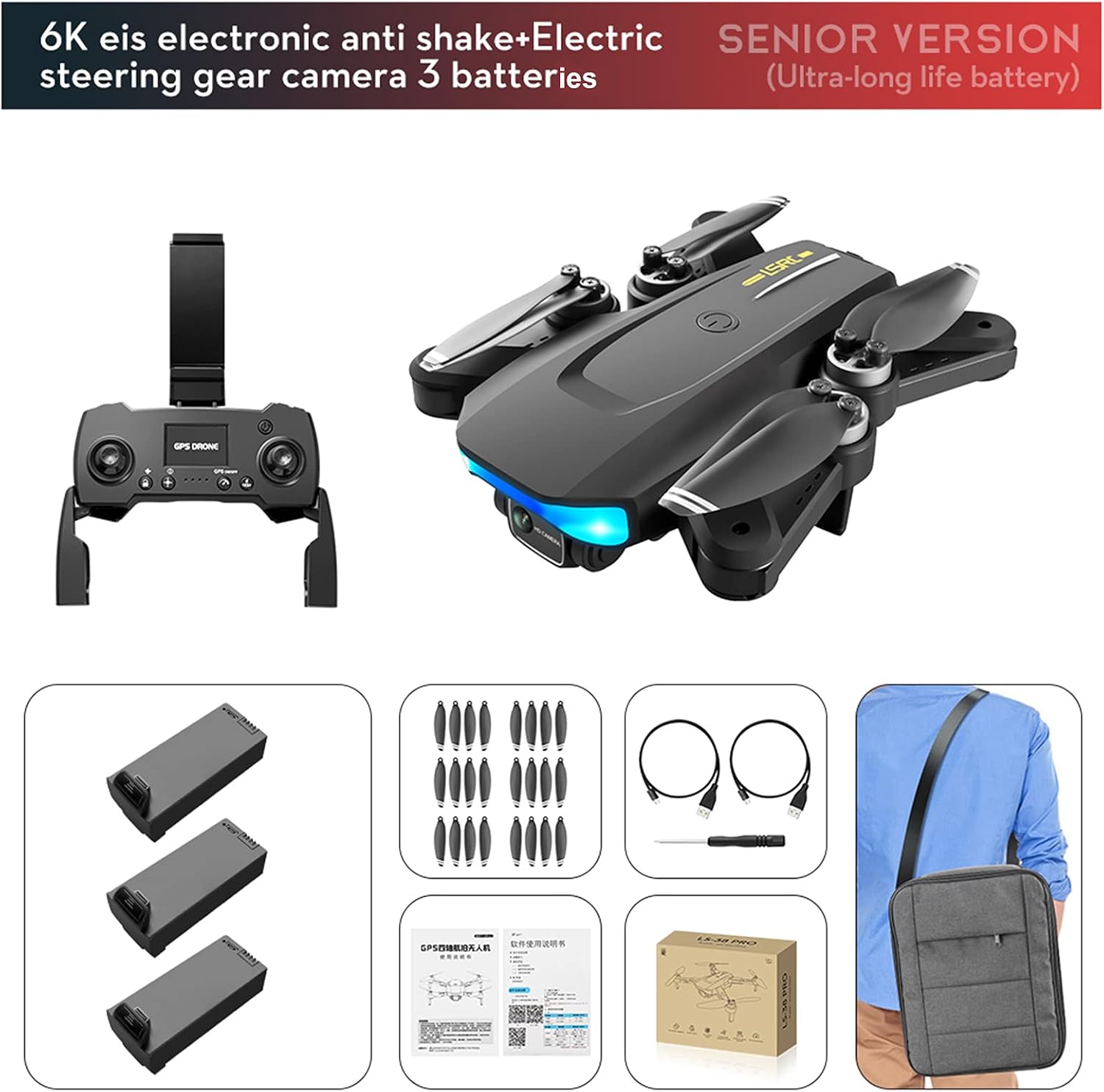
Image: GoolRC LS-38 Drone and its complete set of accessories, including the remote controller, three drone batteries, spare propellers, charging cables, screwdriver, phone holder, and a storage bag.
4. Product Overview
Familiarize yourself with the main components of your GoolRC LS-38 drone.

Image: The GoolRC LS-38 drone in flight, showcasing its sleek design, propellers, and front camera. The remote controller and three drone batteries are also visible, indicating a complete setup.
4.1 Drone Components
- 6K EIS Camera: Front-facing camera with Electronic Image Stabilization for clear aerial footage.
- Optical Flow Localization Camera: Bottom-mounted camera for stable indoor hovering.
- Brushless Motors: Four powerful and efficient motors for stable flight and wind resistance.
- Foldable Arms: Designed for portability and easy storage.
- LED Lights: Indicator lights for status and orientation.

Image: Illustration of the GoolRC LS-38 drone's dual camera system, highlighting the front 6K HD camera and the bottom optical flow localization camera. It shows how users can switch between a "Head-up Angle" for forward views and an "Overlook Angle" for downward views, providing versatile shooting options.
4.2 Remote Controller
The remote controller allows for precise control of the drone's flight and camera functions. It includes a phone holder to mount your smartphone for FPV (First Person View) flying via the companion app.
5. Setup
5.1 Charging Batteries
Before first use, fully charge all drone batteries and ensure the remote controller has sufficient power.
- Connect the drone battery to the USB charging cable.
- Plug the USB cable into a 5V/2A USB adapter (not included).
- Charging time is approximately 3-4 hours per battery. The indicator light will change when fully charged.
- The remote controller has an integrated battery. Charge it using its dedicated USB cable.

Image: A close-up of the GoolRC LS-38 drone battery, highlighting its specifications: 7.4V Li-ion voltage and 2000mAh capacity. This image emphasizes the drone's strong power source, contributing to its 28-minute playing time.
5.2 Installing Drone Battery
- Unfold the drone arms.
- Insert the charged battery into the battery compartment on the drone until it clicks into place.
- Press the power button on the drone to turn it on.
5.3 Propeller Installation
Ensure propellers are installed correctly according to their markings (A or B) on the corresponding motor shafts. Use the provided screwdriver to secure them.
6. Operating the Drone
6.1 Pairing and Calibration
- Place the drone on a flat, level surface.
- Turn on the drone, then the remote controller.
- Push the left joystick up then down to pair.
- Perform gyroscope calibration by pushing both joysticks to the bottom-right.
- Perform compass calibration as instructed by the app or manual (usually rotating the drone horizontally and vertically).
- Wait for GPS signal acquisition (if flying outdoors).
6.2 Take-off and Landing
- One-Key Take-off/Landing: Press the dedicated button on the remote for automatic take-off or landing.
- Manual Take-off: Push both joysticks outwards and downwards to arm the motors, then slowly push the left joystick up to ascend.

Image: The GoolRC LS-38 drone in mid-flight against a scenic backdrop, illustrating its ease of use for flying, controlling, and shooting aerial photography. The image conveys the drone's advanced flight hardware and improved performance for entertainment.
6.3 Flight Controls
| Joystick/Button | Function |
|---|---|
| Left Joystick (Up/Down) | Throttle (Ascend/Descend) |
| Left Joystick (Left/Right) | Yaw (Rotate Left/Right) |
| Right Joystick (Up/Down) | Pitch (Forward/Backward) |
| Right Joystick (Left/Right) | Roll (Left/Right Sideways Flight) |
| Return-to-Home (RTH) Button | Automatically returns drone to take-off point using GPS. |
| Photo/Video Button | Capture photos or start/stop video recording. |
6.4 Smart Features
- GPS Smart Follow: The drone automatically follows the controller's movement.
- Waypoint Flight: Draw a flight path on the app interface, and the drone will fly along the designated path.
- Gesture Recognition: Perform specific hand gestures for automatic photo or video capture.
- MV Special Effects: Use the app to add filters and music to your videos.

Image: A GoolRC LS-38 drone flying over a mountainous landscape, with a person operating it from the ground using the remote controller and a smartphone. This image illustrates the drone's capability for outdoor aerial photography and recording memorable moments.
7. Maintenance
- Cleaning: Use a soft, dry cloth to clean the drone and remote controller. Do not use liquid cleaners.
- Propeller Inspection: Regularly check propellers for damage (cracks, bends). Replace damaged propellers immediately using the spare parts.
- Battery Care: Store batteries in a cool, dry place. Do not overcharge or over-discharge. If storing for extended periods, charge them to about 50% capacity.
- Storage: When not in use, fold the drone arms and store it in the provided carrying bag to protect it from dust and damage.

Image: A comparison showing the GoolRC LS-38 drone in both its folded and unfolded states, along with its dimensions. The folded drone measures 16cm in length and 5.5cm in height, while unfolded it is 21cm long and 19.5cm wide, emphasizing its compact and portable design.
8. Troubleshooting
| Problem | Possible Cause | Solution |
|---|---|---|
| Drone does not respond to remote. | Not paired; low battery; interference. | Re-pair drone and remote; charge batteries; move to an area with less interference. |
| Drone drifts during flight. | Gyroscope not calibrated; strong wind. | Perform gyroscope calibration; avoid flying in strong winds. |
| Poor image/video quality. | EIS not active; low light; camera lens dirty. | Ensure EIS is enabled in app; fly in well-lit conditions; clean camera lens. |
| GPS signal weak or unavailable. | Flying indoors; surrounded by tall buildings/trees. | Fly outdoors in an open area; wait for more satellites to connect. |
| Short flight time. | Battery not fully charged; old battery; aggressive flying. | Fully charge battery; consider replacing old batteries; fly more conservatively. |
9. Specifications
| Feature | Detail |
|---|---|
| Model | LS-38 |
| Brand | GoolRC |
| Weight | 261 Grams |
| Dimensions (Unfolded) | 21 x 19.5 x 5.5 cm |
| Dimensions (Folded) | 16 x 12.5 x 5.5 cm (approx, derived from image) |
| Camera Resolution | 6K (Front), 720p (Bottom Optical Flow) |
| Image Stabilization | EIS (Electronic Image Stabilization) |
| Motor Type | Brushless |
| Connectivity | 5G WiFi, RF |
| Battery Capacity | 2000 mAh (Drone Battery) |
| Battery Voltage | 7.4V (Li-ion) |
| Flight Time | Approx. 28 minutes (per battery) |
| Control Range | Up to 1000m (5G WiFi transmission) |
| Skill Level | Beginner |
10. Warranty and Support
GoolRC products are manufactured to high quality standards. For warranty information, technical support, or service inquiries, please refer to the contact information provided with your purchase or visit the official GoolRC website.
Please retain your proof of purchase for warranty claims.
Related documentsLS-38

Ask a question about this manual
Ask about setup, troubleshooting, compatibility, parts, safety, or missing instructions. Manuals+ will review the question and use this page’s manual context to help answer it.