
1. Introduction
This manual provides essential instructions for the safe and effective installation, operation, and maintenance of the ELOMILE VA450DC V34809-90 12V 120mm Cooling Fan. Please read this manual thoroughly before using the product to ensure proper function and to prevent damage or injury.
The ELOMILE VA450DC V34809-90 is a high-performance 12V DC cooling fan designed for various industrial and electronic applications requiring efficient thermal management. It features a 120x120x38mm form factor and operates at 3.3A.
2. Safety Information
- Electrical Safety: Ensure the power supply matches the fan's voltage (12V DC) and current requirements (3.3A). Incorrect voltage can damage the fan or power supply.
- Power Disconnection: Always disconnect power before installation, maintenance, or troubleshooting.
- Moving Parts: Keep fingers, tools, and other objects away from the fan blades during operation to prevent injury.
- Ventilation: Ensure adequate space around the fan for proper airflow. Do not obstruct the intake or exhaust.
- Environment: Do not expose the fan to excessive moisture, dust, or extreme temperatures outside its operating range.
- Professional Installation: If you are unsure about electrical connections, consult a qualified technician.
3. Setup and Installation
Follow these steps for proper installation of your cooling fan.
3.1 Unpacking
Carefully remove the fan from its packaging. Inspect for any visible damage. If damage is present, do not proceed with installation and contact your supplier.
3.2 Mounting
The fan is designed for mounting using screws through the four corner holes. Ensure the mounting surface is stable and provides sufficient clearance for airflow.
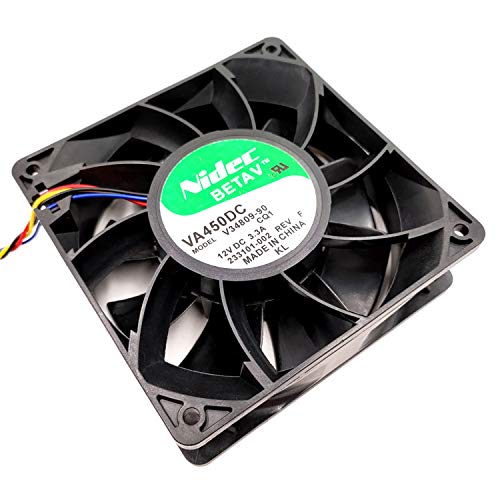
Figure 1: Top view of the fan, illustrating mounting points.
Determine the desired airflow direction (intake or exhaust) and orient the fan accordingly. Most fans have an arrow indicating airflow direction on the side frame (if present, refer to the fan itself).
3.3 Electrical Connection
The fan typically comes with a multi-wire connector. Identify the positive (red), negative (black), and potentially a signal/tachometer wire (yellow/blue).
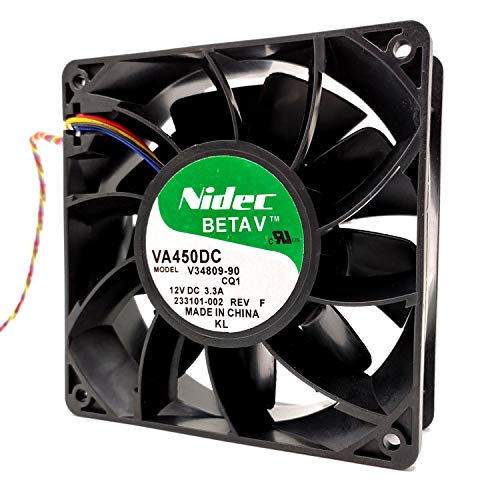
Figure 2: Fan with visible power and signal wires.
- Connect the red wire to the +12V DC power source.
- Connect the black wire to the Ground (GND).
- The yellow wire (if present) is typically a tachometer (RPM signal) output. Connect this to a compatible monitoring system if required. If not needed, it can be left unconnected, ensuring it does not short circuit.
Ensure all connections are secure and insulated to prevent short circuits.
4. Operating Instructions
Once the fan is securely mounted and correctly wired, apply 12V DC power. The fan should begin to rotate immediately, providing airflow. Monitor the fan for any unusual noises or vibrations during initial operation.
The fan is designed for continuous operation within its specified voltage and temperature ranges. No user intervention is typically required during normal operation.
5. Maintenance
Regular maintenance helps ensure the longevity and optimal performance of your cooling fan.
- Cleaning: Periodically inspect the fan blades and grille (if applicable) for dust accumulation. Disconnect power before cleaning. Use a soft brush, compressed air, or a damp cloth to gently remove dust. Do not use harsh chemicals or excessive moisture.
- Inspection: Check for any signs of wear, such as loose wires, damaged blades, or unusual bearing noise. Address any issues promptly.
- Lubrication: This fan is typically designed with sealed bearings that do not require user lubrication. Attempting to lubricate may void the warranty or damage the fan.
6. Troubleshooting
If you encounter issues with your fan, refer to the following troubleshooting guide:
| Problem | Possible Cause | Solution |
|---|---|---|
| Fan does not spin |
|
|
| Unusual noise or vibration |
|
|
| Reduced airflow |
|
|
7. Specifications
The following are the technical specifications for the ELOMILE VA450DC V34809-90 Cooling Fan:
| Feature | Detail |
|---|---|
| Model | VA450DC V34809-90 |
| Brand | ELOMILE |
| Dimensions (L x W x H) | 120mm x 120mm x 38mm (4.72" x 4.72" x 1.5") |
| Voltage | 12V DC |
| Current | 3.3A |
| Wattage | 3 watts |
| Material | Copper (referring to motor windings/internal components) |
| UPC | 755346732336 |
| ASIN | B0963KBDR5 |

Figure 3: Fan dimensions.
8. Warranty and Support
Specific warranty terms for the ELOMILE VA450DC V34809-90 cooling fan may vary depending on the retailer and region of purchase. Please refer to your purchase documentation or contact the seller directly for detailed warranty information.
For technical support or further assistance, please contact the manufacturer or your point of purchase. When contacting support, please have your product model (VA450DC V34809-90) and purchase details readily available.