
MEDca BS0691J
MEDca Automatic Pill Dispenser (Model BS0691J) - Instruction Manual
Your guide to safe and effective medication management.
Introduction
The MEDca Automatic Pill Dispenser is a 28-day electronic medication organizer designed to assist users in taking their medication accurately and on schedule. It features a lockable lid, an LCD display, and both light and sound reminder alarms to prevent missed doses or accidental overdoses. This manual provides detailed instructions for setting up, operating, and maintaining your pill dispenser.

Image: The MEDca Automatic Pill Dispenser, highlighting its portable design and electronic reminder features.
1. Setup
1.1 Battery Installation
The dispenser requires 4 AA batteries (included). Ensure batteries are installed correctly, observing polarity. Batteries should be replaced by an adult.

Image: Battery compartment and key lock mechanism.
1.2 Loading Medication
- Unlock the lid using the provided key.
- Select one of the 6 interchangeable dosing rings based on your medication schedule (e.g., once a day for 28 days, twice a day for 14 days).
- Place your pills into the appropriate slots. Each slot can hold up to 18 tablets, supplements, or capsules.
- Securely lock the lid with the key to prevent accidental spills or unauthorized access.

Image: Illustration of the 28 slots and interchangeable dosing rings for various frequencies.
1.3 Setting Time and Alarms
The dispenser features a bright LCD display and three buttons for programming. With only 3 buttons to operate, you can easily set up the pill dispenser for timing alerts to fit any medication schedule up to a maximum of 6 times a day.
- Set the current time using the control buttons on the display.
- Program up to 6 alarm times for your daily medication schedule.
- Once the lid is closed, the buttons for setting time and alarms are inaccessible, preventing accidental changes.
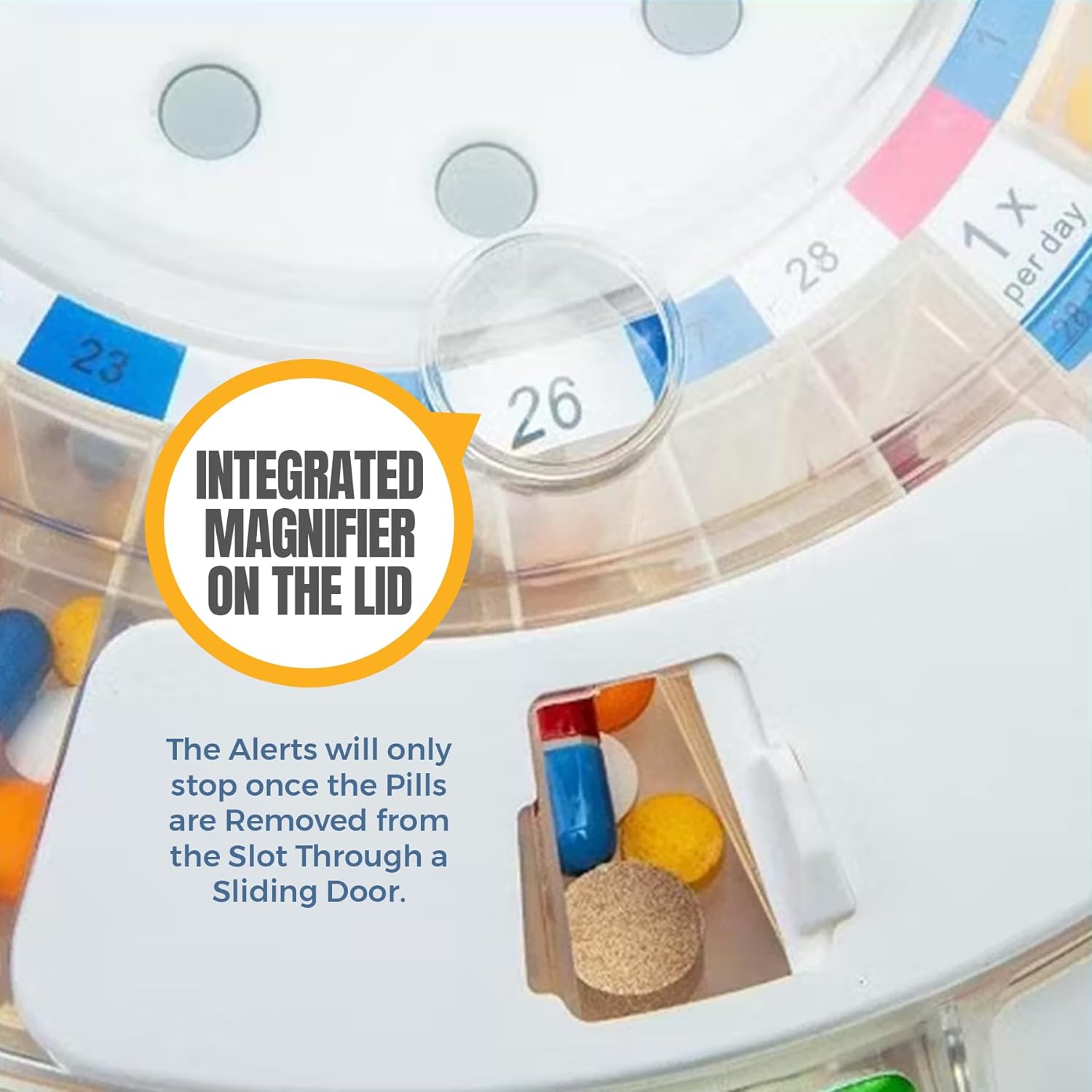
Image: Simple, easy-to-use programming interface for setting time, frequency, and day.
2. Operating Instructions
2.1 Reminder Alarms
When it is time for your scheduled dose, the pill dispenser will activate both an audio alarm and visual notifications. The visual notification includes a green light flashing around the edge of the dispenser.

Image: The dispenser indicating audio and visual notifications for medication times.
2.2 Dispensing Medication
The alarm will continue until the pills are removed from the slot. To dispense:
- Slide open the dispensing door located at the front of the device.
- Flip the dispenser upside down to retrieve the pills from the exposed slot. This action will automatically stop the alarm.
- Close the dispensing door after taking your medication.
The battery-powered carousel automatically rotates to the next scheduled dose after the current dose is taken, ensuring the correct pills are available at the right time.

Image: Integrated magnifier on the lid and the sliding door for pill access.
3. Maintenance
3.1 Cleaning
To clean the dispenser, wipe the exterior with a soft, damp cloth. Do not submerge the device in water. Ensure all parts are dry before reloading medication.
3.2 Battery Replacement
When the battery indicator on the LCD display shows low power, replace all four AA batteries. Always dispose of used batteries responsibly.
4. Troubleshooting
- Alarm not sounding or light not flashing:
- Check if the batteries are correctly installed and have sufficient power. Replace if necessary.
- Ensure the alarm times are correctly set in the programming menu.
- Pills not dispensing:
- Verify that the dispensing door is fully open.
- Ensure the dispenser is flipped completely upside down to allow pills to fall out.
- Check for any obstructions in the dispensing slot.
- Lid not locking securely:
- Ensure the lid is properly aligned before attempting to lock it with the key.
- Inspect the locking mechanism for any damage or debris.
- Accidental access to pills:
- While the lid is lockable, it is important to note that the internal wheel can potentially be manipulated by inserting a finger through the dispensing opening. This device is intended to assist with medication adherence but may not prevent determined access.
5. Specifications
| Product Dimensions | 1 x 1 x 1 inches |
| Item Weight | 1.92 Pounds (0.87 Kilograms) |
| Model Number | BS0691J Pill Alarm with Key |
| Batteries | 4 AA batteries required (included) |
| Manufacturer | MEDca |
| Number of Compartments | 28 |
| Max Pills per Slot | Up to 18 |
| Reminder Type | Audio and Visual (Light) |
| Material Type | Plastic |
| Color | Clear Lid |
6. Warranty Information
Specific warranty details are not provided in the product information. Please refer to the product packaging or contact MEDca customer support for warranty terms and conditions.
7. Support
For further assistance, technical support, or inquiries regarding your MEDca Automatic Pill Dispenser, please contact the manufacturer directly. You may find contact information on the product packaging or on the official MEDca website.
Visit the MEDca Store on Amazon for more products and information.
Ask a question about this manual
Ask about setup, troubleshooting, compatibility, parts, safety, or missing instructions. Manuals+ will review the question and use this page’s manual context to help answer it.