
1. Introduction
The LAUNCH BST-500 is an advanced automotive battery tester designed to efficiently assess the health and performance of 12V and 24V lead-acid batteries. This device provides comprehensive analysis of battery condition, cranking system, and charging system, offering reliable results for various vehicle types.
It supports a wide range of battery types, including regular flooded, AGM flat plate, AGM spiral, GEL, and EFB batteries, with a testing range of 100 to 2000 CCA (30-220AH). The BST-500 is suitable for use with cars, trucks, motorcycles, boats, ATVs, and lawn mowers.

Figure 1.1: LAUNCH BST-500 Car Battery Tester. This image displays the main unit of the BST-500 tester, featuring its red and black housing, a green LCD screen, and attached red and black alligator clips for battery connection.
2. Safety Information
Always observe the following safety precautions when using the LAUNCH BST-500 battery tester:
- Eye Protection: Always wear appropriate eye protection when working near batteries.
- Ventilation: Ensure adequate ventilation when testing batteries, as they can emit explosive gases.
- Spark-Free Operation: The BST-500 is designed for spark-free operation. Avoid creating sparks near the battery.
- Reverse Polarity Protection: The device features reverse polarity protection. However, always double-check connections to ensure correct polarity (red clamp to positive, black clamp to negative).
- Insulated Clamps: The fully insulated alligator clips enhance user safety.
- No Heat or Discharge: The tester does not emit light, heat, spark, or discharge, safeguarding the user, vehicle, battery, and the device itself.

Figure 2.1: Safety Features. This diagram illustrates the LAUNCH BST-500 connected to a car battery, emphasizing its built-in safety features such as short-circuit and reverse connection protection, ensuring safe operation.

Figure 2.2: Fully Insulated Alligator Clips. A close-up view of the robust, fully insulated red and black alligator clips, designed for secure and safe connection to battery terminals.
3. Product Overview
3.1 Components
The LAUNCH BST-500 package typically includes:
- LAUNCH BST-500 Main Unit with integrated cables and alligator clips.
- User Manual (this document).
3.2 Key Features
The BST-500 offers the following key features:
- Wide Compatibility: Tests 6V-30V lead-acid batteries (100-2000 CCA, 30-220AH).
- Battery Types: Compatible with Flooded, AGM Flat Plate, AGM Spiral, GEL, and EFB batteries.
- Multiple Tests: Performs Battery Test, Cranking Test, and Charging Test.
- Safety Features: Includes short-circuit protection and reverse polarity protection.
- Ease of Use: Supports both in-vehicle and out-of-vehicle testing.
- Multi-Language Support: Available in English, Spanish, French, German, Russian, Polish, Italian, and Portuguese.

Figure 3.1: Wide Battery Compatibility. This image shows the BST-500 screen indicating its compatibility with 6V-30V batteries and various types such as Flooded, AGM Flat Plate, AGM Spiral, GEL, EFB, and Deep Cycle batteries.

Figure 3.2: Versatile Applications. The image displays the BST-500 alongside icons representing different vehicle types it can be used with, including cars, trucks, motorcycles, boats, ATVs, and lawn mowers.

Figure 3.3: Multi-Language Support. This image shows the BST-500's display screen with a language selection menu, featuring flags for various supported languages such as English, Spanish, French, German, Russian, Polish, Italian, and Portuguese.
4. Setup
The BST-500 is self-powered by the battery being tested, requiring no internal batteries. Follow these steps to set up the device:
- Prepare the Battery: Ensure the battery terminals are clean and free of corrosion for optimal contact.
- Connect Clamps: Attach the red positive (+) clamp to the positive battery terminal. Attach the black negative (-) clamp to the negative battery terminal.
- Power On: The device will power on automatically once correctly connected.
- Select Language: If prompted, select your preferred language using the navigation buttons and confirm with the 'OK' button.
5. Operating Instructions
The main menu typically offers options for Battery Test, Cranking Test, Charging Test, and Review Data. Navigate using the directional buttons and press 'OK' to select.
5.1 Battery Test
This test assesses the overall health of the battery.
- From the main menu, select "Battery Test".
- Follow the on-screen prompts to input battery type (e.g., Flooded, AGM) and CCA rating.
- The tester will perform the analysis and display results such as State of Health (SOH), State of Charge (SOC), voltage, and measured CCA.
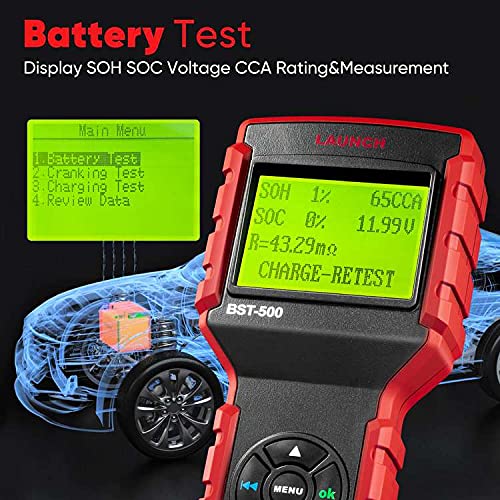
Figure 5.1: Battery Test Results. The BST-500 screen shows detailed battery test results, including State of Health (SOH), State of Charge (SOC), voltage, and CCA rating, with a schematic of a car in the background.
5.2 Cranking Test
This test evaluates the starting motor's performance.
- From the main menu, select "Cranking Test".
- Follow the on-screen instructions, which typically involve starting the vehicle.
- The tester will analyze the cranking process and display results such as cranking time and minimum voltage during cranking.

Figure 5.2: Cranking Test in Progress. This image shows the BST-500 displaying cranking test results, including cranking time and voltage, alongside a visual representation of a car's ignition button, indicating the test procedure.
5.3 Charging Test
This test checks the vehicle's charging system (alternator) to ensure it is functioning correctly.
- From the main menu, select "Charging Test".
- Follow the on-screen instructions, which may include increasing engine RPM to a specified level (e.g., 2500 r/min) and holding it for a few seconds.
- The tester will analyze the charging system's output and provide a status report.

Figure 5.3: Charging Test Procedure. The image depicts the BST-500 displaying instructions for a charging test, such as increasing engine RPM, while a mechanic is shown working on a car engine, illustrating the practical application.
6. Maintenance
To ensure the longevity and accuracy of your LAUNCH BST-500 battery tester:
- Cleaning: Wipe the device with a soft, dry cloth after each use. Avoid using abrasive cleaners or solvents.
- Storage: Store the tester in a clean, dry environment, away from extreme temperatures and direct sunlight.
- Cable Care: Inspect the cables and clamps regularly for any signs of damage. Do not use the device if cables are frayed or clamps are broken.
7. Troubleshooting
If you encounter issues with your BST-500, consider the following:
- Device Not Powering On: Ensure the clamps are securely connected to the correct battery terminals (red to positive, black to negative). Check for sufficient battery voltage (minimum required for operation).
- Inaccurate Readings: Ensure battery terminals are clean. Re-check battery type and CCA input settings.
- Error Messages: Refer to the on-screen error code or message for specific guidance. If persistent, contact customer support.
8. Specifications
| Specification | Value |
|---|---|
| Model Number | BST-500 |
| Product Dimensions | 10.43 x 7.87 x 2.56 inches |
| Item Weight | 1.54 Pounds |
| Power Source | Battery Powered (from tested battery) |
| Supported Battery Voltage | 6V - 30V |
| CCA Testing Range | 100 - 2000 CCA |
| AH Testing Range | 30 - 220 AH |
| Supported Battery Types | Flooded, AGM Flat Plate, AGM Spiral, GEL, EFB |
| Supported Standards | CCA, BCI, CA, MCA, JIS, DIN, IEC, EN, SAE, GB |
| Manufacturer | LAUNCH |
9. Warranty and Support
For warranty information, please refer to the documentation provided at the time of purchase or contact your retailer. LAUNCH offers various protection plans for extended coverage, which can be purchased separately.
For technical support or any questions regarding the LAUNCH BST-500, please contact customer service via email at tianhongkeying@outlook.com.


