
1. Introduction
Thank you for choosing the RHYTHM FUN Treadmill Remote Control 3.0. This manual provides essential information for the proper setup, operation, and maintenance of your remote control. Please read this manual thoroughly before use and retain it for future reference.
Important: This remote control is designed exclusively for RHYTHM FUN treadmills. It is not compatible with treadmills from other brands.

Image 1.1: RHYTHM FUN Remote Control 3.0 with compatible treadmill.
2. Important Safety Information
- Keep the remote control away from water or other liquids to prevent damage.
- Do not expose the remote control to extreme temperatures or direct sunlight.
- Use only the specified battery type (if applicable) and ensure correct polarity during installation.
- Keep batteries out of reach of children. If swallowed, seek immediate medical attention.
- Do not attempt to disassemble or repair the remote control yourself. Contact customer support for assistance.
3. Product Overview
The RHYTHM FUN Treadmill Remote Control 3.0 provides convenient control over your compatible RHYTHM FUN treadmill. It features an ergonomic design for comfortable handling.

Image 3.1: Front view of the RHYTHM FUN Remote Control 3.0.
Remote Control Buttons:
- Power Button (⏻): Turns the treadmill on or off.
- Speed Increase Button (+): Increases the treadmill speed.
- Speed Decrease Button (-): Decreases the treadmill speed.

Image 3.2: Compatibility with RHYTHM FUN Treadmill models WP138 and WP02.
4. Setup
4.1 Battery Installation
- Locate the battery compartment on the back of the remote control.
- Open the battery compartment cover.
- Insert the required batteries (typically AAA, not included) according to the polarity markings (+ and -) inside the compartment. Ensure the flat side of the battery is towards the back of the remote.
- Close the battery compartment cover securely.
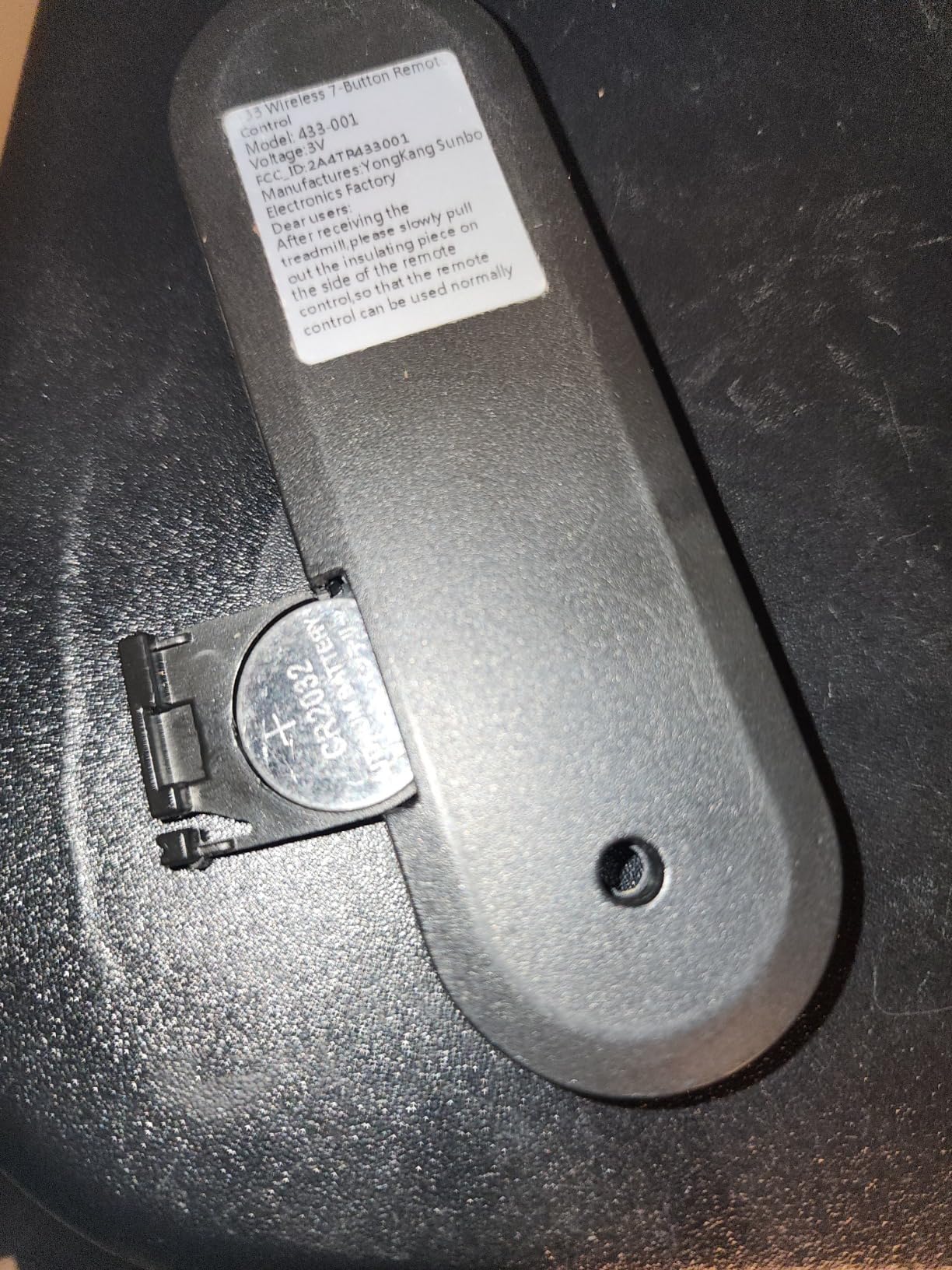
Image 4.1: Correct battery insertion for the remote control.
4.2 Pairing with Treadmill
The RHYTHM FUN Remote Control 3.0 is designed to connect automatically with compatible RHYTHM FUN treadmills. In most cases, simply inserting the batteries and powering on your treadmill will establish the connection.
If the remote does not connect automatically:
- Ensure the treadmill is powered on and plugged into a working outlet.
- Verify that the batteries in the remote control are correctly installed and have sufficient charge.
- Try turning both the treadmill and the remote control off and then on again.
- Move closer to the treadmill to ensure a clear signal path.
5. Operating Instructions
Once the remote control is paired with your RHYTHM FUN treadmill, you can use it to control basic functions:
- To Turn On/Off: Press the ⏻ Power Button once to turn the treadmill on. Press it again to turn the treadmill off.
- To Adjust Speed: Use the + button to increase the treadmill speed and the - button to decrease the speed. Each press will adjust the speed incrementally.
6. Maintenance
6.1 Cleaning
Wipe the remote control with a soft, dry cloth. Do not use abrasive cleaners, solvents, or harsh chemicals, as these can damage the surface or internal components.
6.2 Battery Replacement
When the remote control's response becomes sluggish or it stops functioning, it is likely time to replace the batteries. Follow the battery installation steps in Section 4.1. Always replace all batteries at the same time with new ones of the same type.
7. Troubleshooting
| Problem | Possible Cause | Solution |
|---|---|---|
| Remote control does not work. | Dead or incorrectly installed batteries. | Check battery orientation and replace with fresh batteries. Refer to Section 4.1. |
| Remote control does not connect to the treadmill. | Treadmill not powered on; remote out of range; interference. | Ensure treadmill is on. Move closer to the treadmill. Restart both devices. Verify compatibility (only RHYTHM FUN treadmills). |
| Buttons are unresponsive. | Low battery power; internal malfunction. | Replace batteries. If the issue persists, contact RHYTHM FUN customer support. |
8. Specifications
- Model Number: 113879f5-3827-4290-9a8e-75125f5d7b51
- ASIN: B095WFG23M
- Brand: RHYTHM FUN
- Item Weight: 1.06 ounces
- Package Dimensions: 4.61 x 1.54 x 0.51 inches
- Color: Black
- Special Feature: Ergonomic
- Max Number of Supported Devices: 1
- Compatible Devices: RHYTHM FUN treadmills
9. Warranty and Support
For warranty information or technical support, please contact RHYTHM FUN customer service through their official website or the retailer where the product was purchased. Please have your product model number and purchase details ready when contacting support.
You can visit the RHYTHM FUN Store for more information: RHYTHM FUN Store