
Fytoo 5-in-1 Lipo Battery Charger and 3.7V 720mAh Batteries
Fytoo 5-in-1 Lipo Battery Charger and 3.7V 720mAh Battery Instruction Manual
Brand: Fytoo | Model: 5-in-1 Lipo Battery Charger and 3.7V 720mAh Batteries
1. Introduction
This manual provides essential instructions for the safe and effective use of your Fytoo 5-in-1 Lipo Battery Charger and accompanying 3.7V 720mAh batteries. This product is designed to provide power for various remote-controlled drones. Please read this manual thoroughly before first use.
Compatible Drone Models: Syma X5C, X5C-1, X5, X5SC, X5SW, H5C, V931, S5C, FQ36, UFO 3000, UDI U45, U45W, T5W, H42, SS40, GoolRC T32.

Figure 1: Examples of compatible drone models (SS40, FQ36, S5C, X5C).
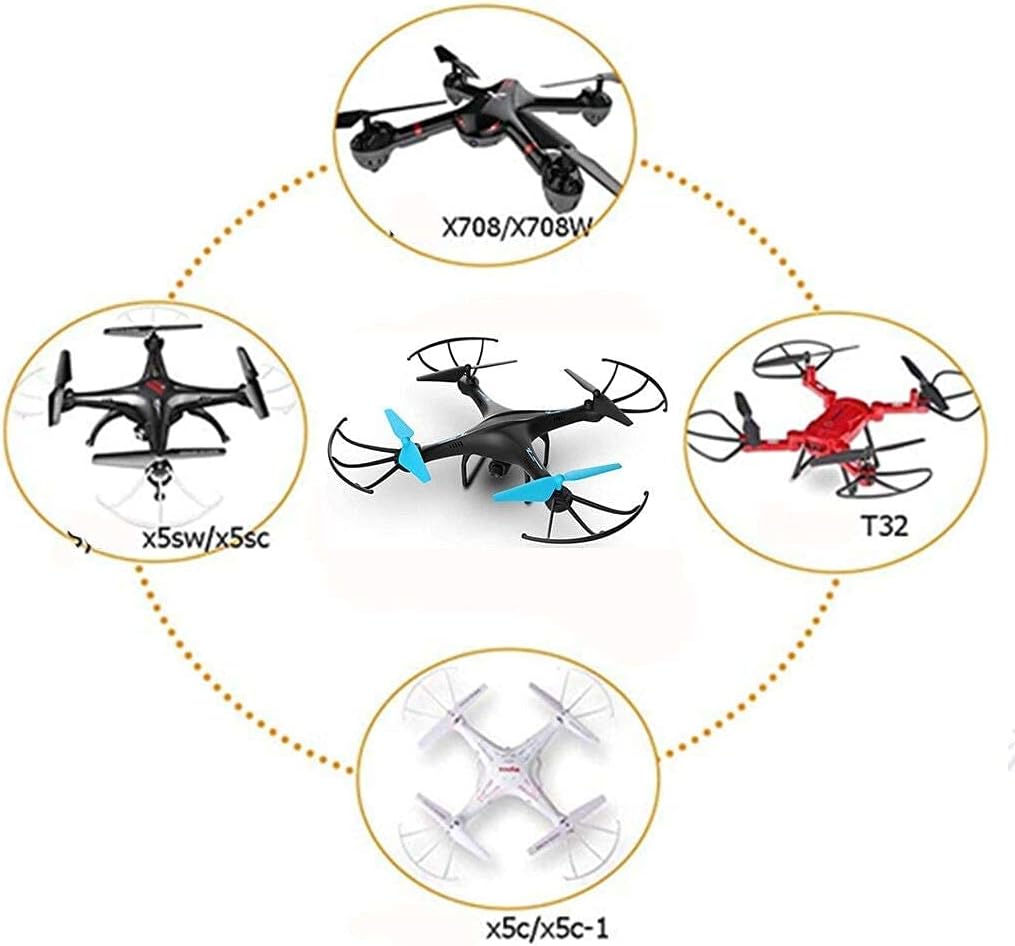
Figure 2: Additional compatible drone models (X708/X708W, X5SW/X5SC, T32, X5C/X5C-1).
2. Package Contents
Verify that all items listed below are included in your package:
- 1 x Fytoo 5-in-1 Lipo Battery Charger
- 5 x Fytoo 3.7V 720mAh Lipo Batteries
- 1 x USB Charging Cable

Figure 3: Complete package contents including the charger, USB cable, and five batteries.
3. Product Specifications
| Component | Specification |
|---|---|
| Battery Voltage | 3.7V |
| Battery Capacity | 720mAh |
| Battery Product Number | 902540 |
| Charger Input Voltage | 5V (via USB) |
| Battery Dimensions (Approx.) | 42mm x 25mm x 8.5mm |
| Battery Weight (Approx.) | 17g |

Figure 4: Battery dimensions and weight.
4. Safety Information
Important: Failure to follow these safety guidelines can result in fire, personal injury, or property damage. Always exercise caution when handling Li-Po batteries.
- Charger Compatibility: Only charge Li-Po batteries with a charger specifically designed for Li-Po batteries. Using an incompatible charger can be dangerous.
- Charging Surface: Always place batteries on a heat-resistant, non-flammable surface during charging. Keep away from combustible materials.
- Pre-Use Inspection: Before each charge and use, carefully inspect Li-Po batteries for any signs of damage, swelling, punctures, or leaks. Do not use damaged batteries.
- Temperature Control: Do not allow Li-Po cells to overheat at any time. If a battery becomes excessively hot during charging or use, immediately disconnect it and place it in a safe, non-flammable area.
- Over-Discharge Prevention: Avoid over-discharging Li-Po batteries. Over-discharging can lead to permanent damage and reduced lifespan.
- Internal Protection: The batteries are equipped with an internal protection mechanism designed for safe charging and operation.
5. Setup: Charging the Batteries
Follow these steps to safely charge your Fytoo 3.7V 720mAh Lipo batteries:
- Connect the provided USB charging cable to the 5-in-1 Lipo Battery Charger.
- Plug the USB cable into a compatible 5V USB power source, such as a computer USB port, a USB wall adapter, or a power bank.
- Carefully insert up to five 3.7V 720mAh Lipo batteries into the designated ports on the charger. Ensure the connectors are properly aligned and fully seated.
- Observe the indicator lights on the charger. Typically, a red light indicates that a battery is currently charging. The light will usually turn off or change color (e.g., to green) once the battery is fully charged.
- Once charging is complete, disconnect the batteries from the charger and unplug the USB cable.

Figure 5: Batteries connected to the 5-in-1 charger for charging.
6. Operating: Using the Batteries
To use the charged batteries with your compatible drone:
- Ensure the battery is fully charged before installation.
- Locate the battery compartment on your drone.
- Carefully connect the battery's connector to the drone's power port. The battery connector is designed to match the original battery's shape for a secure fit.
- Place the battery securely within the compartment, ensuring it does not obstruct any moving parts or interfere with the drone's operation.
- Close the battery compartment cover, if applicable.
- Power on your drone and remote control according to your drone's specific instructions.
7. Maintenance
Proper maintenance extends the life of your batteries and ensures safe operation:
- Storage: Store batteries in a cool, dry place, away from direct sunlight, extreme temperatures, and flammable materials. Avoid storing batteries fully charged or fully discharged for extended periods. A storage charge of approximately 3.8V per cell is recommended for long-term storage.
- Cleaning: Keep battery connectors clean and free from dust or debris to ensure a reliable connection.
- Disposal: Dispose of damaged, swollen, or end-of-life Li-Po batteries responsibly. Consult local regulations for proper battery recycling or disposal procedures. Do not dispose of Li-Po batteries in regular household waste.
8. Troubleshooting
If you encounter issues with your Fytoo charger or batteries, refer to the following common solutions:
- Batteries Not Charging:
- Ensure the USB charging cable is securely connected to both the charger and the power source.
- Verify that the USB power source is functional and providing 5V output.
- Check that batteries are inserted correctly into the charger ports, with connectors fully seated.
- Inspect batteries for any visible damage; do not attempt to charge damaged batteries.
- Short Flight Time:
- Confirm that batteries are fully charged before use.
- Battery performance naturally degrades over time and with cycles. If batteries are old or have been heavily used, their capacity may be reduced.
- Environmental factors (e.g., cold weather) and drone usage (e.g., aggressive flying) can affect flight duration.
9. Warranty and Support
For any questions, concerns, or assistance regarding your Fytoo 5-in-1 Lipo Battery Charger and batteries, please do not hesitate to contact Fytoo customer service. We are dedicated to providing support and ensuring your satisfaction with our products.
Please refer to your purchase documentation or the Fytoo official website for specific warranty details and contact information.
Ask a question about this manual
Ask about setup, troubleshooting, compatibility, parts, safety, or missing instructions. Manuals+ will review the question and use this page’s manual context to help answer it.