Download PDFFree PDF. The Save button below keeps a bookmark and private notes in your account.
GoolRC KF605 RC Airplane Instruction Manual
Model: KF605
1. Product Overview
The GoolRC KF605 RC Airplane is a remote-controlled aircraft designed for both kids and beginners. It features a durable EPP material construction, a 4-channel control system, and a 6-axis gyroscope for stable flight. Its design is inspired by the F35 fighter jet, offering an efficient, power-saving, and long flight experience.
This model is engineered for ease of control, making it suitable for new pilots. It incorporates dual motor control for powerful takeoff and the ability to perform roll flights.
Figure 1.1: The GoolRC KF605 RC Airplane, showcasing its F35 fighter jet inspired design. This image highlights the realistic appearance and scale reduction of the model.
2. Setup and Assembly
2.1 Package Contents
Before beginning, ensure all components are present in the package:
1x GoolRC KF605 RC Airplane
1x Airplane Battery (3.7V 600mAh)
1x Remote Controller
1x Charging Cable
1x Use Manual (this document)
Figure 2.1: The GoolRC KF605 RC Airplane alongside its dedicated 2.4GHz remote controller. This image illustrates the primary components included in the package, ready for setup.
2.2 Battery Installation
2.2.1 Airplane Battery
Locate the battery compartment on the RC airplane.
Carefully insert the provided 3.7V 600mAh airplane battery into the compartment.
Connect the battery connector to the airplane's power port.
Securely close the battery compartment.
2.2.2 Remote Controller Batteries
Open the battery cover on the back of the remote controller.
Insert 4x AA batteries (not included) into the designated slots, ensuring correct polarity (+/-).
Close the battery cover securely.
2.3 Charging the Airplane Battery
The airplane battery requires charging before first use and after each flight. The charging time is approximately 60 minutes.
Connect the charging cable to the airplane battery.
Connect the other end of the charging cable to a suitable USB power source (e.g., computer USB port, USB wall adapter).
The indicator light on the charging cable will show the charging status (refer to the cable's specific instructions for light indications).
Once charging is complete, disconnect the battery from the charging cable and the power source.
3. Operating Instructions
3.1 Powering On and Pairing
Ensure both the airplane battery and remote controller batteries are installed and charged.
Place the airplane on a flat, level surface.
Turn on the power switch on the RC airplane.
Turn on the power switch on the remote controller.
The airplane and remote controller will automatically attempt to pair. Wait for the indicator lights to confirm a successful connection (refer to specific light patterns in the quick start guide if provided).
3.2 Flight Controls and Characteristics
The KF605 features a 4-channel control system and a 6-axis gyroscope for enhanced stability and ease of flight.
6-Axis Gyroscope: Provides automatic stability, making the airplane easier to control for beginners and ensuring a more stable flight experience.
4-Channel Control: Allows for sensitive and accurate control, including rudder control, enabling various maneuvers.
Dual Motor Power: The powerful dual motors allow the model to easily take off from the ground.
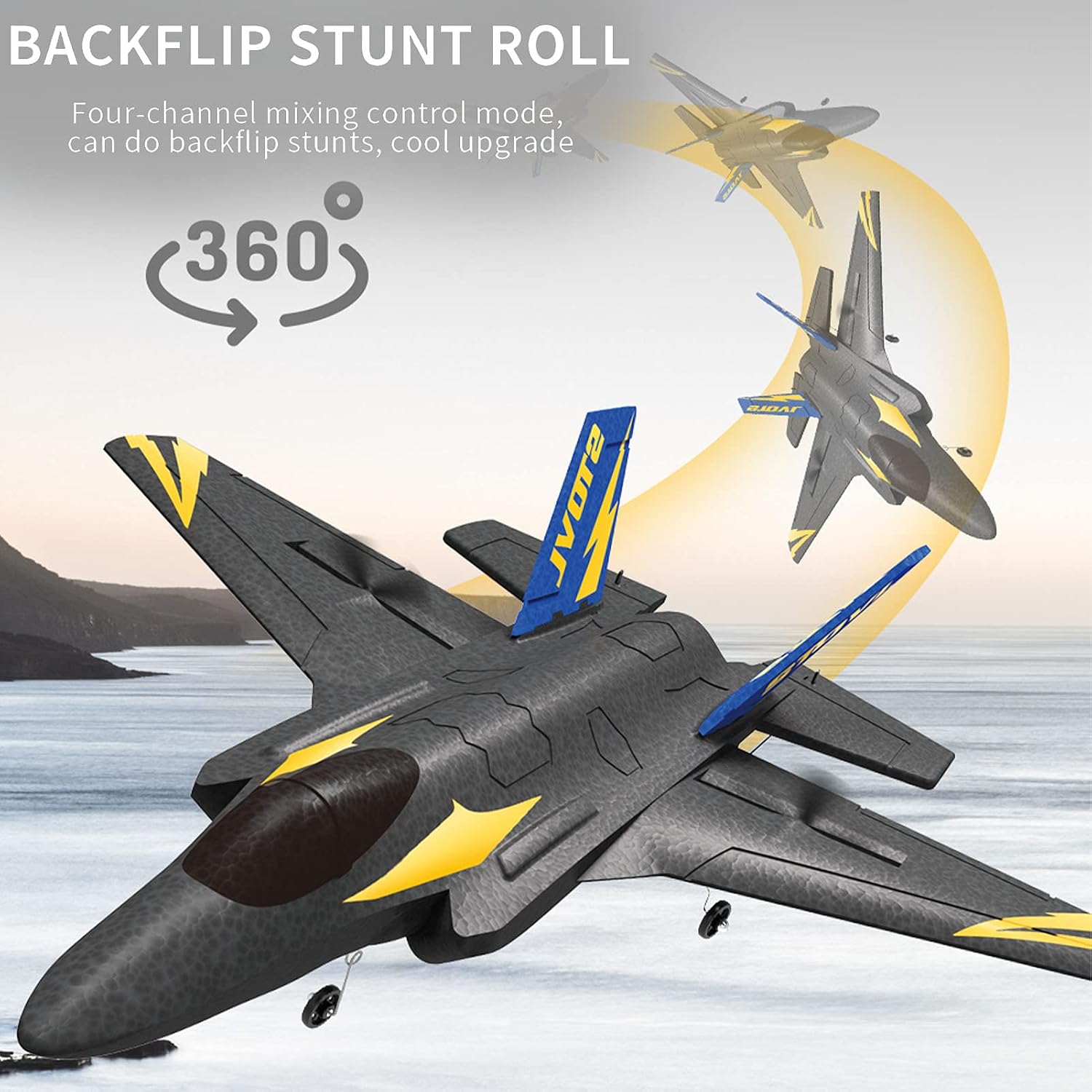
Roll Flight Capability: The four-channel structure supports performing roll stunts.
Figure 3.1: Illustration of the six-axis gyroscope automatic balance system, which simplifies control and enhances wind resistance for beginners.
Figure 3.2: Depiction of the KF605 performing a backflip stunt roll, demonstrating its four-channel mixing control mode and maneuverability.
Figure 3.3: Visual representation of the push-back dual-engine power system. This configuration ensures stable course lock by canceling out anti-torque from forward and reverse propellers.
3.3 Flight Environment and Range
The 2.4GHz remote control system ensures no interference during flight. The maximum remote control distance is approximately 150 meters, providing ample range for outdoor flying.
A fully charged battery provides approximately 15 minutes of flying time.
Figure 3.4: Diagram illustrating the 2.4G remote control signal and its effective flight distance of approximately 150 meters.
4. Maintenance
4.1 Material and Durability
The KF605 RC Airplane is constructed from Super Tough EPP (Expanded Polypropylene) material. EPP is known for its high strength, good toughness, and resistance to deformation, which significantly reduces the probability of damage during impacts.
Figure 4.1: Information graphic detailing the properties of EPP material, including its lightweight nature (approximately 72g for the airplane), ease of repair with foam glue, and impact resistance.
4.2 Cleaning and Storage
Cleaning: Use a soft, dry cloth to wipe down the airplane after use. Avoid using harsh chemicals or excessive moisture.
Storage: Store the airplane and remote controller in a cool, dry place away from direct sunlight and extreme temperatures. Remove batteries from the remote controller if storing for extended periods to prevent leakage.
Repairs: Minor damages to the EPP material can often be repaired using foam-compatible glue.
5. Troubleshooting
This section provides solutions to common issues you might encounter. If the problem persists, please refer to the Warranty & Support section.
Problem
Possible Cause
Solution
Airplane does not power on.
Airplane battery is not charged or not connected properly.
Ensure the airplane battery is fully charged and securely connected.
Remote controller does not power on.
AA batteries are dead or inserted incorrectly.
Replace AA batteries with new ones, ensuring correct polarity.
Airplane and remote controller do not pair.
Interference or incorrect pairing procedure.
Ensure no other 2.4GHz devices are nearby. Turn both devices off and on again, following the pairing steps in Section 3.1.
Short flight time.
Battery not fully charged or aging battery.
Ensure battery is fully charged (60 minutes). Consider replacing the battery if it's old.
Airplane is unstable or difficult to control.
Improper calibration or environmental factors (wind).
Ensure the airplane is placed on a level surface during power-on for gyroscope calibration. Fly in calm conditions, especially as a beginner.
6. Product Specifications
Feature
Detail
Model
KF605
Item Type
RC Airplane
Brand
GoolRC
Material
EPP (Expanded Polypropylene)
Channel
4CH
Motor Type
Brushed
Frequency
2.4Ghz
Remote Control Distance
150m
Charging Time
60min
Flying Time
15min
Airplane Battery
3.7V 600mAh (Included)
Remote Control Battery
4* AA Battery (Not Included)
Airplane Weight
72g
Airplane Size
38 x 32 x 12 cm
Package Dimensions
38.5 x 33.5 x 8 cm
Package Weight
470g
Manufacturer Recommended Age
14 years and up
ASIN
B095SHZWYN
Date First Available
3 December 2021
7. Warranty and Support
7.1 Warranty Information
The manufacturer provides a warranty for this product. If you encounter any problems or defects with your GoolRC KF605 RC Airplane, please contact the store or seller where you purchased the product in a timely manner. They will assist you in finding a satisfactory solution.
7.2 Customer Support
For further assistance, technical support, or inquiries not covered in this manual, please reach out to the GoolRC customer support channels provided by your retailer. Always have your product model number (KF605) and purchase details ready when contacting support.
Ask a question about this manual
Ask about setup, troubleshooting, compatibility, parts, safety, or missing instructions. Manuals+ will review the question and use this page’s manual context to help answer it.