
1. Introduction
The NEJE A40640 Engraving Module is a high-performance laser module featuring 10W optical output power with FAC (Fast Axis Collimation) technology and a dual-beam design. It is designed for precision engraving and cutting across a wide range of materials, compatible with NEJE 3 Plus, Max, and Pro engraving machines, as well as other CNC machines, routers, Arduino, and 3D printers.

Image 1.1: Overview of the NEJE A40640 Engraving Module, highlighting its compact design and cooling fan.
2. Safety Information
Always prioritize safety when operating laser equipment. Failure to follow safety guidelines can result in serious injury or damage to property.
- Wear Protective Eyewear: Always wear appropriate laser safety goggles (OD4+ for 190nm-540nm/900nm-1100nm wavelengths) when the laser is active.
- Avoid Direct Exposure: Never look directly into the laser beam or at reflections.
- Ventilation: Operate the module in a well-ventilated area to dissipate smoke and fumes generated during engraving/cutting.
- Fire Safety: Keep a fire extinguisher nearby. Do not leave the machine unattended during operation.
- Children and Pets: Keep children and pets away from the operating area.
- Material Safety: Do not engrave or cut materials that produce toxic fumes or are highly flammable.
3. Package Contents
Verify that all items listed below are included in your package:
- NEJE A40640 Engraving Module
- Air Assist Nozzle and Tubing
- Control Board / Adapter Board
- Power Cable
- Hex Wrenches
- Mounting Screws
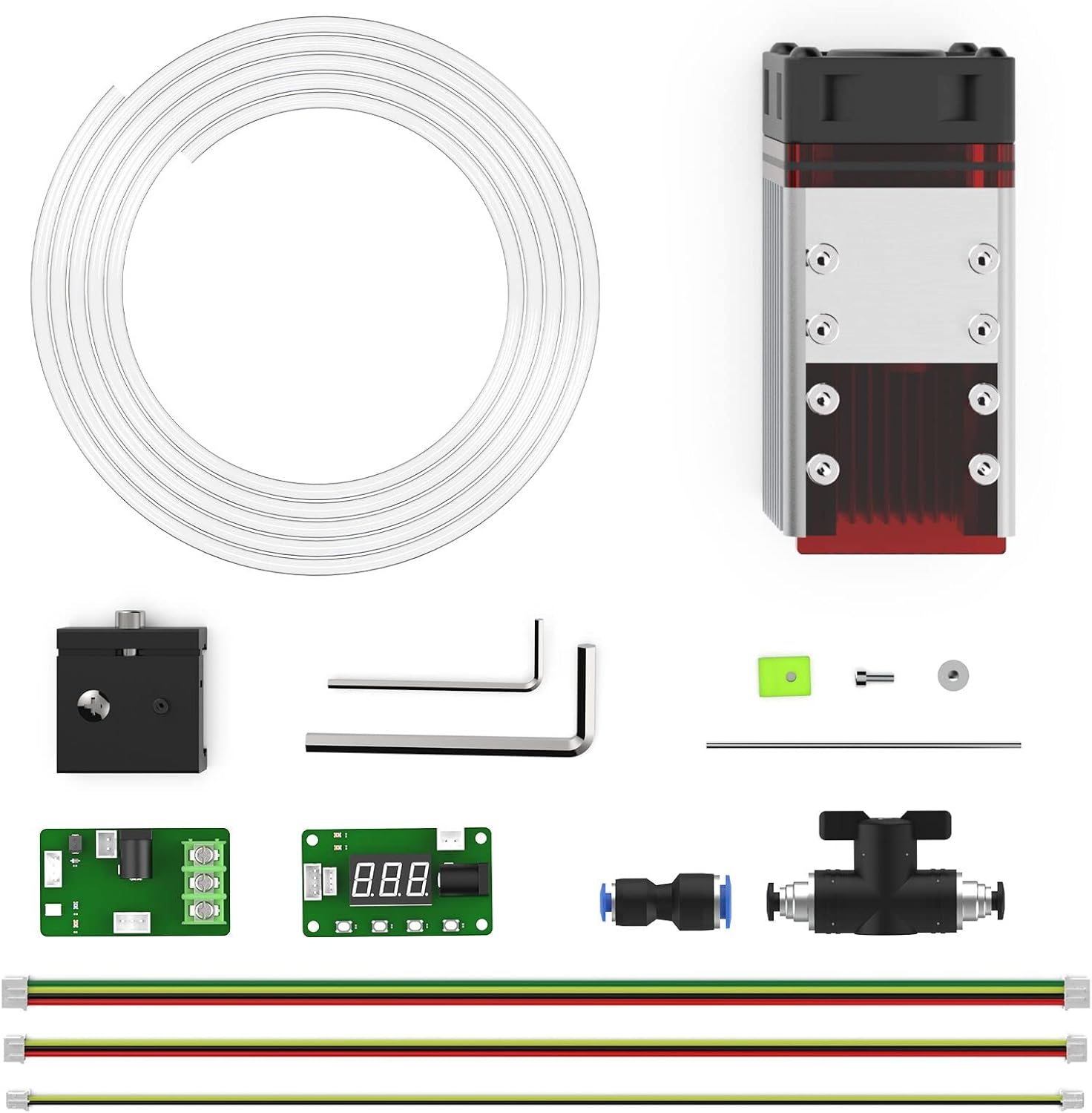
Image 3.1: All components included in the NEJE A40640 Engraving Module package, including the module, air assist parts, and tools.
4. Specifications
| Feature | Specification |
|---|---|
| Brand | NEJE |
| Model | A40640 |
| Optical Output Power | 10W |
| Beam Technology | FAC Tech - 2 x Beam |
| Item Weight | 12.6 ounces |
| Product Dimensions | 3.8 x 3.8 x 11.5 inches |
| Material Type | Stainless Steel |
5. Setup
5.1. Module Installation
Mount the NEJE A40640 module securely onto your compatible engraving machine according to your machine's specific instructions. Ensure all cables are connected correctly.
5.2. Focus Adjustment
Accurate focus is crucial for optimal engraving and cutting results. The A40640 module features a fixed focus design, typically requiring a specific distance from the material surface.
- Place a piece of material on your workbed.
- Lower the laser module until the bottom of the module is approximately 2.5mm from the material surface.
- Use the provided focus gauge or a ruler to set the precise focal distance.
- Tighten the module's securing screws to maintain the focus.
Video 5.1: Demonstrates the process of adjusting the focus for the NEJE A40640 module to achieve a precise laser dot on the material surface.
5.3. Air Assist Installation
Air assist significantly improves cutting performance by blowing away smoke and debris, resulting in cleaner cuts and reduced charring. It also helps protect the laser lens.
- Attach the air assist nozzle to the laser module.
- Connect the air tubing from the nozzle to an external air pump (not included).
- Ensure the nozzle is positioned correctly to direct airflow directly at the laser's focal point.
Video 5.2: Illustrates the installation of the air assist system on the NEJE A40640 Engraving Module, showing how to attach the nozzle and tubing.
Image 5.1: Close-up of the NEJE AF6 CNC Metal Air Nozzle, designed for high-pressure air assist with the A40640 module.
6. Operating the Module
6.1. Material Compatibility
The NEJE A40640 module is capable of engraving and cutting a wide variety of materials. Always perform small test cuts/engravings on new materials to determine optimal settings.
- Engraving: Wood, bamboo, leather, paper, cardboard, painted metal, anodized aluminum, stainless steel, glass (with coating), stone, ceramic, certain plastics (e.g., acrylic).
- Cutting: Thin wood (up to 8mm basswood in one pass), paper, cardboard, leather, certain plastics (e.g., black acrylic, MDF).
- Avoid: PVC, vinyl, and other chlorine-containing plastics, as they produce corrosive and toxic fumes.

Image 6.1: Examples of various materials that can be engraved and cut with the NEJE A40640 module, including wood, acrylic, leather, and metal.
6.2. Engraving and Cutting Performance
The dual-beam technology allows for fine detail in engraving and efficient cutting. The module can achieve a focus spot of 0.04mm for precise work.

Image 6.2: Diagram illustrating the engraving and cutting capabilities of the NEJE A40640 module, showing a 0.04mm focus for engraving and up to 20mm max cutting depth.
Video 6.1: Demonstration of the NEJE A40640 module cutting through high-density MDF board, showcasing its cutting power and precision.
Video 6.2: Various materials being engraved and cut by a NEJE machine with a 30W module, demonstrating the versatility of laser engraving.
7. Maintenance
7.1. Lens Cleaning
Regular cleaning of the laser lens is essential to maintain optimal performance and extend the lifespan of your module. Dust and debris can accumulate on the lens, reducing laser power and quality.
- Ensure the laser module is powered off and cooled down.
- Gently wipe the lens with a clean, lint-free cotton swab or lens paper.
- Use a small amount of isopropyl alcohol or specialized lens cleaning solution if necessary.
- Avoid applying excessive pressure to the lens.
Video 7.1: Shows the NEJE 40W engraving module in operation, including a segment demonstrating how to clean the laser lens for optimal performance.
8. Troubleshooting
If you encounter issues with your NEJE A40640 module, refer to the following common problems and solutions:
- No Laser Output: Check power connections, ensure the module is properly seated, and verify software settings (laser power, enable output).
- Weak Engraving/Incomplete Cuts: Verify focus adjustment, increase laser power, decrease engraving/cutting speed, or increase the number of passes. Clean the laser lens.
- Uneven Engraving: Ensure the material is flat and securely held. Check for any loose components on the machine's gantry or module.
- Smoke/Fumes Excessive: Improve ventilation in your workspace. Ensure air assist is properly installed and functioning.
9. Warranty & Support
The NEJE A40640 Engraving Module comes with a 2-year warranty, as indicated in the product description. For technical support, warranty claims, or further assistance, please contact NEJE Official support channels. Refer to the official NEJE website or your purchase documentation for specific contact details.
Online resources and community forums may also provide helpful tips and solutions from other users.


