
1. Introduction
Welcome to the user manual for your Genelec 8020D 2-Way Active Powered Nearfield Studio Monitor. The 8020D is engineered to provide accurate and transparent audio reproduction, making it an ideal choice for professional audio environments where space is limited. This monitor incorporates Genelec's Minimum Diffraction Enclosure (MDE) and Directivity Control Waveguide (DCW) technologies for superior imaging and frequency response, alongside Intelligent Signal Sensing (ISS) for energy efficiency.
This manual provides essential information for the safe and effective setup, operation, and maintenance of your Genelec 8020D monitor.
2. Important Safety Information
Please read these instructions carefully before operating your Genelec 8020D monitor. Retain this manual for future reference.
- Power Source: Connect the monitor only to a power supply of the type indicated on the unit. Ensure the mains voltage is correct for your region.
- Ventilation: Do not block any ventilation openings. Install in accordance with the manufacturer's instructions to ensure proper airflow.
- Water and Moisture: Do not expose this apparatus to rain or moisture. Do not use near water or in excessively humid environments.
- Heat: Do not install near any heat sources such as radiators, heat registers, stoves, or other apparatus (including amplifiers) that produce heat.
- Power Cord Protection: Protect the power cord from being walked on or pinched, particularly at plugs, convenience receptacles, and the point where they exit from the apparatus.
- Servicing: Do not attempt to service this product yourself. Refer all servicing to qualified service personnel. Servicing is required when the apparatus has been damaged in any way, such as power-supply cord or plug is damaged, liquid has been spilled or objects have fallen into the apparatus, the apparatus has been exposed to rain or moisture, does not operate normally, or has been dropped.
- Cleaning: Unplug this apparatus before cleaning. Use only a dry cloth.
3. Package Contents
Upon unpacking your Genelec 8020D monitor, please verify that all the following items are included:
- Genelec 8020D Active Powered Nearfield Studio Monitor
- 1.8 Meter Mains Cable
- Iso-Pod (Isolation Positioner/Decoupler) Stand
4. Product Overview
The Genelec 8020D is a compact yet powerful studio monitor designed for critical listening. It features a 4-inch woofer and a 3/4-inch metal-dome tweeter, each driven by dedicated Class D amplifiers.
Front Panel
The front of the monitor houses the woofer and tweeter, protected by grilles. A small LED indicator is located at the bottom right, indicating power status and ISS activity.
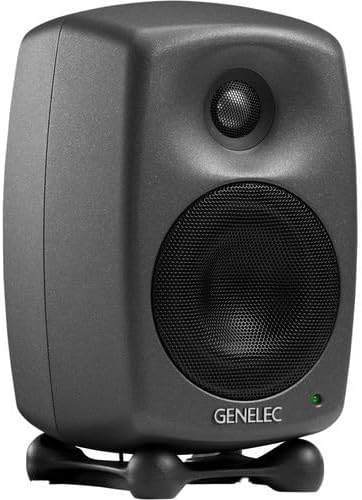
Figure 1: Front angled view of the Genelec 8020D monitor, showing the woofer, tweeter, and power indicator LED.
Rear Panel
The rear panel provides all the necessary connections and controls for the monitor, including the audio input, power input, power switch, and acoustic adjustment DIP switches.

Figure 2: Rear panel of the Genelec 8020D, displaying the XLR input, power connection, power switch, and DIP switches for acoustic control.
5. Setup
5.1 Placement
Optimal placement is crucial for accurate monitoring. Position the 8020D monitors to form an equilateral triangle with your listening position. The tweeters should ideally be at ear level. Ensure there is adequate space around the monitors for proper ventilation and to minimize reflections from nearby surfaces.
5.2 Iso-Pod Stand
The included Iso-Pod stand helps decouple the monitor from the surface it rests on, reducing unwanted vibrations and improving sonic clarity. It also allows for precise angling of the monitor towards the listening position, both vertically and horizontally, by adjusting its rubber feet.
5.3 Mounting Options
The 8020D offers versatile mounting options. It features integrated rear support points for compatibility with various wall and floor stands. Additionally, a 3/8" threaded insert is located on the cabinet base for direct mounting to microphone stands or other compatible fixtures.
5.4 Connections
- Audio Input: Connect your audio source (e.g., audio interface, mixer) to the 8020D's XLR analog input using a balanced XLR cable.
- Power Connection: Connect the supplied 1.8M mains cable to the power input on the rear panel of the monitor, and then plug it into a suitable AC power outlet.
5.5 Powering On/Off
Locate the main power switch on the rear panel of the monitor. Flip the switch to the 'ON' position to power on the monitor. The front LED indicator will illuminate. To power off, flip the switch to the 'OFF' position.
6. Operating Your Monitor
6.1 Room Response Controls (DIP Switches)
The 8020D features a set of DIP switches on the rear panel (refer to Figure 2) that allow you to compensate for the acoustic characteristics of your listening environment. These controls help to achieve a flat frequency response at the listening position.
- BASS TILT: Adjusts the bass response. Useful for compensating for room modes or placement near walls/corners.
- TREBLE TILT: Adjusts the treble response. Can be used to fine-tune the high-frequency balance based on room acoustics or personal preference.
- BASS ROLL-OFF: Provides a low-frequency cut-off, useful when integrating with a subwoofer or in rooms with excessive bass build-up.
- DESKTOP: Specifically designed to compensate for reflections from a desktop surface when the monitors are placed on a desk.
Experiment with these settings to find the optimal sound for your specific room and setup. It is recommended to start with all switches in the 'OFF' position and make adjustments incrementally.
6.2 Intelligent Signal Sensing (ISS)
The Genelec 8020D is equipped with Intelligent Signal Sensing (ISS) circuitry. This feature automatically detects when the monitor is no longer receiving an audio input signal. After a period of inactivity, ISS will switch the monitor into a low-power standby mode, conserving energy. When an audio signal is detected again, the monitor will automatically power back on. This ensures your monitors are always ready when you need them, while also being environmentally friendly.
7. Maintenance
To ensure the longevity and optimal performance of your Genelec 8020D monitors, follow these simple maintenance guidelines:
- Cleaning: Regularly clean the exterior of the monitor with a soft, dry, lint-free cloth. Do not use abrasive cleaners, waxes, or solvents, as these can damage the finish.
- Ventilation: Ensure that the ventilation openings on the monitor are not obstructed by dust or debris.
- Environment: Avoid exposing the monitors to extreme temperatures, direct sunlight, or high humidity.
8. Troubleshooting
If you encounter any issues with your Genelec 8020D monitor, refer to the following common problems and solutions:
- No Sound:
- Check if the monitor is powered on (front LED illuminated).
- Verify that the audio source is active and sending a signal.
- Ensure all audio cables are securely connected.
- Check the volume level of your audio source.
- Distorted Sound:
- Reduce the output level from your audio source to prevent input clipping.
- Check the audio cables for damage or poor connections.
- Ensure the room response DIP switches are not set to extreme positions that might cause distortion.
- Hum or Buzz:
- Ensure all equipment is properly grounded.
- Try connecting the monitor to a different power outlet.
- Keep audio cables away from power cables to avoid interference.
- Use balanced XLR cables for audio connections.
- ISS Not Activating/Deactivating:
- Ensure the audio signal level is sufficient for ISS to detect activity.
- If the monitor remains in standby, check for very low-level background noise from the source that might be keeping it active.
If the problem persists after trying these solutions, please contact Genelec customer support.
9. Technical Specifications
Below are the detailed technical specifications for the Genelec 8020D monitor:
| Feature | Specification |
|---|---|
| Speaker Type | 2-Way Active Powered Nearfield Studio Monitor |
| Woofer Diameter | 4 Inches (105 mm) |
| Tweeter Diameter | 3/4 Inches (19 mm) Metal Dome |
| Amplifier Power (Bass) | 50 Watts Class D |
| Amplifier Power (Treble) | 50 Watts Class D |
| Frequency Response | 56 Hz - 25 kHz (-6 dB) |
| Max SPL | 100 dB |
| Audio Input | 1 x XLR Analog Input |
| Connectivity Technology | Wired (XLR) |
| Power Source | Corded Electric (100-240V, 50/60 Hz) |
| Material | Plastic (MDE Enclosure) |
| Dimensions (H x W x D) | 20.8 cm x 19.3 cm x 37.3 cm (with Iso-Pod) |
| Weight | 3.2 kg / 7.1 lb |
| Included Components | Monitor, 1.8M Mains Cable |
| Special Features | Intelligent Signal Sensing (ISS), Directivity Control Waveguide (DCW), Minimum Diffraction Enclosure (MDE) |

Figure 3: Dimensions of the Genelec 8020D monitor, illustrating its height, width, and depth.
10. Warranty and Support
10.1 Warranty Information
The Genelec 8020D monitor comes with a 2-year warranty from the date of purchase. This warranty covers manufacturing defects and ensures the product meets its specified performance. Please retain your proof of purchase for warranty claims.
10.2 Customer Support
For technical assistance, warranty service, or any questions regarding your Genelec 8020D monitor, please visit the official Genelec website or contact your authorized Genelec dealer. Detailed support resources, FAQs, and contact information can typically be found on the manufacturer's website.


