
1. Introduction
The DollaTek ZK-502M is a compact and versatile digital stereo amplifier module designed for various audio applications. It offers multiple audio input options including Bluetooth, AUX, USB flash drive, and direct computer USB connection, delivering a powerful 50W + 50W output. This manual provides detailed instructions for assembly, connection, operation, and maintenance to ensure optimal performance and longevity of your device.
2. Safety Information
- Ensure the power supply voltage is within the specified range of DC 5-24V. Using an incorrect voltage can damage the module.
- Do not expose the module to moisture, water, or extreme temperatures.
- Handle the module with care during assembly and connection to avoid damaging components.
- Always disconnect the power supply before making or changing any connections.
- Keep the device away from children.
- Do not attempt to modify or repair the module yourself. Refer to qualified personnel for service.
3. Package Contents
Please check the package for the following items:
- 1 x DollaTek ZK-502M Bluetooth Digital Amplifier Module
- Assembly components (upper and lower cover boards, screws, copper pillars, knob, key cap)
- Small screwdriver (may be included)
4. Product Overview
The ZK-502M amplifier module is designed for ease of use and high performance. It features a compact design with clearly labeled ports and controls.

Figure 4.1: Front panel of the ZK-502M module, showing the volume knob, ON/OFF switch, AUX IN, USB IN, AUX OUT, and speaker terminals.
Key features include:
- Audio Inputs: Bluetooth 5.0, AUX (3.5mm jack), USB Flash Disk, Computer USB (plug and play).
- Power Output: 50W + 50W stereo output, suitable for 4-8Ω speakers.
- Power Supply: Wide DC 5-24V input range.
- Protection: Built-in mechanisms for overheating, overcurrent, and short circuit.
- Compact Design: Small footprint (60x60x29mm) for easy integration into various projects.

Figure 4.2: Internal component layout and port identification for the ZK-502M module, including Bluetooth input, audio input, USB input, switch, volume control, power input, right channel, left channel, and audio output.
The module is equipped with a large heatsink for efficient heat dissipation, ensuring stable operation even under high loads.

Figure 4.3: Side view showing the large heatsink (18mm*20mm*10mm) on the ZK-502M module, crucial for thermal management.
5. Setup
5.1. Assembly
The ZK-502M module requires minor assembly of its protective casing. Follow these steps:
- Place the lower cover board.
- Position the PCB (Printed Circuit Board) on top of the lower cover board, aligning the holes.
- Insert the copper pillars into the designated holes and secure them with M2x7 screws from the bottom.
- Attach the upper cover board to the top of the copper pillars, securing it with M2x12 screws.
- Install the volume knob onto the potentiometer shaft and the key cap onto the power switch.
- Ensure the heatsink is firmly attached to the amplifier chip on the PCB.
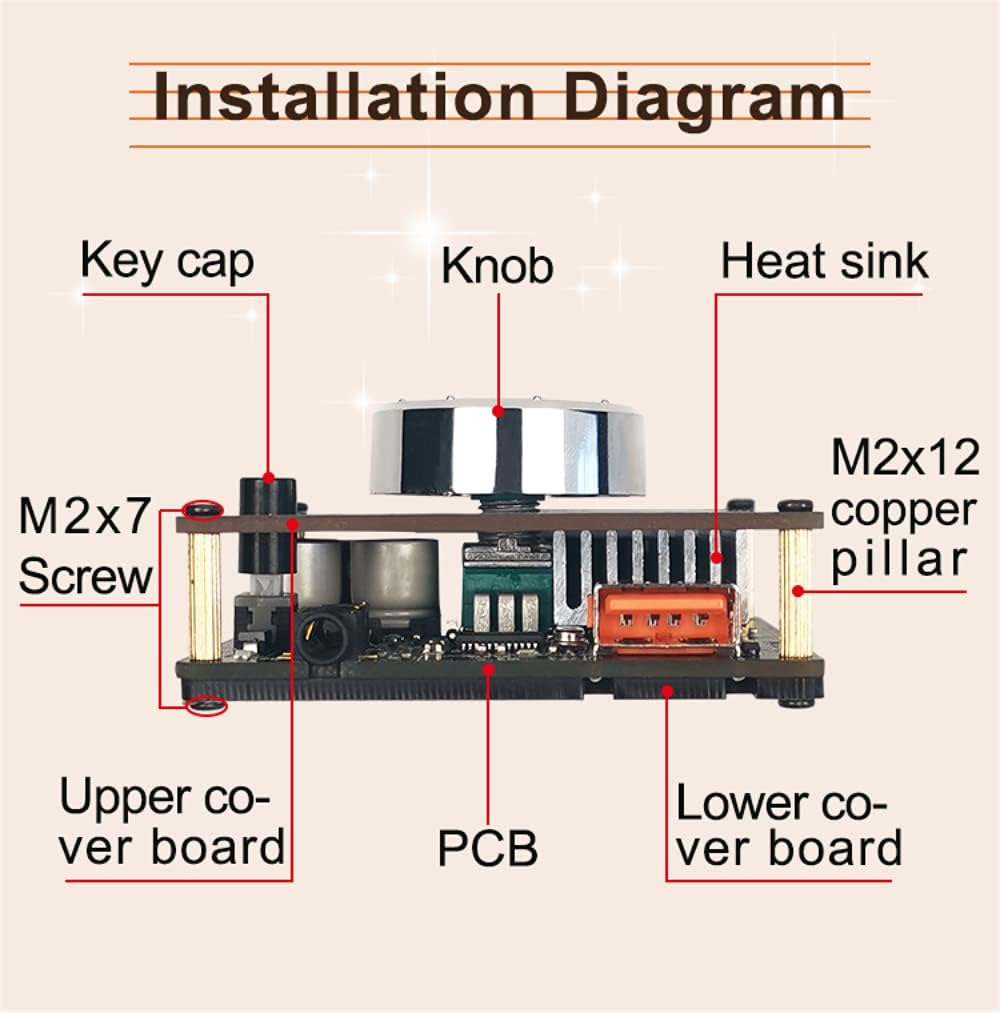
Figure 5.1: Installation diagram detailing the components and their assembly order.
5.2. Connections
Before connecting, ensure the module is powered off.
- Power Supply: Connect a DC 5-24V power adapter to the 'DC5-24V' input port. The recommended voltage for high power output is 24V.
- Speakers: The module supports both passive and active speakers.
- For passive speakers (10-100W, 4-8Ω), connect them to the 'L' (Left) and 'R' (Right) screw terminals. Ensure correct polarity (+/-).
- For active speakers, connect them to the 'AUX OUT' 3.5mm jack.
Note: Do not connect both passive and active speakers simultaneously.
- Audio Input: Choose one of the following input methods:
- USB Flash Disk: Insert a USB flash drive into the 'USB IN' port. The drive must be formatted as FAT32 and have a maximum capacity of 32GB.
- Computer USB: Connect the module directly to a computer's USB port using a USB cable. This acts as a plug-and-play audio input.
- AUX IN: Connect an audio source (e.g., smartphone, MP3 player) to the 'AUX IN' 3.5mm jack using an audio cable.
6. Operating Instructions
6.1. Power On/Off
Press the 'ON/OFF' button located on the front panel to power the module on or off.
6.2. Input Mode Selection
The ZK-502M automatically prioritizes audio inputs in the following order:
- USB Input: If a USB flash drive or computer USB connection is detected, the module will automatically switch to USB input mode.
- AUX Input: If no USB input is active, the module will check for an audio signal from the 'AUX IN' port.
- Bluetooth Mode: If neither USB nor AUX input is detected, the module will automatically enter Bluetooth pairing mode.
6.3. Bluetooth Pairing
When the module is in Bluetooth mode:
- Enable Bluetooth on your audio device (e.g., smartphone, tablet).
- Search for available Bluetooth devices.
- Select 'Wuzhi Audio' from the list to pair.
- Once paired, audio from your device will be streamed to the amplifier. The Bluetooth version is 5.0, offering a stable connection up to 15 meters without obstructions.
6.4. Volume Control
Rotate the large central knob on the front panel clockwise to increase the volume and counter-clockwise to decrease it.
7. Specifications

Figure 7.1: Physical dimensions of the ZK-502M module.
| Feature | Specification |
|---|---|
| Brand | DollaTek |
| Model | ZK-502M |
| Audio Input | Bluetooth + AUX + USB Flash Disk + Computer USB (Plug and Play) |
| Power Supply | DC 5-24V (24V recommended for high power) |
| Adapter Speaker | 10-100W; 4-8Ω |
| Channels | Stereo (Left and Right) |
| Bluetooth Version | 5.0 (> 15 meters without occlusion) |
| Protection Mechanisms | Overheating, Overcurrent, Short Circuit |
| Dimensions | 60mm x 60mm x 29mm |
| Max USB Flash Disk Capacity | 32GB (FAT32 format) |
| Output Power (Peak) | 100W (50W + 50W) |
8. Troubleshooting
- No Power:
- Check if the power adapter is correctly connected and providing DC 5-24V.
- Ensure the ON/OFF switch is pressed.
- No Sound:
- Verify all speaker connections are secure and correctly polarized.
- Confirm the correct audio input mode is active (USB, AUX, or Bluetooth).
- Adjust the volume knob.
- Ensure speakers are compatible (4-8Ω impedance).
- Bluetooth Connection Issues:
- Ensure no USB or AUX input is currently active, as they take priority.
- Restart the amplifier module and your Bluetooth device.
- Check if 'Wuzhi Audio' is visible in your device's Bluetooth pairing list.
- Distorted Sound:
- Reduce the volume level.
- Ensure your speakers' impedance matches the recommended 4-8Ω.
- Verify the power supply is adequate, especially for higher volume levels (a 24V supply is recommended for maximum output).
- USB Flash Drive Not Recognized:
- Confirm the USB flash drive is formatted as FAT32.
- Ensure the capacity does not exceed 32GB.
9. Maintenance
- Keep the module clean by wiping it with a soft, dry cloth. Avoid using liquid cleaners.
- Ensure proper ventilation around the module to prevent overheating.
- Avoid exposing the device to direct sunlight, high humidity, or dusty environments.
- Do not attempt to disassemble the module beyond the initial assembly steps.
10. Warranty and Support
For warranty information, technical support, or service inquiries, please refer to the retailer from whom you purchased the DollaTek ZK-502M module. It is advisable to retain your purchase receipt as proof of purchase for any warranty claims.
