1. Introduction
Thank you for choosing the JISULIFE Desk Fan FA19. This portable and rechargeable electric table fan is designed to provide strong, quiet airflow for various environments, including offices, rooms, and travel. Featuring a 4000mAh battery, 4 adjustable speeds, and a compact design, it offers convenient personal cooling. Please read this manual thoroughly before use to ensure proper operation and maintenance.
2. Safety Instructions
- Do not insert fingers or any objects into the fan grill while it is operating.
- Keep the fan away from water or other liquids to prevent electric shock.
- Do not disassemble, repair, or modify the fan yourself. Contact customer support if service is needed.
- Keep out of reach of children.
- Ensure the fan is placed on a stable surface to prevent tipping.
- Do not use the fan in excessively humid or dusty environments.
- Use only the provided USB-C charging cable.
3. Package Contents
- JISULIFE Desk Fan FA19 (mini turbo fan)
- USB-C Charging Cable
- Instruction Manual
4. Product Features
- Max 15H Long Battery Life: Powered by a 4000mAh rechargeable battery, providing 5-15 hours of continuous operation depending on speed.
- 4 Speeds Adjustable & Strong Airflow: Offers soft breeze, gentle wind, strong wind, and night breeze settings. Equipped with 7 fan blades and a copper brushless motor for powerful, stable airflow.
- Flexible and Thin Design: Features a handle for easy portability and a small parallel hexahedron base for space-saving placement. Can also be hung on a wall.
- Silent Noise Reduction Tech: Constructed with acoustic composite material and a top-mounted anechoic motor, ensuring noise levels below 30dB.
- 18cm Oversized Fan and Washable Design: The fan assembly supports 330° vertical rotation for directed airflow. The front cover is easily removable for cleaning.
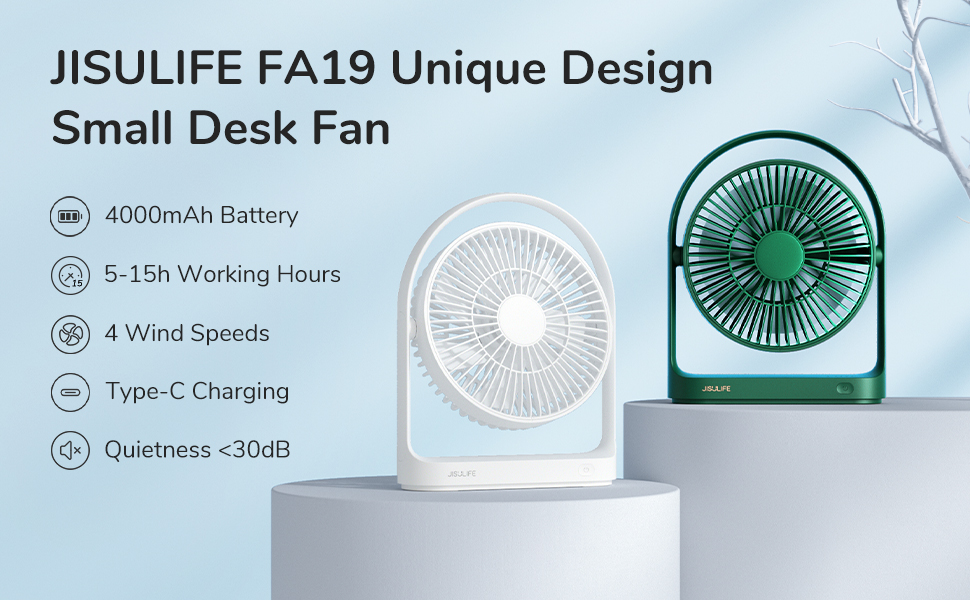
Image: JISULIFE Desk Fan highlighting its 4000mAh battery and Type-C fast charging capability.

Image: JISULIFE Desk Fan emphasizing its powerful, quiet, and compact nature with an 18cm fan.

Image: Close-up of the JISULIFE Desk Fan's non-slip silicone base for stability.

Image: Illustration of the fan's seven airfoil blades and 30-degree grill design for efficient airflow.

Image: The JISULIFE Desk Fan showing its capability for 330-degree vertical rotation.
5. Setup
- Unfold the Stand: Gently pull out the integrated stand at the back of the fan to position it on a flat surface. The stand allows for adjustable angles.
- Wall Mounting (Optional): The fan's design allows it to be hung on a wall using the integrated handle. Ensure a secure mounting point.
- Initial Charge: Before first use, fully charge the fan using the provided USB-C cable.
6. Operating Instructions
- Power On/Off: Short press the power button located on the fan's base to turn the fan on. Short press again to cycle through speeds or long press to turn off.
- Adjusting Fan Speeds: The fan offers 4 speed settings: soft breeze, gentle wind, strong wind, and night breeze. Short press the power button to cycle through these speeds.
- Adjusting Airflow Direction: Manually tilt the fan head up or down to adjust the airflow direction within its 330° vertical rotation range.
- Charging the Fan: Connect the provided USB-C cable to the charging port on the fan's base and to a compatible USB power source. A full charge takes approximately 3-4 hours.
- Using as a Power Bank: The fan's 4000mAh battery can also be used to charge other USB-powered devices. Connect your device's charging cable to the USB-A output port on the fan.

Image: The JISULIFE Desk Fan illustrating its four adjustable wind speed settings.
7. Maintenance
- Cleaning the Fan: The front cover of the fan can be easily removed for cleaning. Gently twist or unclip the front cover to detach it. Use a soft, dry cloth to wipe the fan blades and grill. Do not use abrasive cleaners or solvents.
- Reassembly: After cleaning, align the front cover with the fan body and gently press or twist until it clicks securely into place.

Image: The JISULIFE Desk Fan demonstrating its removable front cover for convenient cleaning.
8. Troubleshooting
- Fan not turning on: Ensure the battery is charged. If not, connect the USB-C cable to a power source.
- Weak airflow: Check if the fan grill or blades are obstructed by dust or debris. Clean the fan as per maintenance instructions.
- Unusual noise: Ensure the fan is placed on a stable surface. Check for any foreign objects caught in the fan blades.
- Charging issue: Verify that the USB-C cable and power source are working correctly. Try a different cable or adapter.
9. Specifications
| Feature | Detail |
|---|---|
| Brand | JISULIFE |
| Model Name | mini turbo fan |
| Power Source | Battery Powered |
| Battery Capacity | 4000mAh (2 Lithium Ion batteries included) |
| Charging Port | USB Type C |
| Number of Power Levels | 4 |
| Noise Level | 30 Decibels |
| Motor Type | Brushless |
| Number of Blades | 7 |
| Blade Length | 7.09 Inches |
| Product Dimensions | 7.17"D x 2.36"W x 8.98"H |
| Item Weight | 15.2 ounces (430 Grams) |
| Mounting Type | Free Standing |
| Installation Type | Portable |
| Manufacturer | Shenzhen Jisu Technology Co., Ltd. |
10. Warranty & Support
For warranty information or technical support, please refer to the product packaging or contact JISULIFE customer service directly. Keep your purchase receipt for warranty claims.