
1. Introduction
This manual provides comprehensive instructions for the safe and effective use of your PROHEAR 030 Bluetooth Electronic Shooting Hearing Protection Muffs. These earmuffs are designed to protect your hearing from loud noises while allowing you to hear ambient sounds and communicate, featuring Bluetooth connectivity for audio streaming.

Image: PROHEAR 030 Bluetooth Electronic Shooting Hearing Protection Muffs, black color, shown from a slight angle.
2. Product Overview
The PROHEAR 030 earmuffs combine advanced hearing protection with modern connectivity features. Key components and features include:
- Bluetooth 5.4 Technology: Provides a stable wireless connection with a range of up to 33 feet (10 meters) for streaming audio from compatible devices.
- Noise Reduction Rating (NRR) 22dB / Signal-to-Noise Ratio (SNR) 27dB: Effectively reduces harmful noises exceeding 82dB.
- Sound Amplification: Recessed microphones amplify low-level environmental sounds, enhancing communication and situational awareness.
- Comfortable Design: Lightweight (0.63lb) with ultra-soft cushioned gel ear pads and a padded, adjustable headband for extended wear.
- Compact Folding Design: Allows for easy storage and portability.
- Power Source: Requires 2 AAA batteries (not included).

Image: A detailed diagram highlighting the components of the PROHEAR 030 earmuffs, including the Bluetooth/Audio Sync Button, BT LED Signal, Bluetooth/Audio Volume Knob, Power On/Off Volume Control Knob, Audio Input, Battery Compartment, and Gel Ear Pads.
3. Setup
3.1 Battery Installation
- Locate the battery compartment on one of the earmuff cups.
- Open the battery compartment cover.
- Insert 2 AAA batteries, ensuring correct polarity (+/-).
- Close the battery compartment cover securely.
3.2 Fitting the Earmuffs
For optimal hearing protection and comfort, proper fit is essential.
- Extend the headband by pulling the ear cups downwards.
- Place the earmuffs over your ears, ensuring the ear cups fully enclose your ears.
- Adjust the headband by sliding the ear cups up or down until the headband rests comfortably on the top of your head and the ear pads create a snug seal around your ears.
- Ensure no hair or clothing interferes with the seal of the ear pads against your head.

Image: A close-up view of the PROHEAR 030 earmuffs highlighting the padded headband, ultra-soft gel ear pads, and the adjustable telescopic design for maximum comfort and fit.
4. Operating Instructions
4.1 Power On/Off and Ambient Volume Control
- To power on the earmuffs, rotate the Power On/Off Volume Control Knob clockwise. You will hear an audible indication.
- Continue rotating the knob clockwise to increase the amplification of ambient sounds. Rotate counter-clockwise to decrease amplification.
- To power off the earmuffs, rotate the knob counter-clockwise until it clicks off.
4.2 Bluetooth Pairing and Audio Control
- With the earmuffs powered on, press and hold the Bluetooth/Audio Sync Button until the BT LED Signal light flashes, indicating pairing mode.
- On your Bluetooth-enabled device (e.g., smartphone, tablet), search for available Bluetooth devices and select "EM030BT".
- Once paired, the BT LED Signal light will remain solid. You can now stream audio to your earmuffs.
- Use the Bluetooth/Audio Volume Knob to adjust the volume of streamed audio.
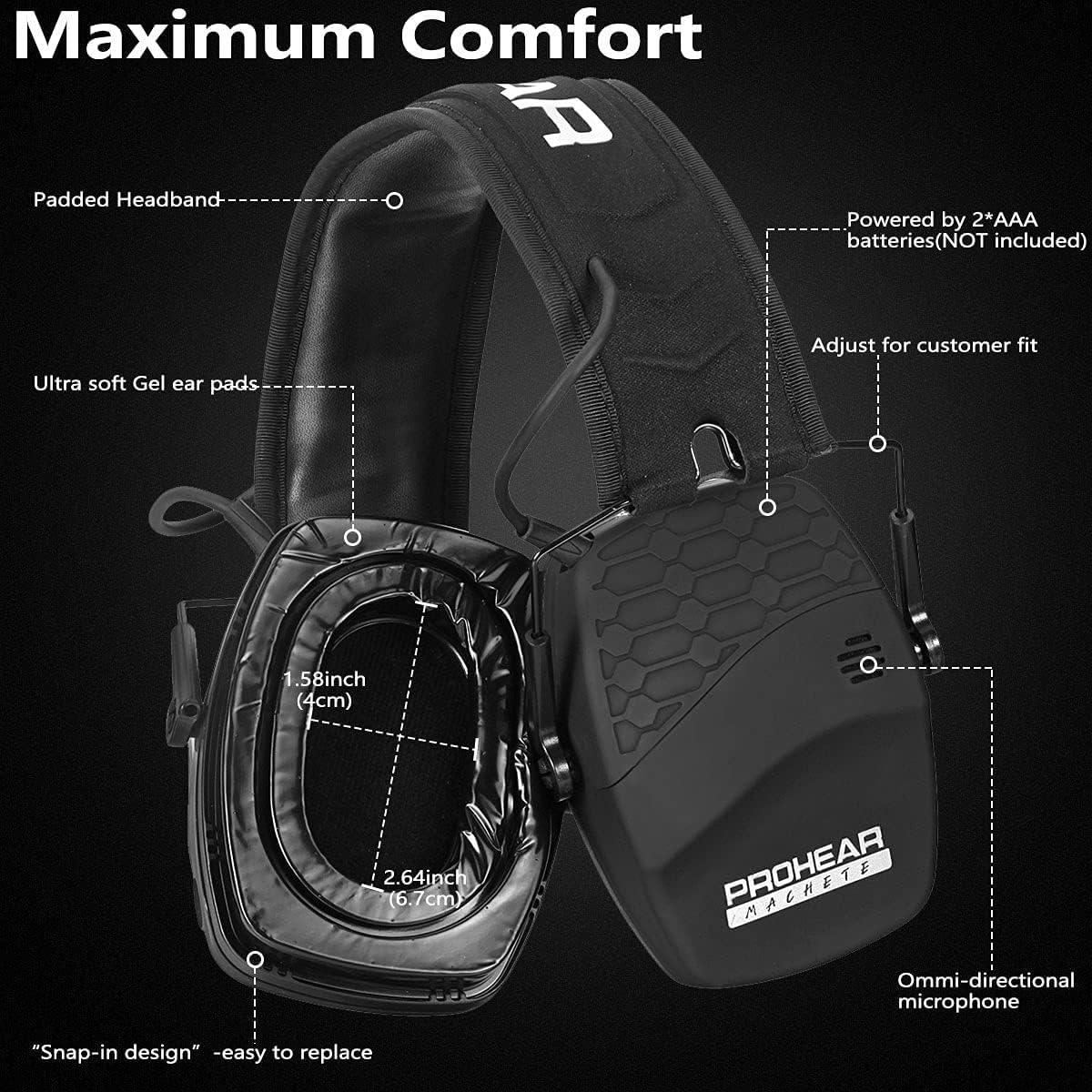
Image: Illustration demonstrating the two audio modes: Audio Input mode via a 3.5mm connection cord and Bluetooth Mode, showing a successful connection to a smartphone.
4.3 Sound Amplification for Situational Awareness
The earmuffs feature active listening mode, which amplifies low-level sounds while simultaneously reducing loud noises above 82dB. This allows for enhanced communication and awareness in environments like shooting ranges or hunting grounds.

Image: Two individuals wearing PROHEAR 030 earmuffs in a shooting environment, illustrating the active listening mode with separate volume controls for ambient sound and Bluetooth audio.
5. Maintenance
5.1 Cleaning
Regular cleaning helps maintain the performance and longevity of your earmuffs.
- Wipe the exterior of the earmuffs with a soft, damp cloth.
- Do not immerse the earmuffs in water or use abrasive cleaners.
- Clean the ear pads with a mild soap solution and allow them to air dry completely before reattaching.
5.2 Ear Pad Replacement
The gel ear pads are designed for easy replacement to ensure continued comfort and acoustic seal.
- Gently pull the old ear pads away from the ear cup until they detach.
- Align the new ear pads with the ear cup and press firmly around the edges until they snap securely into place.

Image: A pair of PROHEAR GEP02 gel ear pads, emphasizing their design for good sealing and comfort.
6. Troubleshooting
If you encounter issues with your PROHEAR 030 earmuffs, please refer to the following common solutions:
- No Power: Ensure batteries are correctly installed and not depleted. Replace with fresh AAA batteries if necessary.
- No Sound Amplification: Check if the earmuffs are powered on and the ambient volume knob is turned up.
- Bluetooth Not Connecting: Ensure the earmuffs are in pairing mode (flashing BT LED). Turn off and on your device's Bluetooth, then try pairing again. Ensure your device is within the 33ft (10m) range.
- Poor Noise Reduction: Verify that the earmuffs are properly fitted and the ear pads form a tight seal around your ears. Adjust the headband as needed. Check for wear or damage on the ear pads; replace if necessary.
- Distorted Audio: Adjust the volume on both the earmuffs and your connected Bluetooth device. Ensure there is no interference from other electronic devices.
7. Specifications
| Feature | Detail |
|---|---|
| Model Number | EM030 |
| Noise Reduction Rating (NRR) | 22dB |
| Signal-to-Noise Ratio (SNR) | 27dB |
| Bluetooth Version | 5.4 |
| Wireless Range | 33ft / 10m |
| Power Source | 2 x AAA Batteries (not included) |
| Item Weight | 10.1 ounces (0.63 lbs) |
| Product Dimensions | 4.52 x 3.54 x 4.92 inches |
| Material | Durable & solid ABS plastic, Ultra-soft ear cushions and headband |
8. Warranty and Support
8.1 Warranty Information
PROHEAR provides a 1-year warranty for the PROHEAR 030 Electronic Shooting Hearing Protection Muffs. This warranty covers manufacturing defects and ensures the product meets its specified performance standards.
8.2 Customer Support
For any questions, suggestions, or issues regarding your PROHEAR 030 earmuffs, please contact our customer support team. We are available 24/7 to assist you.
- Via Amazon: Contact us through the Amazon platform where you purchased the product.
- Via Email: Send an email to support@proheartac.com.


