
NOHAWK NK-600
NOHAWK NK-600 High Precision Telescope Laser Rangefinder User Manual
Model: NK-600
Introduction
The NOHAWK NK-600 Laser Rangefinder is a high-performance device designed for accurate distance measurement in various outdoor activities such as golf, hunting, sporting events, marine operations, and field surveys. It integrates advanced technology to provide precise measurements of distance, area, and speed, enhancing user experience and efficiency.
This manual provides detailed instructions for the setup, operation, maintenance, and troubleshooting of your NK-600 Laser Rangefinder. Please read it thoroughly before using the device to ensure optimal performance and safety.
Product Overview

Front view of the NOHAWK NK-600 Laser Rangefinder, showing the objective lenses and the NOHAWK branding.

Rear view of the NOHAWK NK-600 Laser Rangefinder, highlighting the eyepiece and the USB charging port.
Key Features:
- High Performance Laser Range Finder: Utilizes advanced PinSensor technology for quick and accurate flagpole locking within 1 second, with a range up to 600 yards. Features a Transmissive LCD digital display for clear data.
- Multiple Measurement Modes: Supports Ranging Mode, Scanning Measurement Mode, Golf Mode, Two Points Height Measurement Mode, Angle Measurement Mode, Height Measurement Mode, Speed Measurement Mode, and Storage Mode.
- Golf Mode with Slope Compensation: Provides Golf Distance Compensation Mode, recommending adjusted hitting distances based on positive or negative slopes. Includes Pin-Seeking and Flagpole-Locking Vibration for enhanced golf play.
- Fast and Accurate Measurement: Measurement accuracy within ±1 yard, with a speed of less than 1 second. Capable of switching between Meters/Yards. Speed Measurement Mode measures object speed in KM/H.
- Portable and Durable Design: Lightweight (140g) and compact (96 x 67 x 34 mm) for easy portability. Features multilayer coated lenses for clear viewing and is USB rechargeable.
Setup
Charging the Device:
The NK-600 rangefinder is USB rechargeable. Before first use, ensure the device is fully charged. Connect the provided USB cable to the charging port on the device and to a standard USB power source (e.g., computer USB port, wall adapter).

Illustration of the NK-600 rangefinder's components, including the Mode button, Objective lens, Eyepiece, Battery compartment, and Slope ON/OFF Switch.
Initial Power On:
- Press the "Mode" button (usually marked with a power symbol) to turn on the device.
- The Transmissive LCD digital display will illuminate, showing the current measurement mode and battery status.
Unit Selection (Meters/Yards):
To switch between Meters (M) and Yards (Y), typically press and hold the "Mode" button or a dedicated unit button while the device is on until the unit changes on the display.
Operating Instructions
General Measurement (Ranging Mode):
- Look through the eyepiece.
- Aim the crosshairs at the target.
- Press the power/measurement button once to get a single distance reading. The measurement will appear on the display.
Scanning Measurement Mode:
This mode allows continuous measurement of distance, angle, height, and horizontal distance by scanning across multiple targets. Press and hold the measurement button while sweeping the device across the desired area. The display will update continuously.

Visual representation of the display in All-in-one machine mode and Scanning measurement mode, showing continuous distance updates.
Golf Mode (Slope Compensation & Flagpole Locking):
The Golf Mode provides distance compensation based on terrain slope and features flagpole locking with vibration feedback.
- Activate Golf Mode using the "Mode" button.
- Slope ON/OFF: Use the dedicated Slope ON/OFF switch (refer to Product Overview image) to enable or disable slope compensation. When slope is ON, the device calculates an adjusted distance.
- Flagpole Locking: Aim at the flagpole. The PinSensor technology will lock onto the flagpole, and the device will vibrate to confirm the lock, displaying the accurate distance.

Illustration of how the Golf Slope Adjusted Mode works, showing the difference between straight line measurement and slope-compensated distance for accurate hitting.
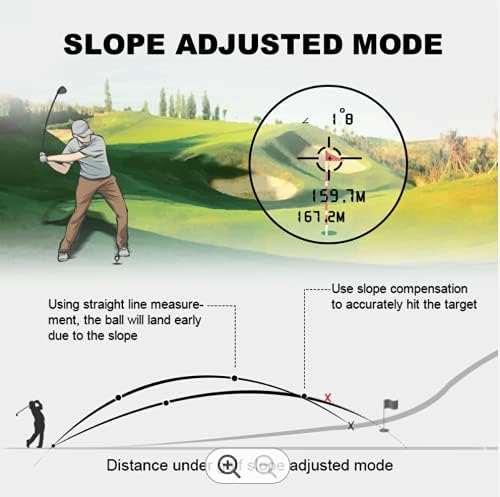
Visual comparison of Slope ON and Slope OFF modes in Golf, demonstrating how the rangefinder provides a compensated distance based on actual slope.

Demonstration of the Flagpole Locking feature using advanced PinSensor Technology, which helps in measuring overlapping subjects accurately.
Speed Measurement Mode:
This mode measures the speed of objects moving in a radial direction relative to the rangefinder. The unit of measurement is Kilometers per Hour (KM/H).
- Select Speed Measurement Mode.
- Aim at the moving object.
- Press the measurement button to obtain the speed reading.
Other Modes:
- Two Points Height Measurement Mode: Measures height between two points.
- Angle Measurement Mode: Measures the angle to a target.
- Height Measurement Mode: Measures the height of a target.
- Storage Mode: Allows for saving measurement data. Refer to the device's on-screen menu for specific instructions on using this feature.

An overview of the multi-purpose capabilities of the rangefinder, illustrating different modes such as Single Ranging, Golf, Speed, Two Point Altimetry, Scan, and All-in-one.
Maintenance
Cleaning:
- Use a soft, clean cloth to wipe the exterior of the device.
- For lenses, use a lens cleaning cloth and solution specifically designed for optical surfaces. Avoid abrasive materials that could scratch the lenses.
- Do not use strong detergents or solvents.
Storage:
- Store the rangefinder in a cool, dry place away from direct sunlight and extreme temperatures.
- If storing for an extended period, ensure the battery is partially charged (around 50%) to prolong battery life.
- Keep the device in its protective case (if provided) to prevent dust and physical damage.
Battery Care:
- Recharge the device when the battery indicator shows low power.
- Avoid completely draining the battery frequently, as this can reduce its lifespan.
- Use only the provided USB cable or a compatible high-quality USB cable for charging.
Troubleshooting
| Problem | Possible Cause | Solution |
|---|---|---|
| Device does not power on. | Battery is depleted. | Charge the device using the USB cable. |
| Inaccurate measurements. | Lens is dirty; Target is too small or reflective; Environmental interference (fog, heavy rain). | Clean the lenses; Ensure target is suitable; Avoid use in extreme weather conditions. |
| Display is dim or unreadable. | Low battery; Extreme temperature. | Recharge battery; Operate within specified temperature range. |
| Flagpole locking not working. | Target not isolated; Device not stable. | Ensure the flagpole is clearly visible and isolated from background objects; Hold the device steady. |
Specifications
| Feature | Detail |
|---|---|
| Brand | NOHAWK |
| Model | NK-600 |
| Measurement Accuracy | ±1 yard |
| Measurement Speed | < 1 second |
| Magnification Maximum | 6x |
| Dimensions (L x W x H) | 96 x 67 x 34 mm (3.78"L x 1.34"W x 2.64"H) |
| Weight | 140g (0.41 Pounds) |
| Color | White |
| International Protection Rating | IP54 |
| Power Source | USB Rechargeable |
| UPC | 691037419790 |
Warranty Information
Specific warranty details for the NOHAWK NK-600 Laser Rangefinder are typically provided with the product packaging or on the manufacturer's official website. Please refer to these sources for the most accurate and up-to-date warranty terms and conditions. Generally, warranties cover manufacturing defects for a specified period from the date of purchase.
Please retain your proof of purchase for any warranty claims.
Customer Support
For technical assistance, troubleshooting beyond this manual, or warranty inquiries, please contact NOHAWK customer support. Contact information can usually be found on the product packaging, the manufacturer's official website, or the retailer's support page where the product was purchased.
When contacting support, please have your product model (NK-600) and purchase details ready to facilitate a quicker resolution.
Related documentsNK-600

Ask a question about this manual
Ask about setup, troubleshooting, compatibility, parts, safety, or missing instructions. Manuals+ will review the question and use this page’s manual context to help answer it.