
ExpertPower C15LBXLFP12_100B3
ExpertPower 2.5KWH 12V Solar Power Kit User Manual
Brand: ExpertPower | Model: C15LBXLFP12_100B3
Introduction
This manual provides essential information for the safe and efficient operation of your ExpertPower 2.5KWH 12V Solar Power Kit. This comprehensive off-grid solar system is designed to provide reliable power for various applications, including RVs, trailers, campers, marine vessels, and other off-grid setups. It features advanced LiFePO4 battery technology, high-efficiency monocrystalline solar panels, and an intelligent inverter charger with MPPT solar charge controller.
Please read this manual thoroughly before installation and use to ensure proper setup, maximize performance, and maintain product longevity.
Product Components
Your ExpertPower 2.5KWH 12V Solar Power Kit includes the following main components:
- Two (2) 12V 100Ah LiFePO4 Bluetooth Batteries
- Four (4) 100W Monocrystalline Solar Panels
- One (1) 3000W Pure Sine Wave Inverter Charger
- One (1) 30A MPPT Solar Charge Controller with Bluetooth
- One (1) pair of 20ft 10AWG Panel-Controller Cables
- One (1) pair of 6ft 12AWG Controller-Battery Cables
- One (1) Y Branch Adapter
- Four (4) sets of Solar Panel Mounting Brackets

Figure 1: Overview of the ExpertPower 2.5KWH 12V Solar Power Kit components.
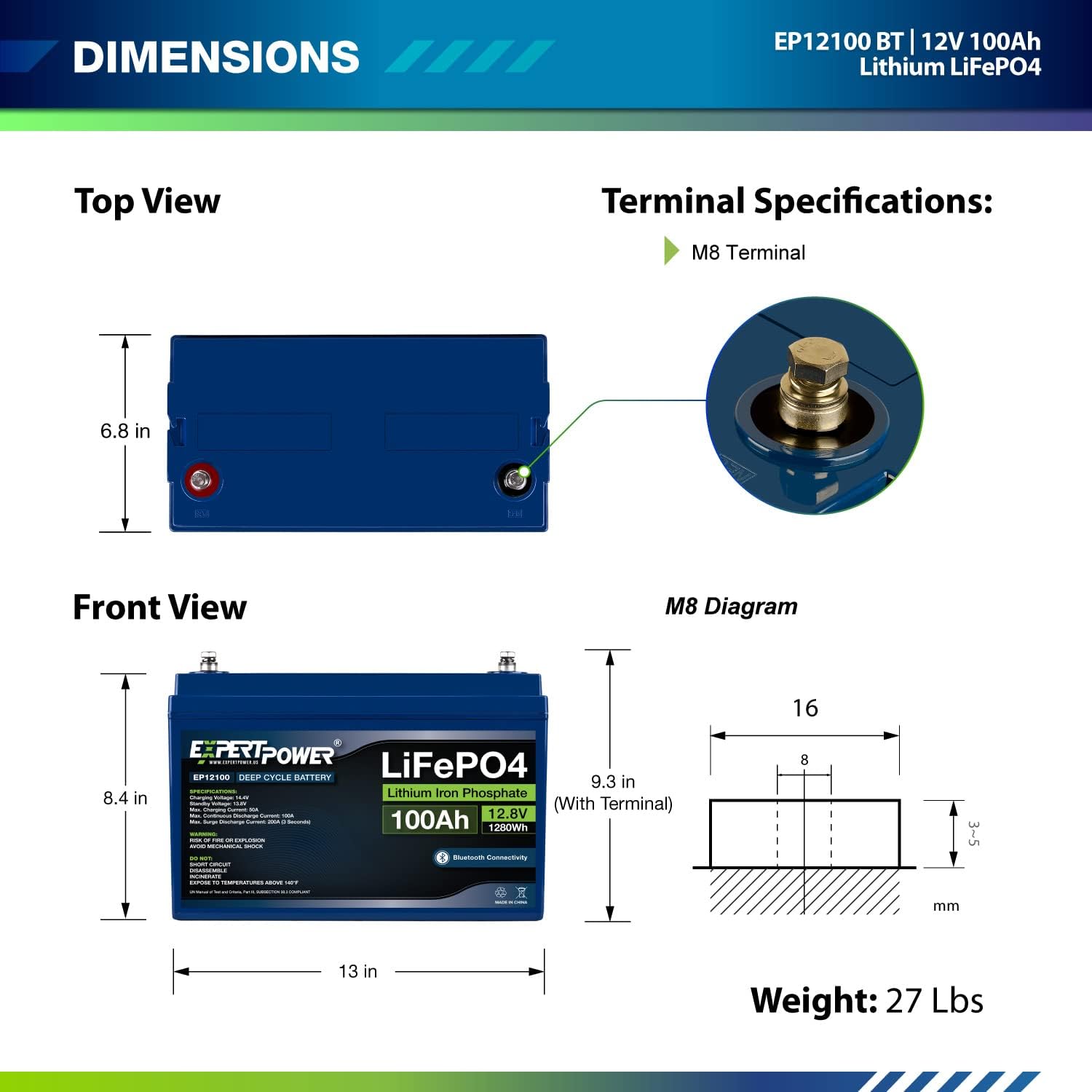
Figure 2: Detailed dimensions and terminal specifications for the ExpertPower 12V 100Ah LiFePO4 battery.

Figure 3: Front and back panel features of the ExpertPower 3000W Pure Sine Wave Inverter Charger, including input/output ports and controls.

Figure 4: Key protective features of the ExpertPower 30A MPPT Solar Charge Controller, such as short-circuit and overload protection.

Figure 5: The Bluetooth app interface for the solar charge controller, showing real-time monitoring and historical data.
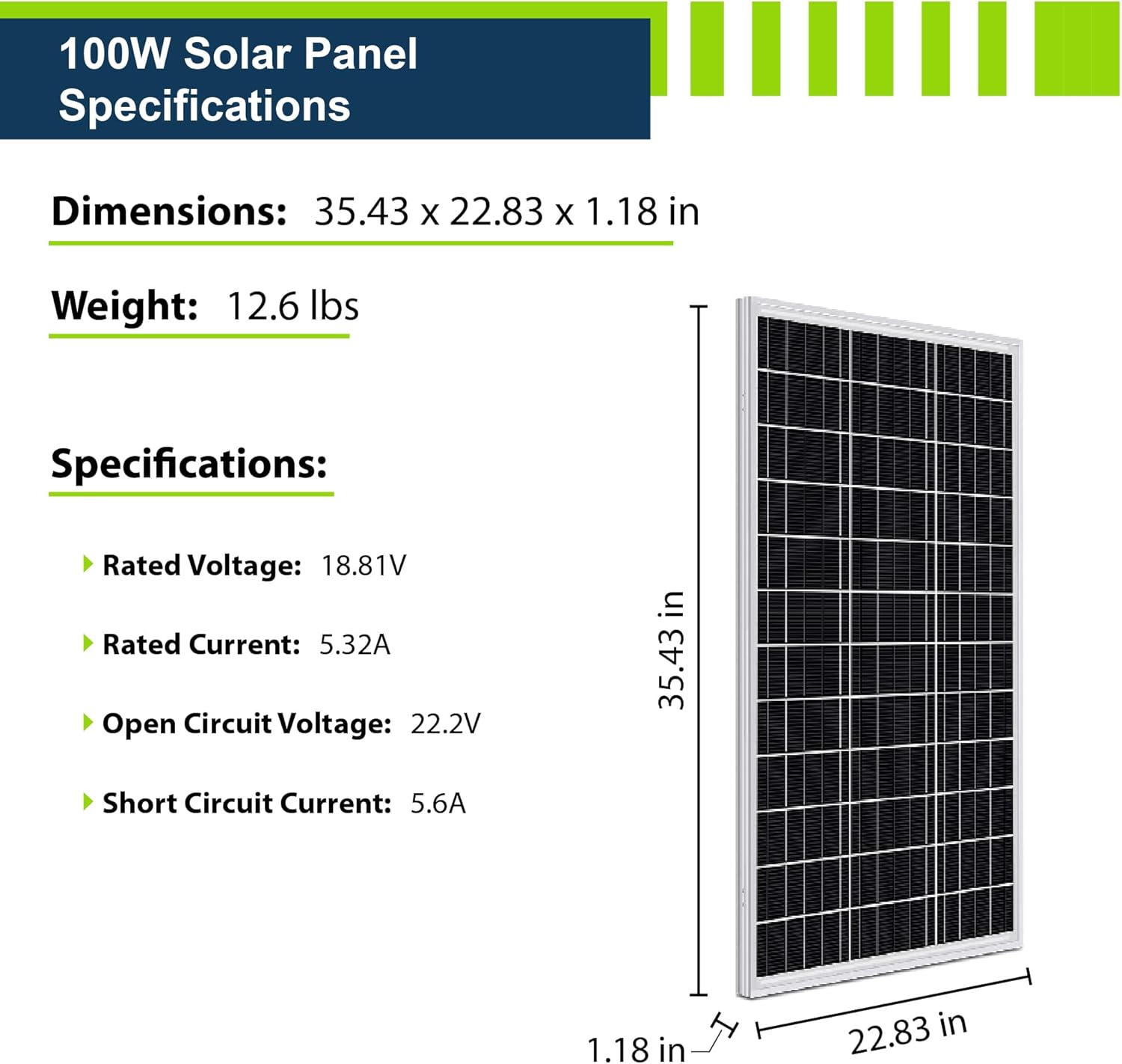
Figure 6: Detailed specifications and physical dimensions of the 100W Monocrystalline Solar Panel.
Setup and Installation
Proper installation is crucial for the safety and performance of your solar power kit. It is highly recommended that installation be performed by a qualified RV technician or electrician if you are not experienced with electrical systems. This diagram is a general guide and does not replace professional advice or local electrical codes.
General Connection Diagram

Figure 7: Basic connection diagram illustrating how the solar panels, charge controller, inverter charger, and battery bank integrate into an RV power system.
Detailed Wiring Steps
- Solar Panel Preparation: Before installation, cover your solar panels to prevent exposure to sunlight and accidental power generation.
- Panel Wiring:
- Connect panels in series or parallel as required for your system voltage.
- Use the provided Y-Branch Cables to combine multiple panels if connecting in parallel.
- Connect the Y-Branch cables to the main MC4 lead cables.
- Controller-Battery Connection: Connect the 6ft 12AWG Controller-Battery Cables to the appropriate positive and negative terminals on the MPPT Solar Charge Controller. Use a screwdriver to secure them.
- Battery Connection: Connect the other end of the 6ft 12AWG Controller-Battery Cables to the battery terminals. Ensure correct polarity (positive to positive, negative to negative). This step will power on your Solar Charge Controller.
- Controller-Panel Connection: Connect the 20ft 10AWG Panel-Controller Cables from your solar array to the appropriate positive and negative terminals on the MPPT Solar Charge Controller. Use a screwdriver to secure them.
- Inverter-Charger to Battery: Connect the Inverter-Charger to the battery bank. Ensure proper gauge cables are used for high current applications. (Note: Battery connection cables are not included in the kit and must be sourced separately, along with appropriate fuses/breakers).
- Inverter-Charger Switch Panel: Connect the Inverter Switch Panel to the Inverter-Charger. Ensure the Switch Panel is in the OFF position during installation.
- Inverter-Charger Settings: Set the Dial and Switches on the front of the Inverter-Charger based on your Battery Type (e.g., LiFePO4) and preferred AC/DC priority. Refer to the inverter's specific manual for detailed settings.
- Optional Shore Power Connection: If using shore power, connect it to the AC Input on the back of the Inverter-Charger. After wiring, power on the Inverter-Charger using the Switch Panel for a brief period to check connectivity.
- AC Output Connection: Connect your AC appliances or AC distribution panel to the AC Output terminals on the Inverter-Charger.
- Final Check: Ensure all cables are securely connected and polarity is correct. Remove any covers from solar panels and expose them to sunlight. Then, turn on the Inverter-Charger.

Figure 8: Step-by-step detailed wiring diagram for connecting solar panels, charge controller, batteries, and inverter charger.
Important Safety Note: Working with electricity is dangerous. The installation should be performed by a qualified technician or electrician. Doing it yourself could cause serious injury or death and may void your RV warranty/insurance. This diagram is a general guide meant to educate in the construction of a typical solar array and should not be taken as direct instruction without understanding electrical safety. Fuses and circuit breakers are essential for safety and must be installed appropriately.
Operating Instructions
MPPT Solar Charge Controller Operation
- The 30A MPPT controller automatically detects 12V/24V systems.
- It maximizes solar array power generation by over 20% compared to PWM controllers through sophisticated tracking.
- Bluetooth Connectivity: Utilize the built-in Bluetooth feature to monitor your system via the handy app on your smartphone. The app allows you to track battery State of Charge (SOC), temperature, protection warnings, and other parameters.
- Ensure the controller settings match your battery's voltage and composition type (LiFePO4).
Pure Sine Wave Inverter Charger Operation
- The 3000W Pure Sine Wave Inverter/40A Charger is compatible with various battery systems, including LiFePO4, with 8 selectable profiles.
- UPS Functionality: The inverter features built-in UPS functionality, automatically switching between shore power and battery power in approximately 5ms, ensuring continuous power supply to connected AC loads.
- Monitor the LCD screen and LED indicators on the inverter for operational status.
- Use the AC/DC Priority Switch to set your preferred power source.
Battery Management System (BMS)
- The LiFePO4 batteries have a built-in BMS that protects against overcharge, deep discharge, overloading, overheating, and short circuits.
- A built-in low-temp cut-off prevents charging under 23°F (-5°C) to protect the battery.
- The batteries support expansion up to 10 units, either in series (for 48V 100Ah) or in parallel (for 12V 1000Ah).
Video 1: An overview of ExpertPower Solar Kits, demonstrating their application and key features. This video provides a visual summary of the system's capabilities.
Maintenance
- Battery Care: LiFePO4 batteries require minimal maintenance due to their low self-discharge rate, allowing up to 1 year of maintenance-free storage. Avoid charging below 23°F (-5°C) to prevent damage.
- Solar Panel Cleaning: Regularly clean the surface of your solar panels to remove dust, dirt, and debris. A clean panel ensures maximum sunlight absorption and efficiency. Use a soft cloth and water.
- Connection Checks: Periodically inspect all electrical connections (cables, terminals, fuses, breakers) for tightness, corrosion, or damage. Loose connections can lead to power loss or overheating.
- System Monitoring: Regularly check the MPPT controller's display and the Bluetooth app for any error codes or unusual readings. Address any warnings promptly.
- Ventilation: Ensure adequate ventilation around the inverter charger and batteries to prevent overheating. Keep vents clear of obstructions.
Troubleshooting
| Problem | Possible Cause | Solution |
|---|---|---|
| No power output from inverter | Inverter is off; Battery low/dead; Overload; Short circuit; Loose connections. | Ensure inverter is ON. Check battery charge. Reduce load. Inspect wiring and connections. Check for short circuits in connected appliances. |
| Batteries not charging from solar panels | Panels covered/dirty; Insufficient sunlight; Loose panel connections; Faulty charge controller; Battery temperature too low. | Clean panels, ensure full sun exposure. Check all solar panel wiring. Verify charge controller settings and status. Ensure battery temperature is above 23°F (-5°C). |
| Battery not holding charge / Rapid discharge | Excessive load; Battery degradation; BMS protection activated; Parasitic drain. | Reduce power consumption. Check battery health via Bluetooth app. If BMS is active, identify and resolve the cause (e.g., over-discharge). Disconnect loads to check for parasitic drains. |
| Inverter/Controller displaying error codes | Specific system fault (e.g., over-voltage, under-voltage, over-temperature). | Refer to the specific manuals for the inverter and charge controller for error code definitions and troubleshooting steps. |
| Missing Y-branch connectors or other cables | Packaging error or not included in standard kit. | Verify kit contents against the packing list. Contact ExpertPower customer support for assistance. |
Specifications
- Brand: ExpertPower
- Model Number: C15LBXLFP12_100B3
- UPC: 840140942125
- Battery Type: LiFePO4 (Lithium Iron Phosphate)
- Battery Capacity: 12V 100Ah (each, two included)
- Battery Lifetime: 2500 - 7000 cycles, 10 years lifetime
- Solar Panel Type: Monocrystalline Silicon
- Solar Panel Max Power: 100 Watts (each, four included, total 400W)
- Solar Panel Dimensions: 35.43 x 22.83 x 1.18 inches
- Solar Panel Weight: 12.6 lbs (each)
- Inverter Type: Pure Sine Wave Inverter Charger
- Inverter Power: 3000W
- Charge Controller Type: MPPT (Maximum Power Point Tracking)
- Charge Controller Current: 30 Amps
- System Voltage: 12 Volts (auto-detects 12V/24V for controller)
- Connector Type: MC4
- Special Feature: High versatility, efficiency, and complete off-grid solar kit with Bluetooth monitoring.
Warranty and Support
ExpertPower products are designed for durability and performance. The LiFePO4 batteries are rated for 2500 - 7000 cycles and offer a 10-year lifetime, backed by a built-in Battery Management System (BMS) for protection.
For any technical assistance, troubleshooting, or warranty claims, please contact ExpertPower customer support. Refer to the contact information provided with your product packaging or visit the official ExpertPower website. Please have your model number (C15LBXLFP12_100B3) and purchase details ready when contacting support.
Additional protection plans may be available for purchase to extend coverage beyond the standard warranty. Please check with your retailer for details.
Related documentsC15LBXLFP12_100B3


Ask a question about this manual
Ask about setup, troubleshooting, compatibility, parts, safety, or missing instructions. Manuals+ will review the question and use this page’s manual context to help answer it.