
1. Introduction
This manual provides instructions for the safe and efficient use of your Brookstone Portable Mini Personal Fan with Power Bank, Model B-FAN-H300-6CS. This versatile device offers personal cooling with 5 adjustable speeds and includes a detachable power bank for charging other electronic devices.
1.1. Package Contents
- Brookstone Portable Mini Personal Fan (Fan Head and Power Bank Handle)
- Charging Dock
- USB Charging Cord
- Wrist Strap
- Instruction Booklet (this document)
2. Setup
2.1. Initial Charge
Before first use, fully charge the fan's internal battery. Connect the provided USB charging cord to the charging dock and then to a USB power source (e.g., computer, wall adapter). Place the fan into the charging dock. The indicator lights on the fan handle will illuminate to show charging status. A full charge is indicated when all four lights are solid.

The Brookstone fan placed in its white charging dock, which also serves as a stable base for desktop use. A hand is shown interacting with the fan.
2.2. Attaching the Wrist Strap
Thread the loop of the wrist strap through the small opening at the bottom of the fan's handle. Secure the strap by passing the larger end through the loop you just created and pulling it tight.

The Brookstone fan with its integrated wrist strap, shown on a desk next to a laptop. This highlights the fan's portability and ease of use while multitasking.
3. Operating Instructions
3.1. Powering On/Off and Adjusting Speed
The fan features a single control button located on the handle. Press the button repeatedly to cycle through the 5 fan speeds and to turn the fan off.
- 1st Press: Activates Speed 1 (lowest)
- 2nd Press: Activates Speed 2
- 3rd Press: Activates Speed 3
- 4th Press: Activates Speed 4
- 5th Press: Activates Speed 5 (highest)
- 6th Press: Turns the fan off

Brookstone Portable Mini Personal Fan with Power Bank. The fan features a white body, a circular fan head with a protective grille, and a handle. The brand name 'Brookstone' is visible on the fan's center.
3.2. Battery Indicator Lights
Four LED indicator lights on the fan handle display the remaining battery charge. Each light represents approximately 25% of the battery capacity. When all four lights are illuminated, the fan is fully charged.
4. Charging the Fan
The fan can be charged using the included charging dock or directly via the USB charging port on the handle.
4.1. Charging with the Dock
- Connect the USB charging cord to the charging dock.
- Plug the other end of the USB cord into a compatible USB power source.
- Place the fan into the charging dock. Ensure it is seated correctly.
- The indicator lights will show charging progress.
4.2. Direct USB Charging
- Locate the USB charging port on the fan handle.
- Connect the USB charging cord directly to this port.
- Plug the other end of the USB cord into a compatible USB power source.
- The indicator lights will show charging progress.
A full charge provides up to 8 hours of continuous use on the lowest speed setting.
5. Using as a Power Bank
The fan's handle contains a detachable 2600mAh power bank, allowing you to charge personal electronic devices.
5.1. Detaching the Power Bank
Gently twist and pull the fan head from the handle to detach the power bank. The handle itself is the power bank unit.
5.2. Charging External Devices
- With the power bank detached, locate the USB-A output port on the top of the power bank (where the fan head connects).
- Connect your device's charging cable to this USB-A output port.
- Connect the other end of your device's charging cable to your electronic device.
- The power bank will begin charging your device. The indicator lights will show the power bank's remaining charge.
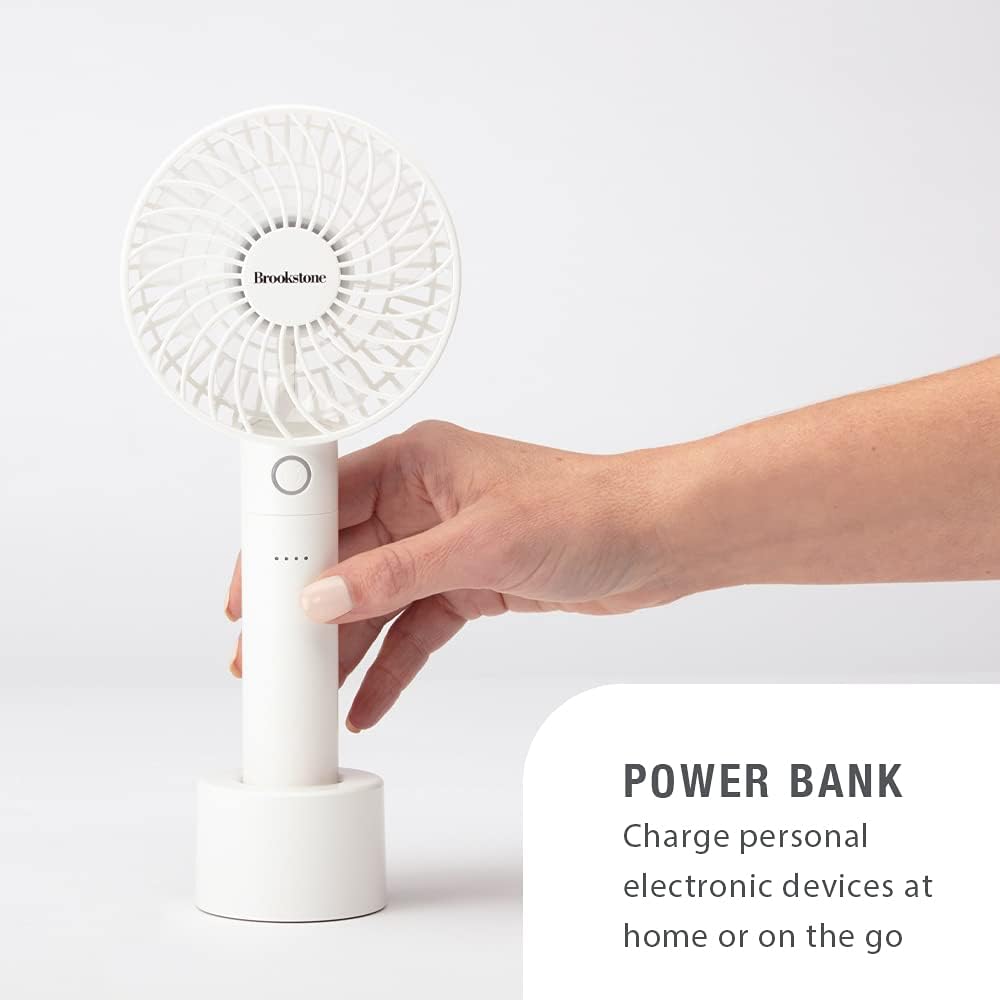
A hand holding the Brookstone fan, demonstrating its use as a power bank. The fan is shown connected to a charging cable, ready to charge another device.
6. Maintenance
6.1. Cleaning
To clean the fan, ensure it is powered off and disconnected from any power source. Use a soft, dry cloth to wipe the exterior surfaces. Do not use abrasive cleaners, solvents, or immerse the fan in water.
6.2. Storage
Store the fan in a cool, dry place away from direct sunlight and extreme temperatures. If storing for an extended period, ensure the battery is partially charged (around 50%) to prolong its lifespan.
7. Troubleshooting
| Problem | Possible Cause | Solution |
|---|---|---|
| Fan does not turn on. | Battery is depleted. | Charge the fan using the charging dock or USB cable. |
| Weak airflow. | Fan is on a low speed setting or battery is low. | Increase the fan speed. Recharge the fan if indicator lights show low battery. |
| Power bank not charging devices. | Power bank battery is depleted or cable is not connected properly. | Ensure the power bank is charged. Verify the charging cable is securely connected to both the power bank and the device. |
| Fan makes unusual noise. | Obstruction in fan blades. | Turn off the fan and carefully check for any obstructions in the fan blades. Remove any debris. |
8. Specifications
- Model Number: B-FAN-H300-6CS
- Brand: Brookstone
- Battery Capacity: 2600mAh
- Number of Speeds: 5
- Max Run Time: Up to 8 hours (on lowest speed)
- Dimensions (Fan): 4.06" W x 9.75" H (10.31 cm W x 22.86 cm H)
- Material: Plastic
- Included Components: Fan head, detachable power bank, charging dock, USB charging cord, wrist strap

An image illustrating the dimensions of the Brookstone Portable Mini Personal Fan. The fan measures 4.06 inches (10.31 cm) in width and 9.75 inches (22.86 cm) in height.
9. Warranty and Support
9.1. Limited Warranty
This Brookstone Portable Mini Personal Fan with Power Bank is covered by a 1-year Limited Warranty from the date of purchase. This warranty covers manufacturing defects in materials and workmanship under normal use.
The warranty does not cover damage caused by misuse, accident, unauthorized modification, or normal wear and tear. Please retain your proof of purchase for warranty claims.
9.2. Customer Support
For warranty service or technical support, please refer to the contact information provided in your original product packaging or visit the official Brookstone website.