
Philips Hue 563007
Philips Hue Smart 75W A19 LED Bulb User Manual
Model: 563007
Introduction
This manual provides essential information for the safe and effective use of your Philips Hue Smart 75W A19 LED Bulb. Please read it thoroughly before installation and operation. The Philips Hue Smart 75W A19 LED Bulb offers soft warm white light, equivalent to a traditional 75-Watt bulb, with dimmable features and smart control capabilities.
Product Overview
The Philips Hue Smart 75W A19 LED Bulb is designed for indoor use, providing 1100 lumens of soft white light at 2700 Kelvin. It features an E26 base and is compatible with smart home systems like Amazon Alexa, Google Assistant, and Apple HomeKit. It can be controlled via Bluetooth for single-room use or with a Philips Hue Bridge for full home control and advanced features.

Image: The Philips Hue Smart 75W A19 LED Bulb shown in its retail packaging alongside the bulb itself. The packaging highlights its 75W equivalent brightness (1100 lumens) and compatibility with Alexa and Google Home.

Image: A diagram illustrating the dimensions of the Philips Hue A19 bulb. It measures 2.4 inches in width and 4.4 inches in height, indicating its standard A19 form factor.
Setup
Setting up your Philips Hue bulb is a straightforward process. You can choose between Bluetooth control for a single room or a Philips Hue Bridge for a more comprehensive smart home experience.
Bluetooth Setup (Single Room)
- Install the Bulb: Screw the Philips Hue A19 bulb into any standard E26 light fixture.
- Power On: Turn on the light switch for the fixture. The bulb should illuminate.
- Download the Hue App: Download the Philips Hue Bluetooth app from your device's app store (App Store or Google Play).
- Pair the Bulb: Open the app and follow the on-screen instructions to discover and pair your new bulb. Ensure Bluetooth is enabled on your smartphone or tablet.

Image: A visual comparison of setting up Philips Hue with a Bridge (for full home and outdoor control) versus Bluetooth (for single room control). It highlights features available with each setup, such as ambiance creation, smart switches, routines, and remote control.
Philips Hue Bridge Setup (Full Home Control)
For advanced features like automations, control from anywhere, and integration with other smart home devices, a Philips Hue Bridge (sold separately) is required.
- Install the Bulb: Screw the Philips Hue A19 bulb into any standard E26 light fixture.
- Connect the Hue Bridge: Plug in your Philips Hue Bridge and connect it to your Wi-Fi router using the provided Ethernet cable.
- Download the Hue App: Download the Philips Hue app (not the Bluetooth version) from your device's app store.
- Discover Bridge and Bulbs: Open the app, follow the instructions to discover your Bridge, and then search for your new Philips Hue bulbs.
- Assign Rooms/Zones: Organize your bulbs into rooms or zones within the app for easy control.

Image: A step-by-step guide for setting up the Philips Hue Bridge. It shows installing lighting, plugging in the Bridge to a Wi-Fi router, and downloading the Philips Hue app for full control and integration with smart home systems like SmartThings, Apple Home, Google Home, Alexa, and Matter.
Operating Instructions
Once your Philips Hue bulb is set up, you can control it in various ways:
Using the Philips Hue App
- On/Off: Tap the light icon in the app to turn the bulb on or off.
- Dimming: Use the brightness slider to adjust the light intensity from 1% to 100%.
- Scenes: Select from pre-set scenes (e.g., Bright, Relax) or create your own custom scenes to instantly change the ambiance.
- Routines & Automations (with Bridge): Set schedules for lights to turn on/off, dim, or change based on time of day, presence, or other triggers.

Image: The Philips Hue app interface displayed on a smartphone, showing options for controlling lights and selecting pre-set scenes like "Bright" and "Dimmed". A table lamp with a Philips Hue bulb is visible in the background, demonstrating the effect of the app's control.
Voice Control
Integrate your Philips Hue bulbs with voice assistants for hands-free control:
- Amazon Alexa: Link your Philips Hue account in the Alexa app. Then use commands like "Alexa, turn on the living room light" or "Alexa, dim the bedroom light to 50%."
- Google Assistant: Link your Philips Hue account in the Google Home app. Use commands like "Hey Google, turn off all lights" or "Hey Google, set the kitchen light to bright."
- Apple HomeKit (with Bridge): Add your Philips Hue Bridge to the Apple Home app. Use Siri commands like "Hey Siri, turn on the lights" or "Hey Siri, set the mood in the dining room."
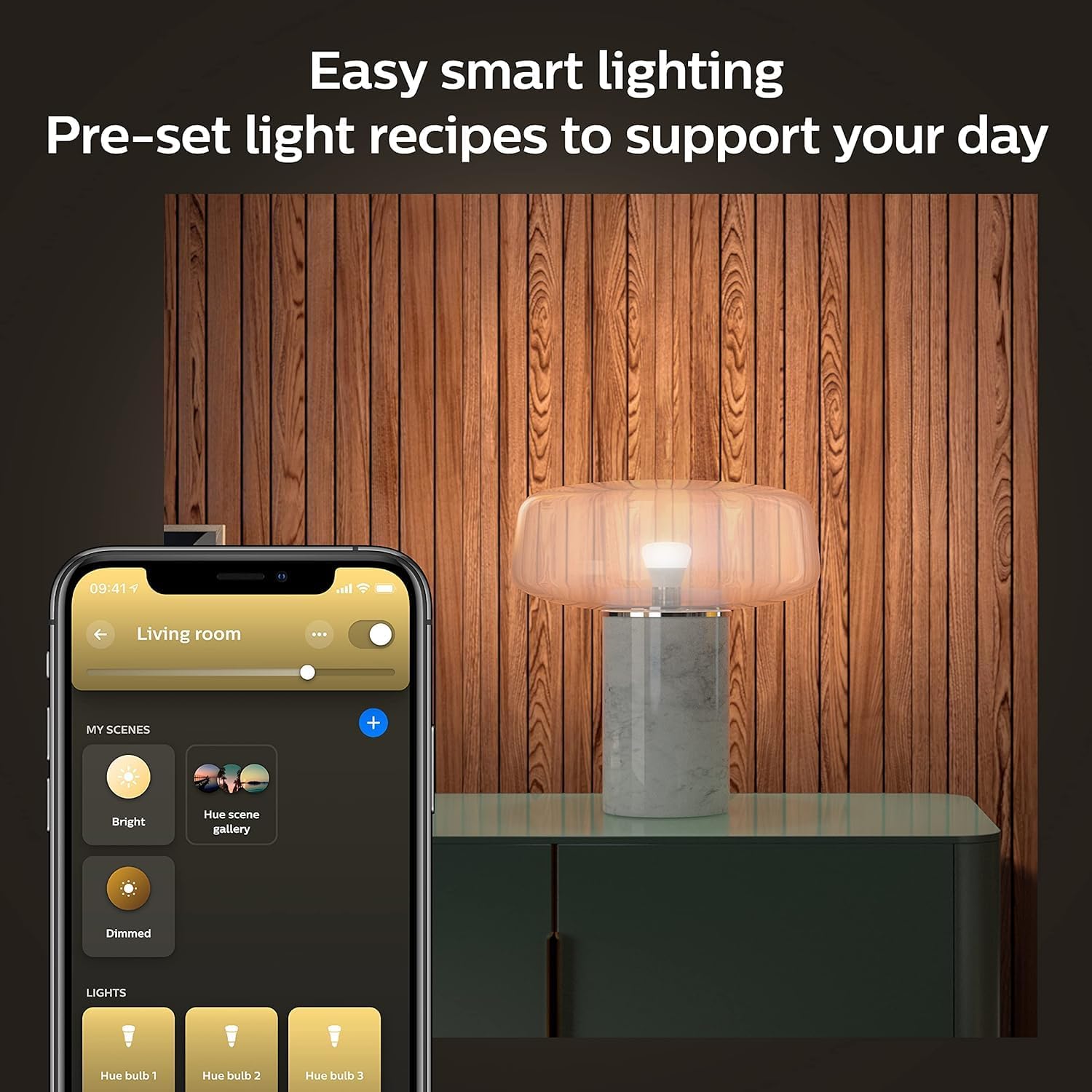
Image: A couple in a living room, with a Philips Hue bulb illuminating the space. A speech bubble indicates the voice command "Turn on all the lights," demonstrating the ease of controlling the smart lighting with voice assistants like Amazon Alexa.
Video: This video demonstrates the voice control functionality of the Philips Hue bulb with Alexa. It shows how to turn the light on and off, and adjust its brightness using simple voice commands, highlighting the ease of integration and use.
Video: An official Philips Hue brand video showcasing the versatility of the Philips Hue system. It highlights various use cases including entertainment, wellbeing, ambiance, and security, demonstrating how the system integrates seamlessly into daily life and offers comprehensive lighting control.
Smart Switches (with Bridge)
Philips Hue offers smart switches (sold separately) that can be placed anywhere for convenient physical control without needing your phone.
- On/Off: Press the power button to toggle lights.
- Dimming: Use the dimming buttons to adjust brightness.
- Scene Cycling: Some switches allow cycling through pre-set scenes with repeated presses.
Video: This official Philips Hue video highlights the comprehensive smart lighting experience offered by the system. It showcases various control methods including the Hue app, smart switches, motion sensors, and voice control (Alexa, Google Assistant, Matter), emphasizing automation and effortless management of lighting.
Maintenance
Philips Hue LED bulbs are designed for long-term use and require minimal maintenance.
- Cleaning: Ensure the bulb is off and cool before cleaning. Wipe with a soft, dry cloth. Do not use liquid cleaners.
- Firmware Updates: Regularly check the Philips Hue app for firmware updates. These updates provide new features, performance improvements, and security enhancements.
- Longevity: The bulb has an average life of 25,000 hours, which translates to approximately 22.8 years based on 3 hours of daily use.
Troubleshooting
If you encounter issues with your Philips Hue bulb, try the following steps:
| Problem | Possible Cause | Solution |
|---|---|---|
| Bulb not responding to app/voice. | Bluetooth/Wi-Fi connectivity issue, bulb out of range, or power interruption. | Ensure bulb is powered on. Check Bluetooth on your device or Bridge connection. Move closer to the bulb (Bluetooth). Restart the Hue app. Power cycle the bulb (turn off/on at switch). |
| Bulb not discovered during setup. | Bulb not powered on, too far from device/Bridge, or interference. | Confirm power is on. Bring your device closer to the bulb. Try resetting the bulb (power cycle 5 times). Ensure no other devices are interfering with Bluetooth/Zigbee signals. |
| Light flickers or dims unexpectedly. | Loose connection, incompatible dimmer switch, or power fluctuations. | Tighten the bulb in the socket. Ensure you are not using an incompatible traditional dimmer switch (Hue bulbs require constant power). Check for stable power supply. |
Specifications
- Model: 563007
- Light Type: LED
- Wattage: 10.5W LED (75W Incandescent Equivalent)
- Brightness: 1100 Lumens
- Color Temperature: 2700 Kelvin (Soft Warm White)
- Bulb Shape Size: A19
- Bulb Base: E26
- Voltage: 110 Volts (Accepted: 100 to 120 Volts and 60 Hertz)
- Connectivity: Bluetooth, Zigbee (requires Hue Bridge for full functionality)
- Control Method: App, Remote, Touch (via smart switch), Voice (Alexa, Google Assistant, Apple HomeKit)
- Average Life: 25,000 Hours
- Material: Synthetic Polymer (PMMA)
- Product Dimensions: 2.4"W x 4.4"H
- Item Weight: 2.56 ounces
- Energy Efficiency: Energy Star certified
Warranty and Support
Your Philips Hue Smart 75W A19 LED Bulb comes with a 2-year manufacturer's warranty.
For further assistance, please refer to the official Philips Hue website or contact customer support:
- Official Website: www.philips-hue.com
- User Manual (PDF): Download PDF
- Safety Information (PDF): Download PDF
Related documents563007


Ask a question about this manual
Ask about setup, troubleshooting, compatibility, parts, safety, or missing instructions. Manuals+ will review the question and use this page’s manual context to help answer it.