
Introduction
This manual provides comprehensive instructions for the installation, operation, and maintenance of your AYR 759-C Replacement Camera for the AYR 759-HD Digital Door Viewer. Please read this manual carefully before installation and use to ensure proper function and longevity of your product. This camera is designed to replace the existing camera unit of the AYR 759-HD digital door viewer, offering enhanced features such as a 128° viewing angle, built-in bell, infrared night vision, and a motion detector.
Safety Information
- Ensure the power to the door viewer system is disconnected before attempting any installation or replacement.
- Handle the camera with care to avoid damage to the lens or internal components.
- Do not expose the camera to extreme temperatures, humidity, or direct water contact.
- Keep out of reach of children.
- Refer to a qualified technician if you encounter difficulties beyond the scope of this manual.
Package Contents
Please check that all the following items are included in your package:
- AYR 759-C Replacement Camera (Satin Brass)
- Data Cable (integrated with camera)
Note: The main digital door viewer unit (AYR 759-HD) is sold separately and is required for this replacement camera to function.
Setup and Installation
Follow these steps to replace your existing camera with the AYR 759-C unit:
- Preparation: Ensure the AYR 759-HD digital door viewer is powered off and disconnected from any power source. Carefully remove the existing camera unit from the door.
- Insert New Camera: Insert the new AYR 759-C camera unit into the door's peephole opening from the exterior side. Ensure the camera is oriented correctly with the AYR logo facing upwards.
- Connect Data Cable: From the interior side of the door, carefully pull the data cable through the peephole. Connect the data cable from the new camera to the corresponding port on your AYR 759-HD digital door viewer unit. Ensure a secure connection.
- Secure Viewer Unit: Mount the AYR 759-HD digital door viewer unit securely to the interior side of the door, ensuring the camera cable is not pinched.
- Power On: Reconnect power to the AYR 759-HD digital door viewer. The system should now recognize the new camera.
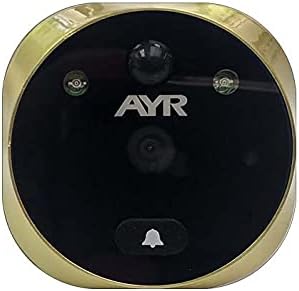
Image 1: Front view of the AYR 759-C replacement camera. This image shows the camera's exterior design, including the lens, infrared sensors, and bell button.

Image 2: Installation diagram and component overview. This diagram labels the various parts of the camera, such as the infrared light, camera lens, bell, motion detector, smart sensor, microphone, and the data cable, and illustrates how it fits into the door.
For a visual guide on installation, please watch the official product video:
Video 1: Official product video demonstrating the installation and features of the AYR digital door viewer system. This video provides a step-by-step visual guide for setting up the camera and highlights its functionalities.
Operating Instructions
The AYR 759-C camera integrates seamlessly with your AYR 759-HD digital door viewer. Once installed, the camera provides the following functionalities:
- Live View: When the digital door viewer is activated (typically by pressing a button on the interior unit), the camera will display a live video feed of the area outside your door on the viewer's screen. The 128° wide-angle lens provides a broad perspective.
- Built-in Bell: The camera features an integrated doorbell button. When pressed by a visitor, it will trigger the chime on your AYR 759-HD unit and display the live feed.
- Infrared Night Vision: The camera is equipped with infrared LEDs, allowing it to capture clear images and video even in complete darkness. This feature activates automatically in low-light conditions.
- Motion Detector: The integrated motion sensor detects movement outside your door. When motion is detected, the AYR 759-HD unit can be configured to automatically activate the display, record video, or take a snapshot, depending on your viewer's settings.
- Full HD 1080 Sensor: The camera captures high-definition video, ensuring clear and detailed images for better security and identification.
Refer to your AYR 759-HD digital door viewer's manual for specific instructions on configuring settings such as motion detection sensitivity, recording options, and chime volume.
Maintenance
Proper maintenance ensures the longevity and optimal performance of your AYR 759-C camera:
- Cleaning the Lens: Periodically clean the camera lens with a soft, dry, lint-free cloth. For stubborn smudges, slightly dampen the cloth with water or a mild lens cleaning solution. Avoid abrasive cleaners or harsh chemicals.
- Exterior Cleaning: Wipe the satin brass finish with a soft, damp cloth to remove dust and dirt. Do not use abrasive materials or polishes that could damage the finish.
- Environmental Protection: While designed for outdoor use, avoid direct exposure to extreme weather conditions if possible. Ensure the camera is securely fitted to prevent water ingress.
- Cable Inspection: Occasionally check the data cable connection for any signs of wear or damage. Ensure it remains securely connected to the main viewer unit.
Troubleshooting
If you encounter issues with your AYR 759-C replacement camera, please refer to the following common problems and solutions:
| Problem | Possible Cause | Solution |
|---|---|---|
| No image on screen / Black screen | Loose cable connection; Camera not powered; Faulty camera or viewer unit. | Check the data cable connection between the camera and the viewer unit. Ensure the main viewer unit is powered on. If the problem persists, try restarting the viewer unit. |
| Poor image quality / Blurry image | Dirty lens; Condensation on lens; Damaged lens. | Clean the camera lens with a soft, lint-free cloth. Ensure the camera is properly installed and sealed against moisture. |
| Infrared night vision not working | Infrared sensors blocked; Faulty infrared LEDs. | Ensure nothing is obstructing the infrared sensors on the camera. Check if the viewer unit's settings for night vision are enabled (if applicable). |
| Doorbell button not responding | Loose connection; Faulty button. | Check the camera's connection to the main unit. Ensure the button is not physically stuck. |
| Motion detection not triggering | Incorrect sensitivity settings; Obstruction; Faulty sensor. | Adjust motion detection sensitivity in the AYR 759-HD viewer settings. Ensure the camera's view is clear of obstructions. |
If these solutions do not resolve the issue, please contact AYR customer support or consult a qualified technician.
Specifications
| Model Number | AYR 759-C |
| Compatibility | AYR 759-HD Digital Door Viewer |
| Viewing Angle | 128° |
| Sensor | Full HD 1080 |
| Features | Built-in Bell, Infrared Night Vision, Motion Detector |
| Finish | Satin Brass |
| Dimensions (approx.) | 6 x 4.68 x 6 cm |
| Weight (approx.) | 120 g |
| Batteries Required | No (powered by main viewer unit) |
| Usage | External |
Warranty and Support
Warranty Information
The AYR 759-C Replacement Camera is covered by a manufacturer's warranty. Specific warranty terms and conditions may vary by region and retailer. Please retain your proof of purchase for warranty claims. For detailed warranty information, refer to the documentation provided with your original AYR 759-HD Digital Door Viewer or visit the official AYR website.
Customer Support
If you require further assistance, have questions not covered in this manual, or need technical support, please contact AYR customer service. Contact details can typically be found on the AYR official website or on the packaging of your product.
Website: www.ayr.es (Note: This is a general link to the brand's website, specific support pages may vary.)


