
Introduction
The Glomex weBBoat® EVO Lite is an advanced all-in-one coastal internet system designed to provide reliable 4G and Wi-Fi connectivity for marine applications. This system integrates a 4G/LTE modem, Wi-Fi router, and high-gain antennas into a single compact unit, ensuring stable internet access while at sea or in coastal areas. It supports a single SIM card for cellular data and can automatically switch between cellular and local Wi-Fi networks to optimize connectivity and data usage.
This manual provides essential information for the proper installation, operation, maintenance, and troubleshooting of your weBBoat® EVO Lite system.
Product Overview
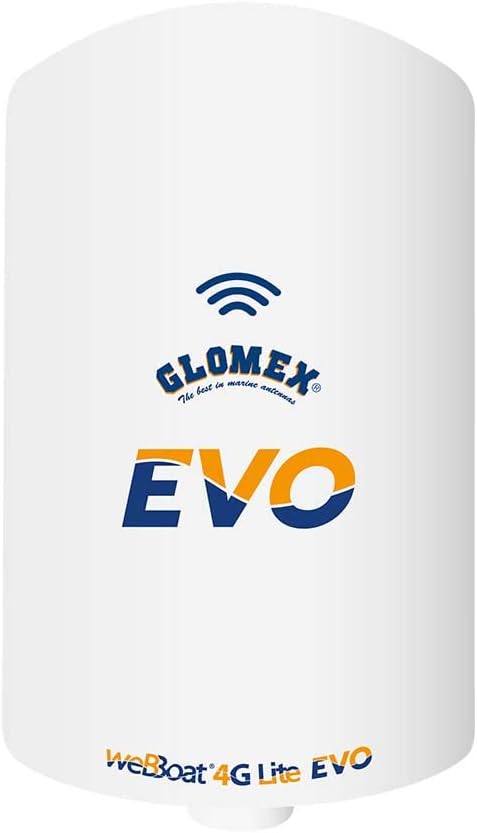
Figure 1: Glomex weBBoat® EVO Lite Coastal Internet System. This image displays the main unit, a white cylindrical device, featuring the Glomex logo, the text "The best in marine antennas", and the prominent "EVO" branding. Below, "weBBoat 4G Lite EVO" is visible, indicating its model and capabilities.
The weBBoat® EVO Lite is engineered for ease of use and robust performance in marine environments. Its key features include:
- Integrated 4G/LTE modem and Wi-Fi router.
- Automatic switching between cellular data and available Wi-Fi networks.
- Single SIM card slot for cellular connectivity.
- Remote management via a dedicated mobile application.
- Designed for coastal internet access.
Setup and Installation
Proper installation is crucial for optimal performance of your weBBoat® EVO Lite. Follow these steps carefully:
- Mounting the Unit: Select a suitable location on your vessel for mounting the weBBoat® EVO Lite. Ensure it is in an elevated position with a clear line of sight to cellular towers and Wi-Fi sources, free from obstructions. Use the provided mounting hardware to securely attach the unit.
- SIM Card Insertion:
- Locate the SIM card slot on the device.
- Insert a data-enabled SIM card from your preferred mobile carrier (e.g., AT&T, T-Mobile in North America). Ensure the SIM card is correctly oriented as indicated on the device.
- Close the SIM card slot cover securely to protect it from marine elements.
- Power Connection: Connect the weBBoat® EVO Lite to a stable 12V DC power source on your vessel. Ensure the power connection is secure and protected from water ingress.
- Initial Configuration:
- Once powered on, the device will create a local Wi-Fi network. Connect your smartphone, tablet, or computer to this Wi-Fi network. The default Wi-Fi name (SSID) and password can typically be found on a label on the device or in the quick start guide.
- Download the official Glomex weBBoat® app from your device's app store (iOS/Android) or access the web interface by typing the device's default IP address (e.g., 192.168.1.1) into a web browser.
- Follow the on-screen instructions within the app or web interface to complete the initial setup, including setting up your cellular data plan and configuring Wi-Fi settings. The device should automatically detect and configure the SIM card settings.
Operating Instructions
Operating the weBBoat® EVO Lite is primarily done through its dedicated mobile application or web interface.
- Connecting to the Internet:
- The weBBoat® EVO Lite is designed to automatically connect to the strongest available internet source, prioritizing Wi-Fi if configured, then switching to cellular data.
- To connect to a specific Wi-Fi network (e.g., marina Wi-Fi), open the weBBoat® app or web interface, navigate to the Wi-Fi settings, scan for available networks, select your desired network, and enter the password if required.
- Ensure your cellular data plan is active and has sufficient data allowance for cellular connectivity.
- Monitoring Status: The app provides a user-friendly interface to monitor the system's status, including signal strength for both 4G and Wi-Fi, data usage, connected devices, and current internet source. Regularly check this information to ensure optimal performance.
- Managing Settings:
- Network Preferences: Adjust settings for automatic network switching, prioritize Wi-Fi or cellular, and manage known Wi-Fi networks.
- Security: Change the device's Wi-Fi password and administrative login credentials regularly for security.
- Firmware Updates: Check for and apply firmware updates through the app or web interface to ensure your device has the latest features and security enhancements.
Maintenance
Regular maintenance helps prolong the life and ensure the reliability of your Glomex weBBoat® EVO Lite.
- Cleaning: Periodically clean the exterior of the unit with a soft, damp cloth. Do not use harsh chemicals or abrasive cleaners. Ensure all ports and covers are free of dirt and debris.
- Firmware Updates: Regularly check for and install firmware updates. These updates often include performance improvements, bug fixes, and security enhancements.
- Connection Checks: Annually inspect all cable connections for corrosion or damage, especially the power cable. Ensure they are securely fastened.
- Environmental Protection: While designed for marine use, ensure the unit is not exposed to extreme physical shock or prolonged submersion beyond its rated specifications.
Troubleshooting
If you encounter issues with your weBBoat® EVO Lite, refer to the following common problems and solutions:
| Problem | Possible Cause | Solution |
|---|---|---|
| No Internet Connection |
|
|
| Slow Internet Speed |
|
|
| Device Not Responding to App/Web Interface |
|
|
Specifications
| Feature | Detail |
|---|---|
| Model Name | IT1104EVO/US |
| Brand | Glomex |
| Connectivity Technology | Wi-Fi, Wireless (4G/LTE) |
| Wireless Communication Standard | 2.4 GHz Radio Frequency, 802.11b |
| Control Method | App |
| Color | White |
| Material | Plastic |
| Item Weight | 1.87 Pounds (0.85 kg) |
| Item Dimensions (LxWxH) | 10 x 7 x 6.75 inches (25.4 x 17.78 x 17.15 cm) |
| Manufacturer | Glomex Marine Antennas |
| Included Components | Main unit, power cable, mounting hardware (inferred from "Great Product" and typical product inclusions) |
Warranty and Support
The Glomex weBBoat® EVO Lite comes with a manufacturer's warranty. Please refer to the warranty description provided with your product packaging for specific terms and conditions. Typically, this covers defects in materials and workmanship under normal use.
For technical support, service, or warranty claims, please contact Glomex Marine Antennas directly or your authorized Glomex dealer. Contact information can usually be found on the Glomex official website or within your product documentation.
Note: Unauthorized modifications or repairs may void your warranty.


