1. Product Overview
The Elitech Inframate C Infrared R-744 Refrigerant Leak Detector is engineered for precise and reliable detection of carbon dioxide (CO2) leaks in various applications. Utilizing an advanced infrared sensor, it offers high sensitivity and rapid response, making it an essential tool for professionals.
Key features include:
- Advanced Infrared Sensor: Provides stable and accurate detection with a low possibility of contamination and strong anti-interference ability. The sensor boasts an impressive life of 40,000 hours.
- Higher Sensitivity: Adaptive sensitivity allows detection of leaks as small as 6g/year.
- Large TFT LCD Display: Clearly shows leakage levels using colorful bars, enhancing user experience and intuitive result presentation.
- Easy to Use: Equipped with a flexible stainless steel probing rod to reach difficult areas.
- Safe & Reliable: Features rechargeable and replaceable batteries for environmental friendliness and convenience.
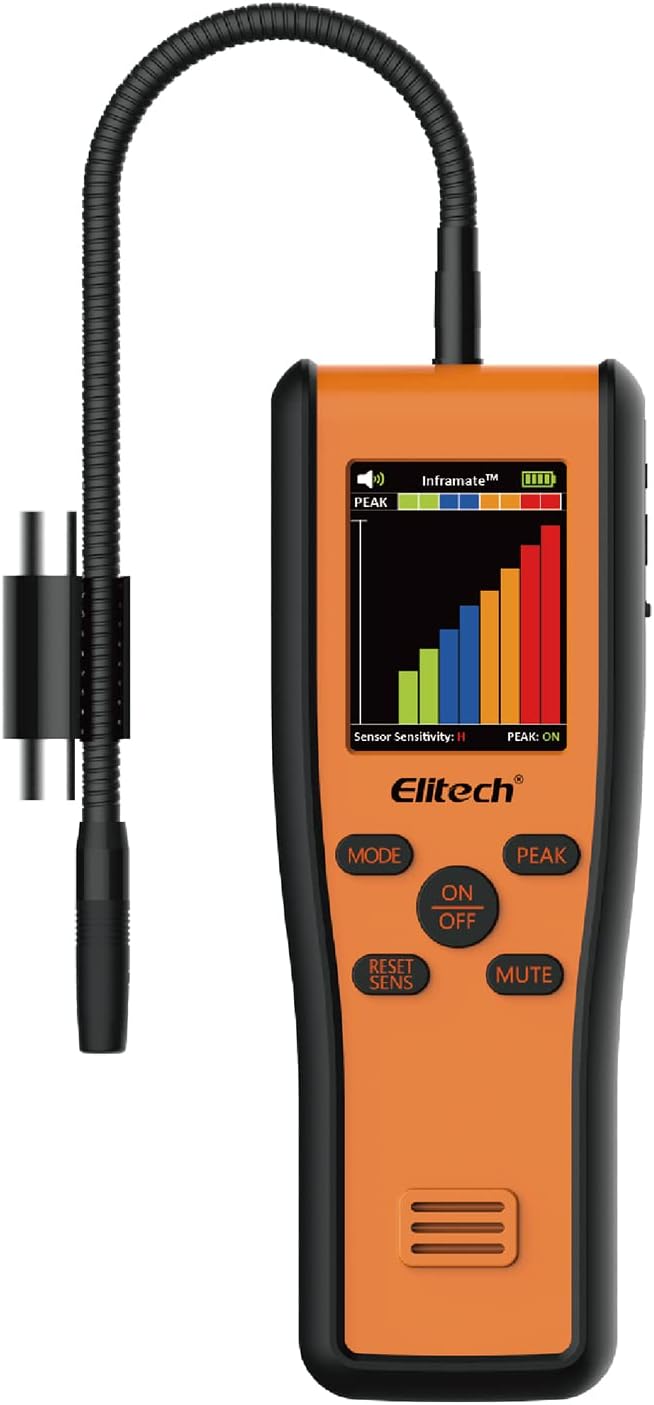
Figure 1: Elitech Inframate C Infrared R-744 Refrigerant Leak Detector
2. Package Contents
Upon opening the package, please verify that all the following items are included:
- 1 x Leak Detector
- 1 x User Manual
- 1 x USB Cable
- 1 x Adapter
- 1 x Packet of Filters (5 filters)
- 1 x UV Light
- 1 x Extension Pole

Figure 2: All items included in the Elitech Inframate C package
3. Setup and Operation
3.1 Component Identification

Figure 3: Labeled components of the Elitech Inframate C, including flexible probe, UV LED, filter components, 3.5mm headphone jack, USB port (Type-C), display screen, buttons, and buzzer.
3.2 Powering On and Warm-up
To power on the detector, press the ON/OFF button. The device will enter a warm-up phase, which takes approximately 30 seconds. During this time, the display will show a warming-up message. Once warmed up, it will enter the infrared detection interface with a continuous beeping sound on standby.
3.3 Adjusting Sensitivity
The SENS button allows you to adjust the detection sensitivity. You can cycle through High (H), Medium (M), and Low (L) levels as needed. The default sensitivity level is Medium (M).
3.4 Leak Detection and Automatic Reset
The Elitech Inframate C features an automatic reset function. This function resets the leaking level every 3 seconds, which is crucial for helping users pinpoint the exact leaking source by allowing the device to re-calibrate to the ambient air and then react to the leak as you move the probe.
3.5 Recording Peak Levels
Press the PEAK button to record the current peak level of refrigerant concentration detected. Pressing it again will clear the recorded peak value.
3.6 Mute Function
To mute the continuous beeping sound during standby or operation, press the MUTE button.
3.7 Powering Off
To turn off the detector, press and hold the ON/OFF button for 2 seconds.
3.8 Operational Demonstration
Video 1: A comprehensive demonstration of the Elitech Inframate C's features, including power-on, warm-up, sensitivity adjustment, automatic reset for leak detection, peak recording, and power-off procedures.
4. Important Considerations
To ensure accurate readings and prolong the life of your detector, please observe the following:
- Avoid Contaminants: Leaking areas are often covered with substances like compressor oil or dirt. It is crucial to prevent the sensor tip from coming into contact with these contaminants, as they can affect detection accuracy and sensor longevity.
- Keep Dry: Keep the sensor tip away from any moisture or other solvents to avoid false alarms and potential damage to the sensor.
- Wear Face Mask: When using the highest sensitivity setting, it is recommended to wear a face mask to avoid faulty alarms caused by exhaled breath.
5. Specifications
| Specification | Value |
|---|---|
| Brand | Elitech |
| Model | Inframate-C-US |
| Power Source | Battery Powered (2 Lithium Ion batteries included) |
| Color | CO2 Detect |
| Product Dimensions | 1.4"D x 2.8"W x 7.9"H |
| Item Weight | 16 Ounces (approx. 1 pound) |
| Alarm | Audible, Visual |
| Operating Humidity | Maximum 90%RH (non-condensing) |
| Upper Temperature Rating | 52 Degrees Celsius |
| Sensor Type | Infrared |
| Sensitivity | 6g/year (0.21oz/yr) |
| Charging Voltage/Current | DC 5V, 1A |
| Charging Time | Approx 4 hours |
| Operating Time | 11 hours |
| Working Temperature Range | -10°C ~ 52°C |

Figure 4: Detailed specifications of the Elitech Inframate C Leak Detector.
6. Maintenance
Proper maintenance ensures the longevity and accuracy of your Elitech Inframate C Leak Detector:
- Sensor Care: The infrared sensor is a critical component. Avoid exposing the sensor tip to compressor oil, dirt, moisture, or other solvents, as these can contaminate or damage it, leading to inaccurate readings or malfunction.
- Cleaning: Regularly wipe the device with a soft, dry cloth. Do not use abrasive cleaners or solvents. Ensure the probe and sensor tip are clean before and after each use.
- Filter Replacement: The device comes with a packet of filters. Replace filters periodically or if you notice a decrease in performance or increased false alarms, especially when operating in dusty environments.
- Battery Management: Use only the specified rechargeable batteries. Ensure they are properly charged before use and replaced when their performance degrades.
- Storage: Store the detector in its protective case in a cool, dry place away from direct sunlight, extreme temperatures, and corrosive substances.
7. Troubleshooting
Here are some common issues and their potential solutions:
7.1 Device Beeps Continuously Upon Power On
Issue: The device starts beeping immediately when turned on.
Solution: This is normal behavior. The device beeps upon powering on. The alarm sound becomes more urgent when a leak is detected.
7.2 Leaks Cannot Be Detected
Issue: The detector fails to identify leaks.
Solutions:
- The product automatically calibrates. After moving away from a suspected leak point, approach it multiple times to confirm if a leak is present.
- Check if the sensor is damaged.
- Verify if the air pump has lost suction capability.
- Inspect for any blockages in the internal pipeline.
7.3 Product Alarms in Non-Leaking Environment
Issue: The detector triggers an alarm even when no leak is present.
Solutions:
- Deformation of the optical chamber can affect detection data; this is a normal occurrence.
- A loose critical optical filter might be the cause. Contact support for repair assistance if this is suspected.
- Check for routers or other electronic devices nearby that might be causing electromagnetic interference.
8. Warranty and Support
Elitech provides comprehensive customer support for the Inframate C Infrared R-744 Refrigerant Leak Detector.
- Technical Support: Enjoy 24/7 US Technician Support via Email and Phone for any operational or technical queries.
- Warranty Information: Please refer to the warranty card included in your product package for detailed terms and conditions regarding your device's warranty.
For further assistance, please visit the official Elitech website or contact their customer service directly.


