
DAVITU JAI-N1000-RZL
DAVITU JAI-N1000-RZL Rotary Encoder User Manual
Model: JAI-N1000-RZL
1. Product Overview
The DAVITU JAI-N1000-RZL is a universal rotary encoder designed for precise measurement of rotational position, speed, or angular displacement. It provides digital output signals based on its rotation, making it suitable for a wide range of industrial and automation applications. This encoder operates via wire control, ensuring reliable data transmission.
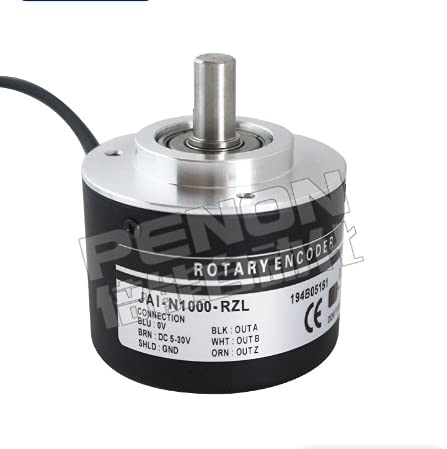
Figure 1: DAVITU JAI-N1000-RZL Rotary Encoder. This image shows a black and silver cylindrical rotary encoder with a protruding metal shaft. A label on its side details the model number 'JAI-N1000-RZL' and connection specifications for its wires.
2. Setup and Installation
Proper installation and wiring are crucial for the correct operation of the rotary encoder. Ensure all connections are secure and follow the wiring diagram carefully.
2.1 Wiring Connections
The JAI-N1000-RZL encoder features a multi-wire cable for power and signal output. Refer to the table below for detailed wiring instructions:
| Wire Color | Function | Description |
|---|---|---|
| BLU (Blue) | 0V (Ground) | Connect to the negative terminal of the power supply. |
| BRN (Brown) | DC 5-30V (Power) | Connect to the positive terminal of a DC power supply (5V to 30V). |
| BLK (Black) | OUTA (Phase A) | Output signal A, typically used for direction and pulse counting. |
| WHT (White) | OUTB (Phase B) | Output signal B, typically used in conjunction with Phase A for direction sensing (quadrature output). |
| ORN (Orange) | OUTZ (Zero/Index) | Output signal Z, a single pulse per revolution, used for absolute position referencing. |
| SHLD (Shield) | GND (Shield Ground) | Connect to system ground for electromagnetic interference (EMI) shielding. |
2.2 Mounting
Mount the encoder securely to the rotating shaft or surface you wish to monitor. Ensure the shaft of the encoder is properly aligned with the target shaft to prevent undue stress on the bearings and ensure accurate readings. Use appropriate fasteners and mounting brackets (not included) for a stable installation.
3. Operating Instructions
Once properly installed and wired, the JAI-N1000-RZL rotary encoder will begin generating signals corresponding to its rotation. These signals are typically fed into a microcontroller, PLC, or other digital input device for processing.
3.1 Signal Interpretation
- OUTA & OUTB (Quadrature Output): These two signals are phase-shifted by 90 degrees. By monitoring the leading/lagging relationship between OUTA and OUTB, the direction of rotation can be determined. The number of pulses generated by these outputs corresponds to the angular displacement.
- OUTZ (Index Pulse): This signal provides a single pulse per revolution, indicating a specific reference point (e.g., the zero position). It is useful for homing procedures or absolute position tracking.
Refer to the documentation of your receiving device (e.g., microcontroller, PLC) for specific programming instructions on how to read and interpret quadrature and index encoder signals.
4. Maintenance
The DAVITU JAI-N1000-RZL rotary encoder is designed for durability and requires minimal maintenance. However, following these guidelines can help ensure its longevity and optimal performance:
- Keep Clean: Periodically clean the exterior of the encoder with a soft, dry cloth. Avoid using harsh chemicals or abrasive materials.
- Environmental Conditions: Ensure the encoder operates within its specified temperature and humidity ranges. Avoid exposure to excessive dust, moisture, or corrosive environments.
- Shaft Alignment: Regularly check the alignment of the encoder shaft with the driven shaft. Misalignment can cause premature wear on bearings.
- Cable Integrity: Inspect the connecting cable for any signs of damage, fraying, or loose connections. Repair or replace damaged cables immediately.
5. Troubleshooting
If you encounter issues with your DAVITU JAI-N1000-RZL rotary encoder, refer to the following common troubleshooting steps:
- No Signal Output:
- Verify that the power supply (BRN and BLU wires) is correctly connected and providing the specified DC 5-30V.
- Check all signal wire connections (BLK, WHT, ORN) for continuity and proper connection to your receiving device.
- Ensure the encoder shaft is rotating.
- Incorrect Readings/Erratic Signals:
- Check for loose or intermittent wire connections.
- Ensure the encoder is securely mounted and there is no slippage between the encoder shaft and the driven shaft.
- Inspect the environment for excessive electromagnetic interference (EMI). Ensure the shield wire (SHLD) is properly grounded.
- Verify that your receiving device's input impedance and signal processing capabilities are compatible with the encoder's output.
- Directional Errors:
- Ensure your receiving device is correctly interpreting the quadrature signals (OUTA and OUTB). Swapping the interpretation of A and B phases can reverse the perceived direction.
If the problem persists after following these steps, please contact DAVITU customer support for further assistance.
6. Specifications
| Feature | Detail |
|---|---|
| Model | JAI-N1000-RZL |
| Brand | DAVITU |
| Use | Universal |
| Certification | CE |
| Connectivity Technology | Wire Control |
| Power Supply | DC 5-30V |
| Output Signals | OUTA, OUTB, OUTZ |
| Color | Jai-n1000-rzl (as per product variant) |
| Material | Other |
| Manufacturer Part Number | DVT-465E9210D976069DC0FB5E57FA7C5274 |
7. Warranty and Support
DAVITU products are manufactured to high-quality standards. For information regarding warranty coverage, terms, and conditions, please refer to the warranty card included with your product or visit the official DAVITU website. For technical support, troubleshooting assistance beyond this manual, or spare parts inquiries, please contact DAVITU customer service through the contact information provided on our website or your purchase platform.
Please have your product model number (JAI-N1000-RZL) and purchase details ready when contacting support.
Ask a question about this manual
Ask about setup, troubleshooting, compatibility, parts, safety, or missing instructions. Manuals+ will review the question and use this page’s manual context to help answer it.