
ciciglow K-605
ciciglow K-605 Portable Radio User Manual
Model: K-605
1. Introduction
The ciciglow K-605 Portable Radio is a compact and versatile device designed for on-the-go audio entertainment. It combines FM, SW, and MW radio reception with an integrated MP3 player, offering a wide range of listening options. Its user-friendly design ensures ease of operation for all users.

Image 1.1: The ciciglow K-605 Portable Radio, highlighting its compact and portable design.
Key Features:
- Compact and Portable Design: Small size and lightweight for easy carrying and flexible operation.
- Multi-band Radio: Supports FM, Shortwave (SW), and Mediumwave (MW) frequencies for diverse radio listening.
- MP3 Player Functionality: Built-in MP3 player supports WAV and MP3 audio formats, with memory card expansion for your music library.
- High Sensitivity & Selectivity: Ensures clear and stable reception, minimizing interference, especially when using earphones.
- Stereo FM: Enhances sound clarity, even in noisy environments.
- User-Friendly Operation: Simple and intuitive controls make it easy for all ages to use.

Image 1.2: The K-605 radio demonstrating its MP3 playback capability with a visual representation of sound waves.

Image 1.3: The K-605 radio illustrating its high sensitivity and selectivity for clear reception.
2. Package Contents
Please check the package carefully to ensure all items are present and in good condition.
- 1 x ciciglow K-605 Portable Radio
- 1 x Earphone
- 2 x Earplugs
- 1 x USB Charging Cable
- 1 x Storage Bag
- 1 x User Instruction Manual

Image 2.1: All items included in the ciciglow K-605 Portable Radio package: the radio unit, earphones, earplugs, USB cable, and storage bag.
3. Product Overview
Familiarize yourself with the various parts and controls of your ciciglow K-605 Portable Radio.
Controls and Ports:
- LCD Display: Shows current mode, frequency, battery level, and playback time.
- Power/Mode Button (Left Side): Used to turn the device ON/OFF and switch between MP3 and FM radio modes.
- Volume Buttons (+/-): Adjusts the audio volume.
- Tuning/Track Buttons (<< / >>): Used for tuning radio frequencies or navigating MP3 tracks.
- Headphone Jack (3.5mm): For connecting external earphones.
- Memory Card Slot: For inserting a memory card (e.g., microSD) for MP3 playback.
- USB Charging Port: For connecting the USB cable to charge the device.

Image 3.1: Close-up view of the top side of the K-605 radio, showing the 3.5mm headphone jack and the memory card slot.
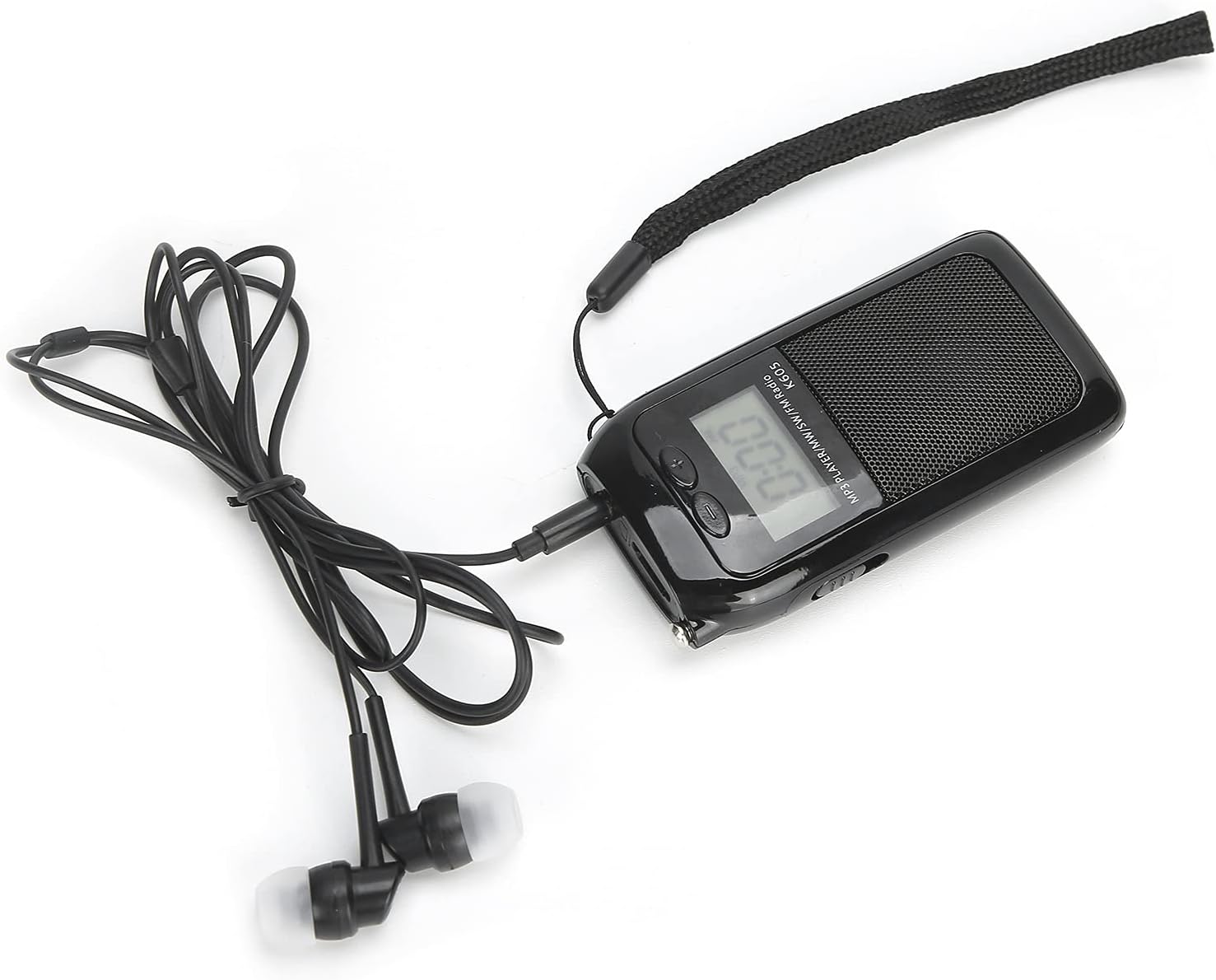
Image 3.2: Close-up view of the side of the K-605 radio, illustrating the USB charging port and the tuning/track navigation buttons.

Image 3.3: Close-up view of the top control panel of the K-605 radio, showing the volume adjustment buttons and the mode selection button.
4. Setup
4.1 Charging the Device
Before first use, fully charge the radio. Connect the supplied USB charging cable to the radio's USB port and the other end to a USB power adapter (not included) or a computer's USB port. The charging indicator on the display will show charging status.
4.2 Inserting a Memory Card (for MP3 Playback)
If you wish to play MP3 or WAV files, insert a compatible memory card (e.g., microSD card) into the memory card slot on the side of the radio. Ensure the card is inserted correctly until it clicks into place.
4.3 Connecting Earphones
For private listening or to enhance reception, plug the supplied earphones into the 3.5mm headphone jack located on the top of the radio.

Image 4.1: The K-605 radio with earphones connected, ready for private listening.
5. Operating Instructions
5.1 Powering On/Off and Mode Selection
- To turn on the radio, press the left button (Power/Mode button). The LCD screen will light up.
- Press the left button again to cycle between MP3 playback mode and FM radio mode.
- To turn off the radio, press and hold the left button until the screen turns off.

Image 5.1: The K-605 radio's LCD display illuminated, showing the time or track information, visible even in low light conditions.
5.2 Adjusting Volume
Use the Volume + and Volume - buttons (located on the top panel) to increase or decrease the audio volume.
5.3 Radio Tuning (FM/SW/MW)
In radio mode, use the Tuning << and Tuning >> buttons to manually scan for radio stations. A short press will fine-tune, while a long press may initiate an automatic scan to the next strong station.
5.4 MP3 Playback
When in MP3 mode (ensure a memory card with audio files is inserted), use the Track << and Track >> buttons to navigate between audio files. The display will show playback information.
6. Specifications
| Feature | Description |
|---|---|
| Item Type | Portable Radio |
| Material | ABS |
| Model | K-605 |
| Color | Black |
| Weight | 156g / 5.5 oz |
| Frequency Range | AM: 522-1620 KHz (9 KHz step), 520-1710 KHz (10 KHz step) SW: 4.75-21.85 MHz FM: 76-108 MHz |
| Reception Sensitivity | AM: 20mV SW: 31uV FM: 8uV |
| SNR (Signal-to-Noise Ratio) | AM: 30dB SW: 25dB FM: 40dB |
| Speaker | 28mm / 6Ω / 2W |
| External Headphone | 3.5mm / 32Ω * 2 |
| Playback Format | WAV, MP3 (with memory card support) |
| Battery | Built-in 500mAh Lithium Battery |
7. Maintenance
- Keep the device dry. Avoid exposure to rain, moisture, or liquids.
- Do not expose the device to extreme temperatures (hot or cold).
- Clean the device with a soft, dry cloth. Do not use harsh chemicals or abrasive cleaners.
- Avoid dropping or subjecting the device to strong impacts.
- When not in use for extended periods, store the radio in a cool, dry place and charge it periodically to maintain battery health.
8. Troubleshooting
| Problem | Possible Cause / Solution |
|---|---|
| Radio does not turn on. | Battery might be depleted. Charge the device fully. |
| Poor radio reception. |
|
| MP3 files not playing. |
|
| No sound from speaker/earphones. |
|
9. Warranty and Support
This product is covered by a standard manufacturer's warranty. For specific warranty terms and conditions, please refer to the documentation provided at the time of purchase or contact your retailer.
For technical support, troubleshooting assistance, or inquiries about replacement parts, please contact ciciglow customer service through the retailer's platform or the official ciciglow website (if available).
Ask a question about this manual
Ask about setup, troubleshooting, compatibility, parts, safety, or missing instructions. Manuals+ will review the question and use this page’s manual context to help answer it.