
triangle AIO_TEB37_F_V1_C
Triangle AIO Twin Bookshelf Speakers
Instruction Manual
1. Introduction
Welcome to the world of high-fidelity audio with your new Triangle AIO Twin Wi-Fi & Bluetooth Active Bookshelf Speakers. These speakers are designed to deliver a rich, precise, and detailed sound experience, combining cutting-edge technology with versatile connectivity options. This manual provides essential information for setting up, operating, and maintaining your speakers to ensure optimal performance and longevity.

Image: The Triangle AIO Twin bookshelf speakers, showcasing their sleek black finish and compact design. One speaker is shown from the front, revealing the tweeter and woofer, while the other is angled to show its side profile and the elegant base.
2. Safety Information
Please read all safety instructions carefully before using the speakers. Keep this manual for future reference.
- Power Source: Only connect the speakers to a power supply as indicated on the product label.
- Ventilation: Ensure adequate ventilation around the speakers. Do not block any ventilation openings.
- Water and Moisture: Do not expose the speakers to water, moisture, or excessive humidity.
- Heat Sources: Keep the speakers away from heat sources such as radiators, heat registers, stoves, or other apparatus that produce heat.
- Cleaning: Clean only with a dry cloth. Do not use liquid cleaners or aerosol cleaners.
- Servicing: Do not attempt to service the speakers yourself. Refer all servicing to qualified service personnel.
- Placement: Place speakers on a stable, level surface to prevent tipping.
3. Package Contents
Carefully unpack your Triangle AIO Twin speakers and verify that all items are present:
- Triangle AIO Twin Active Bookshelf Speakers (Pair)
- Power Cable
- Remote Control
- Speaker Stands (if included with specific model/bundle)
- Components for Stereo Pairing (speaker wire)
- User Manual (this document)

Image: A single Triangle AIO Twin speaker, viewed from an angle, highlighting its compact size and the design of the tweeter and woofer drivers.
4. Setup
4.1 Speaker Placement
Proper speaker placement is crucial for optimal sound quality. For bookshelf speakers, consider the following:
- Place speakers on sturdy, level surfaces, ideally at ear level when seated.
- Maintain an equal distance between the two speakers and from your listening position to form an equilateral triangle.
- Keep speakers away from corners or walls if possible, as this can overemphasize bass.
4.2 Connecting the Speakers
The AIO Twin system consists of one active speaker (with controls and inputs) and one passive speaker. They connect via a supplied speaker cable.
- Connect the active speaker to the passive speaker using the provided speaker cable. Ensure correct polarity (+ to + and - to -).
- Connect the power cable to the active speaker's AC input and then to a wall outlet.
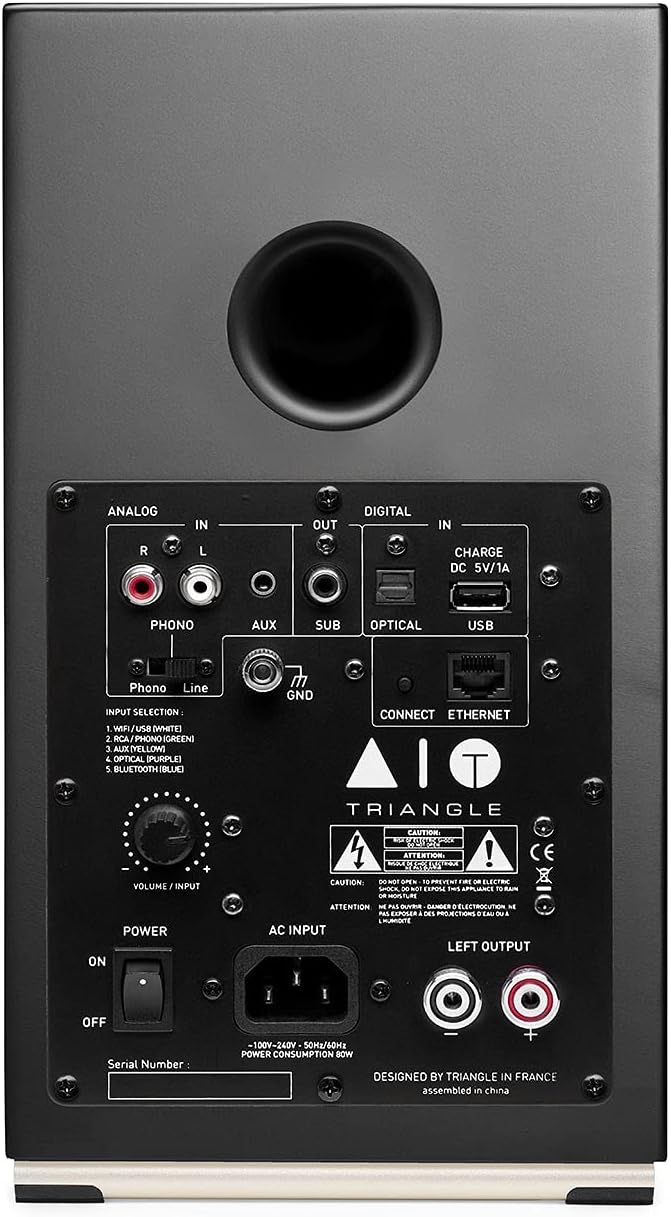
Image: The rear panel of the active speaker, displaying the analog (RCA, AUX), digital (Optical, USB), Ethernet, and subwoofer output connections, along with the power input and volume/input knob.
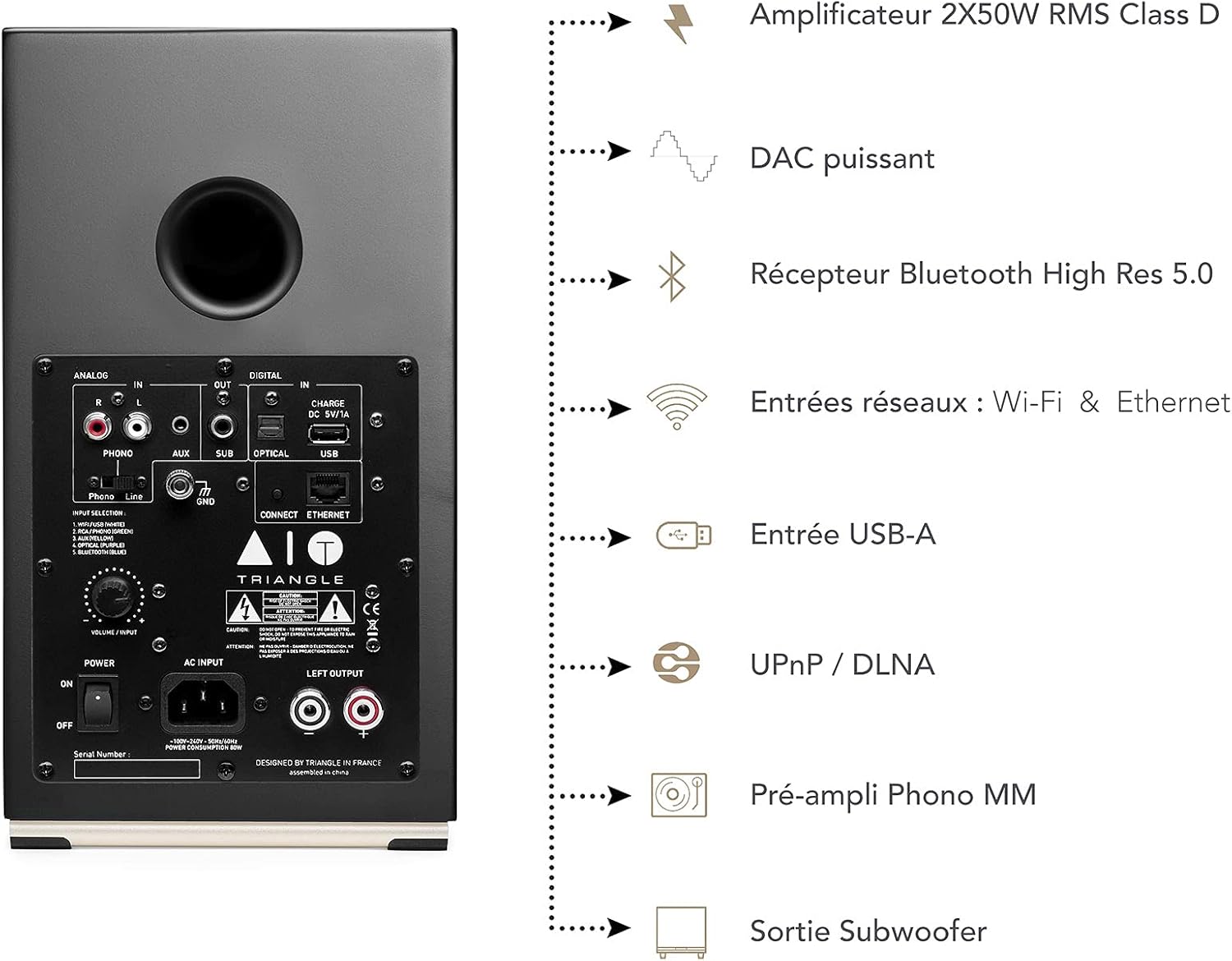
Image: A detailed view of the active speaker's rear panel, showing input options such as Analog (Phono/Line), AUX, Digital (Optical, USB), and Ethernet. It also highlights the subwoofer output and the main power switch.
4.3 Source Connections
The AIO Twin speakers offer a wide range of connectivity options:
- Phono/Turntable Input: Connect your turntable directly using the dedicated Phono input. Ensure the Phono/Line switch is set to "Phono".
- Auxiliary Input (AUX): Use a 3.5mm jack cable to connect devices like smartphones, tablets, or portable music players.
- Optical Input: Connect your TV, CD player, or other digital audio sources using an optical cable for high-quality digital audio.
- USB Input: Connect a USB drive for direct playback of audio files.
- Ethernet: For a stable wired network connection, use the Ethernet port.
- Subwoofer Output (SUB OUT): Connect an external powered subwoofer for enhanced bass performance.
5. Operating Instructions
5.1 Powering On/Off
Use the power switch located on the rear panel of the active speaker to turn the system on or off.
5.2 Input Selection
You can select your desired audio input using the remote control or the volume/input knob on the rear panel of the active speaker. Available inputs include Wi-Fi, Bluetooth, Phono, AUX, Optical, and USB.
5.3 Volume Control
Adjust the volume using the remote control or the volume/input knob on the active speaker.
5.4 Wireless Connectivity (Wi-Fi & Bluetooth)
The AIO Twin speakers support both Wi-Fi and Bluetooth for wireless audio streaming.
5.4.1 Wi-Fi Setup
For Wi-Fi connectivity, download the dedicated Triangle AIO app on your smartphone or tablet. Follow the in-app instructions to connect your speakers to your home network. This enables high-resolution streaming and multi-room audio capabilities.
5.4.2 Bluetooth Pairing
- Select Bluetooth input on the speakers.
- On your device (smartphone, tablet, computer), enable Bluetooth and search for "Triangle AIO Twin".
- Select the speakers to pair. Once paired, you can stream audio wirelessly.
6. Maintenance
To keep your Triangle AIO Twin speakers in optimal condition:
- Cleaning: Use a soft, dry, lint-free cloth to clean the speaker cabinets. Avoid abrasive cleaners, waxes, or solvents.
- Grilles: The speaker grilles can be gently removed for cleaning or if you prefer the aesthetic without them. Clean grilles with a soft brush or vacuum cleaner on a low setting.
- Dust: Regularly dust the speaker drivers (tweeter and woofer) with a soft brush or compressed air, being careful not to touch the cones.
- Storage: If storing the speakers for an extended period, place them in their original packaging in a cool, dry place.

Image: A close-up view of the black fabric speaker grille, showing its woven texture. The grilles are removable for maintenance or aesthetic preference.
7. Troubleshooting
If you encounter issues with your speakers, refer to the following common problems and solutions:
| Problem | Possible Cause | Solution |
|---|---|---|
| No sound |
|
|
| Distorted sound |
|
|
| Bluetooth pairing issues |
|
|
| Wi-Fi connection unstable |
|
|
8. Specifications
| Feature | Detail |
|---|---|
| Model Name | AIO_TEB37_F_V1_C |
| Speaker Type | Bookshelf |
| Speaker Configuration | 2.0 Stereo |
| Power Output | 2 x 50 Watts (RMS) |
| Woofer Diameter | 13 cm (5.1 inches) |
| Tweeter Diameter | 2.5 cm (1 inch) |
| Audio Driver Type | Dynamic Driver |
| Connectivity Technology | Wi-Fi, Bluetooth, Ethernet |
| Wireless Communication | Bluetooth, Wi-Fi |
| Bluetooth Range | Up to 10 meters (33 feet) |
| Inputs | Phono/Line (RCA), AUX (3.5mm), Optical, USB, Ethernet |
| Outputs | Subwoofer Out (RCA) |
| Control Method | Remote Control, App |
| Compatible Devices | Television, Personal Computer, Tablet, Smartphone, Turntable |
| Product Dimensions (each speaker) | Approx. 165 x 304 x 235 mm (6.5 x 12 x 9.25 inches) |
| Item Weight (Pair) | 11.77 kg (25.94 Pounds) |
| Color | Black |
| Manufacturer | Triangle |
9. Warranty and Support
Triangle products are designed for durability and performance. For warranty information and technical support, please refer to the official Triangle website or contact your local distributor.
- Official Website: www.trianglehifi.com
- Customer Service: Refer to the contact section on the official website for support options.
Keep your proof of purchase for warranty claims.
Ask a question about this manual
Ask about setup, troubleshooting, compatibility, parts, safety, or missing instructions. Manuals+ will review the question and use this page’s manual context to help answer it.