
Introduction
Thank you for choosing the Pop Sonic Pro 2.0 Electric Toothbrush. This manual provides essential information for the safe and effective use of your new sonic toothbrush. Please read it thoroughly before first use and retain it for future reference.

Image: The Pop Sonic Pro 2.0 Electric Toothbrush in pink, shown with its packaging and an extra brush head.
Safety Information
Please observe the following safety precautions:
- This product is not intended for children under 3 years of age due to a choking hazard.
- Children aged 8-12 should be supervised during use.
- Do not use this toothbrush for purposes other than oral hygiene.
- Replace the brush head every 3 months or sooner if bristles appear damaged or frayed.
- Avoid using the toothbrush with damaged or frayed bristles to prevent injury.
- The toothbrush has an IPX7 waterproof rating, making it safe for use in the shower. However, avoid submerging the charging port in water when not properly sealed.
What's Included
Your Pop Sonic Pro 2.0 Electric Toothbrush package includes the following components:
- 1x Pro 2.0 Sonic Toothbrush Handle
- 2x Replacement Brush Heads (DuPont Nylon Bristles)
- 1x USB Charging Cable
- 1x Brush Head Cover
- 1x Instruction Manual (this document)
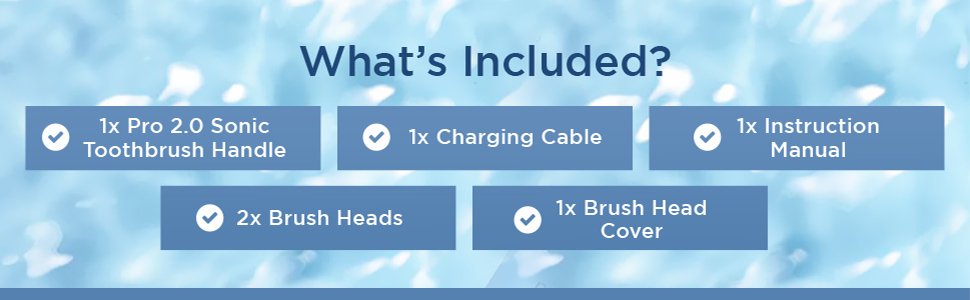
Image: A visual representation of all items included in the Pop Sonic Pro 2.0 package.
Setup
- Initial Charge: Before first use, fully charge your toothbrush. Connect the provided USB charging cable to the charging port at the bottom of the toothbrush handle and plug the USB end into a compatible USB power adapter (not included). The toothbrush must be laid on its side during charging. The battery indicator light will show charging status.
- Attach Brush Head: Align the brush head with the metal shaft on the toothbrush handle and push it down firmly until it clicks into place.
Operating Instructions
The Pop Sonic Pro 2.0 features 4 cleaning modes and a built-in timer for optimal oral care.

Image: A hand holding the pink Pop Sonic Pro 2.0 toothbrush, illustrating its ergonomic design and mode indicators.
Power On/Off and Mode Selection
- Press the power button once to turn the toothbrush on. It will start in the last used mode.
- Press the power button repeatedly to cycle through the available modes: Gentle, Daily, Whiten, Polish.
- To turn off the toothbrush, press and hold the power button for 2 seconds, or cycle through all modes until it turns off automatically.
Cleaning Modes
- Gentle: For sensitive teeth and gums.
- Daily: Standard mode for everyday cleaning.
- Whiten: Designed for surface stain removal and brightening.
- Polish: For a deep clean and polishing effect.

Image: An illustration demonstrating the sonic action of the toothbrush for gum care, whitening, and deep cleaning.
Smart Timer and Quad Pacer
The toothbrush features a built-in 2-minute timer, which is the dentist-recommended brushing time. It also includes a 30-second quad pacer that signals when to move to a different quadrant of your mouth, ensuring an even and thorough clean.
Video: An overview of Pop Sonic products, including the Pro 2.0 toothbrush, highlighting its features and benefits. (Duration: 0:29)
Charging
To charge your Pop Sonic Pro 2.0 toothbrush:
- Ensure the charging port cover at the bottom of the handle is securely closed when not charging to maintain its waterproof integrity.
- Plug the small end of the USB charging cable into the port on the toothbrush handle.
- Connect the USB-A end of the cable to a standard USB wall adapter or a powered USB port.
- The toothbrush must be placed horizontally on a flat surface while charging.
- A full charge typically takes several hours. The battery indicator light will change to indicate a full charge.
Video: A demonstration of the Pro 2.0 Sonic Toothbrush, showcasing its features including charging. (Duration: 0:51)
Maintenance
Cleaning the Toothbrush
- After each use, rinse the brush head thoroughly under running water.
- Wipe the handle with a damp cloth. Do not use abrasive cleaners or harsh chemicals.
- Ensure no water enters the charging port when cleaning the handle.
Replacing Brush Heads
For optimal performance and hygiene, replace your brush head every 3 months, or sooner if the bristles become splayed or worn. Replacement brush heads are available from Pop Sonic retailers.
- Grip the brush head firmly and pull it straight off the handle.
- Align the new brush head with the metal shaft and push it down until it clicks into place.
Troubleshooting
| Problem | Possible Cause | Solution |
|---|---|---|
| Toothbrush does not turn on. | Battery is depleted. | Charge the toothbrush fully. |
| Reduced vibration or cleaning effectiveness. | Worn brush head or low battery. | Replace the brush head or charge the toothbrush. |
| Toothbrush stops unexpectedly during use. | Battery is low. | Charge the toothbrush. |
| Charging indicator not lighting up. | Cable not properly connected or power source issue. | Ensure cable is securely connected to both toothbrush and power source. Try a different USB port or adapter. |
Specifications
- Model: PS_Pro2
- Vibrations Per Minute: Up to 45,000
- Cleaning Modes: Gentle, Daily, Whiten, Polish
- Timer: 2-minute auto-shutoff with 30-second quad pacer
- Bristle Material: DuPont Nylon
- Waterproof Rating: IPX7
- Power Source: Rechargeable Lithium Battery (USB charging)
- Dimensions: 1 x 1 x 9.5 inches
- Weight: 9.91 ounces
- Age Range: Adults & Children 8+ years old

Image: An infographic detailing the key specifications and features of the Pop Sonic Pro 2.0 toothbrush.
Warranty and Support
The Pop Sonic Pro 2.0 Electric Toothbrush is backed by Pop Sonic’s 1-year quality assurance. For warranty claims, technical support, or inquiries about replacement parts, please contact Pop Sonic customer service.
Contact Information:
- Visit the official Pop Sonic website for support resources.
- Refer to your purchase documentation for specific contact details.

