
1. Introduction
This manual provides instructions for the UBay RMT-AH411U remote control, a replacement unit designed for various Sony Sound Bar and AV systems. This remote control offers direct functionality without the need for programming or pairing. Simply install batteries, and it is ready for use.
Compatible Models:
- HT-S100F
- HT-S200F
- HT-SF150
- HT-SF200
- HTS100F
- HTSF200
- HTSF150
- 1-493-360-11
2. Product Overview
The UBay RMT-AH411U remote control features an ergonomic design with clearly labeled buttons for intuitive operation of your Sony Sound Bar or AV system. Below is an illustration of the remote's layout and its key functions.

Figure 1: Front view of the UBay RMT-AH411U remote control. This image displays the full button layout, including power, input selection, sound modes, volume controls, and playback buttons.
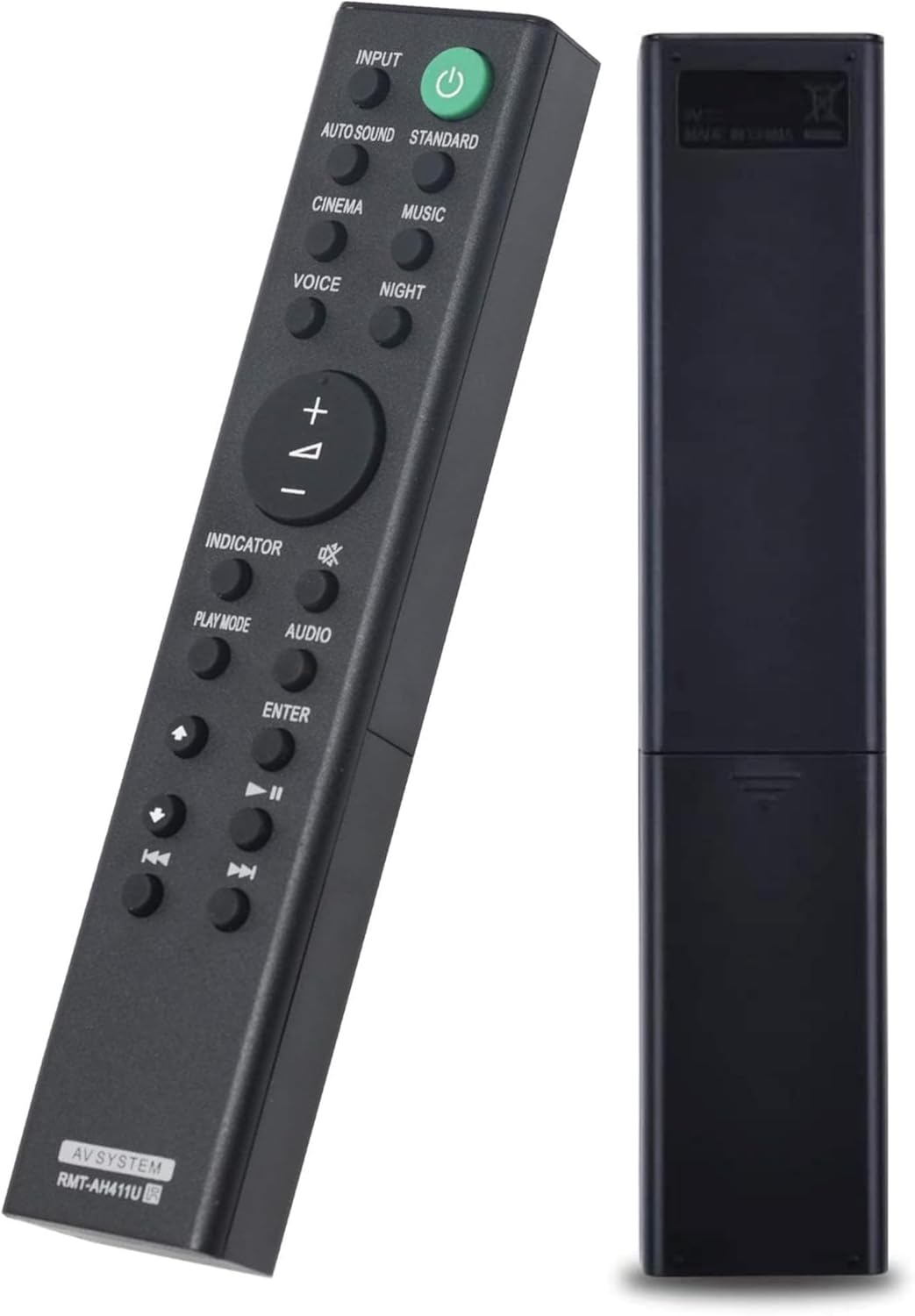
Figure 2: Front and back view of the UBay RMT-AH411U remote control. The back view shows the battery compartment cover.
3. Setup
The UBay RMT-AH411U remote control requires two AAA alkaline batteries for operation. No programming or pairing is necessary.
3.1 Battery Installation
- Locate the battery compartment on the back of the remote control.
- Slide the battery compartment cover downwards and remove it.
- Insert two (2) AAA alkaline batteries, ensuring the positive (+) and negative (-) terminals align correctly with the markings inside the compartment.
- Replace the battery compartment cover by sliding it back into place until it clicks securely.
The remote is now ready for use with your compatible Sony Sound Bar or AV system.
4. Operating Instructions
To operate your device, point the remote control directly at the infrared receiver on your Sony Sound Bar or AV system. Ensure there are no obstructions between the remote and the device.
4.1 Key Functions
- Power Button (⏻): Turns the sound bar/AV system on or off.
- INPUT: Selects the audio input source (e.g., TV, Bluetooth, HDMI).
- AUTO SOUND / STANDARD / CINEMA / MUSIC / VOICE / NIGHT: Selects various sound modes for optimized audio experience.
- Volume (+/-): Increases or decreases the audio volume.
- Mute (🔇): Mutes or unmutes the audio.
- PLAY MODE: Cycles through different playback modes.
- AUDIO: Adjusts audio settings.
- INDICATOR: Activates or deactivates an indicator light.
- Navigation Buttons (Up, Down, Left, Right, ENTER): Used for menu navigation and selection.
- Playback Controls (Play/Pause, Stop, Skip Forward, Skip Backward): Controls media playback.
5. Maintenance
Proper care and maintenance will extend the life of your remote control.
5.1 Cleaning
Wipe the remote control with a soft, dry cloth. For stubborn dirt, lightly dampen the cloth with water. Avoid using abrasive cleaners, solvents, or alcohol, as these can damage the surface and buttons.
5.2 Battery Replacement
Replace batteries when the remote's response becomes sluggish or stops working. Always replace both batteries at the same time with new AAA alkaline batteries. Do not mix old and new batteries, or different types of batteries.
5.3 Storage
If the remote control will not be used for an extended period, remove the batteries to prevent leakage, which can damage the remote.
6. Troubleshooting
If you experience issues with your remote control, try the following steps:
- Remote not responding: Check if the batteries are inserted correctly with the correct polarity.
- Weak or intermittent response: Replace the batteries with fresh AAA alkaline batteries.
- No response after battery replacement: Ensure there is a clear line of sight between the remote control and the infrared receiver on your Sony Sound Bar or AV system. Remove any obstructions.
- Remote still not working: Verify that your Sony Sound Bar or AV system is powered on and functioning correctly. If the issue persists, contact customer support.
7. Specifications
| Brand | UBay |
| Model Name | RMT-AH411U |
| Connectivity Technology | Infrared |
| Battery Type | AAA (2 required) |
| Maximum Range | 10 Meters |
| Item Dimensions (L x W x H) | 6.5"L x 1.2"W x 0.7"H |
| Compatible Devices | Sony Sound Bar, Stereo System |
| Special Feature | Ergonomic |
8. Warranty and Support
For warranty information and customer support, please refer to the documentation provided at the time of purchase or contact the seller directly. As a replacement product, specific warranty terms may vary.