
Introduction
Thank you for choosing the TOZO T5 True Wireless Earbuds. These sport earphones are designed to provide a high-quality audio experience with features like touch control, wireless charging compatibility, and a sweatproof design, making them ideal for active lifestyles. This manual provides detailed instructions for setup, operation, maintenance, and troubleshooting to ensure optimal performance and longevity of your device.

Image: TOZO T5 True Wireless Earbuds in their charging case, showcasing the design and fit.
Package Contents
Please verify that all items are present in the package:
- TOZO T5 True Wireless Earbuds (Left and Right)
- Charging Case
- USB Charging Cable
- User Manual (this document)
- Multiple sizes of silicone ear tips
Setup
1. Charging the Earbuds and Case
Before first use, fully charge the earbuds and the charging case. The charging case provides extended battery life for your earbuds.
- Via USB Cable: Connect the provided USB cable to the charging port on the case and to a USB power source. The indicator lights on the case will show charging status.
- Via Wireless Charger: Place the charging case on a compatible wireless charging pad. Ensure the case is centered on the pad for efficient charging.
A single charge provides over 6 hours of playtime for the earbuds, with the compact charging case extending total playtime up to 24 hours.
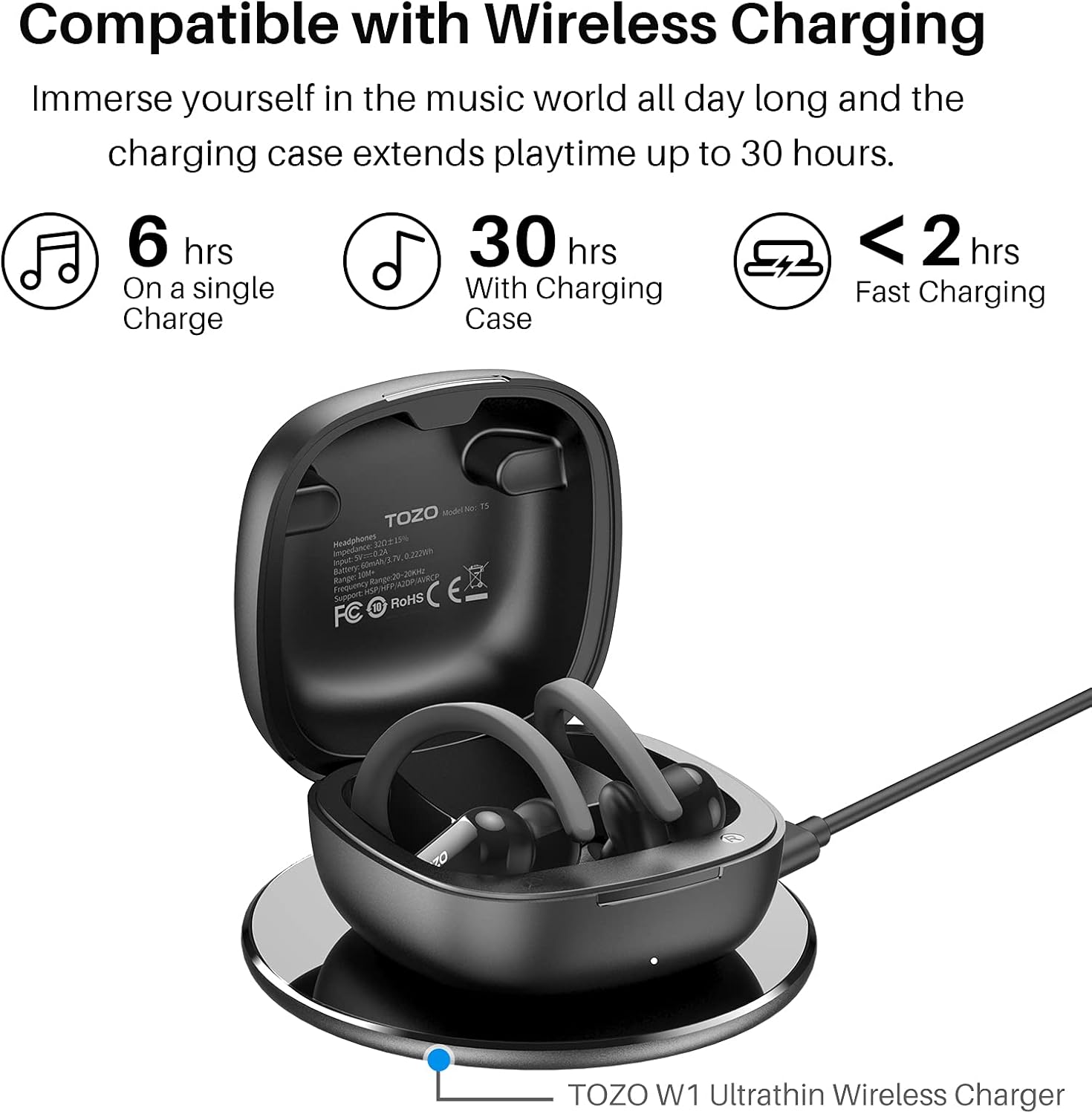
Image: The TOZO T5 charging case being charged wirelessly on a charging pad, illustrating its wireless charging capability.
2. Pairing with Your Device (One-Step Pairing)
The TOZO T5 earbuds feature a convenient one-step pairing process:
- Open the charging case and pick up both earbuds. They will automatically power on and connect to each other.
- Enable Bluetooth on your mobile phone or other Bluetooth-enabled device.
- Search for "TOZO-T5" in the list of available Bluetooth devices and select it to pair.
- Once paired, the earbuds will automatically connect to your device whenever they are taken out of the case and Bluetooth is enabled on your device.

Image: Illustration showing the TOZO T5 earbuds being picked up from the case and the phone's Bluetooth settings displaying "TOZO-T5" for pairing.
Operating Instructions
1. Wearing the Earbuds
The TOZO T5 earbuds are designed with ergonomic flexible ear hooks and silicone earcaps for a secure and comfortable fit, especially during sports activities.
- Place the earhook over the back of your ear.
- Gently insert the earbud into your ear canal.
- Adjust the flexible earhook to fit securely around your ear, ensuring a firm and comfortable seal.

Image: A person wearing the TOZO T5 earbuds, with detailed insets showing how to position the earhook and insert the earbud for a secure fit.
2. Touch Control Functions
The TOZO T5 earbuds feature touch control sensors on the outer surface of each earbud. These controls allow for various functions without needing to access your connected device.
| Action | Function |
|---|---|
| Single Tap (L/R) | Play/Pause Music |
| Double Tap (Left) | Previous Song |
| Double Tap (Right) | Next Song |
| Triple Tap (L/R) | Activate Voice Assistant (Siri/Google Assistant) |
| Hold (Left) | Volume Down |
| Hold (Right) | Volume Up |
| Single Tap (during call) | Answer/End Call |
| Hold (during call) | Reject Call |

Image: A visual diagram detailing the touch control functions for the TOZO T5 earbuds, showing tap and hold gestures for various commands.
3. Sound Quality and Technology
The TOZO T5 earbuds deliver authentic stereo sound with powerful bass, thanks to their 12mm large size speaker drivers. They utilize advanced Bluetooth 5.0 technology, supporting HSP, HFP, A2DP, and AVRCP profiles for stable and fast transmission, ensuring clear in-call stereo sound and a tangle-free listening experience.

Image: An exploded view diagram of the TOZO T5 earbud's internal components, highlighting the 12mm large size speaker driver responsible for sound quality.
Maintenance
Proper maintenance ensures the longevity and optimal performance of your TOZO T5 earbuds.
- Cleaning: Regularly clean the earbuds, especially the ear tips and charging contacts, with a soft, dry, lint-free cloth. Do not use abrasive cleaners or solvents.
- Water Resistance: The earbuds are waterproof and sweatproof, making them suitable for workouts. However, avoid submerging them in water for extended periods or exposing them to high-pressure water jets. Dry them thoroughly before placing them back in the charging case.
- Storage: When not in use, store the earbuds in their charging case to protect them from dust and damage. Store the case in a cool, dry place away from extreme temperatures.
- Battery Care: To preserve battery life, avoid fully discharging the earbuds and case frequently. Charge them regularly, even if not in constant use.
Troubleshooting
If you encounter issues with your TOZO T5 earbuds, refer to the following common solutions:
- Earbuds Not Pairing/Connecting:
- Ensure both earbuds are fully charged.
- Place both earbuds back into the charging case, close the lid, wait a few seconds, then open the lid and take them out again.
- Turn off Bluetooth on your device, then turn it back on.
- Forget "TOZO-T5" from your device's Bluetooth settings and attempt to re-pair.
- Perform a factory reset (if applicable, refer to manufacturer's website for specific instructions, as this model may have a small reset button/hole).
- One Earbud Not Working/No Sound:
- Ensure both earbuds are charged.
- Place both earbuds back in the case and take them out simultaneously to ensure they connect to each other.
- Clean the charging contacts on both the earbuds and inside the case to ensure proper connection and charging.
- Try resetting the earbuds as described above.
- Charging Issues:
- Verify the USB cable is securely connected to both the case and the power source.
- If using wireless charging, ensure the case is correctly positioned on the charging pad.
- Clean the charging contacts on the earbuds and inside the case.
- Try a different USB cable or power adapter.
- Touch Controls Unresponsive/Too Sensitive:
- Ensure your fingers are clean and dry when using touch controls.
- Practice the gestures to ensure correct execution (e.g., distinct taps vs. holds).
- Avoid touching the sensor area when adjusting the earbuds in your ear; hold them by the matte part or earhook.
If issues persist, please refer to the official TOZO support channels.
Specifications
| Feature | Detail |
|---|---|
| Model Name | T5 |
| Connectivity Technology | Bluetooth |
| Wireless Communication Technology | Bluetooth 5.0 |
| Bluetooth Range | 10 Meters |
| Battery Life (Earbuds) | 6 Hours (single charge) |
| Battery Life (with Charging Case) | Up to 24 Hours |
| Audio Driver Size | 12 Millimeters |
| Water Resistance Level | Waterproof (Sweatproof) |
| Control Method | Touch Control |
| Material | PC |
| Item Weight | 6.5 ounces |
| Earpiece Shape | In Ear with Earhook |
| Frequency Range | 20 Hz to 20,000 Hz |
Warranty and Support
For detailed warranty information and customer support, please visit the official TOZO website. You can typically find FAQs, troubleshooting guides, and contact information for technical assistance there.
Official TOZO Website: www.tozostore.com


