
Introduction
Thank you for choosing the M MIVONDA Hollywood Vanity Mirror. This mirror is designed to enhance your makeup and grooming routine with its versatile lighting options, magnification, and convenient charging features. Please read this manual thoroughly before use to ensure proper operation and maintenance.
Important Safety Information
- Always unplug the mirror before installing or removing it from the wall.
- Exercise caution when handling the 10x magnifying glass to prevent eye injuries.
- Keep the mirror out of reach of children and pets when not in use.
- Do not expose the mirror to excessive moisture or direct water contact.
- Ensure the power cord is not damaged or pinched during setup or use.
Product Features
- Eye-Friendly Lighting: 12 soft LED bulbs with three dimmable color temperatures for an optimal visual experience during makeup application.
- Smart Touch Controls: Three smart touch buttons for easy operation of lighting functions and brightness adjustments.
- Memory Function: Automatically recalls the last used color temperature and brightness setting.
- 10X Magnifying Mirror: Includes a detachable 10x magnifying glass for detailed makeup application.
- USB Charging Port: Convenient USB port for charging phones or other USB devices.
- Versatile Installation: Can be used as a tabletop mirror or wall-mounted.
Setup and Installation
1. Tabletop Setup
Place the mirror on a stable, flat surface such as a desk or vanity. Ensure the mirror is securely positioned and the power cord can reach an outlet without strain.

Image: The M MIVONDA Hollywood Vanity Mirror set up on a desk, showcasing its use as a tabletop mirror.
2. Wall-Mounted Installation
This mirror can also be mounted to a wall. All necessary materials and tools for wall mounting are included. Follow these general steps:
- Choose a suitable location on the wall, ensuring it is sturdy enough to support the mirror's weight.
- Mark the drilling points according to the provided template or measurements.
- Drill holes and insert wall anchors if necessary.
- Secure the mounting brackets to the wall.
- Carefully hang the mirror onto the installed brackets.
- Ensure the mirror is level and securely attached before use.
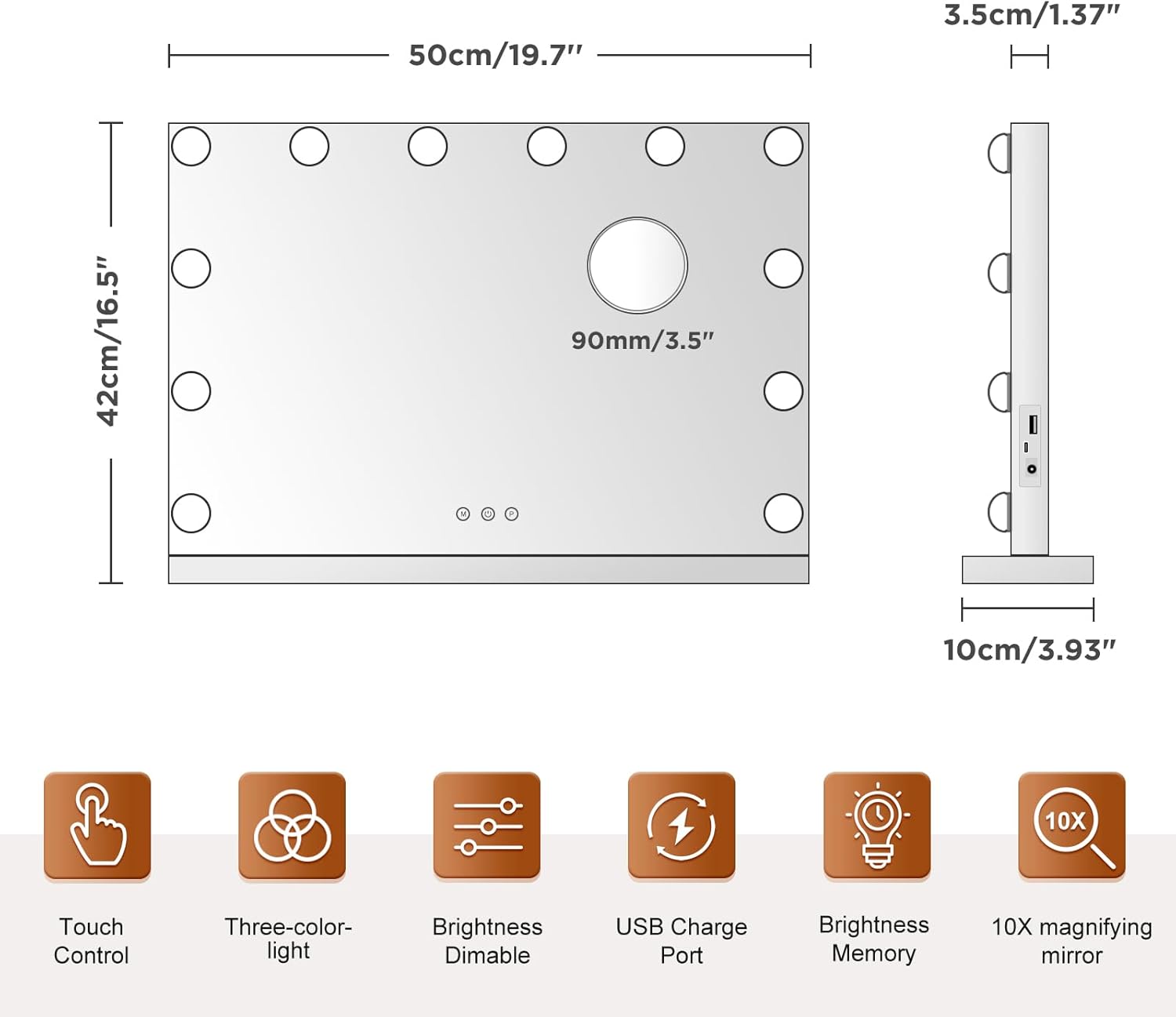
Image: The M MIVONDA Hollywood Vanity Mirror installed on a wall above a vanity desk.
Operating Instructions
1. Power On/Off
Locate the power button (usually indicated by a circle with a vertical line) on the mirror's touch panel. Tap once to turn the mirror on or off.
2. Changing Light Modes (3 Colors)
The mirror features three dimmable color temperatures: Cool White, Warm White, and Warm Yellow. Tap the 'M' button (Mode button) on the touch panel to cycle through these lighting modes.

Image: Visual representation of the three dimmable light modes (Cool White, Warm White, Warm Yellow) and their recommended uses for makeup.
Video: Demonstrates how to switch between the three different lighting modes (Cool White, Warm White, Neutral White) on the vanity mirror using the 'M' touch button.
3. Adjusting Brightness
To adjust the brightness of the selected light mode, tap and hold the 'P' button (Power/Brightness button) on the touch panel. The brightness will gradually increase or decrease. Release the button when the desired brightness level is reached.

Image: A visual guide on using the 'P' touch button to adjust the brightness level of the mirror's lights.
4. Using the 10X Magnifying Mirror
The mirror comes with a detachable 10x magnifying mirror. This can be attached to the main mirror surface via suction cups for detailed tasks such as eyeliner application, eyebrow shaping, or contact lens insertion. Position it as needed for optimal focus.

Image: The detachable 10x magnifying mirror in use, highlighting its utility for precise makeup application.
5. USB Charging Port
A USB charging port is located on the side of the mirror. Use this port to charge your smartphone, nail dryer, or other USB-powered devices while using the mirror.

Image: The USB charging port on the side of the mirror, demonstrating its use for charging a mobile phone.
6. Memory Function
The mirror's memory function automatically saves your last used light color temperature and brightness setting. When you turn the mirror on again, it will resume with these settings.
Maintenance
- Cleaning the Mirror: Use a soft, lint-free cloth and a non-abrasive glass cleaner to wipe the mirror surface. Avoid spraying cleaner directly onto the mirror; instead, apply it to the cloth first.
- Cleaning the Bulbs: Gently wipe the LED bulbs with a dry, soft cloth. Do not use liquid cleaners on the bulbs.
- General Care: Keep the mirror away from direct sunlight and high humidity. Ensure the power cord is not tangled or damaged.
Troubleshooting
- Lights Not Turning On:
- Ensure the mirror is properly plugged into a working power outlet.
- Check if the power button has been pressed.
- Verify that the power adapter is securely connected to the mirror.
- Lights Not Changing Color/Brightness:
- Ensure your fingers are clean and dry when using the touch buttons.
- Try restarting the mirror by unplugging and re-plugging it.
- USB Port Not Charging:
- Confirm the mirror is powered on.
- Check the USB cable and the device being charged for any damage.
- Try a different USB cable or device to isolate the issue.
- If problems persist, please contact customer support.
Specifications
| Feature | Detail |
|---|---|
| Brand | M MIVONDA |
| Model Number | HM12MS |
| Product Dimensions | 20"L x 17"W |
| Frame Material | Metal |
| Mounting Type | Dresser Mount, Wall Mount |
| Special Features | Adjustable, Lighted, Magnifying (10x), USB Charging, Memory Function |
| Number of LED Bulbs | 12 |
| Light Colors | 3 (Cool White, Warm White, Warm Yellow) |
| Item Weight | 8 Pounds |
| Assembly Required | No |
Warranty and Support
M MIVONDA provides a 24-MONTH WARRANTY for this product. If you encounter any issues or have questions regarding your vanity mirror, please do not hesitate to contact our customer support team. The manufacturer is Mcsaver.
For support, please refer to the contact information provided with your purchase or visit the official M MIVONDA website.