Product Overview
The farexon Electric Standing Desk is designed to provide a versatile and ergonomic workspace for both home and office environments. Featuring adjustable height settings, memory presets, and a sturdy construction, this desk promotes a healthier work-life balance by allowing seamless transitions between sitting and standing positions. It includes various accessories for enhanced functionality and organization.

Figure 1: farexon Electric Standing Desk (Brown, 48x24 inch) in a typical office setup.
Key Features
- Adjustable Height Range: Smooth electric lifting from 27.5 inches to 46.5 inches (70cm to 118cm) at a speed of 2.5cm/second.
- Memory Presets: Four programmable memory height settings for quick and easy transitions.
- Quiet Operation: Motor operates at less than 50dB, ensuring minimal disturbance.
- Anti-Collision Technology: Automatically reverses if an obstacle is detected during height adjustment, preventing damage.
- Sturdy Construction: Supported by a durable metal frame and an upgraded motor, tested for long-term reliability.
- Included Accessories: Comes with 4 lockable casters, 4 foot pads, an extra-large mouse pad, 2 metal hooks, and 2 cable take-ups for improved organization and mobility.
- Material Safety: Constructed with materials that meet U.S. federal and state safe air standards, with significant reductions in formaldehyde and VOC emissions.

Figure 2: Detailed view of desk features including wire management, optional casters/foot pads, protective edge, and waterproof surface.
Setup and Assembly
The farexon Electric Standing Desk requires assembly. A detailed installation video is available for reference (though not provided here, users should check the product page or manufacturer's website). Please follow the instructions carefully to ensure proper setup.
Package Contents:
Before beginning assembly, verify that all components are present. The package typically includes:
- Desktop sections (usually two pieces for the 48x24 inch model)
- Desk frame components (legs, crossbeams)
- Electric motor and control box
- Control panel with memory buttons
- Power adapter and cables
- 4 Lockable casters
- 4 Foot pads
- Extra-large mouse pad
- 2 Metal hooks
- 2 Cable take-ups
- Assembly hardware (screws, bolts, etc.)
- Assembly tools (a Phillips-head screwdriver is required, other tools are usually included)

Figure 3: All accessories included in the product package.
Assembly Tips:
- It is recommended to assemble the desk on a soft, clean surface to prevent scratches to the desktop or floor. Using cardboard from the packaging can protect the desktop.
- Ensure the power box faces outward and the two plug points face inward during installation for correct cable management.
- While assembly can be done by one person, having a second person may be helpful due to the weight of some components.
Operating Instructions
Control Panel Functions:

Figure 4: Multifunctional Smart LED Controller.
- LED Display: Shows the current height of the desk in inches or centimeters.
- Up/Down Arrows (^ / v): Press to adjust the desk height upwards or downwards. Hold the button for continuous movement.
- Memory Buttons (1, 2, 3, 4): These buttons allow you to save and recall preferred height settings.
- To Save a Height: Adjust the desk to your desired height. Press and hold one of the memory buttons (1, 2, 3, or 4) until the LED display flashes or beeps, indicating the height has been saved.
- To Recall a Height: Press the corresponding memory button (1, 2, 3, or 4) once. The desk will automatically move to the saved height.
Anti-Collision Feature:
The desk is equipped with an anti-collision system. If the desk encounters an obstacle during height adjustment (either moving up or down), it will automatically stop and reverse slightly to prevent damage to the desk or objects. Ensure the area around the desk is clear before adjusting height.

Figure 5: Anti-Collision Technology in action.
Maintenance
Regular maintenance helps ensure the longevity and optimal performance of your farexon Electric Standing Desk.
- Cleaning: Wipe the desktop and frame with a soft, damp cloth. Avoid using harsh chemicals or abrasive cleaners that could damage the surface. The desktop is waterproof, allowing for easy cleaning of spills.
- Cable Management: Periodically check and organize cables using the provided cable take-ups to prevent tangling and damage.
- Motor and Frame Inspection: Occasionally inspect the motor and frame for any loose screws or unusual noises during operation. Tighten any loose fasteners. If persistent unusual noises occur, refer to the troubleshooting section or contact customer support.
- Caster/Foot Pad Check: If using casters, ensure they are clean and roll smoothly. If using foot pads, ensure they are securely in place.
Troubleshooting
This section addresses common issues you might encounter with your electric standing desk.
| Problem | Possible Cause | Solution |
|---|---|---|
| Desk does not move or respond to controls. | Power cable disconnected; Overload; Motor overheating; Control box error. |
|
| Desk moves unevenly or makes unusual noises. | Loose connections; Obstruction; Uneven load. |
|
| Anti-collision feature triggers too often. | Sensitivity setting; Obstruction. |
|
| Memory presets are not saving or recalling correctly. | Incorrect saving procedure; Power interruption. |
|
Specifications
| Feature | Detail |
|---|---|
| Brand | farexon |
| Model Name | standing desk |
| Model Number | 1 |
| Product Dimensions (D x W x H) | 24"D x 48"W x 46"H (Max Height) |
| Adjustable Height Range | 27.5" (Minimum) to 46.5" (Maximum) |
| Lifting Speed | 2.5 cm/second |
| Noise Level | Less than 50dB |
| Maximum Weight Recommendation | 178 Pounds |
| Top Material Type | Wood (Brown finish for this model) |
| Base Material | Metal (Black finish for this model) |
| Included Components | 4 Lockable casters, 4 foot pads, An extra large mouse, 2 Metal hooks, 2 Cable take-ups, 4 memory buttons |
| Required Assembly | Yes |
| Recommended Number of People for Assembly | 1 |
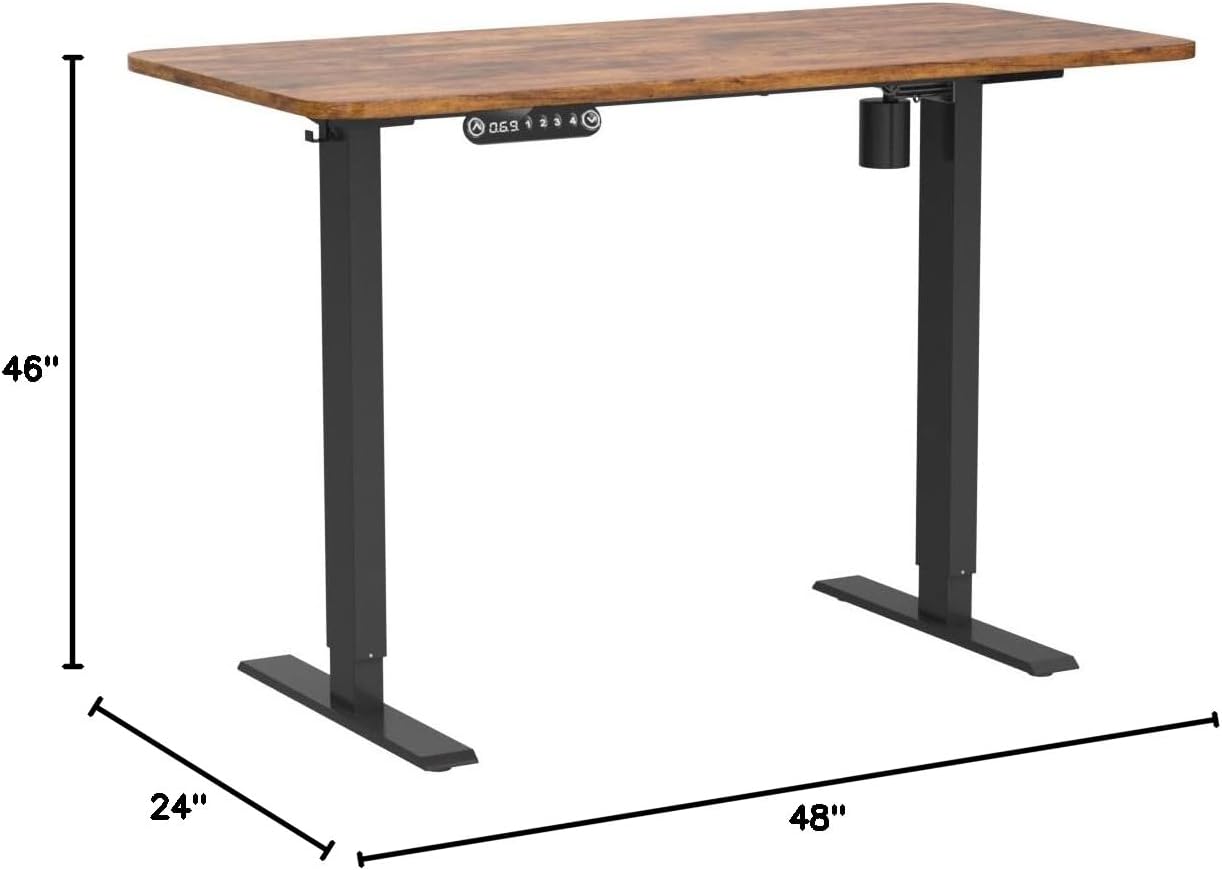
Figure 6: Product Dimensions.

Figure 7: Different height ranges for various user needs.
Warranty and Support
The farexon Electric Standing Desk comes with a Limited Warranty. For specific terms and conditions of the warranty, please refer to the documentation included with your purchase or contact farexon customer support directly.
Customer Support:
If you have any questions, require assistance with assembly, operation, or troubleshooting, or need to inquire about warranty claims, please contact farexon customer support. Your satisfaction is a top priority.
For contact information, please visit the official farexon store on Amazon or their official website. You can also refer to the "Customer Support" information provided during your purchase.

Figure 8: farexon Customer Support Team.


