
1. Introduction
The CONCEPT VP5241 Radical Home&Car Cyclonic Vacuum Cleaner is designed for efficient cleaning of various surfaces, both in your home and vehicle. This appliance features high suction power, low energy consumption, and quiet operation. It incorporates a cyclonic system and a HEPA 13 filter for effective dust and allergen capture.
Key features include:
- High performance with environmental protection.
- Bagless design eliminates the need for replacement bags.
- Washable HEPA 13 filter for allergen-free air.
- 2.5 L dust bin capacity.
- 800 W power with a 10 m operating radius.
- Low noise level of 72 dB.
- AAAA efficiency rating.
2. Product Overview and Components
The VP5241 vacuum cleaner comes with several components and accessories designed for various cleaning tasks.

Figure 1: The CONCEPT VP5241 cyclonic vacuum cleaner shown with its main body and a selection of included cleaning attachments.
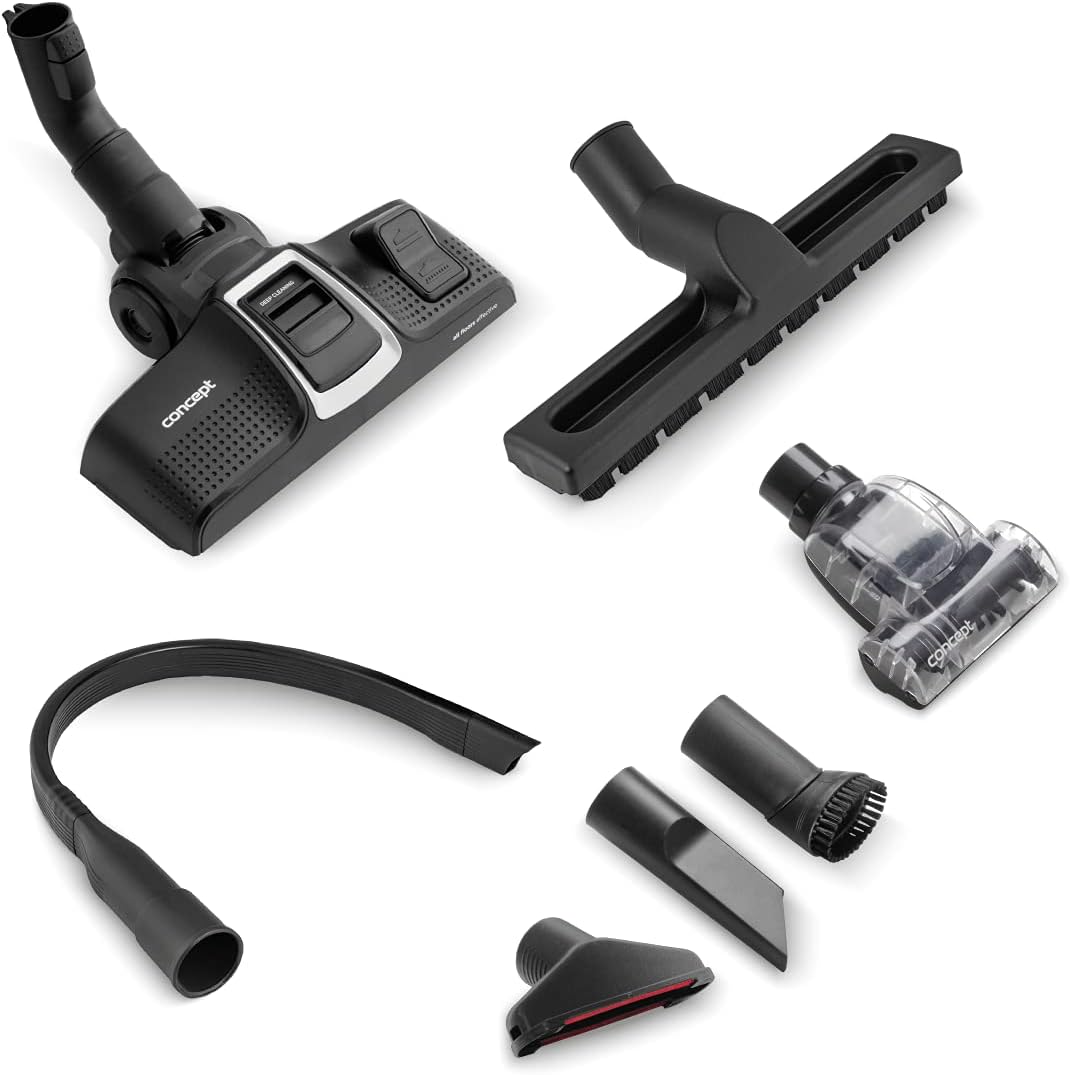
Figure 2: A comprehensive view of all accessories included with the VP5241 vacuum cleaner, laid out for identification.
Main Components:
- Vacuum Cleaner Body: Contains the motor, dust bin, and filter system.
- Hose: Flexible connection between the body and the telescopic tube/attachments.
- Telescopic Tube: Adjustable length tube for extended reach.
- Power Cord: Retractable cord for electrical connection.
Included Accessories:
- AAAA Floor Brush: Designed for optimal performance on both hard floors and carpets. Features a flap to switch between surfaces.
- Small Turbo Brush: Ideal for removing pet hair from upholstery and hard-to-reach areas.
- Extra-long Slit Car Nozzle: Flexible tool for cleaning narrow spaces in vehicles, such as between seats.
- Parquet Brush: Soft brush specifically for gentle cleaning of delicate hard floors without scratching.
- Crevice Nozzle: For cleaning tight spaces like radiators, drawers, and mattress gaps.
- Nozzle with Brush: For dusting furniture, blinds, window sills, books, and keyboards.
- Upholstery Nozzle: For vacuuming sofas, armchairs, mattresses, and other upholstered surfaces.
3. Setup
Follow these steps to assemble your vacuum cleaner before first use.
- Attach the Hose: Insert the flexible hose into the suction inlet on the main body of the vacuum cleaner until it clicks securely into place.
- Connect the Telescopic Tube: Attach the telescopic tube to the handle end of the hose. Adjust the length of the telescopic tube by pressing the release button and sliding it to your desired height.
- Select and Attach an Accessory: Choose the appropriate cleaning accessory (e.g., AAAA floor brush, parquet brush) for your cleaning task and attach it to the end of the telescopic tube.
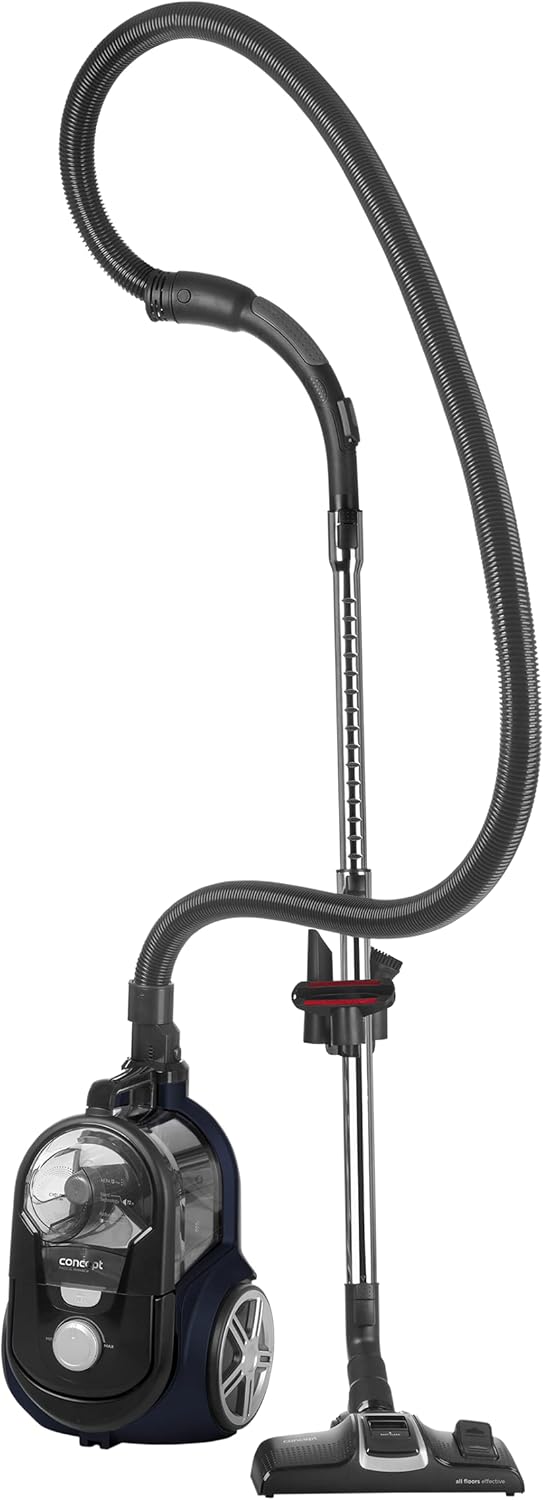
Figure 3: The vacuum cleaner fully assembled with the hose, telescopic tube, and main floor brush attached, ready for use.
4. Operating Instructions
Operating your VP5241 vacuum cleaner is straightforward.
- Power Connection: Extend the power cord and plug it into a suitable electrical outlet.
- Power On/Off: Press the power button located on the vacuum cleaner body to turn the appliance on or off.
- Adjust Suction Power: Use the electronic control dial on the vacuum cleaner body to adjust the suction power according to the cleaning task and surface type. Turn towards 'MIN' for delicate surfaces and 'MAX' for heavy-duty cleaning.
- Using the AAAA Floor Brush: For carpets, ensure the brush bristles are retracted. For hard floors, extend the bristles by pressing the flap on the brush head.
- Using Specialized Nozzles: Attach the small turbo brush for pet hair, the extra-long slit car nozzle for car interiors, or the parquet brush for delicate hard floors as needed. Small accessories can be stored on the telescopic tube for easy access.
- Parking Positions: The vacuum cleaner offers two parking positions to store the floor brush and tube when not in use or during breaks.
- Cord Rewind: After use, unplug the vacuum cleaner. Press the handle (which doubles as the cord rewind button) to automatically retract the power cord.

Figure 4: The AAAA floor brush demonstrating its versatility by cleaning both carpeted and hard floor surfaces.

Figure 5: The small turbo brush in action, designed to efficiently remove pet hair from fabric surfaces.
5. Maintenance
Regular maintenance ensures optimal performance and extends the lifespan of your vacuum cleaner.
Emptying the Dust Bin:
The VP5241 features a 2.5 L bagless dust bin. Empty it regularly, especially when the 'MAX' indicator is reached, to maintain suction power.
- Ensure the vacuum cleaner is unplugged.
- Press the release button to detach the dust bin from the main body.
- Carefully empty the contents of the dust bin into a waste receptacle.
- Reattach the dust bin securely to the vacuum cleaner body.

Figure 6: The transparent dust collection bin, showing its detachable design for easy emptying.
Cleaning the Filters:
The HEPA 13 filter is washable. Clean it regularly to ensure efficient filtration and prevent loss of suction.
- Unplug the vacuum cleaner.
- Remove the dust bin as described above.
- Locate and carefully remove the HEPA filter and any pre-filters.
- Rinse the filters under cold running water until the water runs clear. Do not use detergents.
- Allow the filters to air dry completely for at least 24 hours before reinserting them. Do not use heat to dry.
- Reinsert the dry filters and reattach the dust bin.

Figure 7: Illustration of the HEPA filter and pre-filter components being removed from the vacuum cleaner for cleaning.
Cleaning Brushes and Nozzles:
Periodically check brushes and nozzles for tangled hair, threads, or debris. Remove any obstructions to ensure effective cleaning.
6. Troubleshooting
If you encounter issues with your vacuum cleaner, refer to the following common problems and solutions.
- No Power:
- Check if the power cord is securely plugged into the outlet.
- Ensure the power button is pressed.
- Verify that the electrical outlet is functional by testing it with another appliance.
- Loss of Suction:
- Check if the dust bin is full and needs emptying.
- Inspect the filters (HEPA and pre-filters) for clogging and clean them as described in the Maintenance section.
- Check the hose, telescopic tube, and attachments for any blockages. Remove any obstructions carefully.
- Ensure all connections (hose to body, tube to hose, attachment to tube) are secure.
- Unusual Noise:
- Turn off and unplug the vacuum cleaner.
- Check for any foreign objects caught in the brush head or hose.
- If the noise persists after checking for obstructions, contact customer support.
If these steps do not resolve the issue, please contact Concept customer support for further assistance.
7. Specifications
| Feature | Specification |
|---|---|
| Brand | Concept |
| Model Number | VP5241 |
| Color | Black |
| Product Dimensions (L x W x H) | 26.5 x 41 x 24 cm |
| Item Weight | 4.5 Kilograms (4500 Grams) |
| Capacity (Dust Bin) | 2.5 Liters |
| Power | 800 Watts |
| Voltage | 240 Volts |
| Noise Level | 72 dB |
| Operating Radius | 10 meters |
| Filter Type | HEPA 13 Filter (Washable) |
| Special Feature | HEPA |
| Surface Recommendation | Carpet, Hard Floors |
| Power Source | Corded Electric |
| Cordless | No |
| Product Compatibility | VPP5000 |
8. Warranty and Support
For information regarding warranty coverage, terms, and conditions, please refer to the documentation provided with your purchase or visit the official Concept website. For technical support, spare parts, or service inquiries, please contact Concept customer service.
Spare parts availability information is currently unavailable through this document. Please consult the manufacturer's official channels for the most up-to-date information.


