
Introduction
This manual provides detailed instructions for the assembly, operation, and maintenance of your OUTON LED Floor Lamp, Model MF18812. This lamp features a 27W main torchiere light and a 7W adjustable reading light, both with dimmable brightness and four color temperature settings. Control is available via both touch and remote.
Included Components
Please check the package contents to ensure all items are present:
- Floor Lamp (multiple sections)
- Remote Control
- User Manual (this document)
Setup and Assembly
The OUTON LED Floor Lamp is designed for easy assembly without the need for additional tools. Follow these steps:
- Carefully unpack all components from the box.
- Screw each section of the lamp pole together clockwise until secure. Ensure the power cord passes freely through the pole sections.
- Attach the lamp base to the bottom pole section by screwing it clockwise until firm.
- Connect the power adapter to the lamp's power input and then plug it into a standard electrical outlet.

Image: Lamp dimensions and adjustable components. The main lamp head can rotate 350 degrees and adjust 85 degrees up/down. The side reading lamp can bend 90 degrees. Total height is 70.5 inches, base diameter is 9.8 inches, and the lamp weighs 6.06 lbs.
Operating Instructions
Your OUTON LED Floor Lamp can be controlled using either the integrated touch controls on the lamp pole or the included remote control. Both methods allow independent control of the main torchiere lamp and the reading lamp.
Touch Control
The touch panel is located on the lamp pole. It provides direct access to power, brightness, and color temperature settings for both lamps.
- Reading Lamp On/Off: Touch the dedicated button for the reading lamp.
- Adjust Brightness: Use the '+' and '-' buttons to increase or decrease the brightness level (5% to 100%).
- Change Color Temperature (CCT): Cycle through 4 color temperatures (3000K Warm, 4000K Warm White, 5000K Cool White, 6000K Daylight White) using the CCT button.
- Main Lamp On/Off: Touch the dedicated button for the main torchiere lamp.
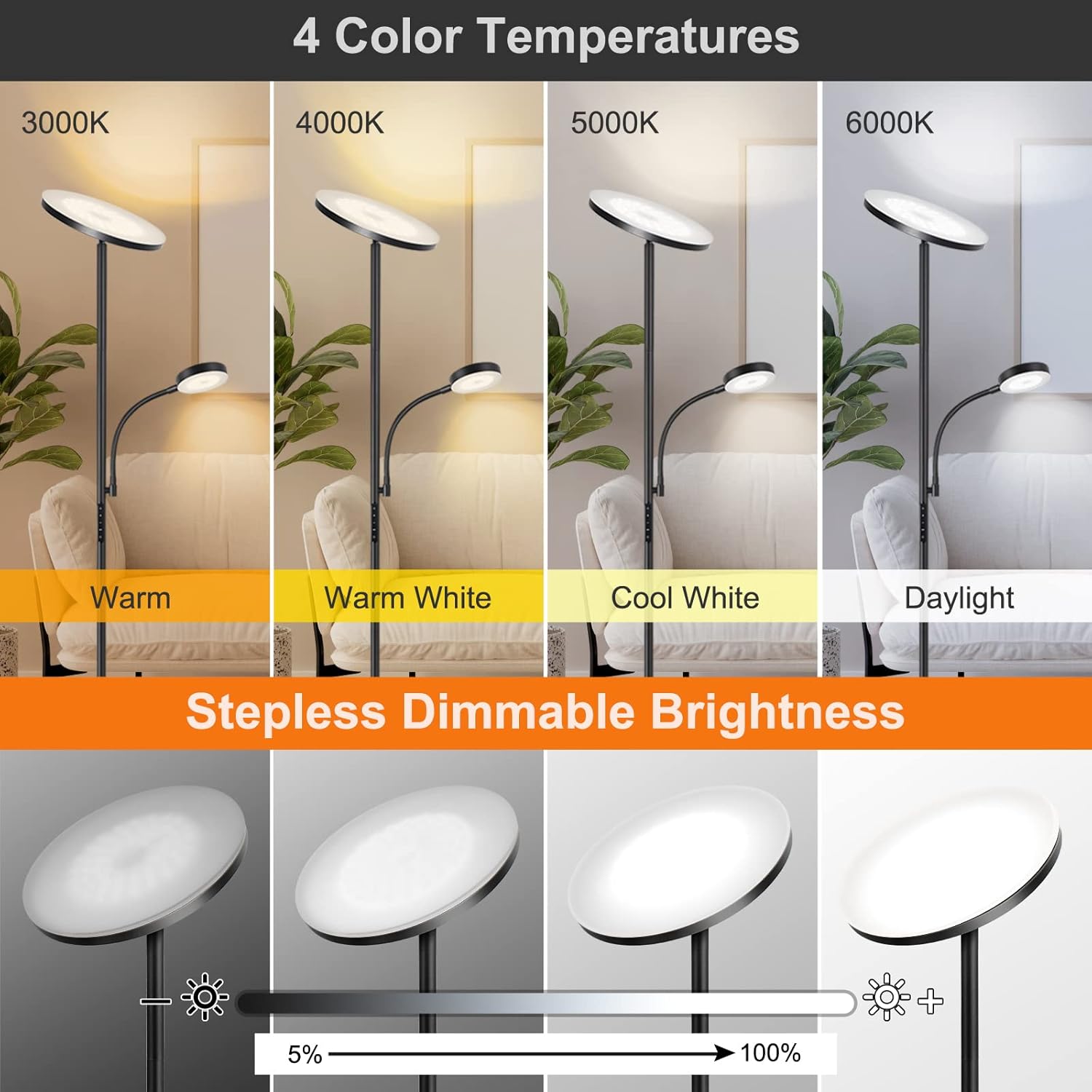
Image: Detailed view of the touch control panel on the lamp pole and the remote control. The touch controls include separate on/off buttons for the reading and main lamps, brightness adjustment buttons (+/-), and a color temperature (CCT) button. The remote control also offers similar functions and is magnetic for convenient storage.
Remote Control
The magnetic remote control allows you to operate the lamp from a distance of up to 32.8 feet. It can be conveniently attached to the lamp pole or other metal surfaces.
- Power On/Off: Separate buttons for main and reading lamps.
- Brightness Adjustment: Dedicated buttons to increase or decrease brightness.
- Color Temperature Adjustment: Buttons to cycle through the 4 color temperature settings.
- Memory Function: The lamp remembers your last brightness and color temperature settings when turned back on.
- 1-Hour Timer: Activate a 1-hour automatic shut-off timer by long-pressing the on/off touch button.
Video: Demonstration of the OUTON LED Floor Lamp with Adjustable Reading Lamp, showcasing its features and controls.
Video: A brief overview of the OUTON LED floor lamp with its reading light, demonstrating its functionality.
Key Features
- Dual Control System: Operate the lamp conveniently with either the integrated touch controls or the magnetic remote control. Both lamps can be controlled independently.
- Adjustable Brightness and Color Temperature: Both the main 27W/2400LM torchiere lamp and the 7W/400LM reading lamp offer stepless dimming from 5% to 100% and four color temperature options (3000K, 4000K, 5000K, 6000K).
- Memory Function: The lamp retains your last used brightness and color temperature settings when powered off and on.
- 1-Hour Timer: Activate a 1-hour automatic shut-off timer by long-pressing the on/off touch button.
- Long Lifespan: Equipped with LEDs designed for over 50,000 hours of operation, reducing the need for frequent bulb replacement.
- Stable and Safe Design: Features a wide (9.8 inch diameter) and weighted base (6.06 lbs) to ensure stability and prevent accidental tipping. The lamp's slender design allows it to fit into narrow spaces.
- Adjustable Lamp Heads: The main lamp head can rotate up to 350 degrees and adjust 85 degrees vertically. The side reading lamp features a flexible gooseneck that can bend up to 90 degrees for precise illumination.

Image: Visual representation of the four available color temperatures (Warm, Warm White, Cool White, Daylight) and the stepless dimming capability from 5% to 100% brightness.

Image: Illustration of the 1-hour timer and memory function, indicating how the lamp retains settings and can be set to turn off automatically.
Maintenance
To ensure the longevity and optimal performance of your OUTON LED Floor Lamp, follow these simple maintenance guidelines:
- Cleaning: Disconnect the lamp from the power source before cleaning. Use a soft, dry cloth to wipe down the lamp pole and light heads. Avoid abrasive cleaners, solvents, or harsh chemicals, as these can damage the finish or electronic components.
- Bulb Replacement: The integrated LED lights are designed for a long lifespan (50,000+ hours) and are not user-replaceable. Do not attempt to disassemble the light heads.
- Cord Care: Regularly inspect the power cord for any signs of damage, fraying, or kinks. If damage is found, discontinue use and contact customer support.
- Remote Control: Replace the AAA batteries in the remote control when its range or responsiveness decreases. Ensure correct polarity when inserting new batteries.
Troubleshooting
If you encounter any issues with your OUTON LED Floor Lamp, please refer to the following troubleshooting tips:
| Problem | Possible Cause | Solution |
|---|---|---|
| Lamp does not turn on. |
|
|
| Remote control is unresponsive. |
|
|
| Brightness or color temperature cannot be adjusted. |
|
|
Specifications
| Feature | Detail |
|---|---|
| Model Number | MF18812 |
| Main Lamp Wattage | 27W |
| Main Lamp Lumens | 2400LM |
| Reading Lamp Wattage | 7W |
| Reading Lamp Lumens | 400LM |
| Light Source Type | LED |
| Color Temperatures | 3000K, 4000K, 5000K, 6000K |
| Dimming Range | 5% - 100% Stepless |
| Control Method | Remote Control, Touch Control |
| Remote Range | Up to 32.8 feet |
| Lifespan | 50,000+ Hours |
| Product Dimensions (D x W x H) | 9.9"D x 9.9"W x 70.5"H |
| Base Diameter | 9.8 Inches |
| Item Weight | 2.75 Kilograms (6.06 lbs) |
| Cable Length | 7.3 Feet |
| Power Source | Corded Electric |
| Voltage | 110 Volts |
| Material | Metal (Base), Plastic (Shade) |
| Indoor/Outdoor Usage | Indoor |
Warranty and Support
For warranty information or technical support, please refer to the contact details provided with your purchase or visit the official OUTON website. Keep your purchase receipt as proof of purchase for any warranty claims.
Manufacturer: OUTON


