
ThruNite Catapult Mini Black CW
ThruNite Catapult Mini LED Flashlight Instruction Manual
Model: Catapult Mini Black CW
Product Overview
The ThruNite Catapult Mini is a compact yet powerful LED flashlight designed for long-distance illumination. It features a rechargeable battery, multiple brightness levels, and a durable, waterproof aluminum alloy body, making it suitable for various outdoor and emergency applications.

Image: The ThruNite Catapult Mini flashlight, showcasing its compact design and main body.
What's in the Box
- Catapult Mini flashlight *1
- Battery *1 (pre-installed)
- USB-C Charging Cord *1
- Lanyard *1
- Spare O-ring *1

Image: All components included in the ThruNite Catapult Mini package: flashlight, lanyard, USB-C charging cable, and spare O-rings.
Product Components

Image: An exploded view diagram of the flashlight, showing its internal components including the rechargeable battery, switch, aluminum alloy body, OSRAM LED, PMMA TIR lens, and waterproof O-ring.
- Rechargeable Battery: Provides power for extended runtime.
- Switch: Multi-function side switch for operation and mode selection.
- Aluminum Alloy Body: Durable and lightweight construction.
- OSRAM LED: High-performance light source.
- PMMA TIR Lens: Designed for optimal light throw and beam intensity.
- Waterproof O-ring: Ensures IPX8 water resistance.
- USB-C Charging Port: Integrated port for convenient recharging.
- Battery Indicator: Displays current battery level.
Setup
- Initial Charge: Before first use, fully charge the flashlight. Ensure the light head and tail cap are screwed down tightly before charging.

Image: Diagram showing arrows indicating to screw down the light head and tail cap tightly for proper operation and charging.
- Charging: Connect the included USB-C charging cord to the flashlight's USB-C port and a power source. The battery indicator will show charging status.
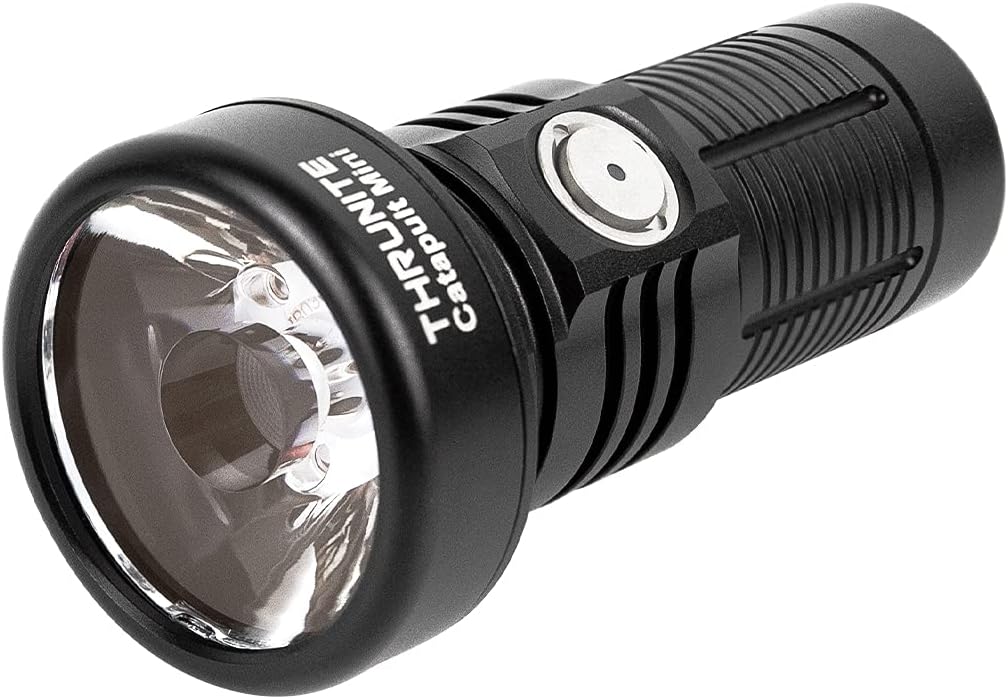
Image: Close-up views of the USB-C charging port and the battery indicator light on the flashlight's side switch.
Operating Instructions
The ThruNite Catapult Mini features a single side switch for all operations.

Image: A hand holding the ThruNite Catapult Mini, demonstrating its ergonomic design and easy access to the side switch.
Basic Operation:
- Turn ON/OFF: Single click the side switch to turn the light ON/OFF.
- Change Modes: When the light is ON, press and hold the side switch to cycle through Low, Medium, and High modes. Release the switch to select the desired mode.
- Firefly Mode: When the light is OFF, press and hold the side switch for 1 second to activate Firefly mode (0.5 lumens).
- Turbo Mode: Double click the side switch from any mode (except lock-out) to activate Turbo mode (680 lumens).
- Strobe Mode: Triple click the side switch from any mode to activate Strobe mode. Single click to return to the previous mode.
- Lock-out/Unlock: When the light is OFF, press and hold the side switch for 3 seconds to enter lock-out mode. The light will flash once to indicate lock-out. To unlock, press and hold the side switch for 3 seconds. The light will turn on in Firefly mode.
Battery Indicator:
The indicator light on the side switch provides real-time battery status:
- Blue: Battery level > 21%
- Purple: Battery level 11-20%
- Red: Battery level < 10%
Video: A night shot comparison demonstrating the long-throw capabilities of the ThruNite Catapult Mini flashlight against other models, highlighting its focused beam at a distance of 230 feet.
Maintenance
- Regularly clean the threads and O-rings with a clean cloth.
- Lubricate the O-rings periodically with silicone grease to maintain water resistance.
- If the flashlight is not used for an extended period, remove the battery to prevent leakage.
- Keep the lens clean to ensure optimal light output.

Image: The ThruNite Catapult Mini flashlight being exposed to water, illustrating its IPX8 waterproof rating.
Troubleshooting
Common Issues and Solutions:
- Light does not turn on:
- Check if the battery is inserted correctly with the positive (+) end facing the head of the flashlight.
- Ensure the light head and tail cap are screwed on tightly.
- The flashlight might be in lock-out mode. Press and hold the side switch for 3 seconds to unlock.
- The battery might be depleted. Recharge the battery.
- Light flickers or modes change unexpectedly:
- Clean the contact points of the battery and the flashlight with an alcohol swab.
- Ensure the O-rings are properly lubricated and not damaged.
- Tighten the light head and tail cap.
- Charging issue:
- Verify the USB-C cable is securely connected to both the flashlight and the power source.
- Try a different USB-C cable or power adapter.
- Ensure the light head and tail cap are screwed down tightly.
Specifications
| Feature | Detail |
|---|---|
| Brand | ThruNite |
| Model | Catapult Mini Black CW |
| Special Feature | Portable, Rechargeable |
| Power Source | Battery Powered |
| Light Source Type | LED |
| Material | Aluminum |
| Product Dimensions | 3.18"D x 1.3"W x 1.3"H |
| Light Path Distance | 598 Meters |
| Brightness | 680 Lumens (Max) |
| Battery Type | 1 Lithium Ion battery (included) |
| Item Weight | 3.09 ounces |
| Water Resistance Level | Waterproof (IPX8) |
| Impact Resistance | 1.5 meter |
Performance Table (General Mode):
| Mode | Output | Run time | Distance | Intensity |
|---|---|---|---|---|
| Turbo | 680 lumens | 70 mins | 598 meters (max.) | 89600 cd (max.) |
| High | 235 lumens | 80 mins | ||
| Medium | 96 lumens | 4 hrs | ||
| Low | 21 lumens | 12 hrs | ||
| Firefly | 0.5 lumens | 106 hrs | ||
| Strobe | 680 lumens | 30 mins |
Warranty & Support
ThruNite products are designed for durability and performance. For warranty information, product support, or service inquiries, please visit the official ThruNite website or contact their customer service directly. Keep your purchase receipt as proof of purchase.
For more information, visit the ThruNite Store on Amazon.
Related documentsCatapult Mini Black CW


Ask a question about this manual
Ask about setup, troubleshooting, compatibility, parts, safety, or missing instructions. Manuals+ will review the question and use this page’s manual context to help answer it.