
TMEZON MZ-IP-V1026TW+MZ-VDP-NA262F
TMEZON WLAN Video Door Intercom System Instruction Manual
Model: MZ-IP-V1026TW+MZ-VDP-NA262F
Product Overview
The TMEZON WLAN Video Door Intercom System provides comprehensive home security and communication. It features a 10-inch 1080P touchscreen monitor and a wired outdoor camera with multiple access methods including APP control, password, fingerprint, and card swipe.

Figure 1: TMEZON WLAN Video Door Intercom System components.
This system is designed for ease of use and robust security, offering remote access and monitoring capabilities.
Key Features
- 10-Inch 1080P Touchscreen Monitor: Large, clear display for viewing visitors and managing settings.
- Multiple Unlocking Methods: Supports APP, password, fingerprint, and RFID card for convenient and secure access.
- Wired Outdoor Camera: Ensures stable and reliable video transmission.
- Night Vision: Provides clear visibility even in low-light conditions.
- Motion Detection: Alerts you to activity at your door.
- Two-Way Audio: Communicate with visitors directly from the monitor or smartphone app.
- Remote Monitoring: Access live video and control the system from anywhere via the mobile app.
- Multi-device Interconnection: Expandable system supporting additional locks, cameras, and outdoor units.

Figure 2: Visual representation of the system's core functionalities.
Setup Guide
1. Wiring Diagram
Proper wiring is crucial for the system's functionality. Refer to the diagram below for connecting the door phone, IP monitor, power, and optional electronic lock.

Figure 3: System wiring connections.
Ensure all connections are secure before powering on the system. The system uses a 2.4 GHz Wi-Fi network for wireless communication.
2. App Pairing (Tuya App)
To enable remote access and control, pair your IP monitor with the Tuya Smart app on your smartphone. Follow these steps:
- Download and install the "Tuya Smart" app from your device's app store.
- Create an account or log in.
- On the IP monitor, navigate to Network settings and ensure "Net pairing Mode" is set to "EZ Mode".
- In the Tuya app, select "Add Device" and choose "Smart Doorbell" under Security & Video Surveillance.
- Switch to "Wi-Fi Mode" in the app if prompted.
- Confirm the indicator light status on the device matches the app's instructions (usually flashing rapidly for EZ Mode).
- Enter your 2.4 GHz Wi-Fi network name and password into the app.
- Proceed with the pairing process. The app will search for and connect to the monitor.
Video 1: Demonstrates the process of pairing the TMEZON IP Monitor with the Tuya Smart mobile application for remote access and control.
Once successfully added, you can manage your intercom system from your smartphone.
Operating the System
1. Monitor Interface
The 10-inch touchscreen monitor provides an intuitive interface for controlling the system. You can access settings, view devices, manage rings, recordings, and communicate with visitors.
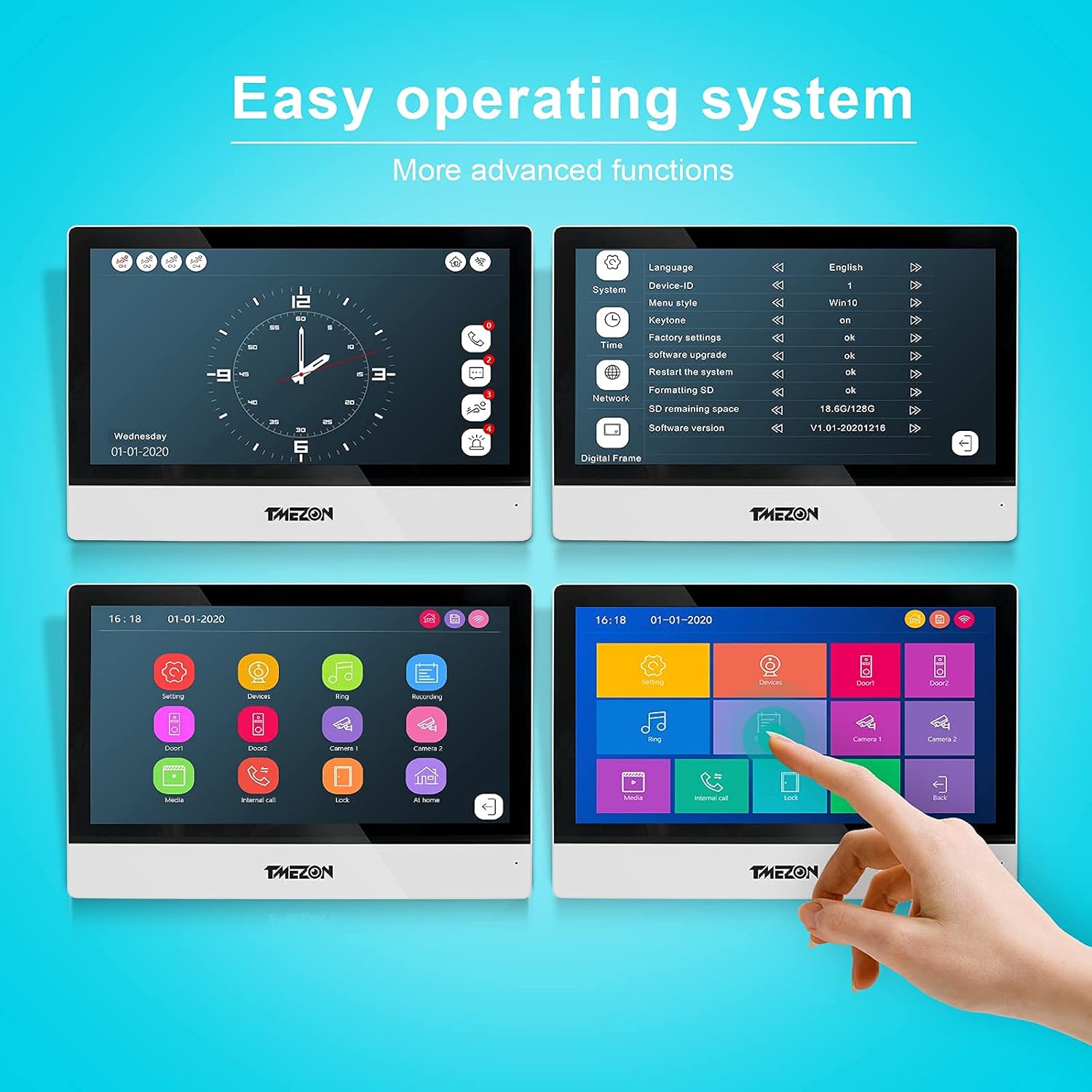
Figure 4: Easy operating system interface on the 10-inch monitor.
2. Visitor Communication and Access
When a visitor presses the doorbell, you will receive an alert on the monitor and your paired smartphone. You can then view the visitor and communicate with them.

Figure 5: Two-way communication with visitors via the system.
The system offers multiple secure ways to grant access:
- Mobile App Unlock: Remotely unlock the door using the Tuya Smart app on your smartphone.
- Password Unlock: Visitors can enter a pre-set password on the outdoor keypad.
- Fingerprint Unlock: Authorized users can use their registered fingerprint on the outdoor unit's biometric scanner.
- RFID Card Unlock: Use provided RFID cards or key fobs to quickly unlock the door.
- Monitor Unlock: Directly unlock the door from the indoor monitor.

Figure 6: Various methods for unlocking the door.
Video 2: Overview of the TMEZON 10-inch IP wireless intercom system, demonstrating its features and app connectivity.
Maintenance
To ensure optimal performance and longevity of your TMEZON intercom system, consider the following maintenance tips:
- Regular Cleaning: Gently wipe the monitor screen and outdoor unit with a soft, damp cloth. Avoid abrasive cleaners.
- Software Updates: Periodically check for and install software updates for the monitor and app to ensure compatibility and access to new features.
- Power Supply: Ensure a stable power supply to both the indoor monitor and outdoor unit.
- Cable Integrity: Inspect wiring periodically for any signs of wear or damage, especially for outdoor cables.
- SD Card Management: If using an SD card for recording, regularly back up important footage and format the card to prevent storage issues.
Troubleshooting
| Problem | Possible Cause | Solution |
|---|---|---|
| No video/audio from outdoor unit. | Loose wiring, power issue, camera malfunction. | Check all wiring connections. Ensure power is supplied. Contact support if issue persists. |
| App cannot connect to monitor. | Incorrect Wi-Fi password, monitor offline, app pairing issue. | Verify Wi-Fi password. Check monitor's network status. Re-pair the device in the app if necessary. |
| Fingerprint/Card unlock not working. | Unregistered fingerprint/card, sensor obstruction. | Ensure fingerprint/card is properly registered. Clean the sensor. |
| Poor video quality. | Low light, dirty lens, network interference. | Clean camera lens. Ensure adequate lighting. Check Wi-Fi signal strength. |
Specifications
- Part Number: MZ-IP-V1026TW+MZ-VDP-NA262F
- Package Dimensions: 32.1 x 22.6 x 9.1 cm
- Material: Metal
- Power Source: Corded Electric
- Voltage: 12 Volts
- Wattage: 1 watts
- Type of Bulb (for night vision): Infrared
- Item Weight: 1.68 kg
- First Available Date: 26 February 2023
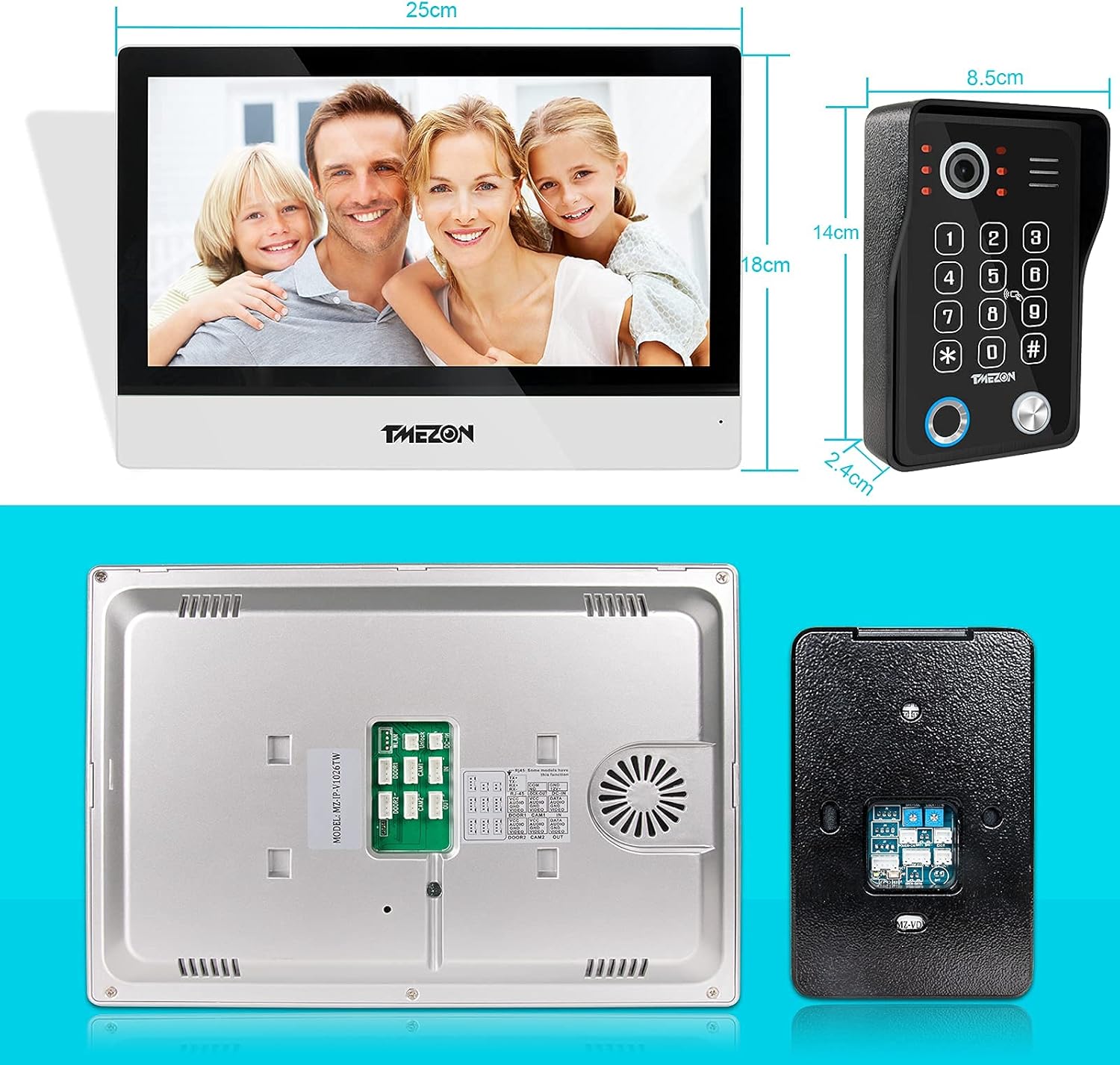
Figure 7: Product dimensions for installation planning.
Security and Certifications
TMEZON is committed to safeguarding your privacy. Your videos are encrypted with AES algorithm for data encryption, RSA/ECDHE algorithm for high-strength key exchange, and follow TLS, kept private anytime anywhere.
All TMEZON products have passed CE, FCC, and ROHS certifications, ensuring compliance with international quality and safety standards.
Related documentsMZ-IP-V1026TW+MZ-VDP-NA262F

Ask a question about this manual
Ask about setup, troubleshooting, compatibility, parts, safety, or missing instructions. Manuals+ will review the question and use this page’s manual context to help answer it.