
WishRing V7
V7 Car 16 Band 360 GPS Camera Laser Police Safe Anti Radar Detector User Manual
Model: V7
Brand: WishRing
1. Introduction
The WishRing V7 Radar Detector is an advanced device designed to provide drivers with early warnings against various speed monitoring systems, including radar and laser signals. Featuring 360-degree laser detection and extreme range super heterodyne technology, it offers comprehensive coverage and rapid detection. The unit incorporates intelligent features such as an auto mute system to reduce false alerts and an auto shutdown feature for enhanced discretion. It is engineered to detect stable or mobile radar speed monitors from significant distances, ensuring timely alerts for safer driving.
2. Package Contents
Please verify that all items listed below are included in your package:
- 1 x V7 Radar Detector
- 1 x Car Charger (DC 12V)
- 1 x Non-Slip Mat
- 1 x User Manual

Image: All components of the V7 Radar Detector package, including the detector, car charger, non-slip mat, and user manual.
3. Product Overview
3.1. Device Layout
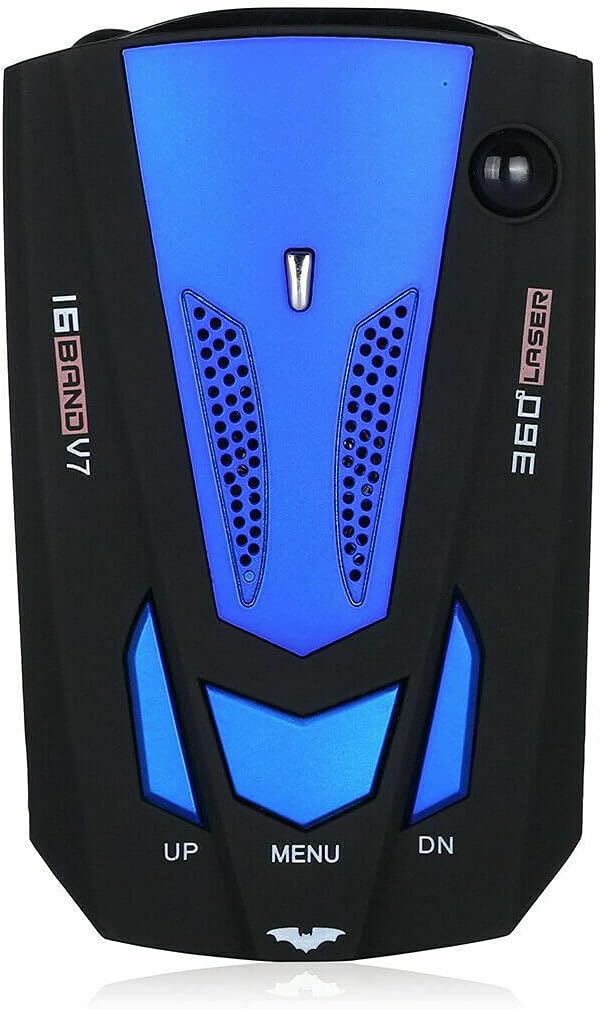
Image: Front view of the V7 Radar Detector, showing the main body and control buttons.

Image: Side view of the V7 Radar Detector, highlighting the power input port.
3.2. Control Buttons and Display
The V7 Radar Detector features intuitive controls for easy operation:

Image: Diagram showing the location and function of the UP, MENU, and DN buttons.
- UP Button: Increases volume.
- MENU Button: Press to make the screen brighter.
- DN Button: Reduces volume. Also used to switch between city mode and highway mode. Press and hold for over 5 seconds to change the language between English and Russian.
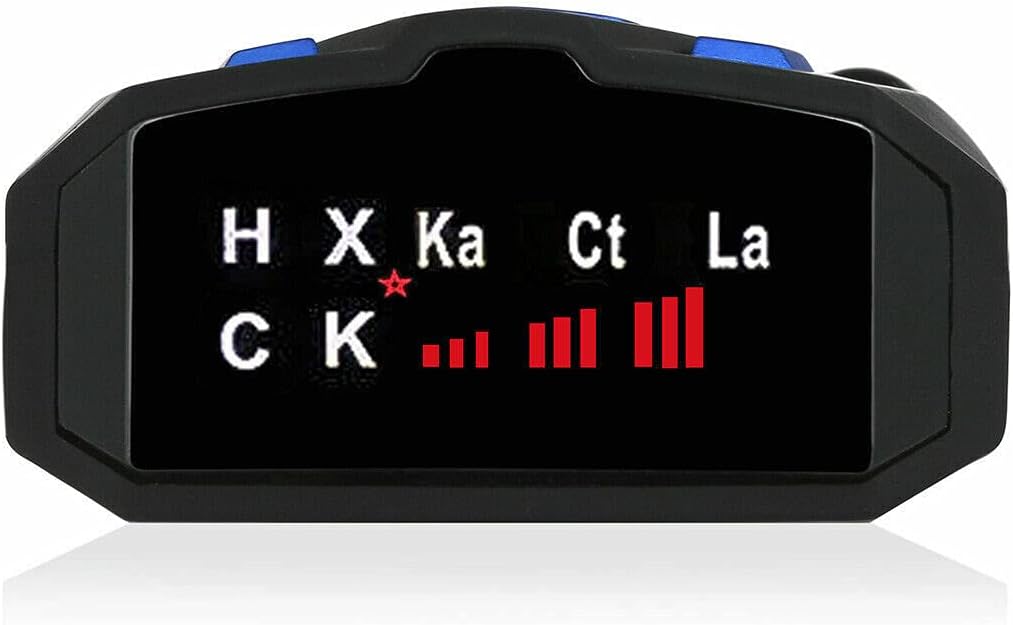
Image: Close-up view of the V7 Radar Detector's display, indicating detected bands like X, K, Ka, Ct, and La.
4. Setup and Installation
Follow these steps to set up your V7 Radar Detector:
- Placement: Choose a location on your dashboard or windshield that provides a clear, unobstructed view of the road ahead and behind. The non-slip mat can be used to secure the device on the dashboard.
- Power Connection: Insert the small end of the provided car charger cable into the DC 12V power input port on the side of the V7 Radar Detector.
- Vehicle Power: Plug the larger end of the car charger into your vehicle's 12V accessory power outlet (cigarette lighter socket).
- Power On: The device should automatically power on when the vehicle's ignition is turned on.

Image: The 12V car charger, used to power the V7 Radar Detector.
5. Operating Instructions
5.1. Basic Operation
Once powered on, the V7 Radar Detector will begin scanning for radar and laser signals. When a signal is detected, the device will provide a voice alert and display the detected band on its screen.
5.2. Adjusting Settings
- Volume Control: Use the UP button to increase the volume of alerts and the DN button to decrease it.
- Screen Brightness: Press the MENU button to cycle through screen brightness levels.
- City/Highway Mode: Press the DN button to toggle between City mode and Highway mode. Highway mode offers maximum sensitivity for open road driving, while City mode reduces sensitivity to minimize false alerts from non-police radar sources in urban areas.
- Language Selection: To change the voice alert language between English and Russian, press and hold the DN button for more than 5 seconds.
5.3. Understanding Alerts
The detector provides voice alerts and visual indicators for the following bands:
- X-BAND: Common radar band.
- K-BAND: Widely used radar band.
- Trfor iPod K-BAND: Specific K-band variant.
- KU-BAND: Less common, but detected.
- KA-BAND: High-frequency radar band, often used by law enforcement.
- Trfor iPod KA-BAND: Specific Ka-band variant.
- Laser Beam: Detection of laser speed guns.
- VG-2: Detection of radar detector-detectors. The V7 offers immunity to VG-2.
6. Specifications
| Feature | Specification |
|---|---|
| X-BAND Frequency | 10.525GHz ± 100MHz |
| X-BAND Detectable Distance | 1500-2500m |
| K-BAND Frequency | 24.150GHz ± 175MHz |
| K-BAND Detectable Distance | 1200-2500m |
| Trfor iPod K-BAND Frequency | 24.150GHz ± 175MHz |
| Trfor iPod K-BAND Detectable Distance | 250-1200m |
| KU-BAND Frequency | 13.450GHz ± 125MHz |
| KU-BAND Detectable Distance | 450-1500m |
| KA-BAND Frequency | 34.700GHz ± 1300MHz |
| KA-BAND Detectable Distance | 800-1500m |
| Trfor iPod KA-BAND Frequency | 33.400GHz ± 1300MHz |
| Trfor iPod KA-BAND Detectable Distance | 200-600m |
| Wireless Duplex Transmission Frequency | 2.4GHz ± 410MHz |
| Laser Beam Frequency | 904 ± 33KMHz |
| VG-2 Frequency | 11.150GHz ± 410MHz |
| Power Requirement | DC 12V |
| Item Weight | 5.9 ounces (approx. 167g) |
| Package Dimensions | 4.8 x 2.99 x 2.64 inches (approx. 12.2 x 7.6 x 6.7 cm) |
| Display Type | LED or LCD |
7. Troubleshooting
If you encounter issues with your V7 Radar Detector, please refer to the following common problems and solutions:
- Device Not Powering On:
- Ensure the car charger is securely plugged into both the detector and the vehicle's 12V power outlet.
- Check if the vehicle's 12V power outlet is functioning (e.g., by testing with another device).
- Verify the vehicle's ignition is on, as some outlets are only active with the ignition.
- Frequent False Alerts:
- Switch the device to City Mode by pressing the DN button. This reduces sensitivity to non-police radar sources like automatic door openers.
- Ensure the detector is not positioned near other electronic devices that might cause interference.
- No Detection of Known Radar/Laser Sources:
- Ensure the detector has a clear line of sight to the front and rear of the vehicle. Obstructions can block signals.
- Verify the device is powered on and functioning correctly (e.g., by observing the display).
- Check if the volume is set too low or muted.
- Voice Alerts are in the Wrong Language:
- Press and hold the DN button for more than 5 seconds to switch between English and Russian voice alerts.
8. Maintenance
To ensure the longevity and optimal performance of your V7 Radar Detector, follow these maintenance guidelines:
- Cleaning: Use a soft, dry cloth to clean the exterior of the device. Do not use abrasive cleaners, solvents, or harsh chemicals, as they may damage the casing or internal components.
- Storage: When not in use for extended periods, store the detector in a cool, dry place, away from direct sunlight and extreme temperatures.
- Avoid Moisture: Keep the device away from water and excessive humidity. Do not expose it to rain or splashes.
- Handle with Care: Avoid dropping the device or subjecting it to strong impacts, which can damage internal circuitry.
9. Warranty and Support
For information regarding warranty coverage, technical support, or service inquiries, please refer to the contact details provided by your retailer or the manufacturer, WishRing. It is recommended to retain your purchase receipt as proof of purchase for any warranty claims.
Ask a question about this manual
Ask about setup, troubleshooting, compatibility, parts, safety, or missing instructions. Manuals+ will review the question and use this page’s manual context to help answer it.