
Introduction
This manual provides detailed instructions for the installation, operation, and maintenance of your Waterdrop WD-PF-01A Plus NSF Certified Replacement Filter. This filter is designed to enhance water quality by reducing various contaminants, improving taste and odor, and ensuring healthier drinking water. It is compatible with all Waterdrop Pitcher and Dispenser Filtration Systems, including models WD-WFD-22, WD-WFD-40, WD-WFD-40-L, WD-PT-07, WD-PT-05, WD-PT-05-L, WD-PT-04, WD-PT-61, and WD-PT-72.
The WD-PF-01A Plus filter utilizes multi-stage filtration technology with advanced Activated Carbon Fiber (ACF) for superior absorption capabilities. It is NSF 42 certified for chlorine, taste, and odor reduction, and NSF 372 certified for lead-free materials.
Setup and Installation
1. Unboxing and Preparation
Carefully remove the new filter from its packaging. Ensure all protective films or stickers are removed from the filter cartridge before use.

Image: Waterdrop WD-PF-01A Plus filter in its packaging, with the instruction manual visible. This shows the initial state of the product upon unboxing.
2. Soaking the Filter
Submerge the new filter cartridge in cold tap water for at least 10 minutes. This step helps to remove any air bubbles and prepares the filter for optimal performance.

Image: A new Waterdrop filter cartridge is shown submerged in a bowl of cold water, illustrating the soaking process.
3. Installing the Filter
Remove the old filter from your Waterdrop pitcher or dispenser. Insert the new, pre-soaked filter into the designated slot. Press firmly to ensure it is securely seated and creates a tight seal to prevent leakage.

Image: A hand is shown inserting the new Waterdrop filter into the top compartment of a Waterdrop pitcher, demonstrating proper installation.
4. Initial Flushing
Fill the reservoir with tap water. Allow the water to filter through completely. Discard the first two cycles of filtered water to flush out any carbon fines and ensure optimal filtration performance.

Image: Water is being poured into the top reservoir of a Waterdrop pitcher, with the filter visible below, ready for the initial flushing process.
Operating Instructions
After installation, your Waterdrop filtration system is ready for use. The WD-PF-01A Plus filter provides a fast flow rate of 0.3 gallons per minute (gpm), allowing for quick access to filtered water.
1. Filling the System
Open the lid of your Waterdrop pitcher or dispenser and pour tap water into the upper reservoir. The water will pass through the filter and collect in the lower chamber.
2. Dispensing Filtered Water
For pitchers, simply pour water from the spout. For dispensers, use the integrated spigot to access filtered water. The direct filter construction ensures that only clean, pure water is dispensed.

Image: A Waterdrop water dispenser is shown on a countertop, highlighting its design and readiness for dispensing filtered water.
3. Filter Indicator (if applicable)
Some Waterdrop systems include an electronic filter life indicator. If your system has one, it will typically display a blue light when the filter is new and functioning correctly. It will turn red or blink when the filter needs replacement. Refer to your specific pitcher/dispenser manual for details on its indicator system.
Maintenance
1. Filter Replacement Schedule
The Waterdrop WD-PF-01A Plus filter has a long service life, capable of filtering over 200 gallons of water or lasting up to 2 months, whichever comes first. Regular replacement ensures continuous high-quality filtration.

Image: A graphic showing the filter's lifespan of up to 2 months or 200 gallons, emphasizing its sustainability compared to multiple standard water bottles.
2. Replacing the Filter
- Remove the old filter from the system.
- Prepare the new filter by removing packaging and soaking it in cold water for 10 minutes.
- Insert the new filter firmly into the system.
- Flush the new filter by running two full cycles of water through it and discarding the water.
- If your system has an electronic indicator, reset it by pressing and holding the reset button for approximately 5 seconds until the light turns blue (or as per your system's specific instructions).
3. Cleaning the System
Periodically clean your Waterdrop pitcher or dispenser with mild soap and water. Ensure all components, especially the spigot (if applicable) and reservoir, are thoroughly cleaned to prevent buildup and maintain hygiene. Rinse all parts completely before reassembling.
Troubleshooting
1. Slow Filtration Rate
If the water filters slowly, it may indicate that the filter is clogged or needs to be re-primed. Remove the filter, shake it gently to dislodge any trapped air or particles, and re-submerge it in cold water for a few minutes before reinserting. If the issue persists, the filter may be at the end of its lifespan and require replacement.
2. Unusual Taste or Odor
If you notice an unusual taste or odor in your filtered water, ensure the filter was properly flushed during initial setup. If the filter has been in use for an extended period (beyond 2 months or 200 gallons), it is likely time for a replacement. Always use genuine Waterdrop replacement filters to ensure optimal performance and water quality.
3. Leakage
If water is leaking from the system, check that the filter is correctly seated and firmly pressed into its slot. Ensure all parts of the pitcher or dispenser are assembled tightly and correctly.
Specifications
- Model Number: WD-PF-01A Plus
- Material: Activated Carbon
- Product Dimensions: 5.43"D x 3.46"W x 3.46"H
- Item Weight: 0.4 Pounds
- External Testing Certification: NSF/ANSI 42 & 372
- Product Benefits: Reduces various contaminants (Lead, PFAS, PFOA/PFOS, arsenic, fluoride, chlorine), improves taste and odor, ultra-high absorptive ACF, long service life, fast flow rate.
- Filter Lifespan: Up to 2 months or 200 gallons (actual results may vary based on local water quality).
- Compatible Water Purifier Models: Waterdrop WD-WFD-22, WD-WFD-40, WD-WFD-40-L, WD-PT-07, WD-PT-05, WD-PT-05-L, WD-PT-04, WD-PT-61, WD-PT-72, WD-PT-04B, WD-PT-04C, WD-PT-04W, WD-PT-05P, WD-PT-05W, WD-PT-07B, WD-PT-07C, WD-PT-07L, WD-PT-07W, WD-PT-08B, WD-PT-61B, WD-WFD-22B, WD-WFD-22L, WD-WFD-24, WD-WFD-40-EU, WD-WFD-40B, WD-WFD-40L.

Image: A graphic displaying the NSF 42 and 372 certifications, emphasizing the filter's compliance with standards for chlorine, taste, odor reduction, and lead-free materials.
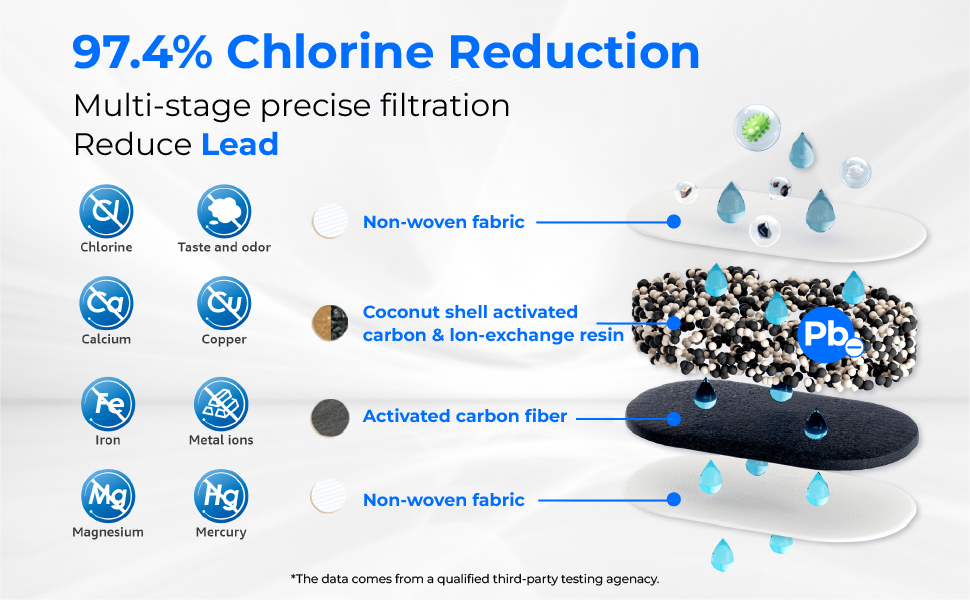
Image: A detailed diagram illustrating the multi-stage filtration layers of the Waterdrop filter, including non-woven fabric, coconut shell activated carbon, ion-exchange resin, and activated carbon fiber, with an indication of lead reduction.
Warranty and Support
Specific warranty information for the Waterdrop WD-PF-01A Plus filter is not provided in the product details. For detailed warranty terms and conditions, please refer to the documentation included with your Waterdrop pitcher or dispenser, or visit the official Waterdrop website.
For customer support, technical assistance, or to inquire about replacement parts, please contact Waterdrop customer service through their official channels. Contact information can typically be found on the product packaging or the Waterdrop website.


