
1. Introduction
This manual provides essential information for the safe and effective use of your Gear4music GDP-100 Digital Grand Piano. Please read these instructions carefully before operating the instrument and retain them for future reference. This digital grand piano combines elegant design with advanced digital features, offering an authentic playing experience for both beginners and experienced pianists.
2. Product Overview
The Gear4music GDP-100 is a sophisticated digital grand piano designed to provide a rich musical experience. It features a full-size 88-key weighted keyboard with adjustable touch response, mimicking the feel of an acoustic piano. The instrument includes a variety of voices, effects, and connectivity options to enhance your playing and learning.
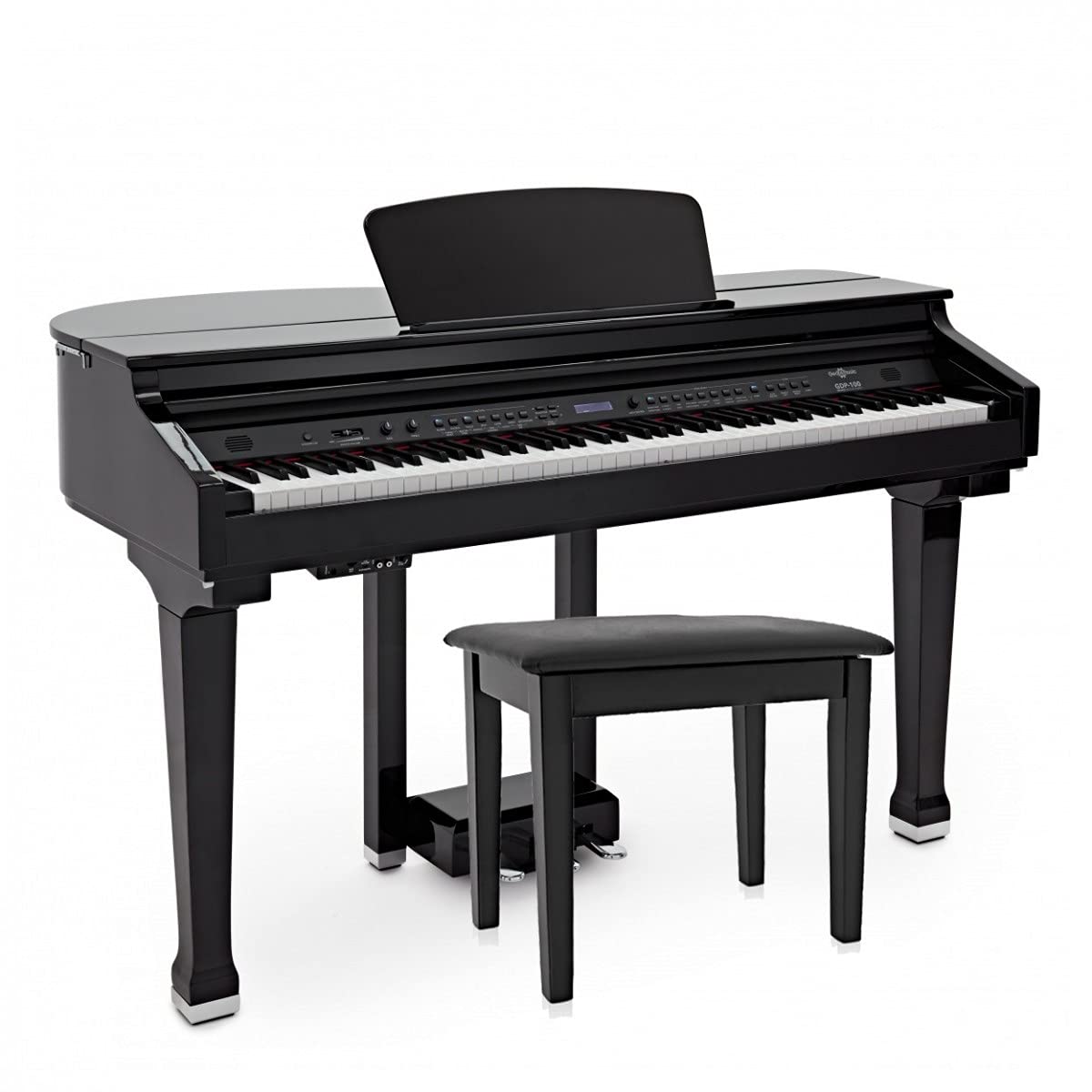
Figure 2.1: Front view of the Gear4music GDP-100 Digital Grand Piano with the lid closed.
Key Features:
- 88 Weighted Keys: Full-size keyboard with adjustable touch response for an authentic feel.
- Layer Mode: Combine two voices for richer sound textures.
- Split Mode: Divide the keyboard to play different voices with each hand.
- Reverb and Chorus Effects: Add depth and ambiance to your sound.
- Metronome: Adjustable metronome for practice.
- Recording Function: Record and playback your performances.
- Powerful Stereo Sound: Two 20-watt speakers integrated into the cabinet.
- Advanced Connectivity: USB MIDI, Auxiliary Input, and Bluetooth for versatile use.
3. Setup
Carefully unpack all components and ensure all parts are present before assembly. It is recommended to have two people for assembly due to the size and weight of the piano.
3.1 Assembly
- Place the main piano body on a soft, flat surface to prevent scratches.
- Attach the legs to the main body using the provided screws and tools. Ensure they are securely fastened.
- Connect the pedal unit to the piano body and secure it.
- Carefully turn the piano upright.
- Place the music rest into its designated slot.
- Assemble the included wooden bench according to its separate instructions.
3.2 Power Connection
Connect the power adapter to the DC IN jack on the piano and then plug it into a suitable wall outlet. Ensure the power cable is not obstructed or pinched.
4. Operating Instructions
4.1 Power On/Off and Volume Control

Figure 4.1: Close-up of the power, volume, bass, and treble controls.
- To power on, press the STANDBY/ON button.
- Adjust the overall volume using the MASTER VOLUME slider.
- Fine-tune the sound with the BASS and TREBLE knobs.
4.2 Voice Selection and Effects
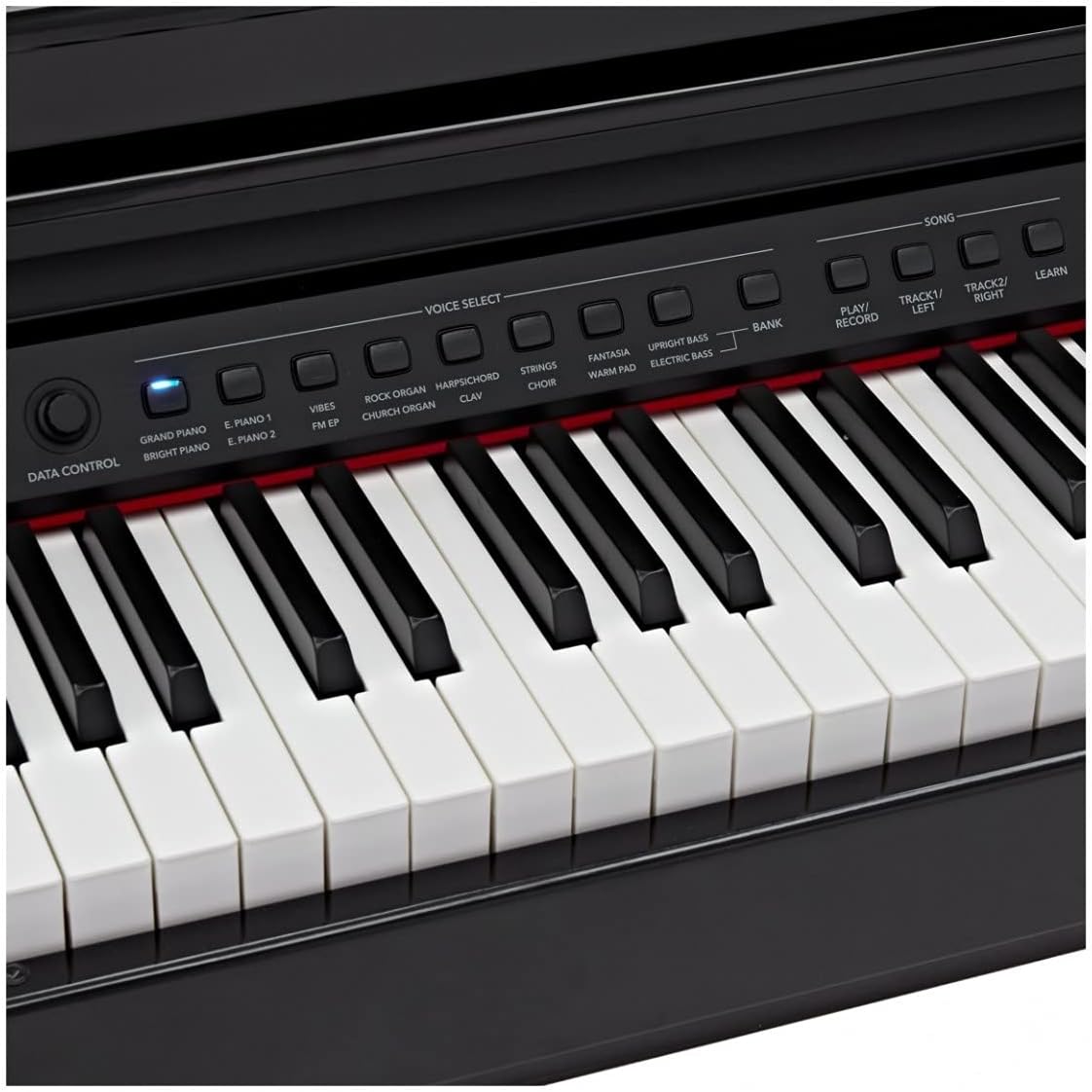
Figure 4.2: Voice selection buttons for various instrument sounds.
- Press the desired voice button (e.g., GRAND PIANO, E. PIANO, STRINGS) to select an instrument sound.
- To activate LAYER mode, press the LAYER button and then select a second voice.
- To activate SPLIT mode, press the SPLIT button. You can then select a different voice for the lower half of the keyboard.
- Use the REVERB and CHORUS buttons to apply effects to your sound.
4.3 Metronome and Recording

Figure 4.3: Function buttons for metronome, recording, and other settings.
- Press the METRONOME button to activate the metronome. Use the TEMPO controls to adjust the speed.
- To record, press the REC button. Play your piece, then press PLAY to listen back.
4.4 Connectivity
- Headphone Jack: Connect headphones to the 3.5mm jack for silent practice.
- Auxiliary Input: Use the auxiliary input to connect an external audio device (e.g., smartphone, tablet) and play along with your favorite music.
- USB MIDI: Connect the piano to a computer or smart device via USB for MIDI functionality, allowing interaction with music software.
- Bluetooth: Use the included USB Bluetooth dongle for wireless connectivity to compatible devices.
4.5 Pedals
The GDP-100 includes a three-pedal unit for expressive playing:
- Soft Pedal (Left): Reduces the volume and alters the tone slightly.
- Sostenuto Pedal (Middle): Sustains only the notes held down at the moment the pedal is pressed.
- Sustain Pedal (Right): Sustains all notes played while the pedal is held down.
5. Maintenance
Proper maintenance ensures the longevity and optimal performance of your digital grand piano.
5.1 Cleaning
- Wipe the piano's surface with a soft, dry cloth. For stubborn dirt, use a slightly damp cloth and then dry thoroughly.
- Avoid using abrasive cleaners, waxes, or solvents, as these can damage the finish.
- Clean the keys with a soft, slightly damp cloth. Do not use chemical cleaners on the keys.
5.2 Storage and Environment
- Store the piano in a stable environment, away from direct sunlight, extreme temperatures, and high humidity.
- Avoid placing heavy objects on the piano.
- Ensure adequate ventilation around the instrument.
6. Troubleshooting
If you encounter any issues, refer to the following common problems and solutions:
| Problem | Possible Cause | Solution |
|---|---|---|
| No sound | Volume too low; headphones connected; power issue. | Increase master volume; disconnect headphones; check power connection. |
| Keys not responding | Instrument not powered on; internal malfunction. | Ensure piano is powered on; contact support if issue persists. |
| Bluetooth not connecting | Dongle not inserted; device not in pairing mode; interference. | Ensure Bluetooth dongle is inserted; put device in pairing mode; move closer to piano. |
| Distorted sound | Volume too high; faulty cable. | Reduce volume; check/replace cables. |
If the problem persists after attempting these solutions, please contact Gear4music customer support.
7. Specifications
| Feature | Detail |
|---|---|
| Model Name | GDP 100 |
| Brand | Gear4music |
| Number of Keys | 88 |
| Key Type | Weighted Touch |
| Connectivity Technology | Bluetooth, USB (MIDI USB) |
| Headphone Jack | 3.5 mm Jack |
| Power Source | Electric Cable |
| Body Material | Wood |
| Color | Black |
| Item Weight | 87 Kilograms |
| Package Dimensions | 152 x 89 x 36.5 cm |
| Supported Software | Standard MIDI compatible software |
| Operating System Compatibility | Windows, macOS, iOS |
| Special Features | Recording, Weighted Key |
8. Warranty and Support
Your Gear4music GDP-100 Digital Grand Piano is covered by a standard manufacturer's warranty. For specific warranty terms and conditions, please refer to the documentation included with your purchase or visit the official Gear4music website.
For technical support, troubleshooting assistance, or spare parts inquiries, please contact Gear4music customer service. Contact details can typically be found on the Gear4music website or on your purchase receipt.

