
1. Introduction
Thank you for choosing the KIMAFUN KM-U208B UHF Wireless Microphone Transmitter-Receiver System. This system is designed to convert your wired microphones into wireless ones, offering flexibility and high-quality audio transmission. This manual provides essential information for the safe and efficient operation of your device. Please read it thoroughly before use and retain it for future reference.
2. Product Overview
Key Features
- UHF Wireless Transmission: Utilizes professional UHF wireless technology to avoid interference from 2.4G wireless devices. Features digital audio transmission, automatic infrared frequency matching, 48 KHz sampling frequency, and ultra-low audio delay for recording-level sound quality.
- 48V Phantom Power Support: Compatible with both dynamic and condenser microphones. The receiver includes both XLR and 6.35mm jacks for compatibility with various equipment like mixers, amplifiers, and speakers. The XLR plug lock design prevents accidental disconnections.
- Long Working Hours: Powered by built-in lithium batteries. Provides up to 5 hours of operation with dynamic microphones. For condenser microphones requiring 48V phantom power, usage time typically ranges from 2-3 hours, varying by microphone model and power consumption.
- Extended Transmission Range: Equipped with a reception antenna to enhance frequency reception. Wireless range can reach up to 50 meters (165 feet) with the antenna installed, and 15-20 meters (65 feet) without it. Supports up to 5 systems for simultaneous use.
- Wide Application Range: Easy to use and compatible with most audio devices. Suitable for recording studios, theaters, conferences, teaching, and outdoor events.
Component Identification
Refer to the diagram below for a detailed view of the transmitter and receiver components.

Image 2.1: Detailed view of the KIMAFUN KM-U208B wireless transmitter (left) and receiver (right), highlighting features such as the 6.35mm male plug, female XLR plug, lock knob, IR sync window, RF indicator, IR indicator, channel display, power button, channel +/- buttons, SYNC switch, low-voltage indicator, charging indicator, MINI-USB charging port, and antenna interface. A detachable antenna is also shown.
- Transmitter (6.35mm Plug): Features a 6.35mm male plug for connection to dynamic microphones. Includes IR Sync Window, RF Indicator, IR Indicator, Channel Display, Power Button, Channel +/- Button, SYNC Switch, Low-Voltage Indicator, Charging Indicator, MINI-USB Charging Port, and Antenna Interface.
- Receiver (XLR Plug): Features a female XLR plug with a lock knob for secure connection to audio equipment. Includes 48V Phantom Power Indicator, PO Power Indicator, Channel Display, Power Button, Channel +/- Button, 48V Phantom Power Switch, Low-Voltage Indicator, Charging Indicator, MINI-USB Charging Port, and Antenna Interface.
- Detachable Antenna: Improves signal reception and extends wireless range.
3. What's in the Box
The KIMAFUN KM-U208B package typically includes the following items:

Image 3.1: Contents of the KIMAFUN KM-U208B package, showing the transmitter, receiver, two detachable antennas, a dual-head USB charging cable, user manual, and a carrying case.
- 1 x UHF Wireless Transmitter (6.35mm plug)
- 1 x UHF Wireless Receiver (XLR plug)
- 2 x Detachable Antennas
- 1 x Dual-head USB Charging Cable
- 1 x User Manual
- 1 x Carrying Case
4. Setup Instructions
4.1 Charging the Devices
Before initial use, fully charge both the transmitter and receiver using the provided dual-head USB charging cable. The charging indicator will illuminate during charging and turn off when fully charged. A full charge typically takes 2 hours.
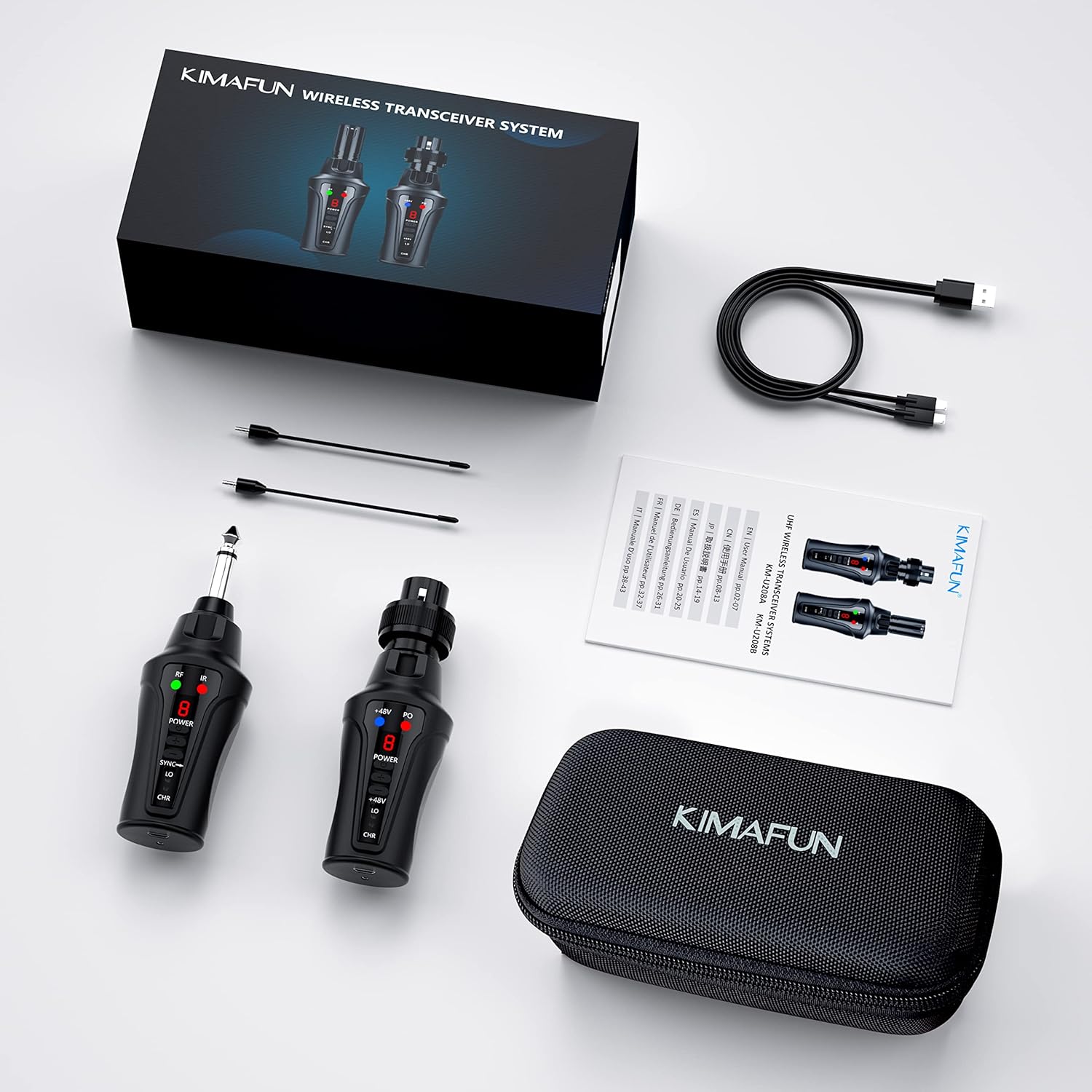
Image 4.1: Illustration of the KIMAFUN KM-U208B transmitter and receiver being charged simultaneously using the dual-head USB charging cable. The charging indicator (CHR) is shown illuminated.
4.2 Connecting the Antenna
For optimal performance and extended range, screw the detachable antennas onto the antenna interfaces of both the transmitter and receiver.
4.3 Connecting the Transmitter to a Microphone
- For Dynamic Microphones: Insert the 6.35mm male plug of the transmitter directly into the microphone's output jack.
- For Condenser Microphones: Insert the 6.35mm male plug of the transmitter into the microphone's output jack. Ensure the 48V phantom power switch on the receiver is activated if your condenser microphone requires it.

Image 4.2: The KIMAFUN KM-U208B transmitter connected to a condenser microphone (left) and a dynamic microphone (right), demonstrating compatibility with both types of microphones.
4.4 Connecting the Receiver to Audio Equipment
Insert the XLR female plug of the receiver into the XLR input of your audio mixer, amplifier, PA system, or speaker. Ensure the lock knob is engaged to secure the connection.

Image 4.3: The KIMAFUN KM-U208B receiver connected to a mixer, illustrating its wide compatibility with various audio equipment such as speakers, recorders, mixers, and PA systems. The XLR plug lock design is highlighted.
5. Operating Instructions
5.1 Powering On/Off
- To Power On: Press and hold the Power Button on both the transmitter and receiver until the display illuminates.
- To Power Off: Press and hold the Power Button on both devices until the display turns off.
5.2 Automatic Frequency Matching (IR Sync)
The system uses automatic infrared frequency matching for easy setup.
- Ensure both the transmitter and receiver are powered on.
- Align the IR Sync Window on the transmitter with the IR sensor on the receiver.
- Press the SYNC switch on the transmitter. The devices will automatically pair and synchronize their frequencies. The RF indicator will light up when a stable connection is established.
5.3 Channel Selection
The system supports up to 16 adjustable channels to avoid interference. Use the Channel +/- buttons on both the transmitter and receiver to manually select a different channel if interference occurs. Ensure both devices are set to the same channel.
5.4 48V Phantom Power Activation (Receiver)
If using a condenser microphone that requires phantom power, activate the 48V Phantom Power Switch on the receiver. The 48V Phantom Power Indicator will illuminate. This function is not needed for dynamic microphones.

Image 5.1: Diagram illustrating the use of the KIMAFUN KM-U208B with a condenser microphone (top) requiring 48V phantom power, resulting in 2-3 hours of use, and with a dynamic microphone (bottom) not requiring phantom power, resulting in 5-6 hours of use. The 48V switch and battery indicators are shown.
5.5 Transmission Range Considerations
The effective transmission distance is up to 50 meters (165 feet) with the antenna installed and 15-20 meters (65 feet) without the antenna. For optimal performance, ensure a clear line of sight between the transmitter and receiver and avoid obstacles.

Image 5.2: Comparison of transmission distances for the KIMAFUN KM-U208B: up to 65 feet (20m) without the antenna and up to 165 feet (50m) with the antenna. Tips indicate support for up to 5 systems simultaneously, UHF wireless transmission, 5-6 hours use time, and 16 optional channels.
6. Maintenance
- Cleaning: Use a soft, dry cloth to clean the devices. Do not use abrasive cleaners or solvents.
- Storage: Store the system in a cool, dry place away from direct sunlight and extreme temperatures. Use the provided carrying case for protection during transport and storage.
- Battery Care: To prolong battery life, avoid fully discharging the devices frequently. Recharge them regularly, even if not in use for extended periods.
- Antenna: Handle the detachable antennas with care to prevent damage.
7. Troubleshooting
| Problem | Possible Cause | Solution |
|---|---|---|
| No sound or weak signal. |
|
|
| Interference or static noise. |
|
|
| Short battery life. |
|
|
8. Specifications
| Feature | Detail |
|---|---|
| Model Number | KM-U208B |
| Wireless Type | UHF |
| Frequency Range (Europe) | 863 - 865 MHz |
| Sampling Frequency | 48 KHz |
| Channels | Up to 16 (Supports up to 5 systems simultaneously) |
| Transmission Distance (with antenna) | Up to 50 meters (165 feet) |
| Transmission Distance (without antenna) | 15-20 meters (65 feet) |
| Battery Type | 2 x Lithium-polymer (included) |
| Charging Time | Approximately 2 hours |
| Operating Time (Dynamic Mic) | Up to 5 hours |
| Operating Time (Condenser Mic with 48V) | 2-3 hours (varies by mic power consumption) |
| Dimensions (L x W x H) | 17.5 x 10 x 6 cm (6.9 x 3.9 x 2.4 inches) |
| Weight | 390 grams (0.86 lbs) |
| UPC | 726312977396 |
9. Safety Information
- Do not expose the device to water, moisture, or extreme temperatures.
- Avoid dropping or subjecting the device to strong impacts.
- Do not attempt to disassemble or repair the device yourself. Refer to qualified personnel for service.
- Use only the provided charging cable or a certified equivalent.
- Keep out of reach of children.
- Dispose of batteries according to local regulations.
10. Warranty and Support
Specific warranty information is not provided in the product details. For warranty claims or technical support, please contact KIMAFUN customer service directly through their official website or the retailer where the product was purchased. Please have your purchase receipt and product model number (KM-U208B) ready when contacting support.

