
1. Introduction
The Weeylite Ninja 20-200W LED Video Light is a powerful and versatile continuous output lighting solution designed for professional photography and videography. Featuring a stable 5600K color temperature, high CRI 95+ and TLCI 97+ for accurate color reproduction, and a robust 200W output, this light is suitable for various applications including vlogging, on-location shooting, weddings, portraits, and product photography. It offers convenient control options via its built-in LCD display and the WeeylitePro mobile application.
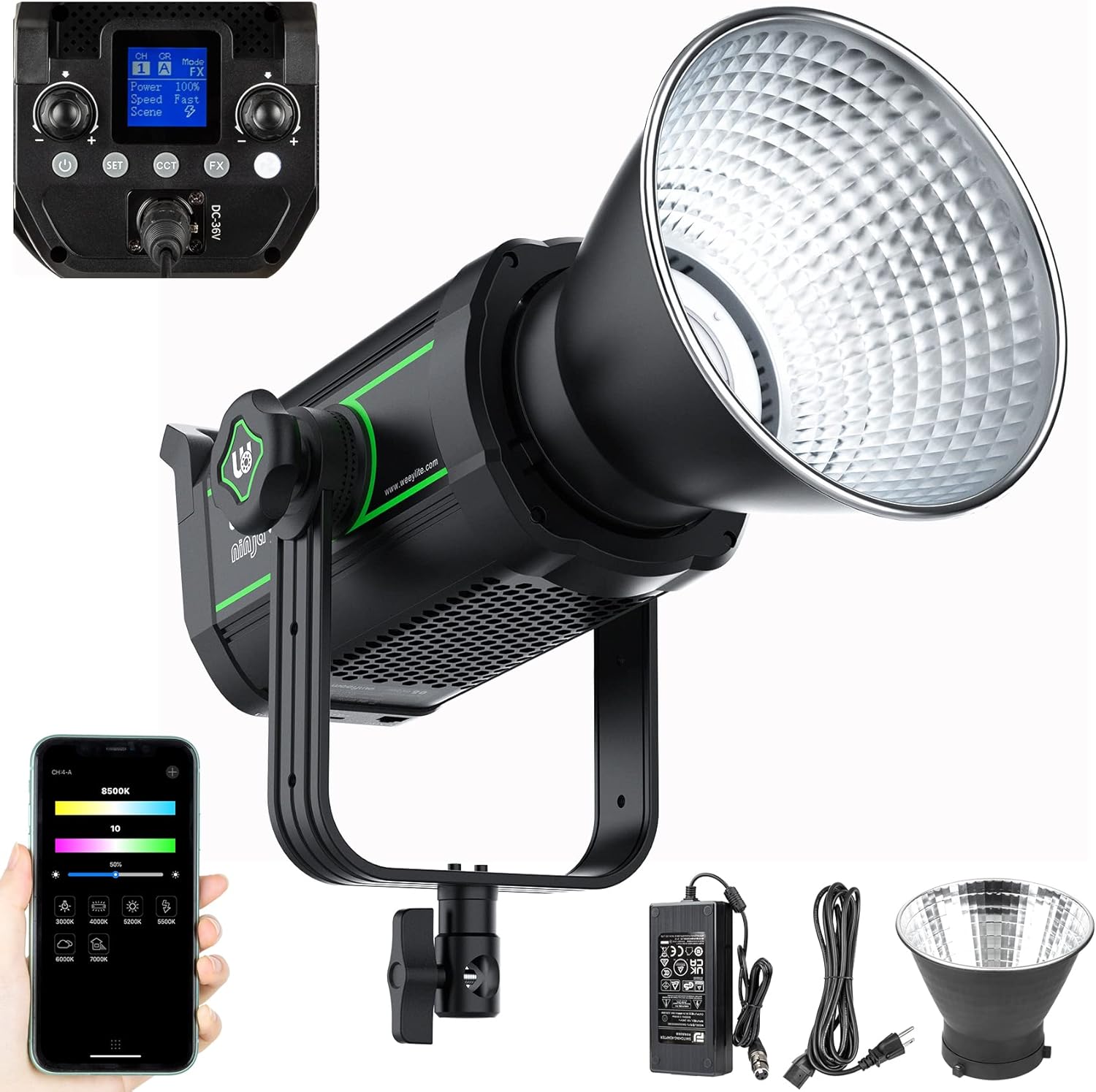
Figure 1.1: The Weeylite Ninja 20-200W LED Video Light with included accessories.

Figure 1.2: The Weeylite Ninja 20-200W is suitable for a wide range of applications including stage, makeup, portrait, and product photography.
2. Important Safety Instructions
Please read and understand all safety instructions before using the product. Failure to follow these instructions may result in electric shock, fire, or serious injury.
- Do not operate the light with wet hands or in wet conditions.
- Ensure the power supply voltage matches the product's requirements.
- Keep the light away from water, flammable gases, and corrosive liquids.
- Do not block the ventilation openings of the light to prevent overheating.
- Avoid direct eye exposure to the LED light source.
- Always disconnect the power before cleaning or performing maintenance.
- Do not attempt to disassemble or modify the product. Repairs should only be performed by authorized personnel.
- Use only original or certified accessories with the product.
3. Package Contents
Upon opening your Weeylite Ninja 20-200W LED Video Light package, please verify that all the following items are included:

Figure 3.1: Product components and packing list.
- 1x Weeylite Ninja 20 COB Light
- 1x Round Lampshade (Reflector)
- 1x COB Beads Protect Cover
- 1x Power Adapter
- 1x User Manual (This document)
4. Product Overview
Familiarize yourself with the main components and features of your Weeylite Ninja 20-200W LED Video Light:
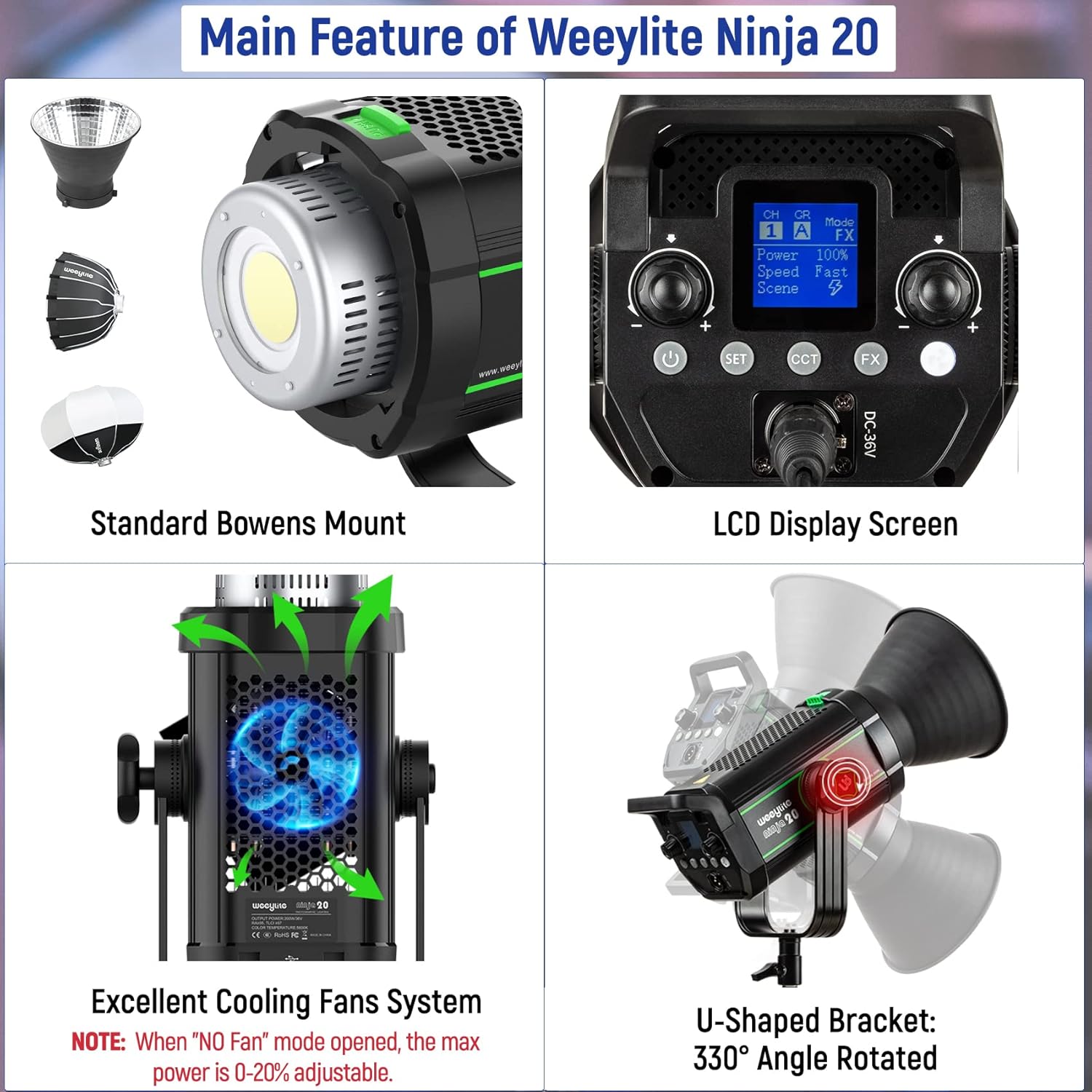
Figure 4.1: Key features of the Weeylite Ninja 20-200W.
- Lampshade Connection Button: Used to attach and detach light modifiers.
- LED COB Beads: The primary light source.
- DMX Input Port: For connecting to DMX512 protocol controllers.
- DMX Output Port: For daisy-chaining multiple DMX-compatible lights.
- Left Rotary Knob: Adjusts various parameters on the LCD.
- LCD Display: Shows current settings and operating status.
- Right Rotary Knob: Adjusts various parameters on the LCD.
- Bracket Lock Knob: Secures the U-shaped bracket in position.
- Power Socket: Connects to the power adapter.
- U-shaped Bracket: Allows for 330° rotation and mounting on light stands.
- Power Key: Turns the light ON/OFF.
- SET Key: Enters/confirms settings.
- CCT Key: Switches to Color Correlated Temperature adjustment mode.
- FX (Lighting Effect) Key: Activates special lighting effects.
- Fan Switch Key: Toggles the cooling fan ON/OFF (Note: Max power is up to 20% when fan is OFF).
- Stand Fastening Knob: Secures the light to a light stand.
The light features a standard Bowens Mount, ensuring compatibility with a wide range of lighting accessories such as softboxes, reflectors, beauty dishes, and snoots.

Figure 4.2: The Bowens mount allows for versatile accessory attachment.
5. Setup
5.1 Mounting the Light
- Attach the Weeylite Ninja 20-200W to a compatible light stand using the U-shaped bracket and the Stand Fastening Knob (16).
- Adjust the angle of the light using the U-shaped bracket (10) and secure it with the Bracket Lock Knob (8). The bracket allows for 330° rotation.
5.2 Attaching Light Modifiers
- Align the included Round Lampshade (reflector) or other Bowens mount compatible accessory with the Bowens mount on the front of the light.
- Press the Lampshade Connection Button (1) and rotate the accessory clockwise until it locks securely into place.
- To remove, press the Lampshade Connection Button (1) and rotate counter-clockwise.
5.3 Power Connection
- Connect the power adapter to the Power Socket (9) on the back of the light.
- Plug the power adapter into a suitable electrical outlet.
6. Operating Instructions
6.1 Manual Control
The Weeylite Ninja 20-200W can be controlled directly using the buttons and rotary knobs on its back panel, with settings displayed on the LCD screen (6).
Figure 6.1: The LCD display provides real-time feedback on light settings.
- Power ON/OFF: Press the Power Key (11) to turn the light on or off.
- Brightness Adjustment: Rotate the Left or Right Rotary Knob (5, 7) to adjust brightness from 0% to 100%.
- Color Temperature (CCT) Adjustment: Press the CCT Key (13) to enter CCT mode, then use the rotary knobs to set the color temperature to a stable 5600K.
- Lighting Effects (FX): Press the FX Key (14) to cycle through 6 built-in lighting effects. Use the rotary knobs to adjust effect parameters if applicable.
- Fan Control: Press the Fan Switch Key (15) to toggle the cooling fan. In "NO Fan" mode, the maximum power output is limited to 20% to prevent overheating.
6.2 Smart App Control
The Weeylite Ninja 20-200W supports control via the WeeylitePro App, available for both iOS and Android devices. This allows for convenient remote adjustment of light settings.

Figure 6.2: Control your Weeylite Ninja 20-200W using the WeeylitePro App.
- Download the "WeeylitePro" App from your device's app store.
- Ensure Bluetooth is enabled on your smartphone.
- Open the App and follow the on-screen instructions to connect to your Ninja 20-200W light.
- The App allows control over brightness, color temperature, and selection of 6 groups and 19 channels for managing multiple Weeylite lights simultaneously.
6.3 DMX Control
The light is equipped with DMX Input (3) and Output (4) ports, supporting DMX512 protocol controllers for professional lighting setups.
7. Maintenance
- Cleaning: Use a soft, dry cloth to clean the light body. For the COB beads, use a lens cleaning cloth. Do not use harsh chemicals or abrasive materials.
- Storage: When not in use, store the light in a dry, cool place, away from direct sunlight and moisture. Use the COB Beads Protect Cover to prevent damage to the LED array.
- Ventilation: Regularly check that the ventilation openings are clear of dust and debris to ensure proper heat dissipation.
8. Troubleshooting
- Light not turning on: Check power connections, ensure the power adapter is securely plugged in, and verify the electrical outlet is functional.
- Light output is low: Ensure the fan is enabled for full power output. If in "NO Fan" mode, output is limited to 20%. Check brightness settings.
- App connection issues: Ensure Bluetooth is active on your device and the light. Restart the app and the light if necessary.
- Overheating: If the light feels excessively hot, ensure ventilation openings are not blocked and the fan is operating correctly. Reduce power output if operating in a high-temperature environment.
9. Specifications
| Feature | Detail |
|---|---|
| Model | Ninja 20-200W |
| Power Output | 200W |
| Color Temperature | 5600K (Stable) |
| CRI | 95+ |
| TLCI | 97+ |
| Illumination | 79000 Lux@1M (with lampshade) |
| Brightness Adjustment | 0% - 100% |
| Mount Type | Bowens Mount |
| Control Methods | Manual, WeeylitePro App (Bluetooth 2.4GHz), DMX512 Protocol |
| Cooling System | Ultra silent fan (Max 20% power in 'NO Fan' mode) |
| U-shaped Bracket Rotation | 330° |
| Item Weight | 2.39 kg (approx. 5.27 lbs) |
| Item Model Number | 6953400302547 |
| UPC | 717664100556 |
10. Warranty and Support
For warranty information and technical support, please refer to the official Weeylite website or contact your local distributor. Keep your purchase receipt as proof of purchase for any warranty claims.
